


文章目录
前言
以下介绍初学者运行jupyter程序的相关知识及可能遇到的问题。
一、jupter切换环境
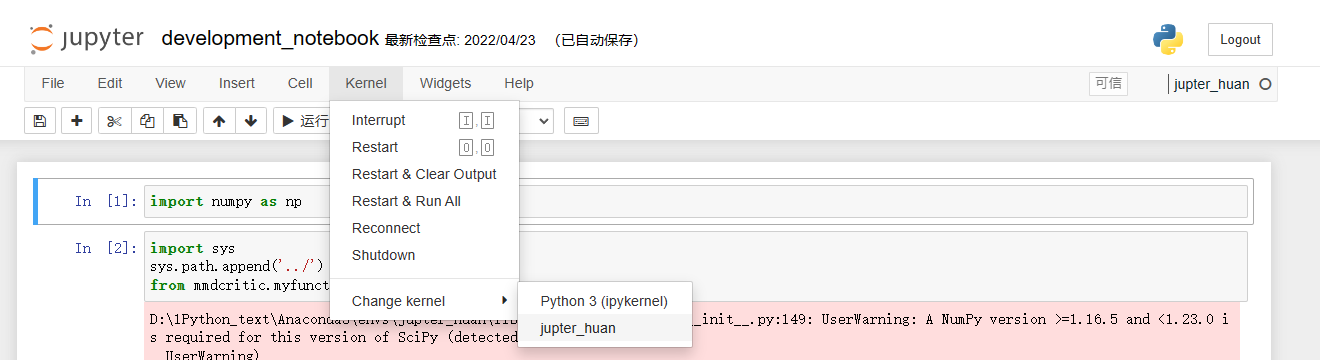
二、卸载jupyter
pip uninstall -y jupyter
pip uninstall -y jupyter_core
pip uninstall -y jupyter-client
pip uninstall -y jupyter-console
pip uninstall -y notebook
pip uninstall -y qtconsole
pip uninstall -y nbconvert
pip uninstall -y nbformat
pip uninstall -y jupyter-packaging
pip uninstall -y jupyter-server
pip uninstall -y jupyterlab
pip uninstall -y jupyterlab-pygments
pip uninstall -y jupyter-console
pip uninstall -y jupyterlab-server
pip uninstall -y jupyterlab-widgets
三、jupyter扩展的安装
#1.安装
conda install -c conda-forge jupyter_contrib_nbextensions
#或者
pip install jupyter_contrib_nbextensions
#2.设置
jupyter contrib nbextension install --user
四、jupyter notebook显示的扩展很少,只有四五个–解决方案
conda remove jupyter_nbextensions_configurator
conda install -c conda-forge jupyter_nbextensions_configurator
conda install -c conda-forge jupyter_contrib_nbextensions
五、启动jupyter notebook
python -m notebook
Jupyter notebook
六、jupter打开网页没进入编程页面
Anaconda Prompt (ANaconda 3)中先激活环境activate jupter_huan,再输入jupyter notebook
七、卸载并重新安装jupyter
1.conda create -n p0 python=3.8
conda activate p0
2.conda install ipykernel
3.python -m ipykernel install --user --name p0 --display-name “pytorch3.7"
4.conda deactivate
//打开jupyter notebook
jupyter notebook
详细参考链接
八、jupyter notebook使用新环境
1.conda create -n p0 python=3.8
conda activate p0
2.conda install ipykernel
3.python -m ipykernel install --user --name p0 --display-name “pytorch3.7"
4.conda deactivate
//打开jupyter notebook
jupyter notebook
详细参考链接
九、jupyter需要密码
jupyter notebook --generate-config
将:jupyter_notebook_config.py文件中的c.NotebookApp.password后面的密码删掉,如下:
c.NotebookApp.password = ‘’
将jupyter_notebook_config.json文件中的"password"后面的密码删掉,如下:
“password”: “”
十、jupyter更改路径
管理员身份打开Anaconda prompt输入:jupyter notebook --generate-config
文件夹路径C:\Users\Administrator.jupyter
c.NotebookApp.notebook_dir = u’D:\Program Files\jupyter’
如果没有,就直接在文件末尾输入这句话,且不加#
详细参考学习链接





 扫一扫
扫一扫


 5万+
5万+

 被折叠的 条评论
为什么被折叠?
被折叠的 条评论
为什么被折叠?
 到【灌水乐园】发言





