






 本文介绍如何使用GridView控件的RowStyle事件来根据单元格值改变行背景颜色,并控制奇偶行样式的显示状态。
使用GridView控件的RowStyle事件,先取单元格值,进行对比过滤。符合条件的,改变背景颜色。不符合颜色的,使用默认的奇偶行样式。
**注:如果已经打开了奇偶行样式,这里的改变背景色事件可能会被覆盖而在展示中无效。
下面是效果:
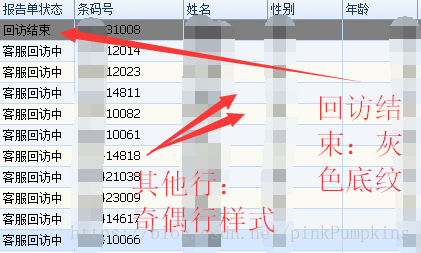
下面是代码:
  private void gridView_Serious_RowStyle(object sender, DevExpress.XtraGrid.Views.Grid.RowStyleEventArgs e)
        {
            int iHandle = e.RowHandle;
            DataRow dr_gridView_Serious = gridView_Serious.GetDataRow(iHandle);
            if (dr_gridView_Serious == null) { return; }
            string strREPORTSTATUS = dr_gridView_Serious["REPORTSTATUS"] == null ? "" : dr_gridView_Serious["REPORTSTATUS"].ToString();
            if (string.IsNullOrWhiteSpace(strREPORTSTATUS))
            {
                return;
            }
            else
            {
                Color appNotPassDefault = e.Appearance.BackColor;
               if (strREPORTSTATUS == EnumSeriousRsltRptStatus.回访结束.ToString("d"))
                {
                    e.Appearance.BackColor = Color.Gray;
                    this.gridView_Serious.OptionsView.EnableAppearanceEvenRow = false;
                    this.gridView_Serious.OptionsView.EnableAppearanceOddRow = false;
                }
                else
                {
                    this.gridView_Serious.OptionsView.EnableAppearanceEvenRow = true;
                    this.gridView_Serious.OptionsView.EnableAppearanceOddRow = true;
                }
            }
        }





 扫一扫
扫一扫


 5216
5216

 被折叠的 条评论
为什么被折叠?
被折叠的 条评论
为什么被折叠?
 到【灌水乐园】发言





