

渗透工具ShellcodeTemplate:适用于 Windows x64/x86 的易于修改的 shellcode 模板

这篇文章介绍了一个GitHub上的开源项目Cracked5pider/ShellcodeTemplate,它提供了易于修改的Windows x64/x86壳代码模板,通过实例演示了如何使用它来编写和编译PE可执行文件,包括模块加载和函数调用。只需克隆并使用make命令,即可定制自己的壳代码。

Git地址:

Cracked5pider/ShellcodeTemplate:适用于 Windows x64/x86 的易于修改的外壳代码模板 (github.com)


ShellcodeTemplate

适用于 Windows x64/x86 的易于修改的代码模板

它是如何工作的?

此模板主要基于Austin Hudson(又名SecIdiot)TitanLdr 它将项目编译为PE可执行文件并提取.text部分

外壳代码的入口点如下所示。当然,这可以根据您的需要进行更改。首先,我们需要使用我们自定义编写的 GetModuleHandle 和 GetProcAddress 来初始化所需的库和函数。

SEC( text, B ) VOID Entry( VOID ) 
{
    INSTANCE Instance = { };

    Instance.Modules.Kernel32   = TGetModuleHandle( HASH_KERNEL32 ); 
    Instance.Modules.Ntdll      = TGetModuleHandle( HASH_NTDLL ); 

    if ( Instance.Modules.Kernel32 != NULL )
    {
        // Load needed functions
        Instance.Win32.LoadLibraryA = TGetProcAddr( Instance.Modules.Kernel32, 0xb7072fdb );

        // Load needed Libraries
        Instance.Modules.User32     = Instance.Win32.LoadLibraryA( GET_SYMBOL( "User32" ) );

        if ( Instance.Modules.User32 != NULL ) 
        {
            Instance.Win32.MessageBoxA = TGetProcAddr( Instance.Modules.User32, 0xb303ebb4 );
        } 
    }
    
    // ------ Code ------
    Instance.Win32.MessageBoxA( NULL, GET_SYMBOL( "Hello World" ), GET_SYMBOL( "MessageBox Title" ), MB_OK );
}

顺便说一句,正如你所看到的,我们可以在我们的shell代码中使用正常的字符串。这是因为我们在链接时将 .rdata 部分包含在外壳代码中。GET_SYMBOL通过其与GetRIP()的相对偏移量获取指向函数或字符串的指针
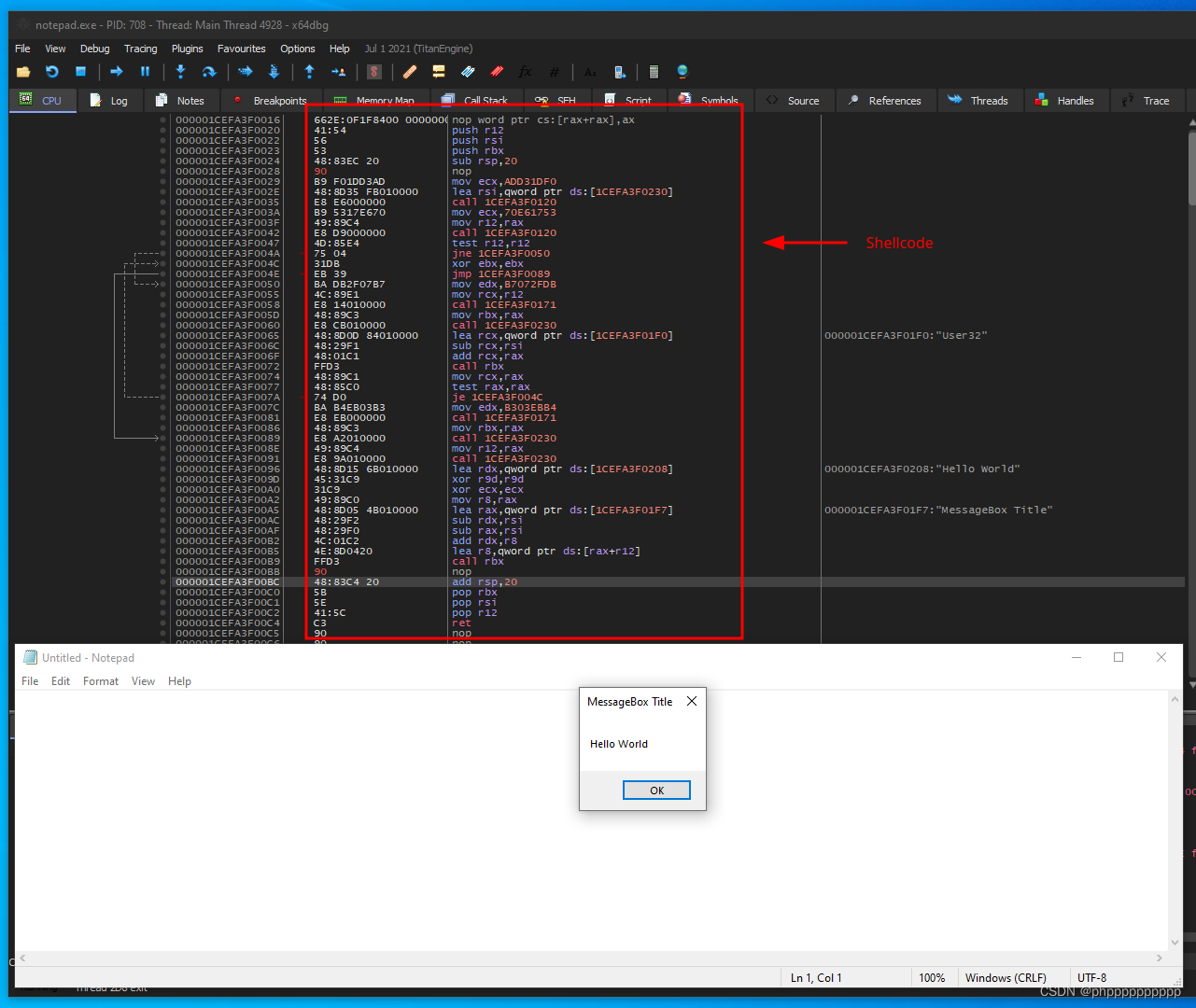
立即开始

克隆此项目,即可开始使用

git clone https://www.github.com/Cracked5pider/ShellcodeTemplate

接下来,您需要将生成文件中的项目名称更改为所需的任何名称,然后您可以使用 make 编译项目ShellcodeTemplate

make        // to compile x64 and x86
make x64    // to compile only x64
make x86    // to compile only x86


Shellcode Helper v1.62 Coded by TeLeMan (c) 2008-2013 Usage: schelper.exe [options] Options: -i [input file] input file (Default: stdin) -o [output file] output file (Default: stdout) -s input file format (Default: Auto-Detection) -sb input file format is Binary -sp the input file format's parameters -d output file format (Default: C format) -db output file format is Binary -dp the output file format's parameters -search get the start offset by the pattern: e.g. PK\x03\x04 -soff fix the match offset after searching (Default: 0) -off convert the input file from the offset (Default: 0) -len convert the input file with the length (Default: 0 - MAX) -en [encoder] encode shellcode (Default: XorDword) -de [encoder] decode shellcode (Default: Auto-Detection) -ex exclude characters: e.g. 0x00,0x01-0x1F,0xFF (Default: 0x00) -in incude characters only -ep the encoder's parameters -t [pid] execute or inject shellcode into process for testing -td [pid] execute or inject shellcode into process for debugging -stack put shellcode into stack and execute it (ESP is the shellcode start) -noinfo display no normal messages except error messages Available formats: 0 - C 1 - C(HexArray) 2 - Perl 3 - Python 4 - Ruby 5 - JavaScript(Escape) 6 - VBScript(Escape) 7 - Pascal 8 - MASM(Data) 9 - HexDump 10 - BitString 11 - HexString 12 - HexArray(C like) 13 - Base64 14 - Binary 15 - HexString(C like) 16 - HexString(Escape) 17 - HexString(JavaScript,UNICODE) 18 - URI(ISO-8859-1) 19 - XML(PCDATA) 20 - BigNumber 21 - BigNumber(Hex) 22 - BigNumber(BaseX) 23 - FloatPoint 24 - UnixTimestamp 25 - GUID 26 - MASM(ASM) 27 - NASM 28 - YASM(ASM) 29 - FASM(ASM) 30 - JWASM(ASM) 31 - POASM(ASM) 32 - GOASM(ASM) 33 - GNU ASM Available encoders:
评论
成就一亿技术人!
拼手气红包6.0元
还能输入1000个字符
 
红包 添加红包
表情包 插入表情
 条评论被折叠 查看
添加红包

请填写红包祝福语或标题

红包个数最小为10个

红包金额最低5元

当前余额3.43前往充值 >
需支付:10.00
成就一亿技术人!
领取后你会自动成为博主和红包主的粉丝 规则
hope_wisdom
发出的红包

打赏作者

风过留不留声

你的鼓励将是我创作的最大动力

¥1 ¥2 ¥4 ¥6 ¥10 ¥20
扫码支付:¥1
获取中
扫码支付

您的余额不足,请更换扫码支付或充值

打赏作者

实付
使用余额支付
点击重新获取
扫码支付
钱包余额 0

抵扣说明:

1.余额是钱包充值的虚拟货币,按照1:1的比例进行支付金额的抵扣。
2.余额无法直接购买下载,可以购买VIP、付费专栏及课程。

余额充值


