


环境
系统平台:
版本:4.1.1
症状
数据库无法访问,根据应用程序提供的错误信息,如下图所示:
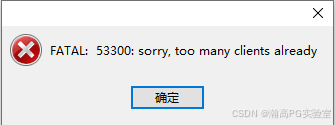
问题原因
数据库设置的连接数已满,无法建立新的连接。
可能原因如下:
1.数据库设置连接数过小(常见于数据库安装完后,未修改连接数,使用的默认值100)。
2.应用程序异常占用。
解决方案
一、查询当前数据库连接数设置
--管理员用户可以连进数据库时,连入数据库查询(普通用户连接数被占满时,默认保留3个连接给管理员使用)


highgo=# show max_connections;

 max_connections

-----------------

 500

(1 row)


--管理员用户无法连进数据库时,通过查询配置配置文件确认参数值设置(postgresql.auto.conf覆盖postgresql.conf设置值)

[root@localhost ~]# cat $PGDATA/postgresql.conf|grep max_connections

max_connections = 100                   # (change requires restart)

[root@localhost ~]# cat $PGDATA/postgresql.auto.conf|grep max_connections

max_connections = 500
二、数据库设置连接数过小
与客户说明情况,调整连接数需重启数据库,征得客户同意后,适当增大连接数。
--管理员用户连进数据库,修改连接数

highgo=# alter system set max_connections = 800;

ALTER SYSTEM


--重启数据库

[root@localhost ~]# pg_ctl restart

waiting for server to shut down.... done

server stopped

waiting for server to start....2023-09-25 10:31:07.064 CST [2334] LOG:  data encryption performed by sm4

2023-09-25 10:31:07.066 CST [2334] LOG:  Password detection module is disabled

2023-09-25 10:31:07.066 CST [2334] LOG:  starting HighGo Security Enterprise Edition Database System 4.5.8 on x86_64,build on 20220708

2023-09-25 10:31:07.066 CST [2334] LOG:  listening on IPv4 address "0.0.0.0", port 5866

2023-09-25 10:31:07.066 CST [2334] LOG:  listening on IPv6 address "::", port 5866

2023-09-25 10:31:07.067 CST [2334] LOG:  listening on Unix socket "/tmp/.s.PGSQL.5866"

2023-09-25 10:31:07.099 CST [2334] LOG:  redirecting log output to logging collector process

2023-09-25 10:31:07.099 CST [2334] HINT:  Future log output will appear in directory "hgdb_log".

 done

server started


--查询连接数

highgo=# show max_connections;

 max_connections

-----------------

 800

(1 row)
管理员用户无法连进数据库时,将postgresql.auto.conf配置文件中的max_connections值修改后,重启数据库。
条件允许时,建议重启数据库前先停止应用程序,重启完成后,再启动应用程序。
三、应用程序异常占用
1.查询占用连接数较多的数据库及用户
select now(),state,count(*),usename,datname from pg_stat_activity group by 1,2,4,5 order by count desc;
无法连入数据库查询时,在操作系统层查看进程信息进行判别
ps -ef|grep post
2.联系对应的应用人员释放异常占用连接
应用无法释放时,征得应用人员同意后,可使用管理员用户连入数据库执行如下sql协助其断开连接
--断开数据库所有空闲连接

select pg_terminate_backend(pg_stat_activity.pid)

from pg_stat_activity

where datname='数据库名' and pid<>pg_backend_pid() and state='idle';


--断开数据库所有连接

select pg_terminate_backend(pg_stat_activity.pid)

from pg_stat_activity

where datname='数据库名' and pid<>pg_backend_pid();
管理员用户无法连入数据库时,可先在系统层kill几个空闲连接后,再尝试连入,若kill后,应用仍不断重复发起连接,可让应用人员先停止相关应用程序后再进行操作。kill操作示例如下:
[root@localhost ~]# ps -ef|grep postgres|grep idle

root       8531   3754  0 13:25 ?        00:00:00 postgres: sysdba highgo [local] idle

root       8650   3754  0 13:32 ?        00:00:00 postgres: sysdba highgo x.x.100.27(52972) idle

root       8653   3754  0 13:32 ?        00:00:00 postgres: sysdba highgo x.x.100.27(52976) idle

root       8656   3754  0 13:32 ?        00:00:00 postgres: sysdba highgo x.x.100.27(52980) idle

[root@localhost ~]# kill 8650

[root@localhost ~]# ps -ef|grep postgres|grep idle

root       8531   3754  0 13:25 ?        00:00:00 postgres: sysdba highgo [local] idle

root       8653   3754  0 13:32 ?        00:00:00 postgres: sysdba highgo x.x.100.27(52976) idle

root       8656   3754  0 13:32 ?        00:00:00 postgres: sysdba highgo x.x.100.27(52980) idle
必要时,征得客户同意后,可通过重启数据库释放连接。





 扫一扫
扫一扫


 1427
1427

 被折叠的 条评论
为什么被折叠?
被折叠的 条评论
为什么被折叠?
 到【灌水乐园】发言





