



 本文详细介绍了一种在iOS应用中展示与优雅关闭动画的方法。通过在当前ViewController上Present一个包含动画的ViewController,并使用maskView实现渐变动画效果。利用Lottie开源库将AfterEffects动画转化为iOS应用中的动态元素,同时通过代理方法处理动画的关闭流程。

效果图
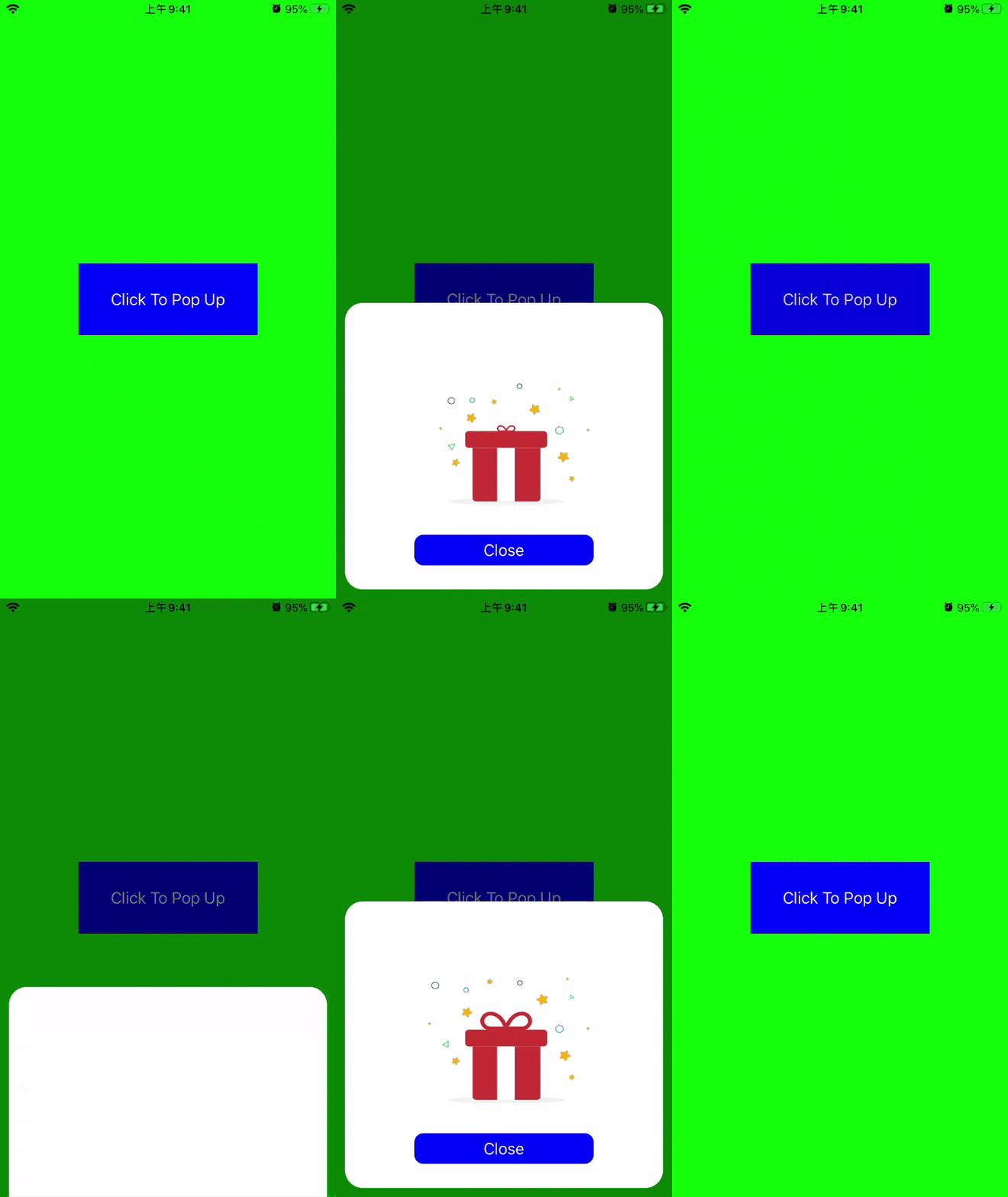
思路
在当前ViewController下Present另外一个AnimationViewController,在弹出的AnimationViewController中播放动画,弹出的时候原来的ViewController上有一个全屏覆盖的maskView,在弹出时,有一个渐变动画(页面渐黑),在AnimationViewController声明一个代理,在代理方法中实现收起的动画效果(dissmissController和maskView消失)
主要代码
    HCAirPodsAnimationViewController *vc =  [[HCAirPodsAnimationViewController alloc] init];
    vc.delegate = self;
    vc.modalPresentationStyle = UIModalPresentationOverCurrentContext;

    [UIView animateWithDuration:0.2 animations:^{
        self.maskBgView.alpha = 0.5;
    } completion:nil];

    [self presentViewController:vc animated:YES completion:^{
        [vc.animationView play];
    }];
模态跳转的style有一个枚举值,在iOS13以前modalPresentationStyle的默认值为UIModalPresentationFullScreen,iOS13以后变成了UIModalPresentationPageSheet,在这里我们把style设置为UIModalPresentationOverCurrentContext弹出的这个控制器就会覆盖在原来的控制器之上
- (UIView *)maskBgView
{
    if (!_maskBgView) {
        _maskBgView = [[UIView alloc] initWithFrame:CGRectMake(0, 0, [UIScreen mainScreen].bounds.size.width, [UIScreen mainScreen].bounds.size.height)];
        _maskBgView.backgroundColor = [UIColor blackColor];
        _maskBgView.alpha = 0;
        [self.view addSubview:_maskBgView];
    }
    return _maskBgView;
}
一个覆盖全屏的maskView采用懒加载的方式实现
- (void)initContentView
{
    CGFloat containerW = SCREEN_WIDTH - 20;
    CGFloat containerH = containerW * 0.9;
    UIView *containerView = [[UIView alloc] initWithFrame:CGRectMake(10, SCREEN_HEIGHT - containerH - 10, containerW, containerH)];
    containerView.layer.cornerRadius = 20;
    containerView.backgroundColor = [UIColor whiteColor];
    [self.view addSubview:containerView];

    self.animationView = [[LOTAnimationView alloc] initWithFrame:CGRectMake(70, 70, containerW - 140, containerH - 140)];
    [containerView addSubview:self.animationView];
    self.animationView.animation = @"gift_animation";

    self.animationView.loopAnimation = YES;

    UIButton *confirmButton = [[UIButton alloc] initWithFrame:CGRectMake(0, 0, 200, 34)];
    confirmButton.center = CGPointMake(self.animationView.center.x, containerH - 44);

    [confirmButton setTitle:@"Close" forState:UIControlStateNormal];
    [confirmButton setTitleColor:[UIColor whiteColor] forState:UIControlStateNormal];

    [confirmButton setBackgroundColor:[UIColor blueColor]];
    confirmButton.layer.cornerRadius = 10;

    [confirmButton addTarget:self action:@selector(onConfirmButtonClick) forControlEvents:UIControlEventTouchUpInside];
    [containerView addSubview:confirmButton];
}
动画这里用到的是Lottie这个动画开源库(Airbnb),这个开源库主要的功能是可以将After Effects制作的动画通过插件导出为json格式的文件,然后通过这个开源库解析成动画。
- (void)onConfirmButtonClick
{
    if ([self.delegate respondsToSelector:@selector(onAirPodsAnimationViewControllerConfirmButtonClick:)]) {
        [self dismissViewControllerAnimated:YES completion:nil];
        [self.delegate onAirPodsAnimationViewControllerConfirmButtonClick:self];
    }
}
dissmiss当前的控制器,让viewController来实现这个代理方法,并且在代理方法中隐藏maskView
- (void)onAirPodsAnimationViewControllerConfirmButtonClick:(HCAirPodsAnimationViewController *)vc
{
    [UIView animateWithDuration:0.2 animations:^{
        self.maskBgView.alpha = 0.0;
    } completion:nil];
}





 扫一扫
扫一扫


 1844
1844

 被折叠的 条评论
为什么被折叠?
被折叠的 条评论
为什么被折叠?
 到【灌水乐园】发言





