



 本文详细介绍了layui框架中表单验证的使用方法,包括自定义验证规则和预设验证标签,如手机号、邮箱、网址等格式检查。通过实例展示了如何在div内部设置form元素,并导入必要的js和css文件。
推荐必看:https://blog.youkuaiyun.com/persistencegoing/article/details/84376427
All rights reserved.No part of this article may be reproduced or distributed by any means,or stored in a database or retrieval system,without the prior written permission of persistenceGoing author
1.form 需在div 内部
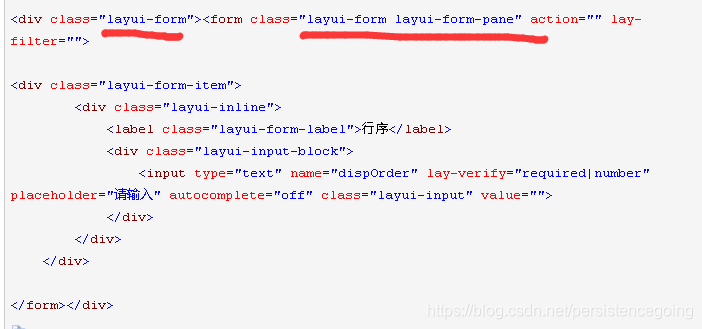
2.导入相应js和css

3.标签
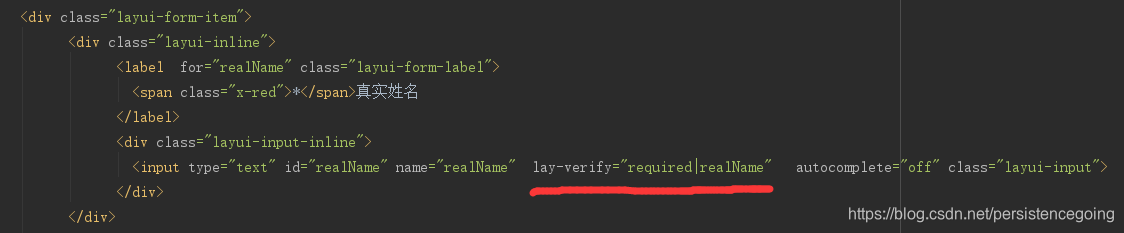
4.自定义验证使用
layui.use(['form'], function () {
var form = layui.form;
//要放在form.on上面,千万不能放在提交步骤中,否则会不触发
form.verify({
realName: function(value) {
//判断这个值,逻辑代码
},
digital: [
/^[0-4]*$/
,'请填入0-4的分数'
]
});
//提交按钮触发
form.on("submit(submit_button)", function (data) {
return false;
});
});
5.自带的验证标签
phone:[/(^$)|^1\d{10}$/,'请输入正确的手机号'],
email:[/(^$)|^([a-zA-Z0-9_\.\-])+\@(([a-zA-Z0-9\-])+\.)+([a-zA-Z0-9]{2,4})+$/,'邮箱格式不正确'],
url:[/(^$)|(^#)|(^http(s*):\/\/[^\s]+\.[^\s]+)/,'链接格式不正确'],
number:[/(^$)|^\d+$/,'只能填写数字'],
date:[/(^$)|^(\d{4})[-\/](\d{1}|0\d{1}|1[0-2])([-\/](\d{1}|0\d{1}|[1-2][0-9]|3[0-1]))*$/,'日期格式不正确'],
identity:[/(^$)|(^\d{15}$)|(^\d{17}(x|X|\d)$)/,'请输入正确的身份证号']
博主强烈推荐:https://blog.youkuaiyun.com/persistencegoing/article/details/84376427
希望大家关注我一波,防止以后迷路,有需要的可以加群讨论互相学习java ,学习路线探讨,经验分享与java求职
群号:721 515 304





 扫一扫
扫一扫


 1774
1774

 被折叠的 条评论
为什么被折叠?
被折叠的 条评论
为什么被折叠?
 到【灌水乐园】发言





