


 本文介绍了三种用于图片预览的Vue插件:viewerjs、vue-photo-preview及vue-picture-preview,详细展示了它们的安装、配置及使用方法。前两者提供丰富的功能如放大、缩小及手势操作,而vue-picture-preview则专注于基本的预览和切换功能。
在看项目时,突然看到预览图片的弹窗,感觉好僵硬,不能放大,不能切换,于是便在网上找下关于图片预览的插件,有找到三个插件,具体的优劣势的看自己的使用吧,我目前只是在电脑查看效果,分别是viewerjs插件、基于photoswipe的vue-photo-preview插件以及vue-picture-preview插件
第一种:viewerjs使用介绍
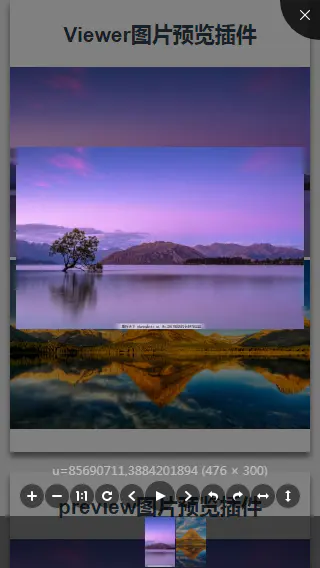
1、先安装依赖
npm install v-viewer --save2、main.js内引用并注册调用
//main.js
import Viewer from 'v-viewer'
import 'viewerjs/dist/viewer.css'

Vue.use(Viewer);
Viewer.setDefaults({
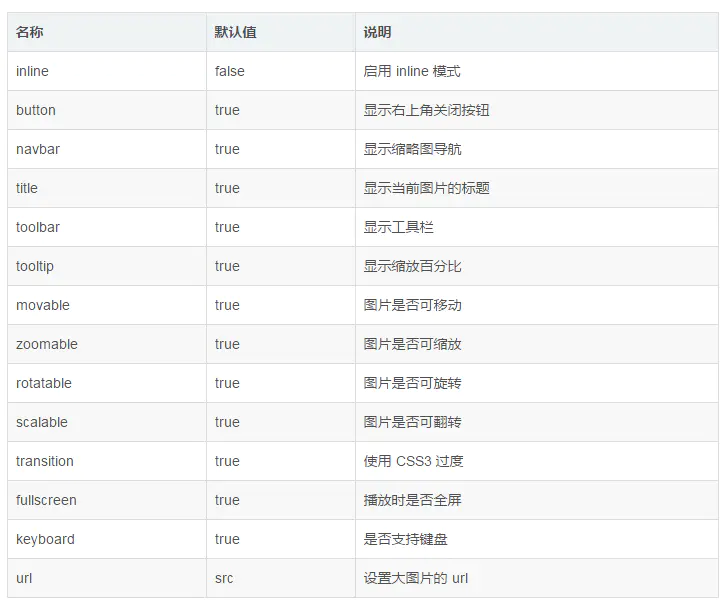
  Options: { "inline": true, "button": true, "navbar": true, "title": true, "toolbar": true, "tooltip": true, "movable": true, "zoomable": true, "rotatable": true, "scalable": true, "transition": true, "fullscreen": true, "keyboard": true, "url": "data-source" }
});
3、代码中使用xxx.vue
<template>
    <div class="content">
        <h1>Viewer图片预览插件</h1>
        <viewer :images="imgs">
            <img v-for="src in imgs" :src="src.url" :key="src.title">
        </viewer>
   </div>
</template>
<script>
export default {
  data () {
    return {
      imgs: [
       {
          url: 'https://ss3.bdstatic.com/70cFv8Sh_Q1YnxGkpoWK1HF6hhy/it/u=85690711,3884201894&fm=27&gp=0.jpg',
          title: '图片1'
        },
        {
          url: 'https://ss0.bdstatic.com/70cFvHSh_Q1YnxGkpoWK1HF6hhy/it/u=3564877025,796183547&fm=27&gp=0.jpg',
          title: '图片2'
        }
      ]
    }
  },
}
</script>
第二种:vue-photo-preview使用介绍

1、先安装依赖
npm install vue-photo-preview --save2、main.js内引用并注册调用
//main.js
import preview from 'vue-photo-preview'
import 'vue-photo-preview/dist/skin.css'
Vue.use(preview)
3、代码中使用xxx.vue
<template>
    <div class="content">
       <section>
        <h1>preview图片预览插件</h1>
        <img v-for="src in imgs" :src="src.url" :key="src.title" :preview="src.preview" :preview-text="src.title">
    </section>
   </div>
</template>
<script>
export default {
  data () {
    return {
      imgs: [
       {
          url: 'https://ss3.bdstatic.com/70cFv8Sh_Q1YnxGkpoWK1HF6hhy/it/u=85690711,3884201894&fm=27&gp=0.jpg',
          title: '图片1',
          preview: '1'
        },
        {
          url: 'https://ss0.bdstatic.com/70cFvHSh_Q1YnxGkpoWK1HF6hhy/it/u=3564877025,796183547&fm=27&gp=0.jpg',
          title: '图片2',
          preview: '1'
        }
      ]
    }
  },
}
</script>
option配置请查看 http://photoswipe.com/documentation/options.html
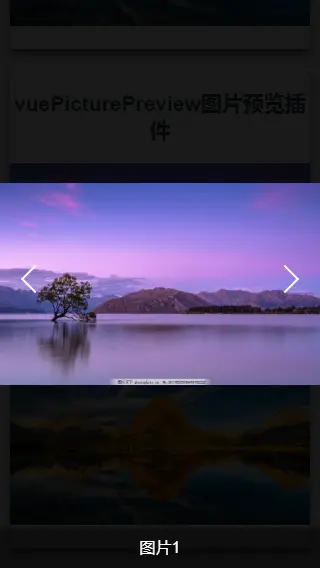
第三种:vue-picture-preview使用介绍
1、先安装依赖
npm install vue-picture-preview --save2、main.js内引用并注册调用
//main.js
iimport vuePicturePreview from 'vue-picture-preview'
Vue.use(vuePicturePreview)
3、在根组件添加 lg-preview 组件的位置
<!-- APP.vue -->
<div id="app">
    <router-view></router-view>
    <lg-preview></lg-preview>
</div>
4、代码中使用xxx.vue
<template>
    <div class="content">
        <h1>vuePicturePreview图片预览插件</h1>
        <img v-for="(img,index) in imgs"
        v-preview="img.url"
        :src="img.url"
        :alt="img.title"
        :key="index"
        preview-title-enable="true"
        preview-nav-enable="true">
   </div>
</template>
<script>
export default {
  data () {
    return {
      imgs: [
       {
          url: 'https://ss3.bdstatic.com/70cFv8Sh_Q1YnxGkpoWK1HF6hhy/it/u=85690711,3884201894&fm=27&gp=0.jpg',
          title: '图片1'
        },
        {
          url: 'https://ss0.bdstatic.com/70cFvHSh_Q1YnxGkpoWK1HF6hhy/it/u=3564877025,796183547&fm=27&gp=0.jpg',
          title: '图片2'
        }
      ]
    }
  },
}
</script>
总结
这三个插件介绍完了,除了第三种vue-picture-preview插件只有预览和切换上下张功能,另外两种都有放大和缩小(包括手势)以及其他功能。还是蛮好上手的插件,但我是更喜欢第一种。





 扫一扫
扫一扫


 2767
2767

 被折叠的 条评论
为什么被折叠?
被折叠的 条评论
为什么被折叠?
 到【灌水乐园】发言





