



 本文介绍了如何在PyTorch中使用torch.utils.data.DataLoader和Dataset处理和管理数据集,包括使用预加载的FashionMNIST示例,以及如何创建自定义数据集和使用DataLoader进行训练数据的批处理加载以提高模型效率。
Code for processing data samples can get messy and hard to maintain; we ideally want our dataset code to be decoupled from our model training code for better readability and modularity. PyTorch provides two data primitives: torch.utils.data.DataLoader and torch.utils.data.Dataset that allow you to use pre-loaded datasets as well as your own data. Dataset stores the samples and their corresponding labels, and DataLoader wraps an iterable around the Dataset to enable easy access to the samples.
PyTorch domain libraries provide a number of pre-loaded datasets (such as FashionMNIST) that subclass torch.utils.data.Dataset and implement functions specific to the particular data. They can be used to prototype and benchmark your model. You can find them here: Image Datasets, Text Datasets, and Audio Datasets
翻译如下:
处理数据集的代码会变得杂乱无章且难以维护;我们理想地希望我们的数据处理代码能够从我们的模型训练代码中分离出来,从而拥有更好的可阅读性和模块性。Pytorch提供了两种数据原语:torch.utils.data.DataLoader和torch.utils.data.Dataset,这两种数据原语允许你使用预载的数据集和你自己的数据。Dataset存储了数据的样本和他们的标签,而DataLoader封装了Dataset作为一个迭代器,从而使访问这些样例变得容易。
PyTorch的域库提供了一些预载的数据集(比如FashionMNIST),这些数据集被放在torch.utils.data.Dataset中,并且对这些特定的数据提供了一些函数。他们能够被用创建原型和基准测试。
载入Dataset
这里有一个例子关于如何载入Fashion-MNIST数据集从TorchVision。Fashion-MNIST是一个Zalando文章图片的数据集。这个数据集中包含60,000个训练数据和10,000个测试数据。每一个样本包括28x28的灰度照片和一个与之相关的标签,这个标签是十个类别中的一个
在载入FashionMNIST数据集时,我们有如下参数同时载入
- root train/test数据被载入时的地址
- train 指定是训练还是测试的数据集
- download=Ture 在root地址不可用时,从互联网下载数据集
- transform and target_transform 指定了特征和标签的转换
import torch
from torch.utils.data import Dataset
from torchvision import datasets
from torchvision.transforms import ToTensor
import matplotlib.pyplot as plt
from torch.utils.data import DataLoader

training_data = datasets.FashionMNIST(
    root="data",
    train=True,
    download=True,
    transform=ToTensor()
)

test_data = datasets.FashionMNIST(
    root="data",
    train=False,
    download=True,
    transform=ToTensor()
)
Downloading http://fashion-mnist.s3-website.eu-central-1.amazonaws.com/train-images-idx3-ubyte.gz
Downloading http://fashion-mnist.s3-website.eu-central-1.amazonaws.com/train-images-idx3-ubyte.gz to data/FashionMNIST/raw/train-images-idx3-ubyte.gz

  0%|          | 0/26421880 [00:00<?, ?it/s]
  0%|          | 65536/26421880 [00:00<01:11, 366336.34it/s]
  1%|          | 229376/26421880 [00:00<00:38, 685398.22it/s]
  3%|2         | 753664/26421880 [00:00<00:12, 2075020.41it/s]
  7%|6         | 1835008/26421880 [00:00<00:06, 4001857.11it/s]
 17%|#6        | 4489216/26421880 [00:00<00:02, 9814263.30it/s]
 25%|##5       | 6717440/26421880 [00:00<00:01, 11325179.52it/s]
 35%|###5      | 9371648/26421880 [00:01<00:01, 14785601.06it/s]
 44%|####4     | 11730944/26421880 [00:01<00:00, 14709910.53it/s]
 54%|#####4    | 14385152/26421880 [00:01<00:00, 17181823.45it/s]
 64%|######3   | 16908288/26421880 [00:01<00:00, 16562802.22it/s]
 74%|#######4  | 19628032/26421880 [00:01<00:00, 18724881.63it/s]
 84%|########3 | 22151168/26421880 [00:01<00:00, 17671272.20it/s]
 93%|#########3| 24576000/26421880 [00:01<00:00, 19223752.80it/s]
100%|##########| 26421880/26421880 [00:01<00:00, 13861930.93it/s]
Extracting data/FashionMNIST/raw/train-images-idx3-ubyte.gz to data/FashionMNIST/raw

Downloading http://fashion-mnist.s3-website.eu-central-1.amazonaws.com/train-labels-idx1-ubyte.gz
Downloading http://fashion-mnist.s3-website.eu-central-1.amazonaws.com/train-labels-idx1-ubyte.gz to data/FashionMNIST/raw/train-labels-idx1-ubyte.gz

  0%|          | 0/29515 [00:00<?, ?it/s]
100%|##########| 29515/29515 [00:00<00:00, 328323.10it/s]
Extracting data/FashionMNIST/raw/train-labels-idx1-ubyte.gz to data/FashionMNIST/raw

Downloading http://fashion-mnist.s3-website.eu-central-1.amazonaws.com/t10k-images-idx3-ubyte.gz
Downloading http://fashion-mnist.s3-website.eu-central-1.amazonaws.com/t10k-images-idx3-ubyte.gz to data/FashionMNIST/raw/t10k-images-idx3-ubyte.gz

  0%|          | 0/4422102 [00:00<?, ?it/s]
  1%|1         | 65536/4422102 [00:00<00:11, 363632.15it/s]
  5%|5         | 229376/4422102 [00:00<00:06, 683572.85it/s]
 18%|#7        | 786432/4422102 [00:00<00:01, 2216864.73it/s]
 33%|###3      | 1474560/4422102 [00:00<00:00, 3027984.83it/s]
 82%|########2 | 3637248/4422102 [00:00<00:00, 7947473.58it/s]
100%|##########| 4422102/4422102 [00:00<00:00, 6006712.22it/s]
Extracting data/FashionMNIST/raw/t10k-images-idx3-ubyte.gz to data/FashionMNIST/raw

Downloading http://fashion-mnist.s3-website.eu-central-1.amazonaws.com/t10k-labels-idx1-ubyte.gz
Downloading http://fashion-mnist.s3-website.eu-central-1.amazonaws.com/t10k-labels-idx1-ubyte.gz to data/FashionMNIST/raw/t10k-labels-idx1-ubyte.gz

  0%|          | 0/5148 [00:00<?, ?it/s]
100%|##########| 5148/5148 [00:00<00:00, 45843475.57it/s]
Extracting data/FashionMNIST/raw/t10k-labels-idx1-ubyte.gz to data/FashionMNIST/raw
迭代并可视化数据集
我们能够对数据集进行索引使其手动的看起来像一个列表:training_data[index]。我们使用matplotlib来可视化在我们训练数据中的一些样本。
labels_map = {
    0: "T-shirt",
    1: "Trouser",
    2: "Pullover",
    3: "Dress",
    4: "Coat",
    5: "Sandal",
    6: "Shirt",
    7: "Sneaker",
    8: "Bag",
    9: "Ankle Boot"
}

figure = plt.figure(figsize=(8, 8))
cols, rows = 3, 3
for i in range(1, cols * rows + 1):
    # 从训练数据集中随机抽一个index
    sample_idx = torch.randint(len(training_data), size=(1,)).item()
    # 获取
    img, label = training_data[sample_idx]
    figure.add_subplot(rows, cols, i)
    # 设置每一个图片的标题
    plt.title(labels_map[label])
    # 关闭坐标轴
    plt.axis("off")
    plt.imshow(img.squeeze(), cmap="gray")

plt.show()
对你的文件创建一个定做的Dataset
一个定做的Dataset class必须提供三种函数:__init__,__len__,和__getitem__。以这一个实现为例子:FashionMNIST突变被存储在文件夹img_dir中,而其的标签被单独存储在CSV文件annotations_中。
在下一个段落中,我们会分别解释在在每一个函数发生了什么。
import os
import pandas as pd
from torchvision.io import read_image


class CustomImageDataset(Dataset):

    def __init__(self, annotations_file, img_dir, transform=None,
                 target_transform=None):
        """
        :param annotations_file: 标注信息的csv档案
        :param img_dir: 图片的目录
        :param transform: 变换器
        :param target_transform: target变换器
        """
        self.img_labels = pd.read_csv(annotations_file)
        self.img_dir = img_dir
        self.transform = transform
        self.target_transform = target_transform

    def __len__(self):
        """
        :return: 样本中的数目
        """
        return len(self.img_labels)

    def __getitem__(self, idx):
        """
        :param idx: int,索引
        :return: tuple,索引对应的图片和标签
        """
        img_path = os.path.join(self.img_dir, self.img_labels.iloc[idx, 0])
        image = read_image(img_path)
        label = self.img_labels.iloc[idx, 1]
        if self.transform:
            image = self.transform(image)
        if self.target_transform:
            label = self.target_transform(label)

        return image, label
__init__
__init__函数将会在Dataset object对象实例化的时候运行。我们初始化的包含图片,标注文件和两种转换器的目录。(在下一章节有更多的信息)
label.csv文件看起来像是这样:
tshirt1.jpg, 0
tshirt2.jpg, 0
......
ankleboot999.jpg, 9
__len__
__len__函数返回了dataset样本中的数目
def __len__(self):
    return len(self.img_labels)
__getitem__
__getitem__函数会装载并返回一个数据集中给定下标为idx的样本。基于标识的数据,该函数会识别存于磁盘中图片的位置,并使用read_image将其转换为一个tensor,在self.img_labels的csv数据中取回对应的标签,并对其调用transform函数(如果可用),最后在一个元组中返回一个tensor的图片和其对应的标签。
def __getitem__(self, idx):
    img_path = os.path.join(self.img_dir, self.img_labels.iloc[idx, 0])
    image = read_image(img_path)
    label = self.img_labels.iloc[idx, 1]
    if self.transform:
        image = self.transform(image)
    if self.target_transform:
        label = self.target_transform(label)
    return image, label
使用DataLoaders准备你的数据以便于训练
Dataset每次都会从我们的数据集中取回一个样本的的特征和标签,当我们训练模型的时候,我们通常希望发送样本在一个“最小batch中”,重新更换数据在每一个epoch中以便减少模型的overfitting,并且使用Python’s的并行处理去加速数据的取回。
DataLoader是一个迭代器,其使用简单的API帮助我们抽象了这些复杂的特性。
train_dataloader = DataLoader(training_data, batch_size=64, shuffle=True)
test_dataloader = DataLoader(test_data, batch_size=64, shuffle=True)
遍历DataLoader
我们现在已经将数据集装载到了DataLoader并且也能以我们所需要的方式进行遍历。每一次迭代都会返回一个batch,这个bach包含train_feature和train_labels(分别包含了batch_size=64个feature和labels)。因为我们指定了shuffle=Ture,所以当我们遍历了所有的batches以后,数据就会被打乱(对于数据装载更详细的控制,请见Samplers)
# 显示图片和标签
train_features, train_labels = next(iter(train_dataloader))
print(f"Feature batch shape: {train_features.size()}")
print(f"Labels batch shape: {train_labels.size()}")
img = train_features[0].squeeze()   # 删除维度为1的维度
label = train_labels[0]
plt.imshow(img, cmap="gray")
plt.title(labels_map[label.item()])
plt.show()
print(f"Label: {label}")
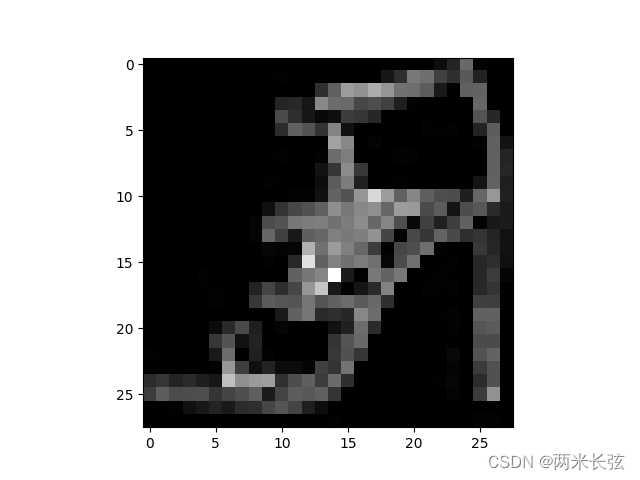
Feature batch shape: torch.Size([64, 1, 28, 28])
Labels batch shape: torch.Size([64])
Label: 5






 扫一扫
扫一扫


 被折叠的 条评论
为什么被折叠?
被折叠的 条评论
为什么被折叠?
 到【灌水乐园】发言





