



原始文档连接:https://developer.huawei.com/consumer/cn/doc/harmonyos-guides/app-permission-mgmt
以下为静态权限案例,动态权限参照原始文件
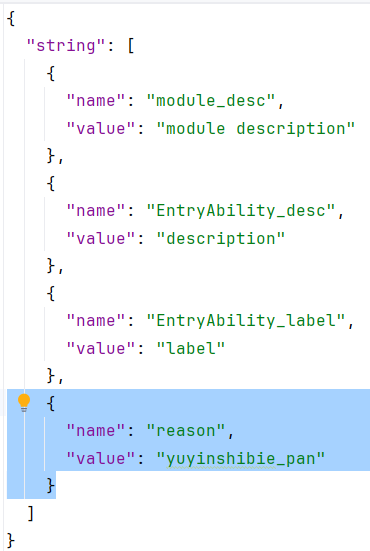
在Module.json5中进行权限管理,这里我们添加的话筒权限和文件管理权限,注意"reason": "$string:reason",使用本地枚举数据
"requestPermissions":[
  {
    "name" : "ohos.permission.MICROPHONE",
    "reason": "$string:reason",
    "usedScene": {
      "abilities": [
        "FormAbility"
      ],
      "when":"inuse"
    }
  },
  {
    "name" : "ohos.permission.FILE_ACCESS_MANAGER",
    "reason": "$string:reason",
    "usedScene": {
      "abilities": [
        "FormAbility"
      ],
      "when":"always"
    }
  }
]
这是module.json5文件中的内容
{
  "module": {
    "name": "entry",
    "type": "entry",
    "description": "$string:module_desc",
    "mainElement": "EntryAbility",
    "deviceTypes": [
      "phone"
    ],
    "deliveryWithInstall": true,
    "installationFree": false,
    "pages": "$profile:main_pages",
    "abilities": [
      {
        "name": "EntryAbility",
        "srcEntry": "./ets/entryability/EntryAbility.ets",
        "description": "$string:EntryAbility_desc",
        "icon": "$media:layered_image",
        "label": "$string:EntryAbility_label",
        "startWindowIcon": "$media:startIcon",
        "startWindowBackground": "$color:start_window_background",
        "exported": true,
        "skills": [
          {
            "entities": [
              "entity.system.home"
            ],
            "actions": [
              "ohos.want.action.home"
            ]
          }
        ]
      }
    ],
    "extensionAbilities": [
      {
        "name": "EntryBackupAbility",
        "srcEntry": "./ets/entrybackupability/EntryBackupAbility.ets",
        "type": "backup",
        "exported": false,
        "metadata": [
          {
            "name": "ohos.extension.backup",
            "resource": "$profile:backup_config"
          }
        ],
      }
    ],
    "requestPermissions":[
      {
        "name" : "ohos.permission.MICROPHONE",
        "reason": "$string:reason",
        "usedScene": {
          "abilities": [
            "FormAbility"
          ],
          "when":"inuse"
        }
      },
      {
        "name" : "ohos.permission.FILE_ACCESS_MANAGER",
        "reason": "$string:reason",
        "usedScene": {
          "abilities": [
            "FormAbility"
          ],
          "when":"always"
        }
      }
    ]
  }
}





 扫一扫
扫一扫


 949
949

 被折叠的 条评论
为什么被折叠?
被折叠的 条评论
为什么被折叠?
 到【灌水乐园】发言





