


 本文介绍了XPTable组件中如何实现表格的选择功能。通过TableModel的Selections对象,可以方便地进行单元格的选择和操作。示例代码展示了如何选中多个单元格,并通过SelectionStyle属性切换网格样式和列表视图样式。此外,还强调了在列表视图模式下,高亮的单元格可能并不实际被选中。
我一开始在网上没有找到资料,后来在XPTable的使用帮助中发现了用法,其实在Tablemodel中有一个Selections对象,里面就是选中的数据和功能,什么都有:
A Table provides two ways that selected Cells can be visualised - Grid style where the individual selected Cells are hilighted, or ListView style where only the Cell in the first visible Column is hilighted. The images below show an example of this:
| // select a bunch of cells table.TableModel.Selections.SelectCell(0, 0); table.TableModel.Selections.AddCell(0, 2); table.TableModel.Selections.AddCell(2, 0); table.TableModel.Selections.AddCell(2, 2); |
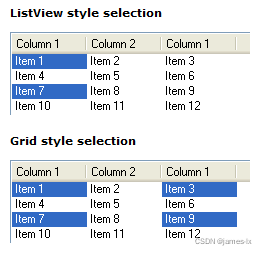
This can be set using the Table's SelectionStyle property:
| // use grid style selection table.SelectionStyle = SelectionStyle.Grid; |
Note: With ListView style selection the highlighted Cell may not actually be selected.
The TableModel also provides a Selection object that you can use to programmatically select or deselect Cells.





 扫一扫
扫一扫


 2698
2698

 被折叠的 条评论
为什么被折叠?
被折叠的 条评论
为什么被折叠?
 到【灌水乐园】发言





