



 本文介绍了一个汽车保养记录工具的开发,该工具仅使用4张表即可管理供应商信息。通过选择框操作,用户能直接编辑多张表,代码简洁高效。此外,计划在EVENTS表中添加字段以展示详细说明,并增设图片表来存储二进制图片数据,用户可通过ID查看和显示图片。
今天继续做了一点汽车保养记录工具,发现只需要4张表,供应商字段放物料表中就可以了。
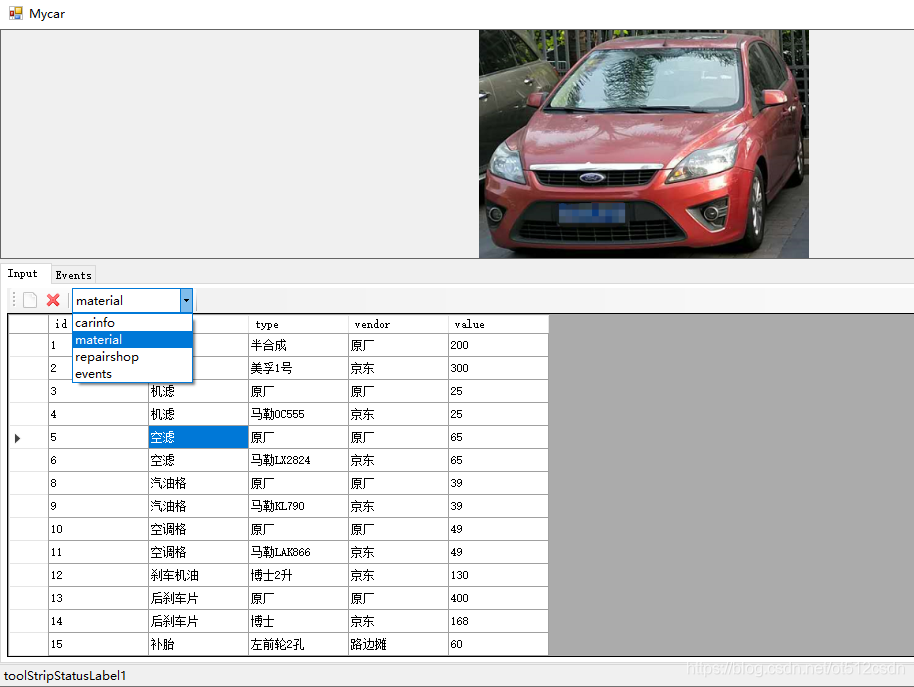
在选择框中选中表,就可以直接对这个表进行编辑,所需的代码非常少,就是这些,就可以编辑多张表了:
        ///////////input table///////////////

        //数据库加载到DGV控件
        private void DB2DGV()
        {
            if (toolStripComboBox1_table.Text.Equals("carinfo")) dataGridView1.DataSource = db.carinfo.ToList();
            if (toolStripComboBox1_table.Text.Equals("material")) dataGridView1.DataSource = db.material.ToList();
            if (toolStripComboBox1_table.Text.Equals("repairshop")) dataGridView1.DataSource = db.repairshop.ToList();
            if (toolStripComboBox1_table.Text.Equals("events")) dataGridView1.DataSource = db.events.ToList();
        }

        //DGV是操作哪一张表
        private void toolStripComboBox1_table_SelectedIndexChanged(object sender, EventArgs e)
        {
            DB2DGV();
        }

        //DGV控件和数据库保存变更
        private void dataGridView1_CellValueChanged(object sender, DataGridViewCellEventArgs e)
        {
            db.SaveChanges();
        }


        //数据库和DGV控件新建行
        private void toolStripButton1_new_Click(object sender, EventArgs e)
        {
            //新增一行空白
            if (toolStripComboBox1_table.Text.Equals("carinfo"))    { carinfo line = new carinfo(); db.carinfo.Add(line); }
            if (toolStripComboBox1_table.Text.Equals("material"))   { material line = new material(); db.material.Add(line); }
            if (toolStripComboBox1_table.Text.Equals("repairshop")) { repairshop line = new repairshop(); db.repairshop.Add(line); }
            if (toolStripComboBox1_table.Text.Equals("events"))      { events line = new events(); db.events.Add(line); }

            //保存到数据库
            db.SaveChanges();
            DB2DGV();

        }

        //数据库和DGV控件删除行
        private void toolStripButton1_del_Click(object sender, EventArgs e)
        {
            foreach (DataGridViewRow one in dataGridView1.SelectedRows)
            {
                long id = I(dataGridView1.Rows[one.Index].Cells[0].Value);//得到0列的id

                if (toolStripComboBox1_table.Text.Equals("carinfo"))
                    {
                        var line = (from t in db.carinfo where t.id.Equals(id) select t).FirstOrDefault();
                        db.carinfo.Remove(line);
                    }

                if (toolStripComboBox1_table.Text.Equals("material"))
                {
                    var line = (from t in db.material where t.id.Equals(id) select t).FirstOrDefault();
                    db.material.Remove(line);
                }

                if (toolStripComboBox1_table.Text.Equals("repairshop"))
                {
                    var line = (from t in db.repairshop where t.id.Equals(id) select t).FirstOrDefault();
                    db.repairshop.Remove(line);
                }

                if (toolStripComboBox1_table.Text.Equals("events"))
                {
                    var line = (from t in db.events where t.id.Equals(id) select t).FirstOrDefault();
                    db.events.Remove(line);
                }
            }

            db.SaveChanges();
            DB2DGV();


        }
关于汽车保养记录工具的功能:
1、在EVENTS事件表中增加一个字段放大文本的说明。
2、需要增加一个表专门放图片,放二进制的图片,数据行中有ID可以对于图片数据,当点击这数据行时,通过ID带出图片,显示在软件上方的区域。





 扫一扫
扫一扫


 717
717

 被折叠的 条评论
为什么被折叠?
被折叠的 条评论
为什么被折叠?
 到【灌水乐园】发言





