


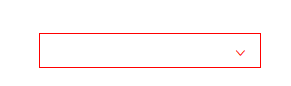
 本文通过一个具体的案例,展示了如何使用伪元素和自定义字体图标来增强网页元素的视觉效果。介绍了@font-face规则的使用,以及如何利用:before伪元素插入特定的字体图标,并实现鼠标悬停状态下的样式变化。
《2018年11月30日》【连续422天】
标题:伪元素案例复习;
内容:
<!DOCTYPE html>
<html lang="en">
<head>
	<meta charset="UTF-8">
	<title>Document</title>
	<style>
			@font-face {
		  font-family: 'icomoon';
		  src:  url('fonts/icomoon.eot?hrstq9');
		  src:  url('fonts/icomoon.eot?hrstq9#iefix') format('embedded-opentype'),
		    url('fonts/icomoon.ttf?hrstq9') format('truetype'),
		    url('fonts/icomoon.woff?hrstq9') format('woff'),
		    url('fonts/icomoon.svg?hrstq9#icomoon') format('svg');
		  font-weight: normal;
		  font-style: normal;
		}
	div {
		width: 200px;
		height: 30px;
		border: 1px solid #ccc;
		margin: 100px auto;
		font-family: "icomoon";
		position: relative;
	}
	div::before {   /*是一个能插入元素的选择器*/
		content: "\ea51";
		position: absolute;
		right: 10px;
		top: 5px;
	}
	div:hover {
		border: 1px solid red;
	}
	div:hover::before {
		color: red;

	}
	</style>
</head>
<body>
	<div>

	</div>
</body>
</html>





 扫一扫
扫一扫


 80
80

 被折叠的 条评论
为什么被折叠?
被折叠的 条评论
为什么被折叠?
 到【灌水乐园】发言





