


 本文介绍了一个简单的CSS应用案例,展示了如何使用内部样式表和外部样式表来定义网页元素的样式,包括不同选择器的使用方法及其优先级。通过具体的HTML代码示例,读者可以了解如何为不同的元素设置背景颜色等样式。
《2018年9月3日》【连续336天】
标题:css初级;
内容:
<html lang="zh,en">
<head>
	<title>t1</title>
	<meta charset="utf-8">
	<!-- <style type="text/css">
		div{
			width:100th;
			height: 100th;
		}
	</style> -->
	<link rel="stylesheet" href="t2.css">
</head>
<body>
    <form method="get" action="">
    	<h1>
    		<!-- choose your favourite fruit! -->

    	</h1>
    	<!-- 1.apple<input type="checkbox" name="fruit" value="apple">
    	2.orange<input type="checkbox" name="fruit" value="orange">
    	3.banana<input type="checkbox" name="fruit" value="banana"> -->
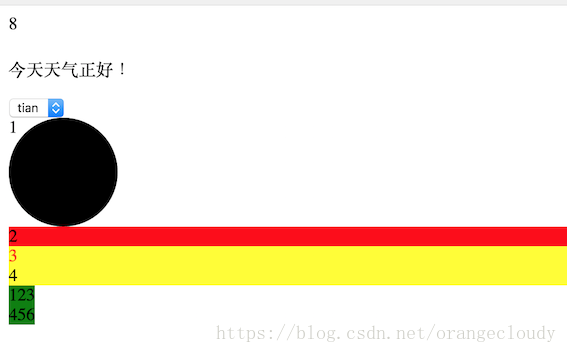
        <p>今天天气正好!</p>
       	<select name="wei" id="">
    		<option >tian</option>
    		<option >di</opt ion>
    		<option >ren</option>
    	</select>
    	<!-- 引入css
    	1.行间样式
    	<div style=""></div> -->
    	<!-- 2.页面级css -->
    	<!-- 3.外部css文件 -->
    	<!-- 选择器 -->
    	<!-- id -->
    	<div id="only">1</div>
    	<div id="only1">2</div>
    	<!-- class -->
    	<div class="demo demo1">3</div>
    	<div class="demo">4</div>
    	<!-- 标签 -->
    	<span>123</span>
    	<div>
    		<span>456</span>
    	</div>
    	<!-- 通配符*-->
    	<!-- 优先级:!important>行间样式>id>class=属性>标签>通配符 -->

        <!-- css权重:
            !important        Infinity
            行间样式           1000
            id                100
            class|属性|伪类    10
            标签|伪元素        1
            通配符            0 -->

    </form>
</body>
</html>
#only{
	width:100px;
	height: 100px;
	border-radius: 50%;
	background-color: black;
}

#only1{
	background-color: red;
}

.demo{
	background-color: yellow;
}

.demo1{
	color: #f40;
}

span{
	background-color: green;
	font-weight: bold;
}

*{

}


[id="only"]{

}





 扫一扫
扫一扫


 1万+
1万+

 被折叠的 条评论
为什么被折叠?
被折叠的 条评论
为什么被折叠?
 到【灌水乐园】发言





