 京东耳机爬虫实战


 本文介绍了使用Python进行京东网站耳机商品信息爬取的过程,重点讨论了如何解析网页内容获取商品名称和价格等信息,并分享了利用BeautifulSoup处理复杂HTML标签的经验。
《2018年6月13日》【连续246天】
标题:京东耳机定向爬虫练习;
内容:
1.今天练习爬取京东的商品页面,以耳机为例:
第一页url:
https://search.jd.com/Search?keyword=%E8%80%B3%E6%9C%BA&enc=utf-8&qrst=1&rt=1&stop=1&vt=2&wq=%E8%80%B3%E6%9C%BA&page=1&s=1&click=0
第二页:
https://search.jd.com/Search?keyword=%E8%80%B3%E6%9C%BA&enc=utf-8&qrst=1&rt=1&stop=1&vt=2&wq=%E8%80%B3%E6%9C%BA&page=3&s=55&click=0
再点几页,可发现每页是page加2,s加54
选中第一个商品,搜索发现:

由于字是在标签里的,所以可以用BeautifulSoup库方法;
写了很久以后,发现标签之间的关系实在是理不清,
于是便想到了浏览器自带的检查元素:
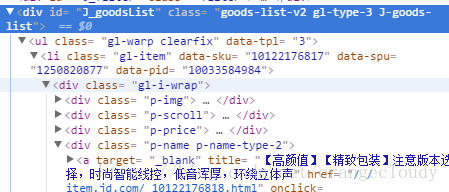
这样一下子就可以理清标签之间的关系;
标签有点复杂,暂时想不到好的方法去取标签里的内容:
写的代码其它方面:
import bs4
from bs4 import BeautifulSoup
import requests

def getHTMLText(url):
    try:
        r = requests.get(url)
        r.raise_for_status()
        r.encoding =r.apparent_encoding
        return r.text
    except:
        return ""
def printGood(list):
    tplt = "{:14}\t{:8}"
    print(tplt.format("商品名称","价格"))
    for i in range(len(list)):
        g= list[i]
        print(tplt.format(g[1],g[0]))

def main():
    goods ="耳机"
    depth =3
    start_utl="https://search.jd.com/Search?keyword="+goods
    infoList =[]
    for i in range(depth):
        try:
            url =start_url +"&page=" +str(1+2*i)+"&s="+ str(1+i*54)
            html =getHTMLText(url)
            parsePage(infolist,html)
        except:
            continue
    printGood(infoList)

main()
爬取标签内容的:
def parsePage(list, html):
    soup =BeautifulSoup(html, "html.parser")
    for li in soup.find('ul').children:
        if isinstance(li,bs4.element.Tag):
            ems =li('em')
            ies =li('i')
            list.append(ems[0].string,i[0].string)
没爬取成功,明天把这个函数解决;





 扫一扫
扫一扫


 2336
2336


 到【灌水乐园】发言



