



一、 概述与介绍
ActiveMQ 是Apache出品,最流行的、功能强大的即时通讯和集成模式的开源服务器。ActiveMQ 是一个完全支持JMS1.1和J2EE 1.4规范的 JMS Provider实现。提供客户端支持跨语言和协议,带有易于在充分支持JMS 1.1和1.4使用J2EE企业集成模式和许多先进的功能。
二、 特性
1、 多种语言和协议编写客户端。语言: Java、C、C++、C#、Ruby、Perl、Python、PHP。应用协议:OpenWire、Stomp REST、WS Notification、XMPP、AMQP
2、完全支持JMS1.1和J2EE 1.4规范 (持久化,XA消息,事务)
3、对Spring的支持,ActiveMQ可以很容易内嵌到使用Spring的系统里面去,而且也支持Spring2.0的特性
4、通过了常见J2EE服务器(如 Geronimo、JBoss 4、GlassFish、WebLogic)的测试,其中通过JCA 1.5 resource adaptors的配置,可以让ActiveMQ可以自动的部署到任何兼容J2EE 1.4 商业服务器上
5、支持多种传送协议:in-VM、TCP、SSL、NIO、UDP、JGroups、JXTA
6、支持通过JDBC和journal提供高速的消息持久化
7、从设计上保证了高性能的集群,客户端-服务器,点对点
8、支持Ajax
9、支持与Axis的整合
10、可以很容易得调用内嵌JMS provider,进行测试
三、 安装
开发环境:
System:Windows
JDK:1.6+
IDE:eclipse
apache ActiveMQ 5.8
Email:hoojo_@126.com
1、 下载ActiveMQ,下载地址:http://www.apache.org/dyn/closer.cgi?path=/activemq/apache-activemq/5.8.0/apache-activemq-5.8.0-bin.zip
2、 解压apache-activemq-5.8.0.zip即可完成ActiveMQ的安装
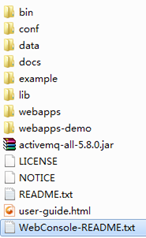
3、 解压后目录结构如下
+bin (windows下面的bat和unix/linux下面的sh) 启动ActiveMQ的启动服务就在这里
+conf (activeMQ配置目录,包含最基本的activeMQ配置文件)
+data (默认是空的)
+docs (index,replease版本里面没有文档)
+example (几个例子)
+lib (activeMQ使用到的lib)
+webapps (系统管理员控制台代码)
+webapps-demo(系统示例代码)
-activemq-all-5.8.0.jar (ActiveMQ的binary)
-user-guide.html (部署指引)
-LICENSE.txt
-NOTICE.txt
-README.txt
其他文件就不相信介绍了,搞Java的应该都知道干什么用的。
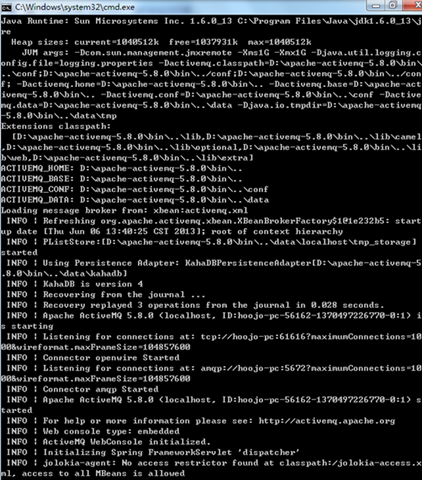
你可以进入bin目录,使用activemq.bat双击启动(windows用户可以选择系统位数,如果你是linux的话,就用命令行的发送去启动),如果一切顺利,你就会看见类似下面的信息:
如果你看到这个,那么恭喜你成功了。如果你启动看到了异常信息:
Caused by: java.io.IOException: Failed to bind to server socket: tcp://0.0.0.0:61616?maximumConnections=1000&wireformat.maxFrameSize=104857600 due to: java.net.SocketException: Unrecognized Windows Sockets error: 0: JVM_Bind
那么我告诉你,很不幸,你的端口被占用了。接下来你大概想知道是哪个程序占用了你的端口,并kill掉该进程或服务。或者你要尝试修改ActiveMQ的默认端口61616(ActiveMQ使用的默认端口是61616),在大多数情况下,占用61616端口的是Internet Connection Sharing (ICS) 这个Windows服务,你只需停止它就可以启动ActiveMQ了。
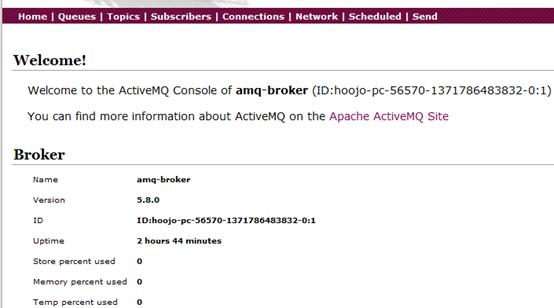
4、 启动成功就可以访问管理员界面:http://localhost:8161/admin,默认用户名和密码admin/admin。如果你想修改用户名和密码的话,在conf/jetty-realm.properties中修改即可。
其中在导航菜单中,Queues是队列方式消息。Topics是主题方式消息。Subscribers消息订阅监控查询。Connections可以查看链接数,分别可以查看xmpp、ssl、stomp、openwire、ws和网络链接。Network是网络链接数监控。Send可以发送消息数据。
5、 运行demo示例,在dos控制台输入activemq.bat xbean:../conf/activemq-demo.xml 即可启动demo示例。官方提供的user-guide.html中的access the web console中是提示输入:activemq.bat console xbean:conf/activemq-demo.xml,我用这种方式不成功。
当然你还可以用绝对的文件目录方式:activemq.bat xbean:file:D:/mq/conf/activemq-demo.xml
如果提示conf/activemq-demo.xml没有找到,你可以尝试改变下路径,也就是去掉上面的“..”。通过http://localhost:8161/demo/ 就可以访问示例了。


四、 消息示例
1、ActiviteMQ消息有3中形式
JMS 公共
点对点域
发布/订阅域
ConnectionFactory
QueueConnectionFactory
TopicConnectionFactory
Connection
QueueConnection
TopicConnection
Destination
Queue
Topic
Session
QueueSession
TopicSession
MessageProducer
QueueSender
TopicPublisher
MessageConsumer
QueueReceiver
TopicSubscriber
(1)、点对点方式(point-to-point)
点对点的消息发送方式主要建立在 Message Queue,Sender,reciever上,Message Queue 存贮消息,Sneder 发送消息,receive接收消息.具体点就是Sender Client发送Message Queue ,而 receiver Cliernt从Queue中接收消息和"发送消息已接受"到Quere,确认消息接收。消息发送客户端与接收客户端没有时间上的依赖,发送客户端可以在任何时刻发送信息到Queue,而不需要知道接收客户端是不是在运行
(2)、发布/订阅 方式(publish/subscriber Messaging)
发布/订阅方式用于多接收客户端的方式.作为发布订阅的方式,可能存在多个接收客户端,并且接收端客户端与发送客户端存在时间上的依赖。一个接收端只能接收他创建以后发送客户端发送的信息。作为subscriber ,在接收消息时有两种方法,destination的receive方法,和实现message listener 接口的onMessage 方法。
2、ActiviteMQ接收和发送消息基本流程
发送消息的基本步骤:
(1)、创建连接使用的工厂类JMS ConnectionFactory
(2)、使用管理对象JMS ConnectionFactory建立连接Connection,并启动
(3)、使用连接Connection 建立会话Session
(4)、使用会话Session和管理对象Destination创建消息生产者MessageSender
(5)、使用消息生产者MessageSender发送消息
消息接收者从JMS接受消息的步骤
(1)、创建连接使用的工厂类JMS ConnectionFactory
(2)、使用管理对象JMS ConnectionFactory建立连接Connection,并启动
(3)、使用连接Connection 建立会话Session
(4)、使用会话Session和管理对象Destination创建消息接收者MessageReceiver
(5)、使用消息接收者MessageReceiver接受消息,需要用setMessageListener将MessageListener接口绑定到MessageReceiver消息接收者必须实现了MessageListener接口,需要定义onMessage事件方法。

五、 代码示例
在代码开始,我们先建一个project,在这个project中添加如下jar包
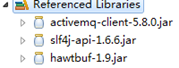
添加完jar包后就可以开始实际的代码工作了。
1、 使用JMS方式发送接收消息
消息发送者
package com.hoo.mq.jms;import javax.jms.Connection;import javax.jms.ConnectionFactory;import javax.jms.DeliveryMode;import javax.jms.Destination;import javax.jms.MessageProducer;import javax.jms.Session;import javax.jms.TextMessage;import org.apache.activemq.ActiveMQConnection;import org.apache.activemq.ActiveMQConnectionFactory;/*** <b>function:</b> 消息发送者* @author hoojo* @createDate 2013-6-19 上午11:26:43* @file MessageSender.java* @package com.hoo.mq.jms* @project ActiveMQ-5.8* @blog http://blog.youkuaiyun.com/IBM_hoojo* @email hoojo_@126.com* @version 1.0*/public class MessageSender {// 发送次数public static final int SEND_NUM = 5;// tcp 地址public static final String BROKER_URL = "tcp://localhost:61616";// 目标,在ActiveMQ管理员控制台创建 http://localhost:8161/admin/queues.jsppublic static final String DESTINATION = "hoo.mq.queue";/*** <b>function:</b> 发送消息* @author hoojo* @createDate 2013-6-19 下午12:05:42* @param session* @param producer* @throws Exception*/public static void sendMessage(Session session, MessageProducer producer) throws Exception {for (int i = 0; i < SEND_NUM; i++) {String message = "发送消息第" + (i + 1) + "条";TextMessage text = session.createTextMessage(message);System.out.println(message);producer.send(text);}}public static void run() throws Exception {Connection connection = null;Session session = null;try {// 创建链接工厂ConnectionFactory factory = new ActiveMQConnectionFactory(ActiveMQConnection.DEFAULT_USER, ActiveMQConnection.DEFAULT_PASSWORD, BROKER_URL);// 通过工厂创建一个连接connection = factory.createConnection();// 启动连接connection.start();// 创建一个session会话session = connection.createSession(Boolean.TRUE, Session.AUTO_ACKNOWLEDGE);// 创建一个消息队列Destination destination = session.createQueue(DESTINATION);// 创建消息制作者MessageProducer producer = session.createProducer(destination);// 设置持久化模式producer.setDeliveryMode(DeliveryMode.NON_PERSISTENT);sendMessage(session, producer);// 提交会话session.commit();} catch (Exception e) {throw e;} finally {// 关闭释放资源if (session != null) {session.close();}if (connection != null) {connection.close();}}}public static void main(String[] args) throws Exception {MessageSender.run();}}
接受者
package com.hoo.mq.jms;import javax.jms.Connection;import javax.jms.ConnectionFactory;import javax.jms.Destination;import javax.jms.Message;import javax.jms.MessageConsumer;import javax.jms.Session;import javax.jms.TextMessage;import org.apache.activemq.ActiveMQConnection;import org.apache.activemq.ActiveMQConnectionFactory;/*** <b>function:</b> 消息接收者* @author hoojo* @createDate 2013-6-19 下午01:34:27* @file MessageReceiver.java* @package com.hoo.mq.jms* @project ActiveMQ-5.8* @blog http://blog.youkuaiyun.com/IBM_hoojo* @email hoojo_@126.com* @version 1.0*/public class MessageReceiver {// tcp 地址public static final String BROKER_URL = "tcp://localhost:61616";// 目标,在ActiveMQ管理员控制台创建 http://localhost:8161/admin/queues.jsppublic static final String DESTINATION = "hoo.mq.queue";public static void run() throws Exception {Connection connection = null;Session session = null;try {// 创建链接工厂ConnectionFactory factory = new ActiveMQConnectionFactory(ActiveMQConnection.DEFAULT_USER, ActiveMQConnection.DEFAULT_PASSWORD, BROKER_URL);// 通过工厂创建一个连接connection = factory.createConnection();// 启动连接connection.start();// 创建一个session会话session = connection.createSession(Boolean.TRUE, Session.AUTO_ACKNOWLEDGE);// 创建一个消息队列Destination destination = session.createQueue(DESTINATION);// 创建消息制作者MessageConsumer consumer = session.createConsumer(destination);while (true) {// 接收数据的时间(等待) 100 msMessage message = consumer.receive(1000 * 100);TextMessage text = (TextMessage) message;if (text != null) {System.out.println("接收:" + text.getText());} else {break;}}// 提交会话session.commit();} catch (Exception e) {throw e;} finally {// 关闭释放资源if (session != null) {session.close();}if (connection != null) {connection.close();}}}public static void main(String[] args) throws Exception {MessageReceiver.run();}}
2、 Queue队列方式发送点对点消息数据
发送方
package com.hoo.mq.queue;import javax.jms.DeliveryMode;import javax.jms.MapMessage;import javax.jms.Queue;import javax.jms.QueueConnection;import javax.jms.QueueConnectionFactory;import javax.jms.QueueSession;import javax.jms.Session;import org.apache.activemq.ActiveMQConnection;import org.apache.activemq.ActiveMQConnectionFactory;/*** <b>function:</b> Queue 方式消息发送者* @author hoojo* @createDate 2013-6-19 下午04:34:36* @file QueueSender.java* @package com.hoo.mq.queue* @project ActiveMQ-5.8* @blog http://blog.youkuaiyun.com/IBM_hoojo* @email hoojo_@126.com* @version 1.0*/public class QueueSender {// 发送次数public static final int SEND_NUM = 5;// tcp 地址public static final String BROKER_URL = "tcp://localhost:61616";// 目标,在ActiveMQ管理员控制台创建 http://localhost:8161/admin/queues.jsppublic static final String DESTINATION = "hoo.mq.queue";/*** <b>function:</b> 发送消息* @author hoojo* @createDate 2013-6-19 下午12:05:42* @param session* @param sender* @throws Exception*/public static void sendMessage(QueueSession session, javax.jms.QueueSender sender) throws Exception {for (int i = 0; i < SEND_NUM; i++) {String message = "发送消息第" + (i + 1) + "条";MapMessage map = session.createMapMessage();map.setString("text", message);map.setLong("time", System.currentTimeMillis());System.out.println(map);sender.send(map);}}public static void run() throws Exception {QueueConnection connection = null;QueueSession session = null;try {// 创建链接工厂QueueConnectionFactory factory = new ActiveMQConnectionFactory(ActiveMQConnection.DEFAULT_USER, ActiveMQConnection.DEFAULT_PASSWORD, BROKER_URL);// 通过工厂创建一个连接connection = factory.createQueueConnection();// 启动连接connection.start();// 创建一个session会话session = connection.createQueueSession(Boolean.TRUE, Session.AUTO_ACKNOWLEDGE);// 创建一个消息队列Queue queue = session.createQueue(DESTINATION);// 创建消息发送者javax.jms.QueueSender sender = session.createSender(queue);// 设置持久化模式sender.setDeliveryMode(DeliveryMode.NON_PERSISTENT);sendMessage(session, sender);// 提交会话session.commit();} catch (Exception e) {throw e;} finally {// 关闭释放资源if (session != null) {session.close();}if (connection != null) {connection.close();}}}public static void main(String[] args) throws Exception {QueueSender.run();}}接收方
package com.hoo.mq.queue;import javax.jms.JMSException;import javax.jms.MapMessage;import javax.jms.Message;import javax.jms.MessageListener;import javax.jms.Queue;import javax.jms.QueueConnection;import javax.jms.QueueConnectionFactory;import javax.jms.QueueSession;import javax.jms.Session;import org.apache.activemq.ActiveMQConnection;import org.apache.activemq.ActiveMQConnectionFactory;/*** <b>function:</b> 消息接收者; 依赖hawtbuf-1.9.jar* @author hoojo* @createDate 2013-6-19 下午01:34:27* @file MessageReceiver.java* @package com.hoo.mq.queue* @project ActiveMQ-5.8* @blog http://blog.youkuaiyun.com/IBM_hoojo* @email hoojo_@126.com* @version 1.0*/public class QueueReceiver {// tcp 地址public static final String BROKER_URL = "tcp://localhost:61616";// 目标,在ActiveMQ管理员控制台创建 http://localhost:8161/admin/queues.jsppublic static final String TARGET = "hoo.mq.queue";public static void run() throws Exception {QueueConnection connection = null;QueueSession session = null;try {// 创建链接工厂QueueConnectionFactory factory = new ActiveMQConnectionFactory(ActiveMQConnection.DEFAULT_USER, ActiveMQConnection.DEFAULT_PASSWORD, BROKER_URL);// 通过工厂创建一个连接connection = factory.createQueueConnection();// 启动连接connection.start();// 创建一个session会话session = connection.createQueueSession(Boolean.TRUE, Session.AUTO_ACKNOWLEDGE);// 创建一个消息队列Queue queue = session.createQueue(TARGET);// 创建消息制作者javax.jms.QueueReceiver receiver = session.createReceiver(queue);receiver.setMessageListener(new MessageListener() {public void onMessage(Message msg) {if (msg != null) {MapMessage map = (MapMessage) msg;try {System.out.println(map.getLong("time") + "接收#" + map.getString("text"));} catch (JMSException e) {e.printStackTrace();}}}});// 休眠100ms再关闭Thread.sleep(1000 * 100);// 提交会话session.commit();} catch (Exception e) {throw e;} finally {// 关闭释放资源if (session != null) {session.close();}if (connection != null) {connection.close();}}}public static void main(String[] args) throws Exception {QueueReceiver.run();}}
3、 Topic主题发布和订阅消息
消息发送方
package com.hoo.mq.topic;import javax.jms.DeliveryMode;import javax.jms.MapMessage;import javax.jms.Session;import javax.jms.Topic;import javax.jms.TopicConnection;import javax.jms.TopicConnectionFactory;import javax.jms.TopicPublisher;import javax.jms.TopicSession;import org.apache.activemq.ActiveMQConnection;import org.apache.activemq.ActiveMQConnectionFactory;/*** <b>function:</b> Queue 方式消息发送者* @author hoojo* @createDate 2013-6-19 下午04:34:36* @file QueueSender.java* @package com.hoo.mq.topic* @project ActiveMQ-5.8* @blog http://blog.youkuaiyun.com/IBM_hoojo* @email hoojo_@126.com* @version 1.0*/public class TopicSender {// 发送次数public static final int SEND_NUM = 5;// tcp 地址public static final String BROKER_URL = "tcp://localhost:61616";// 目标,在ActiveMQ管理员控制台创建 http://localhost:8161/admin/queues.jsppublic static final String DESTINATION = "hoo.mq.topic";/*** <b>function:</b> 发送消息* @author hoojo* @createDate 2013-6-19 下午12:05:42* @param session 会话* @param publisher 发布者* @throws Exception*/public static void sendMessage(TopicSession session, TopicPublisher publisher) throws Exception {for (int i = 0; i < SEND_NUM; i++) {String message = "发送消息第" + (i + 1) + "条";MapMessage map = session.createMapMessage();map.setString("text", message);map.setLong("time", System.currentTimeMillis());System.out.println(map);publisher.send(map);}}public static void run() throws Exception {TopicConnection connection = null;TopicSession session = null;try {// 创建链接工厂TopicConnectionFactory factory = new ActiveMQConnectionFactory(ActiveMQConnection.DEFAULT_USER, ActiveMQConnection.DEFAULT_PASSWORD, BROKER_URL);// 通过工厂创建一个连接connection = factory.createTopicConnection();// 启动连接connection.start();// 创建一个session会话session = connection.createTopicSession(Boolean.TRUE, Session.AUTO_ACKNOWLEDGE);// 创建一个消息队列Topic topic = session.createTopic(DESTINATION);// 创建消息发送者TopicPublisher publisher = session.createPublisher(topic);// 设置持久化模式publisher.setDeliveryMode(DeliveryMode.NON_PERSISTENT);sendMessage(session, publisher);// 提交会话session.commit();} catch (Exception e) {throw e;} finally {// 关闭释放资源if (session != null) {session.close();}if (connection != null) {connection.close();}}}public static void main(String[] args) throws Exception {TopicSender.run();}}接收方
package com.hoo.mq.topic;import javax.jms.JMSException;import javax.jms.MapMessage;import javax.jms.Message;import javax.jms.MessageListener;import javax.jms.Session;import javax.jms.Topic;import javax.jms.TopicConnection;import javax.jms.TopicConnectionFactory;import javax.jms.TopicSession;import javax.jms.TopicSubscriber;import org.apache.activemq.ActiveMQConnection;import org.apache.activemq.ActiveMQConnectionFactory;/*** <b>function:</b> 消息接收者; 依赖hawtbuf-1.9.jar* @author hoojo* @createDate 2013-6-19 下午01:34:27* @file MessageReceiver.java* @package com.hoo.mq.topic* @project ActiveMQ-5.8* @blog http://blog.youkuaiyun.com/IBM_hoojo* @email hoojo_@126.com* @version 1.0*/public class TopicReceiver {// tcp 地址public static final String BROKER_URL = "tcp://localhost:61616";// 目标,在ActiveMQ管理员控制台创建 http://localhost:8161/admin/queues.jsppublic static final String TARGET = "hoo.mq.topic";public static void run() throws Exception {TopicConnection connection = null;TopicSession session = null;try {// 创建链接工厂TopicConnectionFactory factory = new ActiveMQConnectionFactory(ActiveMQConnection.DEFAULT_USER, ActiveMQConnection.DEFAULT_PASSWORD, BROKER_URL);// 通过工厂创建一个连接connection = factory.createTopicConnection();// 启动连接connection.start();// 创建一个session会话session = connection.createTopicSession(Boolean.TRUE, Session.AUTO_ACKNOWLEDGE);// 创建一个消息队列Topic topic = session.createTopic(TARGET);// 创建消息制作者TopicSubscriber subscriber = session.createSubscriber(topic);subscriber.setMessageListener(new MessageListener() {public void onMessage(Message msg) {if (msg != null) {MapMessage map = (MapMessage) msg;try {System.out.println(map.getLong("time") + "接收#" + map.getString("text"));} catch (JMSException e) {e.printStackTrace();}}}});// 休眠100ms再关闭Thread.sleep(1000 * 100);// 提交会话session.commit();} catch (Exception e) {throw e;} finally {// 关闭释放资源if (session != null) {session.close();}if (connection != null) {connection.close();}}}public static void main(String[] args) throws Exception {TopicReceiver.run();}}
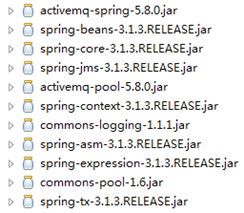
4、 整合Spring实现消息发送和接收,在整合之前我们需要添加jar包,需要的jar包如下
这些jar包可以在D:\apache-activemq-5.8.0\lib这个lib目录中找到,添加完jar包后就开始编码工作。
消息发送者
package com.hoo.mq.spring.support;import java.util.Date;import javax.jms.JMSException;import javax.jms.MapMessage;import javax.jms.Message;import javax.jms.Session;import org.springframework.context.ApplicationContext;import org.springframework.context.support.FileSystemXmlApplicationContext;import org.springframework.jms.core.JmsTemplate;import org.springframework.jms.core.MessageCreator;/*** <b>function:</b> Spring JMSTemplate 消息发送者* @author hoojo* @createDate 2013-6-24 下午02:18:48* @file Sender.java* @package com.hoo.mq.spring.support* @project ActiveMQ-5.8* @blog http://blog.youkuaiyun.com/IBM_hoojo* @email hoojo_@126.com* @version 1.0*/public class Sender {public static void main(String[] args) {ApplicationContext ctx = new FileSystemXmlApplicationContext("classpath:applicationContext-*.xml");JmsTemplate jmsTemplate = (JmsTemplate) ctx.getBean("jmsTemplate");jmsTemplate.send(new MessageCreator() {public Message createMessage(Session session) throws JMSException {MapMessage message = session.createMapMessage();message.setString("message", "current system time: " + new Date().getTime());return message;}});}}消息接收者
package com.hoo.mq.spring.support;import java.util.Map;import org.springframework.context.ApplicationContext;import org.springframework.context.support.FileSystemXmlApplicationContext;import org.springframework.jms.core.JmsTemplate;/*** <b>function:</b> Spring JMSTemplate 消息接收者* @author hoojo* @createDate 2013-6-24 下午02:22:32* @file Receiver.java* @package com.hoo.mq.spring.support* @project ActiveMQ-5.8* @blog http://blog.youkuaiyun.com/IBM_hoojo* @email hoojo_@126.com* @version 1.0*/public class Receiver {@SuppressWarnings("unchecked")public static void main(String[] args) {ApplicationContext ctx = new FileSystemXmlApplicationContext("classpath:applicationContext-*.xml");JmsTemplate jmsTemplate = (JmsTemplate) ctx.getBean("jmsTemplate");while(true) {Map<String, Object> map = (Map<String, Object>) jmsTemplate.receiveAndConvert();System.out.println("收到消息:" + map.get("message"));}}}这里主要是用到了JmsTemplate这个消息模板,这个对象在spring的IoC容器中管理,所以要从spring的容器上下文中获取。下面看看spring的配置文件applicationContext-beans.xml内容:
<?xml version="1.0" encoding="UTF-8"?><beans xmlns="http://www.springframework.org/schema/beans"xmlns:context="http://www.springframework.org/schema/context"xmlns:xsi="http://www.w3.org/2001/XMLSchema-instance"xsi:schemaLocation="http://www.springframework.org/schema/beanshttp://www.springframework.org/schema/beans/spring-beans-3.1.xsdhttp://www.springframework.org/schema/contexthttp://www.springframework.org/schema/context/spring-context-3.1.xsd"><!-- 连接池 --><bean id="pooledConnectionFactory" class="org.apache.activemq.pool.PooledConnectionFactory" destroy-method="stop"><property name="connectionFactory"><bean class="org.apache.activemq.ActiveMQConnectionFactory"><property name="brokerURL" value="tcp://localhost:61616" /></bean></property></bean><!-- 连接工厂 --><bean id="activeMQConnectionFactory" class="org.apache.activemq.ActiveMQConnectionFactory"><property name="brokerURL" value="tcp://localhost:61616" /></bean><!-- 配置消息目标 --><bean id="destination" class="org.apache.activemq.command.ActiveMQQueue"><!-- 目标,在ActiveMQ管理员控制台创建 http://localhost:8161/admin/queues.jsp --><constructor-arg index="0" value="hoo.mq.queue" /></bean><!-- 消息模板 --><bean id="jmsTemplate" class="org.springframework.jms.core.JmsTemplate"><property name="connectionFactory" ref="activeMQConnectionFactory" /><property name="defaultDestination" ref="destination" /><property name="messageConverter"><bean class="org.springframework.jms.support.converter.SimpleMessageConverter" /></property></bean></beans>这里的整合就比较简单了,如果你是web工程,那你在需要用jms的时候,只需用注入jmsTemplate即可。
1、下载安装ActiveMQ
ActiveMQ官网下载地址:http://activemq.apache.org/download.html
ActiveMQ 提供了Windows 和Linux、Unix 等几个版本,楼主这里选择了Linux 版本下进行开发。
下载完安装包,解压之后的目录:
从它的目录来说,还是很简单的:
- bin存放的是脚本文件
- conf存放的是基本配置文件
- data存放的是日志文件
- docs存放的是说明文档
- examples存放的是简单的实例
- lib存放的是activemq所需jar包
- webapps用于存放项目的目录
2、启动ActiveMQ
进入到ActiveMQ 安装目录的Bin 目录,linux 下输入 ./activemq start 启动activeMQ 服务。
输入命令之后,会提示我们创建了一个进程IP 号,这时候说明服务已经成功启动了。
ActiveMQ默认启动时,启动了内置的jetty服务器,提供一个用于监控ActiveMQ的admin应用。
admin:http://127.0.0.1:8161/admin/
我们在浏览器打开链接之后输入账号密码(这里和tomcat 服务器类似)
默认账号:admin
密码:admin
到这里为止,ActiveMQ 服务端就启动完毕了。
ActiveMQ 在linux 下的终止命令是 ./activemq stop
3、创建一个ActiveMQ工程
项目目录结构:
上述在官网下载ActiveMq 的时候,我们可以在目录下看到一个jar包:
这个jar 包就是我们需要在项目中进行开发中使用到的相关依赖。
3.1 创建生产者
 public class Producter { //ActiveMq 的默认用户名 private static final String USERNAME = ActiveMQConnection.DEFAULT_USER; //ActiveMq 的默认登录密码 private static final String PASSWORD = ActiveMQConnection.DEFAULT_PASSWORD; //ActiveMQ 的链接地址 private static final String BROKEN_URL = ActiveMQConnection.DEFAULT_BROKER_URL; AtomicInteger count = new AtomicInteger(0); //链接工厂 ConnectionFactory connectionFactory; //链接对象 Connection connection; //事务管理 Session session; ThreadLocal<MessageProducer> threadLocal = new ThreadLocal<>(); public void init(){ try { //创建一个链接工厂 connectionFactory = new ActiveMQConnectionFactory(USERNAME,PASSWORD,BROKEN_URL); //从工厂中创建一个链接 connection = connectionFactory.createConnection(); //开启链接 connection.start(); //创建一个事务(这里通过参数可以设置事务的级别) session = connection.createSession(true,Session.SESSION_TRANSACTED); } catch (JMSException e) { e.printStackTrace(); } } public void sendMessage(String disname){ try { //创建一个消息队列 Queue queue = session.createQueue(disname); //消息生产者 MessageProducer messageProducer = null; if(threadLocal.get()!=null){ messageProducer = threadLocal.get(); }else{ messageProducer = session.createProducer(queue); threadLocal.set(messageProducer); } while(true){ Thread.sleep(1000); int num = count.getAndIncrement(); //创建一条消息 TextMessage msg = session.createTextMessage(Thread.currentThread().getName()+ "productor:我是大帅哥,我现在正在生产东西!,count:"+num); System.out.println(Thread.currentThread().getName()+ "productor:我是大帅哥,我现在正在生产东西!,count:"+num); //发送消息 messageProducer.send(msg); //提交事务 session.commit(); } } catch (JMSException e) { e.printStackTrace(); } catch (InterruptedException e) { e.printStackTrace(); } } }
public class Producter {

    //ActiveMq 的默认用户名
    private static final String USERNAME = ActiveMQConnection.DEFAULT_USER;
    //ActiveMq 的默认登录密码
    private static final String PASSWORD = ActiveMQConnection.DEFAULT_PASSWORD;
    //ActiveMQ 的链接地址
    private static final String BROKEN_URL = ActiveMQConnection.DEFAULT_BROKER_URL;

    AtomicInteger count = new AtomicInteger(0);
    //链接工厂
    ConnectionFactory connectionFactory;
    //链接对象
    Connection connection;
    //事务管理
    Session session;
    ThreadLocal<MessageProducer> threadLocal = new ThreadLocal<>();

    public void init(){
        try {
            //创建一个链接工厂
            connectionFactory = new ActiveMQConnectionFactory(USERNAME,PASSWORD,BROKEN_URL);
            //从工厂中创建一个链接
            connection  = connectionFactory.createConnection();
            //开启链接
            connection.start();
            //创建一个事务(这里通过参数可以设置事务的级别)
            session = connection.createSession(true,Session.SESSION_TRANSACTED);
        } catch (JMSException e) {
            e.printStackTrace();
        }
    }

    public void sendMessage(String disname){
        try {
            //创建一个消息队列
            Queue queue = session.createQueue(disname);
            //消息生产者
            MessageProducer messageProducer = null;
            if(threadLocal.get()!=null){
                messageProducer = threadLocal.get();
            }else{
                messageProducer = session.createProducer(queue);
                threadLocal.set(messageProducer);
            }
           while(true){
                Thread.sleep(1000);
                int num = count.getAndIncrement();
                //创建一条消息
                TextMessage msg = session.createTextMessage(Thread.currentThread().getName()+
                        "productor:我是大帅哥,我现在正在生产东西!,count:"+num);
                System.out.println(Thread.currentThread().getName()+
                        "productor:我是大帅哥,我现在正在生产东西!,count:"+num);
                //发送消息
                messageProducer.send(msg);
                //提交事务
                session.commit();
            }
        } catch (JMSException e) {
            e.printStackTrace();
        } catch (InterruptedException e) {
            e.printStackTrace();
        }
    }
}
3.2 创建消费者
public class Comsumer {

    private static final String USERNAME = ActiveMQConnection.DEFAULT_USER;

    private static final String PASSWORD = ActiveMQConnection.DEFAULT_PASSWORD;

    private static final String BROKEN_URL = ActiveMQConnection.DEFAULT_BROKER_URL;

    ConnectionFactory connectionFactory;

    Connection connection;

    Session session;

    ThreadLocal<MessageConsumer> threadLocal = new ThreadLocal<>();
    AtomicInteger count = new AtomicInteger();

    public void init(){
        try {
            connectionFactory = new ActiveMQConnectionFactory(USERNAME,PASSWORD,BROKEN_URL);
            connection  = connectionFactory.createConnection();
            connection.start();
            session = connection.createSession(false,Session.AUTO_ACKNOWLEDGE);
        } catch (JMSException e) {
            e.printStackTrace();
        }
    }


    public void getMessage(String disname){
        try {
            Queue queue = session.createQueue(disname);
            MessageConsumer consumer = null;

            if(threadLocal.get()!=null){
                consumer = threadLocal.get();
            }else{
                consumer = session.createConsumer(queue);
                threadLocal.set(consumer);
            }
            while(true){
                Thread.sleep(1000);
                TextMessage msg = (TextMessage) consumer.receive();
                if(msg!=null) {
                    msg.acknowledge();
                    System.out.println(Thread.currentThread().getName()+": Consumer:我是消费者,我正在消费Msg"+msg.getText()+"--->"+count.getAndIncrement());
                }else {
                    break;
                }
            }
        } catch (JMSException e) {
            e.printStackTrace();
        } catch (InterruptedException e) {
            e.printStackTrace();
        }
    }
}
4、运行ActiveMQ项目
4.1 生产者开始生产消息
public class TestMq {
    public static void main(String[] args){
        Producter producter = new Producter();
        producter.init();
        TestMq testMq = new TestMq();
        try {
            Thread.sleep(1000);
        } catch (InterruptedException e) {
            e.printStackTrace();
        }
        //Thread 1
        new Thread(testMq.new ProductorMq(producter)).start();
        //Thread 2
        new Thread(testMq.new ProductorMq(producter)).start();
        //Thread 3
        new Thread(testMq.new ProductorMq(producter)).start();
        //Thread 4
        new Thread(testMq.new ProductorMq(producter)).start();
        //Thread 5
        new Thread(testMq.new ProductorMq(producter)).start();
    }

    private class ProductorMq implements Runnable{
        Producter producter;
        public ProductorMq(Producter producter){
            this.producter = producter;
        }

        @Override
        public void run() {
            while(true){
                try {
                    producter.sendMessage("Jaycekon-MQ");
                    Thread.sleep(10000);
                } catch (InterruptedException e) {
                    e.printStackTrace();
                }
            }
        }
    }
}
运行结果:
 INFO | Successfully connected to tcp://localhost:61616
Thread-6productor:我是大帅哥,我现在正在生产东西!,count:0
Thread-4productor:我是大帅哥,我现在正在生产东西!,count:1
Thread-2productor:我是大帅哥,我现在正在生产东西!,count:3
Thread-5productor:我是大帅哥,我现在正在生产东西!,count:2
Thread-3productor:我是大帅哥,我现在正在生产东西!,count:4
Thread-6productor:我是大帅哥,我现在正在生产东西!,count:5
Thread-3productor:我是大帅哥,我现在正在生产东西!,count:6
Thread-5productor:我是大帅哥,我现在正在生产东西!,count:7
Thread-2productor:我是大帅哥,我现在正在生产东西!,count:8
Thread-4productor:我是大帅哥,我现在正在生产东西!,count:9
Thread-6productor:我是大帅哥,我现在正在生产东西!,count:10
Thread-3productor:我是大帅哥,我现在正在生产东西!,count:11
Thread-5productor:我是大帅哥,我现在正在生产东西!,count:12
Thread-2productor:我是大帅哥,我现在正在生产东西!,count:13
Thread-4productor:我是大帅哥,我现在正在生产东西!,count:14
Thread-6productor:我是大帅哥,我现在正在生产东西!,count:15
Thread-3productor:我是大帅哥,我现在正在生产东西!,count:16
Thread-5productor:我是大帅哥,我现在正在生产东西!,count:17
Thread-2productor:我是大帅哥,我现在正在生产东西!,count:18
Thread-4productor:我是大帅哥,我现在正在生产东西!,count:19
4.2 消费者开始消费消息
public class TestConsumer {
    public static void main(String[] args){
        Comsumer comsumer = new Comsumer();
        comsumer.init();
        TestConsumer testConsumer = new TestConsumer();
        new Thread(testConsumer.new ConsumerMq(comsumer)).start();
        new Thread(testConsumer.new ConsumerMq(comsumer)).start();
        new Thread(testConsumer.new ConsumerMq(comsumer)).start();
        new Thread(testConsumer.new ConsumerMq(comsumer)).start();
    }

    private class ConsumerMq implements Runnable{
        Comsumer comsumer;
        public ConsumerMq(Comsumer comsumer){
            this.comsumer = comsumer;
        }

        @Override
        public void run() {
            while(true){
                try {
                    comsumer.getMessage("Jaycekon-MQ");
                    Thread.sleep(10000);
                } catch (InterruptedException e) {
                    e.printStackTrace();
                }
            }
        }
    }
}
运行结果:
INFO | Successfully connected to tcp://localhost:61616Thread-2: Consumer:我是消费者,我正在消费MsgThread-5productor:我是大帅哥,我现在正在生产东西!,count:4--->0Thread-3: Consumer:我是消费者,我正在消费MsgThread-4productor:我是大帅哥,我现在正在生产东西!,count:36--->1Thread-4: Consumer:我是消费者,我正在消费MsgThread-3productor:我是大帅哥,我现在正在生产东西!,count:38--->2Thread-5: Consumer:我是消费者,我正在消费MsgThread-6productor:我是大帅哥,我现在正在生产东西!,count:37--->3Thread-2: Consumer:我是消费者,我正在消费MsgThread-6productor:我是大帅哥,我现在正在生产东西!,count:2--->4Thread-3: Consumer:我是消费者,我正在消费MsgThread-5productor:我是大帅哥,我现在正在生产东西!,count:40--->5Thread-4: Consumer:我是消费者,我正在消费MsgThread-6productor:我是大帅哥,我现在正在生产东西!,count:42--->6Thread-5: Consumer:我是消费者,我正在消费MsgThread-4productor:我是大帅哥,我现在正在生产东西!,count:41--->7Thread-2: Consumer:我是消费者,我正在消费MsgThread-3productor:我是大帅哥,我现在正在生产东西!,count:1--->8Thread-3: Consumer:我是消费者,我正在消费MsgThread-2productor:我是大帅哥,我现在正在生产东西!,count:44--->9Thread-4: Consumer:我是消费者,我正在消费MsgThread-4productor:我是大帅哥,我现在正在生产东西!,count:46--->10Thread-5: Consumer:我是消费者,我正在消费MsgThread-5productor:我是大帅哥,我现在正在生产东西!,count:45--->11Thread-2: Consumer:我是消费者,我正在消费MsgThread-2productor:我是大帅哥,我现在正在生产东西!,count:3--->12Thread-3: Consumer:我是消费者,我正在消费MsgThread-3productor:我是大帅哥,我现在正在生产东西!,count:48--->13Thread-4: Consumer:我是消费者,我正在消费MsgThread-5productor:我是大帅哥,我现在正在生产东西!,count:50--->14Thread-5: Consumer:我是消费者,我正在消费MsgThread-2productor:我是大帅哥,我现在正在生产东西!,count:49--->15Thread-4: Consumer:我是消费者,我正在消费MsgThread-2productor:我是大帅哥,我现在正在生产东西!,count:54--->16Thread-2: Consumer:我是消费者,我正在消费MsgThread-5productor:我是大帅哥,我现在正在生产东西!,count:6--->17Thread-3: Consumer:我是消费者,我正在消费MsgThread-6productor:我是大帅哥,我现在正在生产东西!,count:52--->18Thread-5: Consumer:我是消费者,我正在消费MsgThread-3productor:我是大帅哥,我现在正在生产东西!,count:53--->19Thread-4: Consumer:我是消费者,我正在消费MsgThread-3productor:我是大帅哥,我现在正在生产东西!,count:58--->20
查看运行结果,我们可以做ActiveMQ 服务端:http://127.0.0.1:8161/admin/ 里面的Queues 中查看我们生产的消息。
5、ActiveMQ的特性
5.1 ActiveMq 的特性
- 多种语言和协议编写客户端。语言: Java, C, C++, C#, Ruby, Perl, Python, PHP。应用协议: OpenWire,Stomp REST,WS Notification,XMPP,AMQP
- 完全支持JMS1.1和J2EE 1.4规范 (持久化,XA消息,事务)
- 对Spring的支持,ActiveMQ可以很容易内嵌到使用Spring的系统里面去,而且也支持Spring2.0的特性
- 通过了常见J2EE服务器(如 Geronimo,JBoss 4, GlassFish,WebLogic)的测试,其中通过JCA 1.5 resource adaptors的配置,可以让ActiveMQ可以自动的部署到任何兼容J2EE 1.4 商业服务器上
- 支持多种传送协议:in-VM,TCP,SSL,NIO,UDP,JGroups,JXTA
- 支持通过JDBC和journal提供高速的消息持久化
- 从设计上保证了高性能的集群,客户端-服务器,点对点
- 支持Ajax
- 支持与Axis的整合
- 可以很容易得调用内嵌JMS provider,进行测试
5.2 什么情况下使用ActiveMQ?
- 多个项目之间集成
(1) 跨平台
(2) 多语言
(3) 多项目- 降低系统间模块的耦合度,解耦
(1) 软件扩展性- 系统前后端隔离
(1) 前后端隔离,屏蔽高安全区





 扫一扫
扫一扫


 1186
1186

 被折叠的 条评论
为什么被折叠?
被折叠的 条评论
为什么被折叠?
 到【灌水乐园】发言





