


 本文档介绍如何在Metal程序中管理数据依赖性,避免CPU和GPU之间的冲突,通过使用资源的多个实例来同步工作,提高效率。通过一个渲染多个三角形的例子,解释了如何初始化数据、分配存储、更新数据、编码GPU命令等步骤,确保CPU和GPU能有效地协同工作,避免处理器停滞。
Synchronizing CPU and GPU Work 同步CPU和GPU工作
该节对应源代码(经优化可直接运行)请移步下载资源,搜索如上标题即可。
本文介绍了在Metal程序中,同时异步运行的CPU和GPU协同工作,避免冲突,提高效率。
本文利用了一个渲染多个三角形的范例来进行说明。
针对:苹果系统Metal编程
Avoid stalls失控、熄火 between CPU and GPU work by using multiple instances of a resource.
Overview
In this sample code project, you learn how to manage data dependencies依赖性 and avoid processor stalls between the CPU and the GPU.
The project continuously持续地 renders triangles along a sine wave. In each frame, the sample updates the position of each triangle’s vertices and then renders a new image. These dynamic data updates create an illusion of motion运动幻觉, where the triangles appear to move along the sine wave.

The sample stores the triangle vertices in a buffer that’s shared between the CPU and the GPU. The CPU writes data to the buffer and the GPU reads it.
- Note: The Xcode project contains schemes场景(程序运行环境) for running the sample on macOS, iOS, and tvOS. The default scheme is macOS, which runs the sample on your Mac.
Understand the Solution to Data Dependencies and Processor Stalls 了解数据依赖性和处理器冲突的解决方法
Resource sharing creates a data dependency between the processors; the CPU must finish writing to the resource before the GPU reads it. If the GPU reads the resource before the CPU writes to it, the GPU reads undefined resource data. If the GPU reads the resource while the CPU is writing to it, the GPU reads incorrect错误的 resource data.
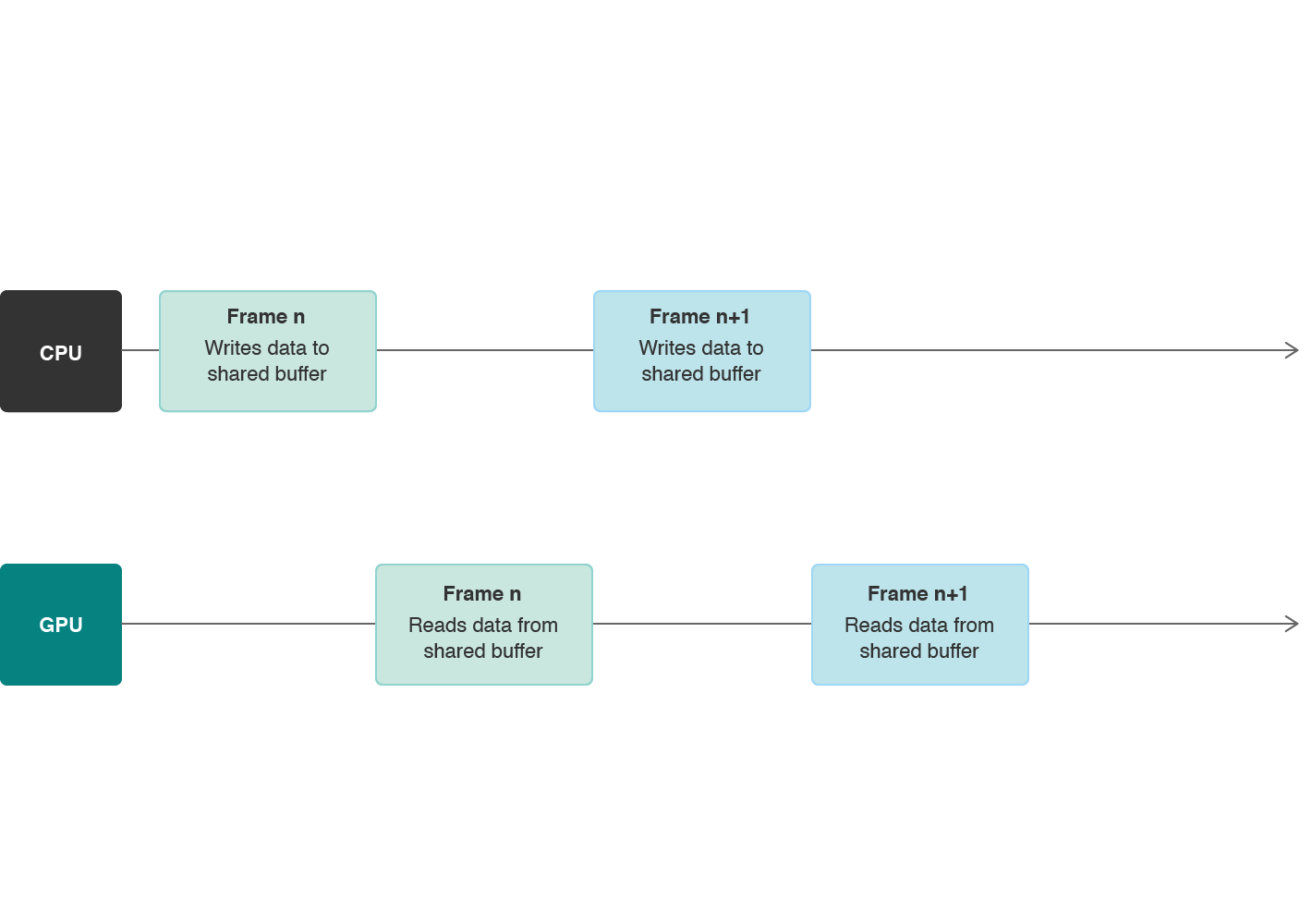
These data dependencies create processor stalls between the CPU and the GPU; each processor must wait for the other to finish its work before beginning its own work.
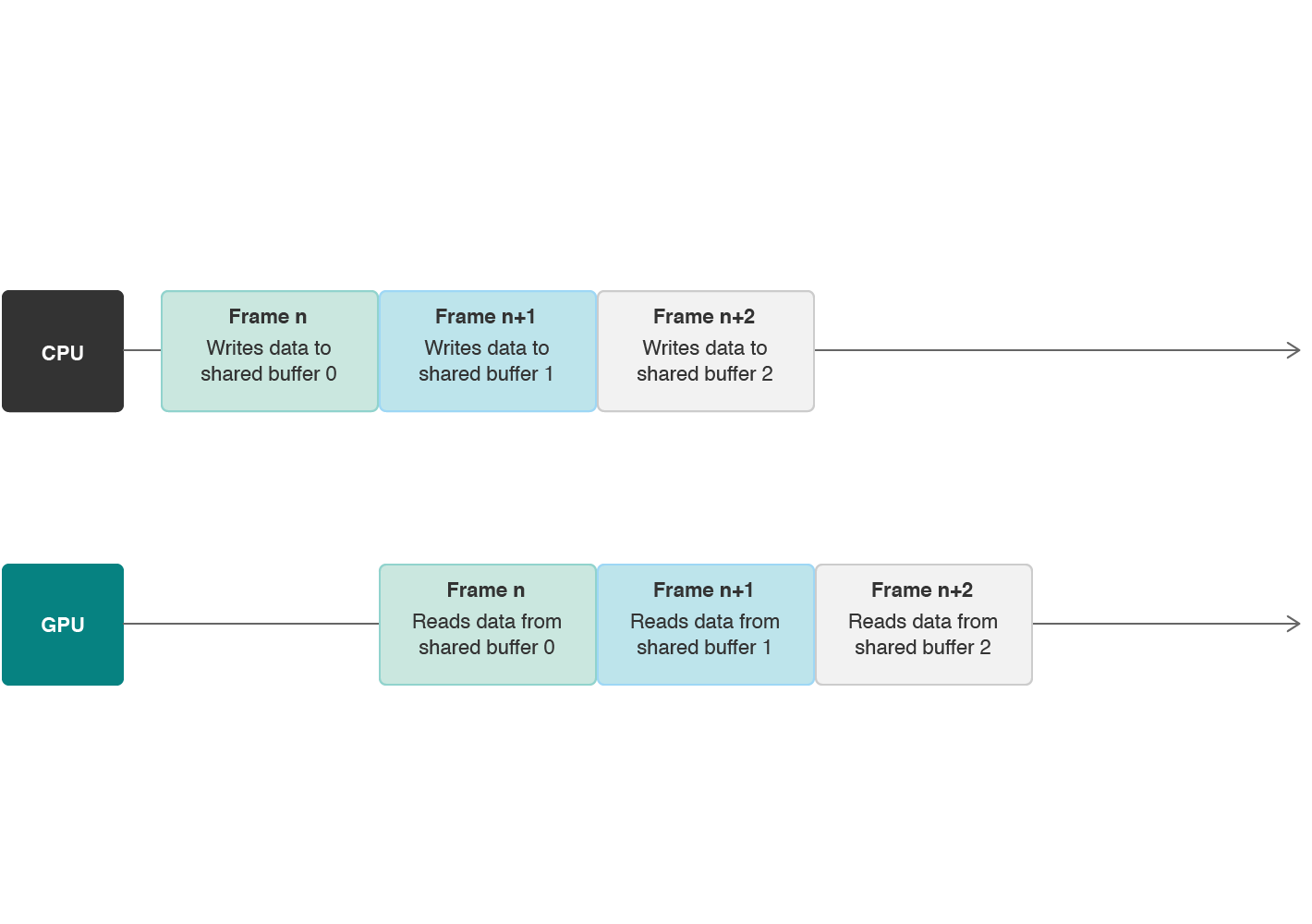
However, because the CPU and GPU are separate分离的 processors, you can make them work simultaneously同时 by using multiple instances of a resource. Each frame, you must provide the same arguments to your shaders, but this doesn’t mean you need to reference the same resource object. Instead相反, you create a pool of multiple instances of a resource and use a different one each time you render a frame. For example, as shown below, the CPU can write position data to a buffer used for frame n+1, at the same time that the GPU reads position data from a buffer used for frame n. By using multiple instances of a buffer, the CPU and the GPU can work continuously持续地 and avoid stalls as long as you keep rendering frames.
Initialize Data with the CPU 初始化CPU数据
Define a custom AAPLVertex structure that represents描述 a vertex. Each vertex has a position and a color:
定义一个三角形顶点结构
typedef struct
{
    vector_float2 position;
    vector_float4 color;
} AAPLVertex;
Define a custom AAPLTriangle class that provides an interface t
 最低0.47元/天 解锁文章






 扫一扫
扫一扫


 1345
1345

 被折叠的 条评论
为什么被折叠?
被折叠的 条评论
为什么被折叠?
 到【灌水乐园】发言





