


文章目录
支付相关知识点
1.加密
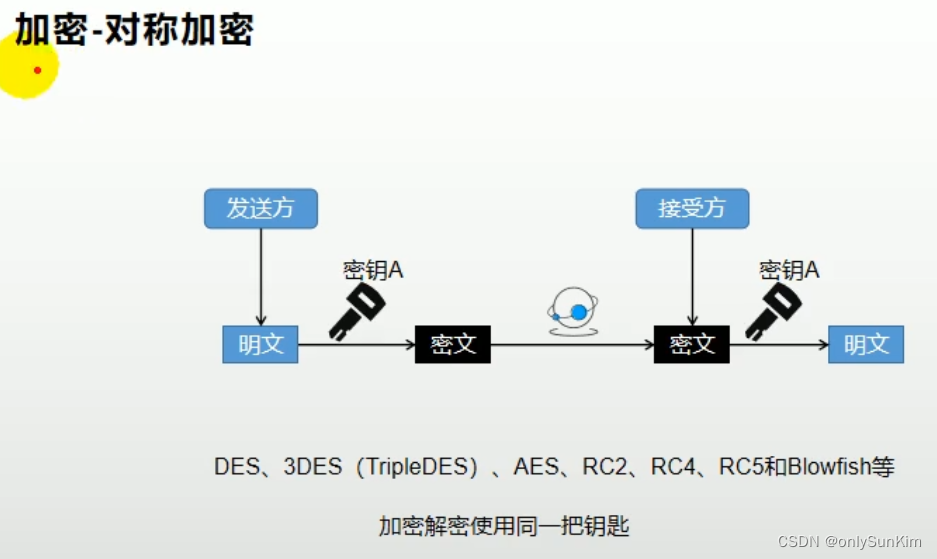
1.1.对称加密
加密解密使用同一把钥匙
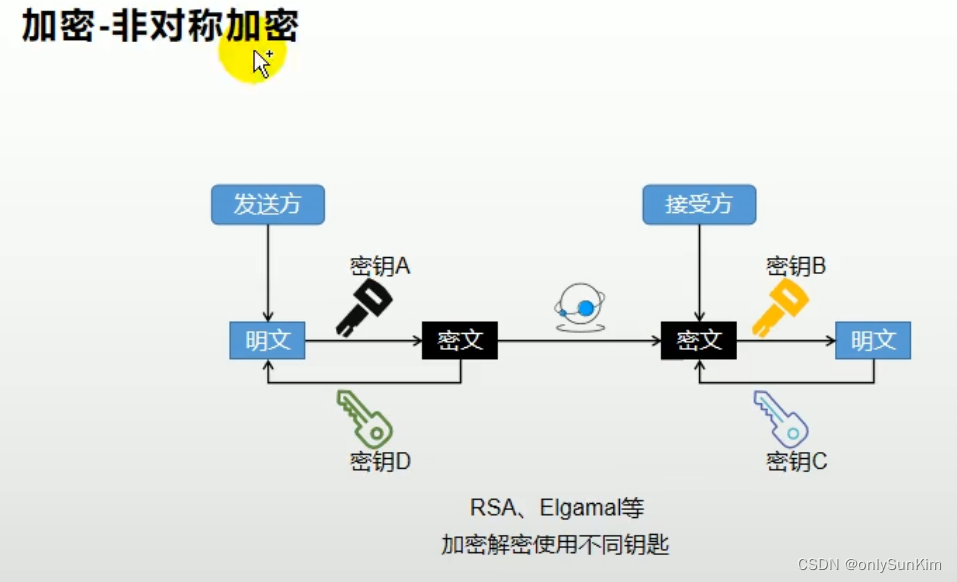
1.2.非对称加密
钥匙A:加密明文发送
钥匙B:将经过钥匙A加密的密文解密
钥匙C:加密明文发送
钥匙D:将经过钥匙C加密的密文解密
1.2.1.公钥
公钥:用于解密的 A/C

1.2.2.私钥
私钥:用于加密的 B/D
1.2.3.签名
作用:
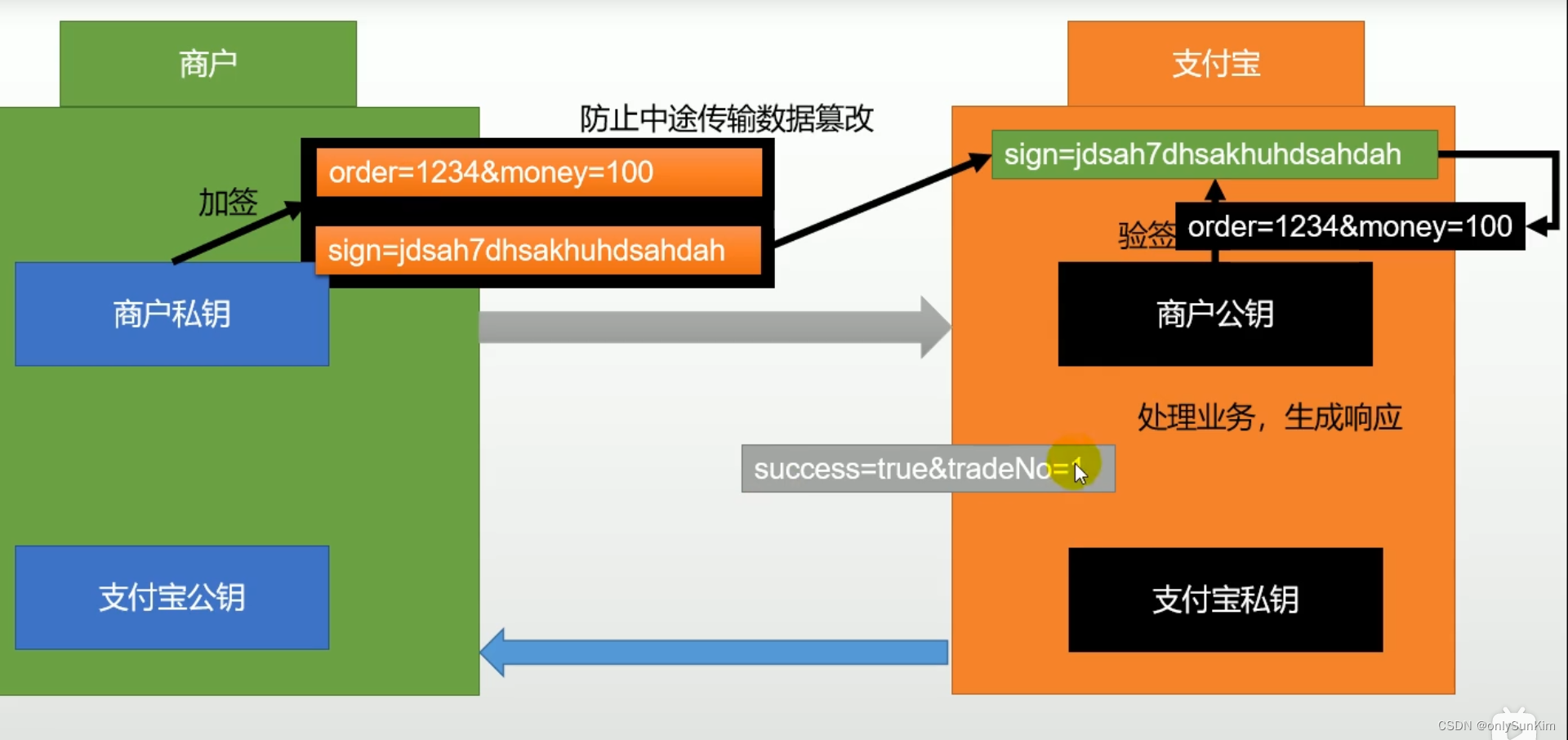
	防止中途数据传输篡改

加签流程:
	1.商户使用私钥对请求参数加签生成签名sign=xxxxx,发送请求
	2.支付宝接收请求,根据公钥生成签名,与传参签名对比,相等则验参成功
1.2.4.验签
验参流程:
	支付宝接收请求,根据公钥生成签名,与传参签名对比,相等则验参成功
支付宝
1.文档汇总
蚂蚁金服开放平台:  https://open.alipay.com/
应用:		       https://open.alipay.com/dev/workspace
API文档:		   https://open.alipay.com/api
开发文档:		  https://opendocs.alipay.com/open/270
2.接入流程
2.1.正式环境使用流程
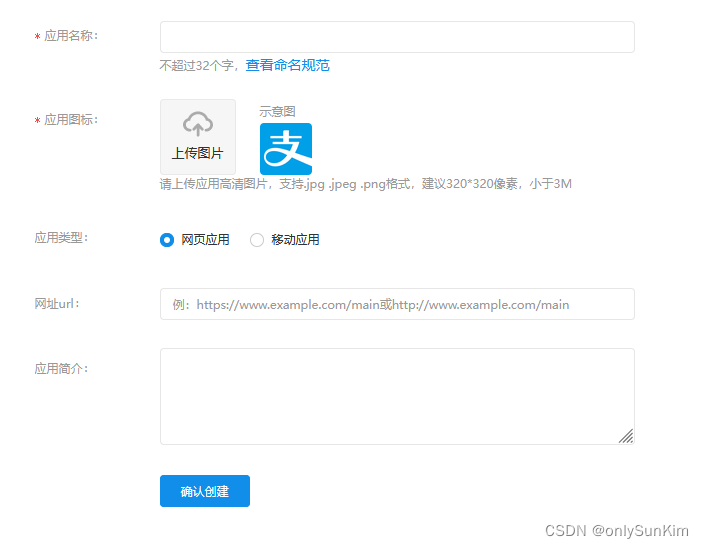
1.创建应用
2.添加能力:选择新增能力=》支付,全选
3.签约:https://memberprod.alipay.com/account/reg/index.htm
	操作指南:https://opendocs.alipay.com/open/00r5uy
2.2.demo下载测试
demo下载:https://opendocs.alipay.com/open/270/106291
2.3.沙箱环境使用流程
1.找到沙箱文档步骤
	1)文档:https://opendocs.alipay.com/home(打开API集成工具)
	2)侧边栏找到沙箱环境:https://opendocs.alipay.com/common/02kkv7
	3)沙箱应用:https://open.alipay.com/platform/appDaily.htm
	4)支付宝开放平台开发助手:https://opendocs.alipay.com/common/02mriz
		工具下载下载:https://opendocs.alipay.com/common/02kipk
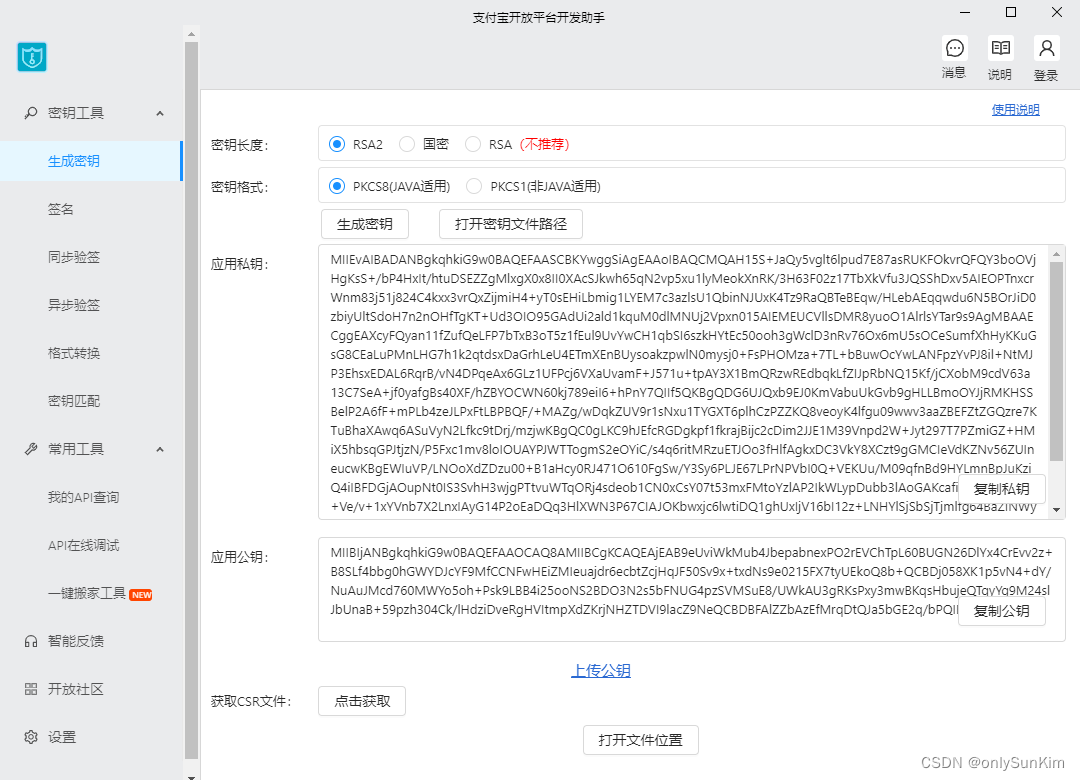
生成密钥、设置公钥
1.工具下载下载:https://opendocs.alipay.com/common/02kipk

2.生成商户私钥、公钥

3.拷贝商户私钥放到java配置文件中
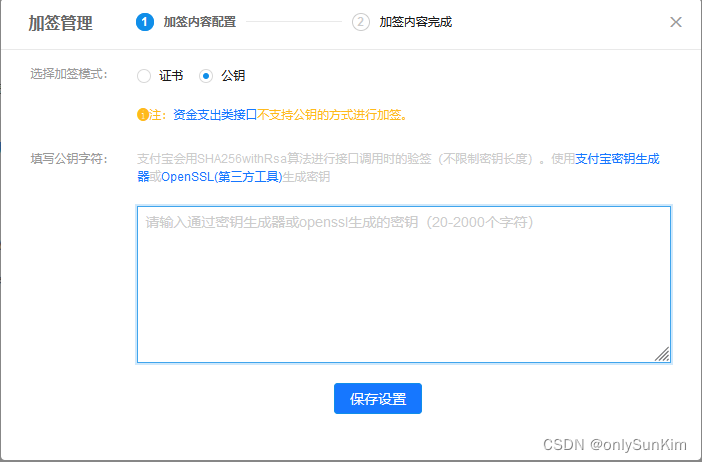
  拷贝商户公钥设置到沙箱环境中
  拷贝支付宝公钥到java配置文件中
生成商户私钥、公钥:
设置RSA2公钥:
内网穿透
参考nps、npc相关文档搭建内网穿透
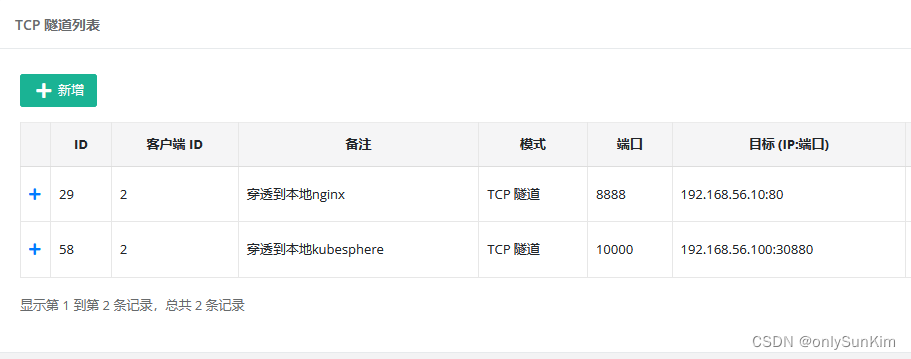
- bug1:使用nps作内网穿透,无法使用域名必须使用IP:PORT,所以会造成nginx无法根据访问的域名gulimall.com来匹配请求
- 解决:
- 方案一:修改nginx配置文件gulimall.conf监听server_name 124.223.7.41
- 解决:
- bug2:添加以上域名监听后,访问124.223.7.41:8888出现404异常
- 原因:网关88未拦截到请求
- 解决:
- 方案一:在网关增加拦截规则,拦截124.223.7.41,将请求发送到order.gulimall.com
- 方案二:在nginx转发时(/payed),设置host=order.gulimall.com,使网关可以正确拦截【推荐】
- 方案三:内网穿透的地址直接配成192.168.56.1:9000【缺点:没有负载均衡了】
bug1:
	修改gulimall.conf
server {
    listen       80;
    server_name gulimall.com *.gulimall.com 124.223.7.41;

    location /static/ {
        root /usr/share/nginx/html;
    }

    location / {
        proxy_set_header Host $host;
        proxy_pass http://gulimall;
    }

    error_page   500 502 503 504  /50x.html;
    location = /50x.html {
        root   /usr/share/nginx/html;
    }
}

bug2:
方案一:
        - id: gulimall_order_route2
          uri: lb://gulimall-order
          predicates:
            - Host=124.223.7.41

方案二:
	修改gulimall.conf
server {
    listen       80;
    server_name gulimall.com *.gulimall.com 124.223.7.41;

    location /static/ {
        root /usr/share/nginx/html;
    }

    location /payed/ {
        proxy_set_header Host order.gulimall.com;
        proxy_pass http://gulimall;
    }

    location / {
        proxy_set_header Host $host;
        proxy_pass http://gulimall;
    }

    error_page   500 502 503 504  /50x.html;
    location = /50x.html {
        root   /usr/share/nginx/html;
    }
}

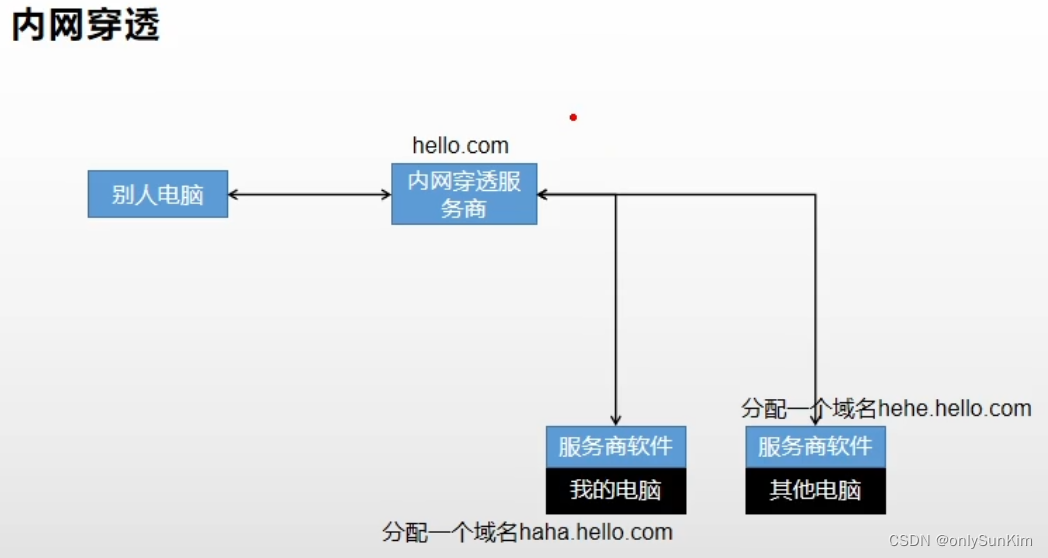
内网穿透配置:

账户密码
- 商家信息
- 商家账号:qdjyva8795@sandbox.com
- 登录密码:111111
- 商户PID:2088621957017110
- 买家信息
- 买家账号:ejjcyw3030@sandbox.com
- 登录密码:111111
- 支付密码:111111
- 用户UID:2088102181519523
- 用户名称:沙箱环境
- 证件类型:身份证(IDENTITY_CARD)
- 证件号码:631951191803114688
属性
#支付宝相关的配置
alipay.app_id=2021000118641369
alipay.merchant_private_key=xx
alipay.alipay_public_key=xx
#支付成功异步跳转的地址(内网穿透)
alipay.url=http://124.223.7.41:8888
#支付成功同步跳转的地址
alipay.return_url=http://member.gulimall.com/memberOrder.html
alipay.sign_type=RSA2
alipay.charset=utf-8
alipay.gatewayUrl=https://openapi.alipaydev.com/gateway.do
导入依赖、配置类
1.导入依赖
<!-- 支付宝sdk -->
<dependency>
    <groupId>com.alipay.sdk</groupId>
    <artifactId>alipay-sdk-java</artifactId>
    <version>4.10.111.ALL</version>
</dependency>
<dependency>
    <groupId>cn.springboot</groupId>
    <artifactId>best-pay-sdk</artifactId>
    <version>1.3.0</version>
</dependency>
2.配置类
@ConfigurationProperties(prefix = "alipay")
@Component
@Data
public class AliPayConfig {

    // 应用ID,您的APPID,收款账号既是您的APPID对应支付宝账号
    private String app_id;

    // 商户私钥,您的PKCS8格式RSA2私钥
    private String merchant_private_key;

    // 支付宝公钥,查看地址:https://openhome.alipay.com/platform/keyManage.htm 对应APPID下的支付宝公钥。
    private String alipay_public_key;

    // 当前项目域名地址
    private String url;

    // 服务器[异步通知]页面路径  需http://格式的完整路径,不能加?id=123这类自定义参数,必须外网可以正常访问
    // 支付宝会悄悄的给我们发送一个请求,告诉我们支付成功的信息
    private String notify_url;

    // 页面跳转同步通知页面路径 需http://格式的完整路径,不能加?id=123这类自定义参数,必须外网可以正常访问
    //同步通知,支付成功,一般跳转到成功页
    private String return_url;

    // 签名方式
    private String sign_type;

    // 字符编码格式
    private String charset;

    //订单超时时间
    private String timeout = "2m";

    // 支付宝网关
    private String gatewayUrl;
}
创建支付
1.支付接口
/**
 * @author: wan
 */
@Slf4j
@Controller
public class PayWebController {

    @Autowired
    OrderServiceImpl orderService;
    @Autowired
    PayContextStrategy payContextStrategy;
    @Autowired
    AliPayConfig aliPayConfig;

    /**
     * 创建支付,返回text/html页面
     * @param orderSn       订单号
     * @param type          支付类型
     * @param businessType  业务类型
     */
    @ResponseBody
    @GetMapping(value = "/html/pay", produces = "text/html")
    public String htmlPayOrder(@RequestParam(value = "orderSn", required = false) String orderSn,
                               @RequestParam(value = "payCode", required = true) Integer payCode,
                               @RequestParam(value = "businessCode", required = true) Integer businessCode) throws Exception {
        // 获取支付类型
        PayType payType = PayType.getByCode(payCode);
        // 获取业务类型
        PayBusinessDetailType businessDetailType = PayBusinessDetailType.getByCodeAndBusinessCode(
                payType.getCode(), businessCode);

        // 获取订单信息,构造参数
        PayVO order = orderService.getOrderPay(orderSn);
        order.setNotify_url(aliPayConfig.getUrl() + businessDetailType.getNotifyUrl());// 封装异步回调地址
        order.setReturn_url(businessDetailType.getReturnUrl());// 封装同步回调地址

        // 请求策略方法
        String html = payContextStrategy.pay(payType, order);
        return html;
    }
}
2.支付策略类
/**
 * 策略类
 */
@Component
public class PayContextStrategy {

    /**
     * 创建支付
     *
     * @param payType        策略类型
     * @param businessDetail 业务类型
     * @param order          订单数据
     * @return
     */
    public String pay(PayType payType, PayVO order) throws Exception {
        // 获取实际策略对象
        PayStrategy payStrategy = SpringUtils.getBean(payType.getStrategyBeanId(), PayStrategy.class);
        // 执行具体策略
        return payStrategy.pay(order);
    }
}
3.策略角色
/**
 * 支付宝策略角色实现
 */
@Component
public class AliPayStrategy implements PayStrategy {

    @Autowired
    AliPayServiceImpl aliPayService;

    /**
     * 创建支付
     * @param order 订单详情
     */
    @Override
    @Transactional
    public String pay(PayVO order) throws AlipayApiException {
        // 创建支付返回html渲染
        String html = aliPayService.pay(order);
        return html;
    }
}
4.支付宝远程调用
/**
 * 支付宝支付
 *
 * @Author: wanzenghui
 * @Date: 2022/1/4 23:19
 */
@Service
public class AliPayServiceImpl implements PayService {

    @Autowired
    AliPayConfig aliPayConfig;

    /**
     * 创建支付,获取支付页
     */
    @Override
    public String pay(PayVO order) throws AlipayApiException {
        //AlipayClient alipayClient = new DefaultAlipayClient(AlipayTemplate.gatewayUrl, AlipayTemplate.app_id, AlipayTemplate.merchant_private_key, "json", AlipayTemplate.charset, AlipayTemplate.alipay_public_key, AlipayTemplate.sign_type);
        //1、根据支付宝的配置生成一个支付客户端
        AlipayClient alipayClient = new DefaultAlipayClient(
                aliPayConfig.getGatewayUrl(),
                aliPayConfig.getApp_id(),
                aliPayConfig.getMerchant_private_key(),
                "json",
                aliPayConfig.getCharset(),
                aliPayConfig.getAlipay_public_key(),
                aliPayConfig.getSign_type());

        //2、创建一个支付请求 //设置请求参数
        AlipayTradePagePayRequest alipayRequest = new AlipayTradePagePayRequest();
        alipayRequest.setReturnUrl(order.getReturn_url());
        alipayRequest.setNotifyUrl(order.getNotify_url());

        //商户订单号,商户网站订单系统中唯一订单号,必填
        String out_trade_no = order.getOut_trade_no();
        //付款金额,必填
        String total_amount = order.getTotal_amount();
        //订单名称,必填
        String subject = order.getSubject();
        //商品描述,可空
        String body = order.getBody();

        alipayRequest.setBizContent("{\"out_trade_no\":\"" + out_trade_no + "\","
                + "\"total_amount\":\"" + total_amount + "\","
                + "\"subject\":\"" + subject + "\","
                + "\"body\":\"" + body + "\","
                + "\"timeout_express\":\"" + aliPayConfig.getTimeout() + "\","
                + "\"product_code\":\"FAST_INSTANT_TRADE_PAY\"}");

        // 执行创建支付请求,返回支付页面
        String result = alipayClient.pageExecute(alipayRequest).getBody();

        //会收到支付宝的响应,响应的是一个页面,只要浏览器显示这个页面,就会自动来到支付宝的收银台页面
        System.out.println("支付宝响应:登录页面的代码\n" + result);

        return result;
    }
}
同步回调
不建议在同步回调修改订单状态
member模块接收异步回调

/**
 * 支付同步回调
 *
 * @Author: wanzenghui
 * @Date: 2022/1/5 0:17
 */
@Controller
public class MemberWebController {

    @Autowired
    private OrderFeignService orderFeignService;

    /**
     * 支付宝同步回调
     * 查询用户订单列表
     * @param pageNum
     * @param model
     * @return
     */
    @GetMapping(value = "/memberOrder.html")
    public String memberOrderPage(@RequestParam(value = "pageNum", required = false, defaultValue = "0") Integer pageNum,
                                  Model model) {
        // 获取支付宝回参,根据sign延签,延签成功修改订单状态【不建议在同步回调修改订单状态,建议在异步回调修改订单状态】

        // 封装分页数据
        Map<String, Object> page = new HashMap<>();
        page.put("page", pageNum.toString());

        // 分页查询当前用户的订单列表、订单项
        R orderInfo = orderFeignService.listWithItem(page);
        model.addAttribute("orders", orderInfo);

        return "orderList";
    }
}
异步回调
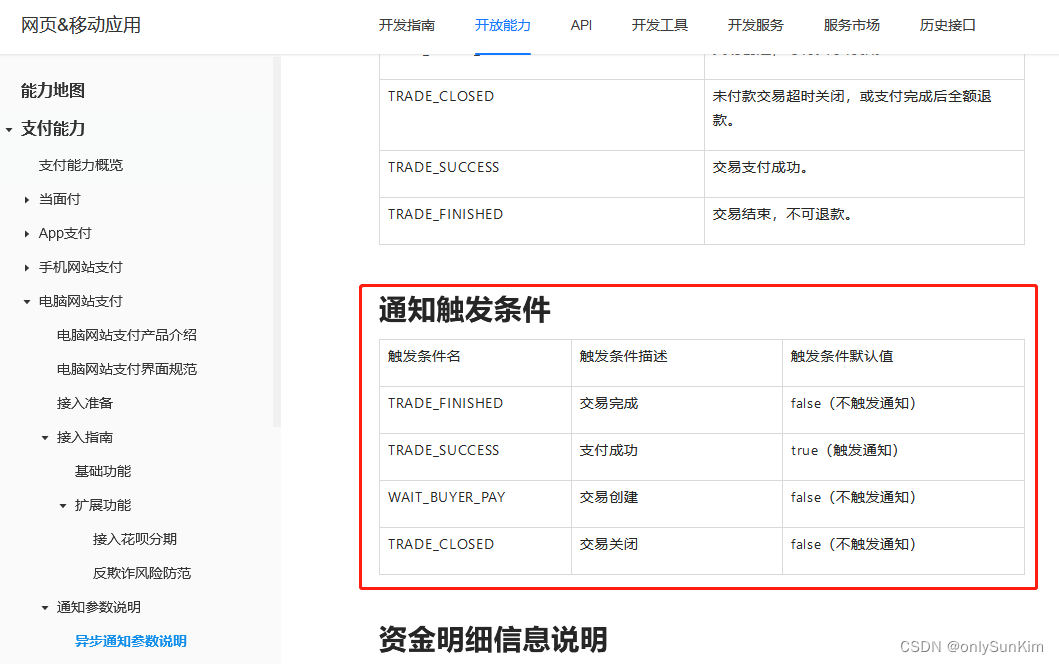
建议在异步回调修改订单状态

	程序执行完后必须打印输出“success”(不包含引号)。如果商户反馈给支付宝的字符不是 success 这7个字符,支付宝服务器会不断重发通知,直到超过 24 小时 22 分钟。一般情况下,25 小时以内完成 8 次通知(通知的间隔频率一般是:4m,10m,10m,1h,2h,6h,15h)。
bug_时间格式化
rejected value [2021-04-07 15:20:13]; codes [typeMismatch.xxx]

原因:异步回调参数时间时字符串类型,但是java参数类型是Date

解决:
@DateTimeFormat(pattern = "yyyy-MM-dd HH:mm:ss")
private Date notify_time;
1.回调接口
/**
 * 订单支付成功监听器
 *
 */
@RestController
public class OrderPayedListener {

    @Autowired
    PayContextStrategy payContextStrategy;

    /**
     * 支付宝支付异步通知
     * 只有支付成功会触发
     * @param request
     * @param asyncVo
     */
    @PostMapping(value = "/payed/ali/notify")
    public String handleAliNotify(HttpServletRequest request, AliPayAsyncVO asyncVo) throws AlipayApiException, UnsupportedEncodingException {
        asyncVo.setPayCode(PayType.ALI_PAY.getCode());// 封装付款类型
        Boolean result = payContextStrategy.notify(PayType.ALI_PAY, request, asyncVo);
        if (result) {
            return "success";// 返回success,支付宝将不再异步回调
        }
        return "error";
    }
}
2.回调策略类
/**
 * 策略类
 */
@Component
public class PayContextStrategy {

    /**
     * 处理回调
     * @param payType   策略类型
     * @param request   请求
     * @param asyncVo   回参VO
     * @return
     */
    public Boolean notify(PayType payType, HttpServletRequest request, PayAsyncVO asyncVo) throws AlipayApiException {
        // 获取实际策略对象
        PayStrategy payStrategy = SpringUtils.getBean(payType.getStrategyBeanId(), PayStrategy.class);
        // 执行具体策略
        return payStrategy.notify(request, asyncVo);
    }
}
3.策略角色
/**
 * 支付宝策略角色实现
 */
@Component
public class AliPayStrategy implements PayStrategy {

    @Autowired
    AliPayServiceImpl aliPayService;

    @Override
    public Boolean notify(HttpServletRequest request, PayAsyncVO asyncVo) throws AlipayApiException {
        // 验签
        Boolean signVerified = aliPayService.verify(request);
        if (signVerified) {
            // 修改订单状态
            System.out.println("签名验证成功...修改订单状态");
            aliPayService.handlePayResult(asyncVo);
        } else {
            System.out.println("签名验证失败...");
        }
        return signVerified;
    }
}
4.验签+修改订单状态
package com.atguigu.gulimall.order.service.impl.alipay;

import com.alipay.api.AlipayApiException;
import com.alipay.api.AlipayClient;
import com.alipay.api.DefaultAlipayClient;
import com.alipay.api.internal.util.AlipaySignature;
import com.alipay.api.request.AlipayTradePagePayRequest;
import com.atguigu.common.constant.order.OrderConstant.OrderStatusEnum;
import com.atguigu.common.entity.order.PaymentInfoEntity;
import com.atguigu.common.vo.order.PayAsyncVO;
import com.atguigu.common.vo.order.PayVO;
import com.atguigu.common.vo.order.alipay.AliPayAsyncVO;
import com.atguigu.gulimall.order.config.AliPayConfig;
import com.atguigu.gulimall.order.service.PayService;
import com.atguigu.gulimall.order.service.impl.OrderServiceImpl;
import org.springframework.beans.factory.annotation.Autowired;
import org.springframework.stereotype.Service;

import javax.servlet.http.HttpServletRequest;
import java.math.BigDecimal;
import java.util.Date;
import java.util.HashMap;
import java.util.Map;

/**
 * 支付宝支付
 *
 * @Author: wanzenghui
 * @Date: 2022/1/4 23:19
 */
@Service
public class AliPayServiceImpl implements PayService {

    @Autowired
    OrderServiceImpl orderService;
    @Autowired
    AliPayConfig aliPayConfig;

    /**
     * 验签
     *
     * @param request 回参
     */
    @Override
    public Boolean verify(HttpServletRequest request) throws AlipayApiException {
        Map<String, String> params = new HashMap<>();
        Map<String, String[]> requestParams = request.getParameterMap();
        for (String name : requestParams.keySet()) {
            String[] values = requestParams.get(name);
            String valueStr = "";
            for (int i = 0; i < values.length; i++) {
                valueStr = (i == values.length - 1) ? valueStr + values[i]
                        : valueStr + values[i] + ",";
            }
            //乱码解决,这段代码在出现乱码时使用
            // valueStr = new String(valueStr.getBytes("ISO-8859-1"), "utf-8");
            params.put(name, valueStr);
        }

        return AlipaySignature.rsaCheckV1(params, aliPayConfig.getAlipay_public_key(),
                aliPayConfig.getCharset(), aliPayConfig.getSign_type()); //调用SDK验证签名
    }

    /**
     * 处理支付回调
     *
     * @param asyncVo
     */
    @Override
    public void handlePayResult(PayAsyncVO asyncVo) {
        // 封装交易流水信息
        AliPayAsyncVO aliVo = (AliPayAsyncVO) asyncVo;
        // 保存交易流水信息
        PaymentInfoEntity paymentInfo = new PaymentInfoEntity();
        paymentInfo.setOrderSn(aliVo.getOut_trade_no());
        paymentInfo.setAlipayTradeNo(aliVo.getTrade_no());
        paymentInfo.setTotalAmount(new BigDecimal(aliVo.getBuyer_pay_amount()));
        paymentInfo.setSubject(aliVo.getBody());
        paymentInfo.setPaymentStatus(aliVo.getTrade_status());
        paymentInfo.setCreateTime(new Date());
        paymentInfo.setCallbackTime(aliVo.getNotify_time());

        // 获取支付状态
        String tradeStatus = aliVo.getTrade_status();
        Integer orderStatus = null;
        if (tradeStatus.equals("TRADE_SUCCESS") || tradeStatus.equals("TRADE_FINISHED")) {
            // 支付成功状态
            orderStatus = OrderStatusEnum.PAYED.getCode();
        }
        orderService.handlePayResult(orderStatus, aliVo.getPayCode(), paymentInfo);
    }
}
收单
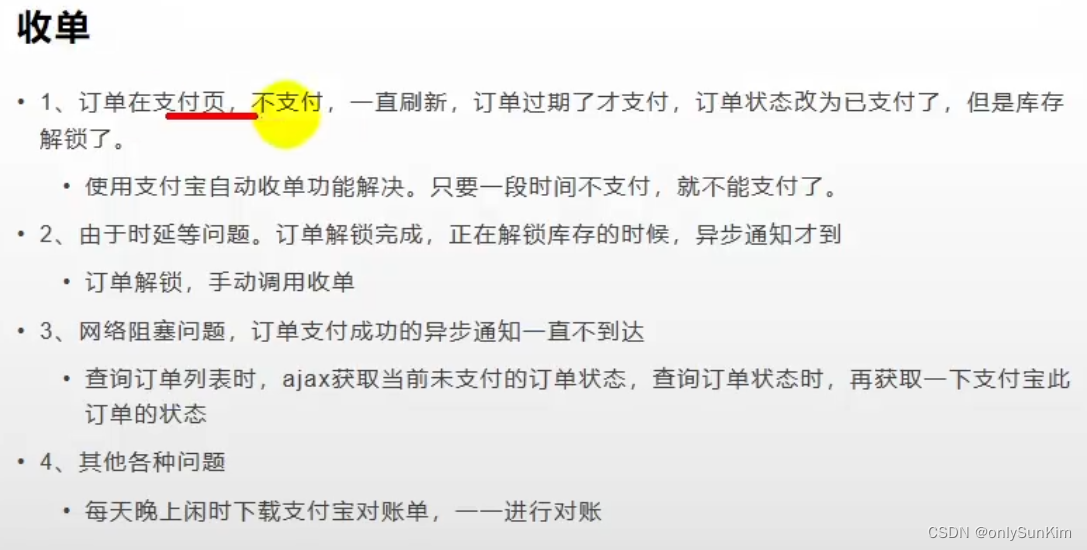
1.订单超时,不允许支付
	解决:支付时设置超时时间 timeout_express=30m

2.订单解锁完成,异步通知才到
	解决:释放库存的时候,手动调用收单功能(参照官方demo的实现)





 扫一扫
扫一扫


 被折叠的 条评论
为什么被折叠?
被折叠的 条评论
为什么被折叠?
 到【灌水乐园】发言





