



参数说明
fetch参数:一个必选的资源路径和一个可选的参数init。无论请求是否成功都返回一个Promise
与$.ajax()的不同
fetch与$.ajax()的不同
- 当接收到类似404或500这类表示错误的状态码时,fetch返回的Promise对象的状态仍然为resolve
(resolve的返回值‘ok’属性设置为false),仅当网络故障时或请求被阻止时,才会标记为reject - 默认情况下fetch
不会从服务端发送或接收任何 cookies, 如果站点依赖于用户 session,则会导致未经认证的请求(要发送 cookies,必须设置 credentials 选项)
示例
不带参数的请求
fetch('http://www.tingchunyu.com/test/fetch_test/fetch_test.php').then(response=>{
    // response为HTTP响应
    return response.json()// 将HTTP响应转为json数据
}).then(data=>{
    console.log(data)// 打印json数据
}).catch(error=>{// 捕获异常
    console.log(error)
})
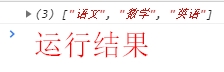
上面代码获取了一个json字符串,其中response为HTTP响应。如果要得到json数据需要使用.json()方法进行转换。
带参数的请求(以post为例)
fetch('http://www.tingchunyu.com/test/fetch_test/fetch_getuser_test.php', {
    body: JSON.stringify({id:666}),//这里是要传递的参数
    headers: {
        'content-type': 'application/json'
    },
    method: 'POST',
})
    .then(response => response.json())
    .then(data=>{
        console.log(data)
    })
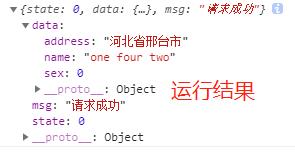
注意:如果后台接收不到数据请参考这篇文章
判断请求是否成功
因为 这个 的原因,resolved状态不一定代表请求成功,所以需要在resolved的状态下再次判断Response.ok,如下代码:
fetch('http://www.tingchunyu.com/test/fetch_test/fetch_test.php')
    .then(response => {
        if (response.ok) {
            return response.json()
        }
        throw new Error('请求失败')
    })
    .then(data => {
        console.log(data)
    })
    .catch(error => {
        console.log(error)
    })





 扫一扫
扫一扫


 467
467

 被折叠的 条评论
为什么被折叠?
被折叠的 条评论
为什么被折叠?
 到【灌水乐园】发言





