





 本文介绍了在C++项目发布模式下,由于优化导致对象信息丢失时,如何使用Visual Studio工具找到正确地址的方法。通过分析调用堆栈、寄存器值和反汇编窗口,可以定位到对象的实际内存地址,从而解决因对象信息缺失导致的异常问题。
Debugging C++ Release Projects - Finding the Lost Object Information
By
,
15 Feb 2014
|
|

Introduction
When compiling a C++ project in release with optimizations, the compiler sometimes doesn't show the right object information.
The local variables are usually the first to go, and many times the this object's information are lost to the debugger.
The reason is that the compiler uses the available hardware registers to hold the information, and uses optimizations to avoid allocation of local variables.
In this tip, I'll show how to use Visual Studio's tools to see where the information is held.
Using the Code
I'll give a simple example of some code that throws an exception,
I'll create a simple class and a situation where one of the member's value will cause a division by zero exception.
I'll add an extra method just so the debugger will stop at the right line (due to optimizations, the debugger may not stop at the right line, because the actual code stack doesn't represent where you are in the code - just the return address. This issue may be explained in a future post.).
The extra method is important for this scenario, just so we can imitate the scenario I'm talking about.

  class SomeClass
    {
    public:
        int a,b;
        void MyMethod()
        {
            int i = 0;
            int j = i;
            DoStuff();
            a = this->a/this->b;
            DoStuff();
            DoStuff();
        }

        void DoStuff()
        {
            int i = 10;
            int j = 5;
            int k = 4;
            for ( ;i * j + k < 40000; i++)
            {
                int fs = 34;
            }
            printf("%d %d %d %d %d", i , j , k , 10,8);
        }
    };
int main(int argc, void* argv[])
{
    SomeClass a;
    a.a = 5;
    a.b = 0;

    a.MyMethod();
    return 0;
}
Now, if you run this little program in release mode, you'll get an exception complaining about a division by zero. This is because the member b is set to 0.
The debugger will conveniently stop at the right line, but unfortunately all the local variables and the this variable will be corrupted.

The information is obviously somewhere, but the debugger just doesn't seem to load the right information. If you look closely, then you can see that the this value is 01 which indicates that it's just reading the object's information from the wrong place/address.
So, how can we find the object's right address ?
Using the Call Stack
The first method, which is the easiest, is to go up the call stack and hope that at some level the debugger sees the right address. This is by far easier than the next method...
If we look at the call stack, we can see that the debugger correctly resolved that we are in the method MyMethod of the SomeClass class:
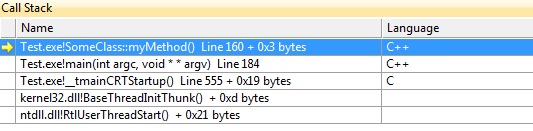
So, if we just go to the previous function in the stack (main), the debugger might still hold the right address to the object (because the object was known and used there). This will work as long as the compiler didn't decide to re-use the registers that held the object's address.
So, if we double click the line just below our current position, the debugger will jump to the code where the current method was called:


Here, we can clearly see that b equals 0, and we are dividing by b, so mystery solved - that's why we get an exception!
But... In deeper nested call stacks, with more complicated code, this doesn't always work, and the debugger may use the information throughout the whole call stack hierarchy.
Registry Values and Disassembly
The key is to understand that the CPU holds its information in its registers. Although the actual information may be stored in memory (stack or heap), the CPU itself only uses the registers.
The compiler adds assembly code that copies the relevant information from the memory to the registers for the CPU to actually do the calculations.
Knowing that, we can assume that most of the locally used variables and this address will be held in the registers (unless there is no farther use for them, in which case the register may be re-used to hold other information).
To know how exactly the variables are mapped to registers, we can use the Disassembly window and Registerswindow.
I'll not really go into assembly code, I'll just look at the register names.
Let's look at the Dissasembly window of our problematic code. We want to find a place where the code calls a local variable of the current object we want, the mapped assembly code can point out the register it's using:

We can see that when we call the local members, the matching assembly code calls a register called rdi.
This register probably holds the address of our object (object members are accessed by an offset from the object's starting point (address) in memory).
We will now want to see what value the register holds. We hope that it's an address (a large number). If we open the Registers window, we can see its value:

We can see that rdi holds the value 000000000025F950 it's a hexadecimal value that is pretty big, and this is what a memory address usually looks like. (Lower values usually represent counters or other local function members.)
Of course, this means absolutely nothing to me, or almost anyone else, so let's let the debugger help us figure it out.
We can now open the Watch window. It's a useful window which among other things allows you to enter specific addresses and show their value.
We'll cast the address to a pointer of our object's type, and add a 0x prefix to the number so the debugger knows it's a hexadecimal value:
(SomeClass*)(0x000000000025F950)
The debugger will now show us the object like we're used to seeing it:

Points of Interest
- Call Stack: Debug -> Windows -> Call Stack (alt+7)
- Locals: Debug -> Windows -> Locals (alt+4)
- Disassembly window: Debug -> Windows -> Disassembly (alt+8)
- Registers window: Debug -> Windows -> Registers (alt+5)
- Watch window: Debug -> Windows -> Watch -> Watch 1 (ctrl + alt + w, 1)
History
- 15th February, 2014: Initial version
License
This article, along with any associated source code and files, is licensed under The Code Project Open License (CPOL)





 扫一扫
扫一扫


 被折叠的 条评论
为什么被折叠?
被折叠的 条评论
为什么被折叠?
 到【灌水乐园】发言





