



 本文分享了作者从零开始学习Android开发的经历,详细介绍了使用Android Studio进行界面设计的过程,包括去除默认头部、修改状态栏颜色、设置背景图片及按钮样式的技巧。
(背景)过完年来,一脸懵逼状态下开始的安卓学习,学错的求解勿喷。
创建了个安卓下载地址 有需要的可以直接下载安装
链接:https://pan.baidu.com/s/1oLtvkOWgBhzelAGs1XX7lw
提取码:qrq6
个人感觉android studio写安卓貌似比之前的eclipse简单些,毕竟还有Design可视化视图拖拖拖,后台自动生成代码。但是也要考虑到布局,刚开始各种不懂,各种摸索。
先上demo效果图 凑合看
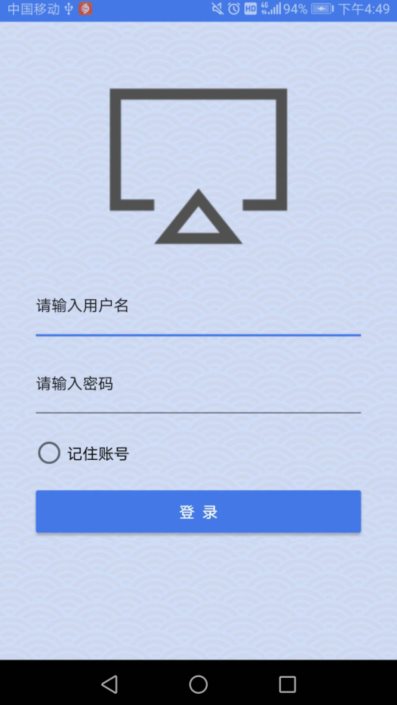
布局代码
<?xml version="1.0" encoding="utf-8"?>
<android.support.constraint.ConstraintLayout xmlns:android="http://schemas.android.com/apk/res/android"
    xmlns:app="http://schemas.android.com/apk/res-auto"
    xmlns:tools="http://schemas.android.com/tools"
    android:layout_width="match_parent"
    android:layout_height="match_parent"
    tools:context=".login_user">

    <LinearLayout
        android:layout_width="wrap_content"
        android:layout_height="wrap_content"
        android:background="@drawable/dengl_bg"
        android:orientation="vertical">

        <RelativeLayout
            android:layout_width="match_parent"
            android:layout_height="match_parent"
            android:layout_marginLeft="30dp"
            android:layout_marginTop="40dp"
            android:layout_marginRight="30dp"
            android:layout_marginBottom="10dp">

            <LinearLayout
                android:layout_width="match_parent"
                android:layout_height="match_parent"
                android:orientation="vertical">

                <ImageView
                    android:id="@+id/imageView16"
                    android:layout_width="wrap_content"
                    android:layout_height="179dp"
                    app:srcCompat="@drawable/dengl_logo" />

                <EditText
                    android:id="@+id/editText"
                    android:layout_width="match_parent"
                    android:layout_height="70dp"
                    android:ems="10"
                    android:inputType="textPersonName"
                    android:text="请输入用户名"
                    android:textAppearance="@style/TextAppearance.AppCompat.Body1" />

                <EditText
                    android:id="@+id/editText2"
                    android:layout_width="match_parent"
                    android:layout_height="70dp"
                    android:ems="10"
                    android:inputType="textPersonName"
                    android:text="请输入密码"
                    android:textAppearance="@style/TextAppearance.AppCompat.Body1" />

                <RadioButton
                    android:id="@+id/radioButton"
                    android:layout_width="match_parent"
                    android:layout_height="55dp"
                    android:text="记住账号"
                    android:textAppearance="@style/TextAppearance.AppCompat.Body1" />

                <Button
                    android:id="@+id/button22"
                    style="@style/Widget.AppCompat.Button.Colored"
                    android:layout_width="match_parent"
                    android:layout_height="50dp"
                    android:text="登  录"
                    android:textColorLink="@color/colorAccent" />

            </LinearLayout>
        </RelativeLayout>

    </LinearLayout>
</android.support.constraint.ConstraintLayout>
遇到问题之一:
顶部默认有头部,登录页一般会选择去掉。
在res——values——styles.xml 加一句代码即可
<item name="windowNoTitle">true</item>遇到问题之二:
修改手机顶部状态栏颜色
在res——values——styles.xml 加一句代码即可
<item name="colorPrimaryDark">#4477e7</item>遇到问题之三:
背景图片设置!!
在LinearLayout下加上一句代码
android:background="@drawable/dengl_bg"背景图片即可应用
遇到问题之四:
button填充样式
在右边属性界面 button——style——Widget.AppCompat.Button.Colored 即可如图填充
其他自己设计就好,下一篇首页界面设计





 扫一扫
扫一扫


 597
597

 被折叠的 条评论
为什么被折叠?
被折叠的 条评论
为什么被折叠?
 到【灌水乐园】发言





