



ElementUI 官网
https://element.eleme.cn/#/zh-CN
Vue 安装 ElementUI
一个命令搞定
npm i element-ui -S

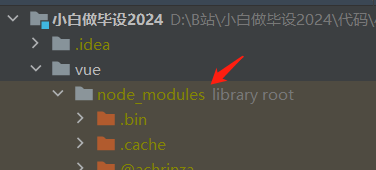
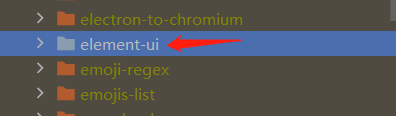
没搞定的检查下 npm 镜像,修改镜像源为淘宝
npm config set registry https://registry.npmmirror.com
查看 npm 镜像
npm config get
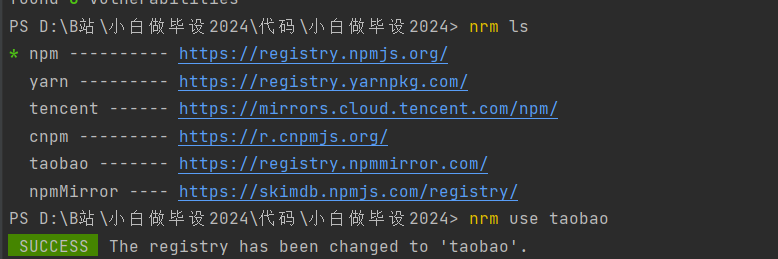
或者安装 nrm,管理 npm 镜像
npm install nrm -g
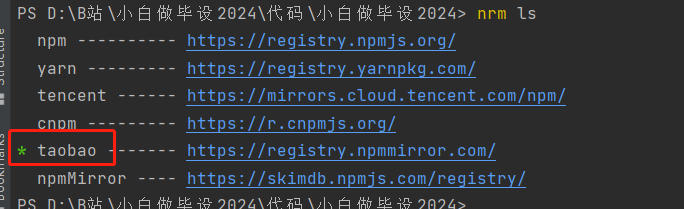
nrm 切换镜像为 taobao
nrm ls
nrm use taobao
nrm current

Vue 配置安装 ElementUI
在 main.js 里引入下面的内容
import ElementUI from 'element-ui';
import 'element-ui/lib/theme-chalk/index.css';

Vue.use(ElementUI, { size: 'small' });
el-row + el-col
按钮 Button
属性:type、plain、round、circle
circle 按钮使用 icon 设置图标
禁用状态
文字按钮(可改变颜色)
事件:click
<el-button>默认按钮</el-button>
<el-button type="primary">主要按钮</el-button>
表单 Form
输入框
type
show-password
clearable
suffix-icon=“el-icon-date”
<el-input v-model="input" placeholder="请输入内容"></el-input>
强制要求你必须有v-model
输入建议表单
<el-autocomplete style="width: 300px" placeholder="请输入内容,我来帮你猜一猜" :fetch-suggestions="querySearch"
:trigger-on-focus="false" v-model="value3"></el-autocomplete>

coffees: [{ value: '1星巴克咖啡' },{ value: '1栖巢咖啡' }, {value: '2瑞幸咖啡'}, {value: '3库迪咖啡'}]
// 值必须带value

querySearch(query, cb) {  // callback
  let result =  query ? this.coffees.filter(v => v.value.includes(query)) : this.coffees
  console.log(result)
  cb(result);
}
下拉框
clearable
multiple
filterable 可搜索
<el-select v-model="value" placeholder="请选择">
  <el-option value="糕"></el-option>
  <el-option value="高"></el-option>
  <el-option value="羔"></el-option>
</el-select>

<el-select v-model="value" placeholder="请选择">
  <el-option
    v-for="item in options"
    :key="item.value"
    :label="item.label"
    :value="item.value">
  </el-option>
</el-select>
单选
<el-radio-group v-model="radio">
  <el-radio label="男"></el-radio>
  <el-radio label="女"></el-radio>
</el-radio-group>
多选
<el-checkbox-group v-model="checkList">
  <el-checkbox label="复选框 A"></el-checkbox>
  <el-checkbox label="复选框 B"></el-checkbox>
</el-checkbox-group>
日期时间
format
value-format
<el-date-picker v-model="date" type="date" placeholder="选择日期"></el-date-picker>
<el-date-picker v-model="datetime" type="date" placeholder="选择日期时间"></el-date-picker>

<el-date-picker v-model="daterange" type="daterange"
      start-placeholder="开始日期"
      end-placeholder="结束日期">
</el-date-picker>
初始格式:Wed Aug 09 2023 00:00:00 GMT+0800 (中国标准时间)
一定要设置 value-format
年月日:value-format="yyyy-MM-dd"
年月日时分秒:value-format="yyyy-MM-dd HH:mm:ss"
表格 el-table
<el-table :data="tableData" border :header-cell-style="{ background: 'aliceblue', fontSize: '16px' }">
  <el-table-column label="序号" prop="id" align="center"></el-table-column>
  <el-table-column label="名称" prop="name" align="center"></el-table-column>
  <el-table-column label="年龄" prop="age" align="center"></el-table-column>
  <el-table-column label="地址" prop="address" align="center"></el-table-column>
  <el-table-column label="操作">
    <template v-slot="scope">
      <el-button type="primary" @click="edit(scope.row)">编辑</el-button>
    </template>
  </el-table-column>
</el-table>

tableData: [
        {  name: '糕', address: '江苏省常州市', id: 1, age: '20' },
        {  name: '糕', address: '江苏省常州市', id: 1, age: '20' },
        {  name: '糕', address: '江苏省常州市', id: 1, age: '20' },
        {  name: '糕', address: '江苏省常州市', id: 1, age: '20' },
        {  name: '糕', address: '江苏省常州市', id: 1, age: '20' },
        {  name: '糕', address: '江苏省常州市', id: 1, age: '20' },
        {  name: '糕', address: '江苏省常州市', id: 1, age: '20' },
      ],
提示信息
message
notify
confirm
// alert(row.name)
// this.$message.success(row.name)
// this.$message.warning(row.name)
// this.$notify.success(row.name)

this.$confirm('这是什么个玩意儿?', '提示', {
  type: 'warning'
}).then(res => {
  this.$message.success("ok 我点击了确认")
}).catch(() => {
  this.$message.warning("ok 我点击了取消")
})





 扫一扫
扫一扫


 1万+
1万+

 被折叠的 条评论
为什么被折叠?
被折叠的 条评论
为什么被折叠?
 到【灌水乐园】发言





