






 本文详细介绍了使用Java和SpringMVC框架搭建微信企业号接入的基本流程。从创建Maven项目开始,逐步配置依赖、设置JDK版本、添加必要的web及Spring配置等步骤,为开发者提供了一个完整的开发环境搭建指南。
微信对企业号的定义:
企业号是微信为企业客户提供的移动应用入口。它帮助企业建立员工、上下游供应链与企业IT系统间的连接。利用企业号,企业或第三方合作伙伴可以帮助企业快速、低成本的实现高质量的移动轻应用,实现生产、管理、协作、运营的移动化。
本系列博客将全方位的讲解第三方应用介入微信平台的相关细节,有兴趣的朋友可以一起探讨。
首先来讲讲微信平台的工作模式或者实现原理:
微信: 从字面上来翻译,就是 微小的信息, 当然还有另外一层隐晦的含义: 不要过多相信。这个要归咎要中文的博大进深啦。
言归正题,微信 其实就是一段简短的信息,和微博应该是同一概念。 微信用户关注一个企业之后,可以访问授权过的应用(App),在这些应用里面用户输入一段文字,发送一张图片或者发布一段语音,视频,微信服务器接受到这个消息之后,将消息
转发给第三方云服务, 第三方云服务提供接受消息的接口,收到消息后可以对该消息进行处理,比如返回被动消息,或者主动发送消息给指定的部门或者人。微信服务器就相当于一个消息中间件,所有的第三方后台都是他的服务,他负责把用户消息和第三方
服务联系起来。
废话少说, 进入技术讲解部分。 
我们使用的开发语言是JAVA,代码管理使用的是Maven, 使用的框架是Spring MVC
在网上也搜过一些MVC的实现,我总觉得那些实现和普通的servlet没什么区别,没把Spring MVC的特点体现出来。
本节主要讲解JAVA Spring MVC开发环境的搭建
新建一个Maven项目
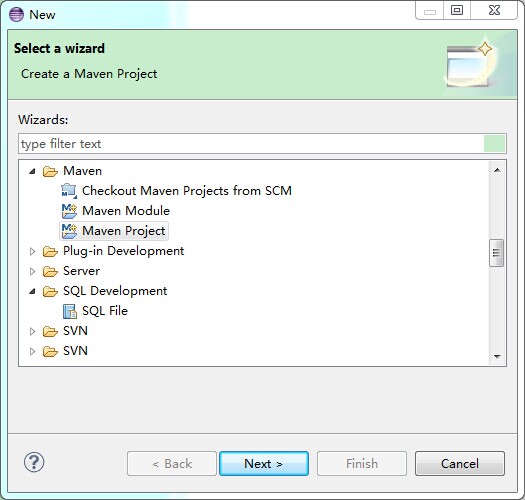
Next
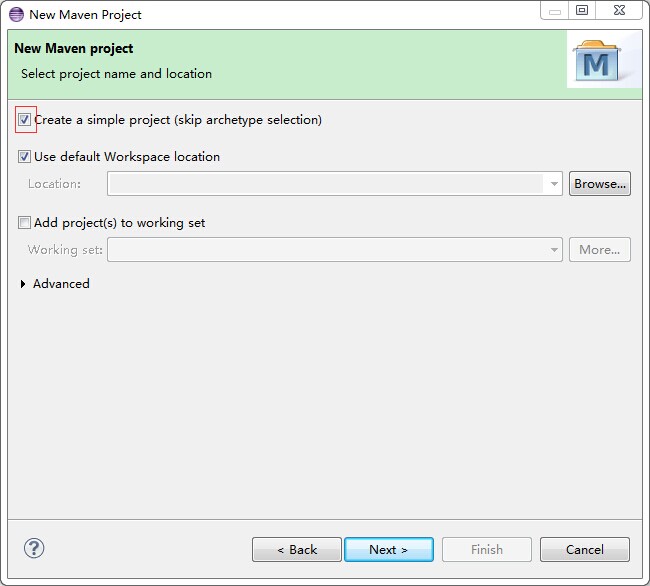
选中第一个复选框,然后点Next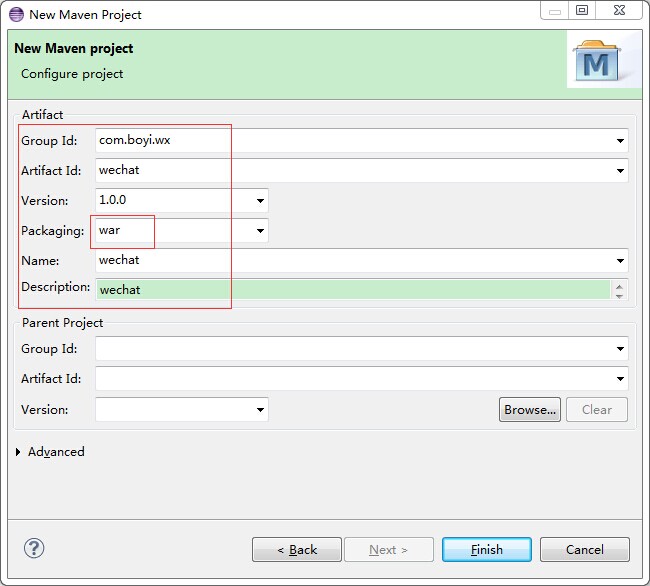
Package 选中war,点击Finish
看一下创建出来的项目:
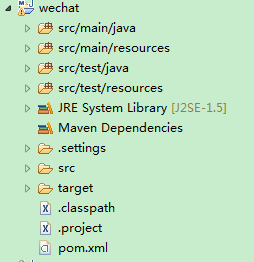
配置Maven项目
接下来我们要把项目的依赖关系加入pom.xml中, 主要依赖: Spring MVC, Jackson, Dom4j 和Commons-codec
<project xmlns="http://maven.apache.org/POM/4.0.0" xmlns:xsi="http://www.w3.org/2001/XMLSchema-instance"
	xsi:schemaLocation="http://maven.apache.org/POM/4.0.0 http://maven.apache.org/xsd/maven-4.0.0.xsd">
	<modelVersion>4.0.0</modelVersion>
	<groupId>com.boyi.wx</groupId>
	<artifactId>wechat</artifactId>
	<version>1.0.0</version>
	<packaging>war</packaging>
	<name>wechat</name>
	<description>wechat</description>

	<properties>
		<project.build.sourceEncoding>UTF-8</project.build.sourceEncoding>
		<spring.version>3.1.0.RELEASE</spring.version>
	</properties>
	<dependencies>
		<dependency>
			<groupId>org.springframework</groupId>
			<artifactId>spring-context</artifactId>
			<version>${spring.version}</version>
		</dependency>
		<dependency>
			<groupId>org.springframework</groupId>
			<artifactId>spring-webmvc</artifactId>
			<version>${spring.version}</version>
		</dependency>
		<dependency>
			<groupId>org.codehaus.jackson</groupId>
			<artifactId>jackson-core-asl</artifactId>
			<version>1.8.8</version>
		</dependency>
		<dependency>
			<groupId>org.codehaus.jackson</groupId>
			<artifactId>jackson-mapper-asl</artifactId>
			<version>1.8.8</version>
		</dependency>
		<dependency>
			<groupId>commons-io</groupId>
			<artifactId>commons-io</artifactId>
			<version>2.4</version>
		</dependency>
		<dependency>
			<groupId>commons-codec</groupId>
			<artifactId>commons-codec</artifactId>
			<version>1.9</version>
		</dependency>
		<dependency>
			<groupId>dom4j</groupId>
			<artifactId>dom4j</artifactId>
			<version>1.6</version>
		</dependency>
	</dependencies>
	<build>
		<finalName>wechat</finalName>
	</build>
</project>
修改项目的JRE System Libray,把他改成1.7的jdk
添加web和Spring配置
在webapp下面创建WEB-INF文件夹,并在WEB-INF中创建web.xml 和 dispatcher-servlet.xml
配置web.xml如下:
<?xml version="1.0" encoding="UTF-8"?>
<web-app xmlns:xsi="http://www.w3.org/2001/XMLSchema-instance"
	xmlns="http://java.sun.com/xml/ns/javaee" xmlns:web="http://java.sun.com/xml/ns/javaee/web-app_2_5.xsd"
	xsi:schemaLocation="http://java.sun.com/xml/ns/javaee http://java.sun.com/xml/ns/javaee/web-app_3_0.xsd"
	version="3.0">
	<display-name>wechat</display-name>
	<filter>
		<filter-name>CharacterEncoding</filter-name>
		<filter-class>org.springframework.web.filter.CharacterEncodingFilter</filter-class>
		<init-param>
			<param-name>encoding</param-name>
			<param-value>UTF-8</param-value>
		</init-param>
		<init-param>
			<param-name>forceEncoding</param-name>
			<param-value>true</param-value>
		</init-param>
	</filter>
	<filter-mapping>
		<filter-name>CharacterEncoding</filter-name>
		<url-pattern>/*</url-pattern>
	</filter-mapping>
	<context-param>
		<param-name>contextConfigLocation</param-name>
		<param-value>
        /WEB-INF/dispatcher-servlet.xml
    </param-value>
	</context-param>
	<listener>
		<listener-class>org.springframework.web.context.request.RequestContextListener</listener-class>
	</listener>
	<listener>
		<listener-class>org.springframework.web.context.ContextLoaderListener</listener-class>
	</listener>
	<servlet>
		<servlet-name>dispatcher</servlet-name>
		<servlet-class>org.springframework.web.servlet.DispatcherServlet</servlet-class>
		<load-on-startup>1</load-on-startup>
	</servlet>
	<servlet-mapping>
		<servlet-name>dispatcher</servlet-name>
		<url-pattern>/*</url-pattern>
	</servlet-mapping>

</web-app>
配置 dispatcher-servlet.xml
<?xml version="1.0" encoding="UTF-8"?>
<beans xmlns="http://www.springframework.org/schema/beans"
	xmlns:xsi="http://www.w3.org/2001/XMLSchema-instance" xmlns:aop="http://www.springframework.org/schema/aop"
	xmlns:c="http://www.springframework.org/schema/c" xmlns:cache="http://www.springframework.org/schema/cache"
	xmlns:context="http://www.springframework.org/schema/context"
	xmlns:sec="http://www.springframework.org/schema/security" xmlns:jee="http://www.springframework.org/schema/jee"
	xmlns:lang="http://www.springframework.org/schema/lang" xmlns:mvc="http://www.springframework.org/schema/mvc"
	xmlns:p="http://www.springframework.org/schema/p"
	xsi:schemaLocation="http://www.springframework.org/schema/beans http://www.springframework.org/schema/beans/spring-beans-3.1.xsd
		http://www.springframework.org/schema/aop http://www.springframework.org/schema/aop/spring-aop-3.1.xsd
		http://www.springframework.org/schema/cache http://www.springframework.org/schema/cache/spring-cache-3.1.xsd
		http://www.springframework.org/schema/context http://www.springframework.org/schema/context/spring-context-3.1.xsd
		http://www.springframework.org/schema/jee http://www.springframework.org/schema/jee/spring-jee-3.1.xsd
		http://www.springframework.org/schema/lang http://www.springframework.org/schema/lang/spring-lang-3.1.xsd
		http://www.springframework.org/schema/mvc http://www.springframework.org/schema/mvc/spring-mvc-3.1.xsd
		http://www.springframework.org/schema/security http://www.springframework.org/schema/security/spring-security-3.1.xsd">

	<mvc:annotation-driven>
		<mvc:message-converters>
			<bean class="org.springframework.http.converter.StringHttpMessageConverter">
				<property name="supportedMediaTypes">
					<list>
						<value>text/html;charset=UTF-8</value>
						<value>text/plain;charset=UTF-8</value>
					</list>
				</property>
			</bean>
			<bean id="jsonHttpMessageConverter"
				class="org.springframework.http.converter.json.MappingJacksonHttpMessageConverter" />
		</mvc:message-converters>
	</mvc:annotation-driven>

	<context:component-scan base-package="com.boyi"></context:component-scan>
	<bean class="org.springframework.web.client.RestTemplate"></bean>
</beans>
到这里的话SpringMVC的项目已经搭建好了,至于为什么要这么配置请去搜索SpringMVC的相关知识,这里不做详解。
本节到此结束,下节将讲述如何开启微信企业号回调模式。





 扫一扫
扫一扫


 被折叠的 条评论
为什么被折叠?
被折叠的 条评论
为什么被折叠?
 到【灌水乐园】发言





