


 本文介绍了使用Speex进行语音压缩的实践,包括服务端使用speex4j进行压缩,终端(Android)如何封装so库进行解压,以及构建speex的aar依赖并引入到Android应用中的详细步骤。着重强调了不同模式下的采样率、压缩质量和数据大小的关系,以及在处理过程中需要注意的细节。
speex简介
Speex说一种有损的语音压缩算法,可以极大的压缩语音文件大小。
官网地址
个人认为翻译文档最全的地址
简单说下个人理解:
- 我们需要知道speex的数据帧概念,还要知道音频的采样率、比特率等基本概念。
- speex默认的三种模式,nb,wb,uwb对应的采样率分别是8000,16000,32000;其对应的帧大小分别为:160,320,640.这点很重要。
- 我们需要知道不同采样率,不同压缩质量下,其对应的压缩前后数据大小,对于我们解压来说很重要。
网上目前大多数都是基于nb,也就是8000采样率的例子。本文是16000,也就是wb模式,压缩质量为8.其对应的帧、压缩前数据大小、压缩后数据大小为:320,640,70.我们这里采用的是定长压缩。没有用动态压缩,动态情况下,压缩后数据大小不可知。
服务端语音压缩
环境介绍
- speex框架:开源的speex4j
- springboot 2.4.4
pom依赖
<parent>
    <groupId>org.springframework.boot</groupId>
    <artifactId>spring-boot-starter-parent</artifactId>
    <version>2.4.4</version>
</parent>

<dependencies>
    <dependency>
        <groupId>org.projectlombok</groupId>
        <artifactId>lombok</artifactId>
    </dependency>
    <dependency>
        <groupId>org.springframework.boot</groupId>
        <artifactId>spring-boot-starter-web</artifactId>
    </dependency>
    <dependency>
        <groupId>com.orctom</groupId>
        <artifactId>speex4j</artifactId>
        <version>1.0.3</version>
    </dependency>
</dependencies>
压缩代码很简单如下:
@GetMapping("/pcm2spx")
public void pcm2spx(HttpServletResponse response){


    try(InputStream inputStream = new FileInputStream(ResourceUtils.getFile("test.wav"));
        ByteArrayOutputStream bos = new ByteArrayOutputStream()){


        int len = 0;
        byte[] buff = new byte[1024];
        // 读取文件
        while ((len = inputStream.read(buff)) > 0) {


            bos.write(buff, 0, len);
        }
        // 去掉wav文件头
        byte[] source = new byte[bos.toByteArray().length - 44];
        System.arraycopy(bos.toByteArray(), 44, source, 0, source.length);
        response.getOutputStream().write(SpeexUtils.pcm2spx(source));
        response.getOutputStream().flush();
        response.getOutputStream().close();
    }catch (Exception e) {


        e.printStackTrace();
    }
}
说明:
- 如果流式处理压缩,请使用SpeexEncoder和SpeexDecoder类,不要直接使用speexUtils类。
- 如果流式压缩,请在每次压缩/解压时传入帧数的整数倍,对于我们这里来说就是压缩时,每次传入640的整数倍数据,解压时传入71的整数倍。
- 来说下,为什么是71.上文说了,speex,wb模式,质量8,定长压缩的话,其压缩后数据大小是70.但是speex4j,自己在压缩数据头增加了一个字节用于记录当前压缩后数据大小。因此,使用speex4j会多出一个头字节。我们自己解压时也需要注意,将该字节剔除。
终端解压
终端so库封装
可以参考上文里面提到的文档最全的地址。也可以参考本文,其实,本文就是参照上面内容来做的。
-
登录speex官网,下载源码,本文下载的是1.20版本
-
新建android项目
-
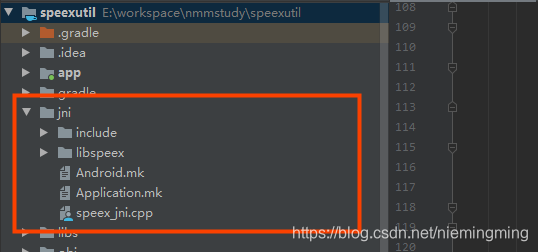
在项目根目录下,新建jni目录,并将speex的include和libspeex文件夹拷贝到该目录下:
-
进入jni/include/speex/目录,新建speex_config.type.h头文件。内容如下:
#ifndef __SPEEX_TYPES_H__
#define __SPEEX_TYPES_H__
typedef short spx_int16_t;
typedef unsigned short spx_uint16_t;
typedef int spx_int32_t;
typedef unsigned int spx_uint32_t;
#endif- 进入jni目录,新建Android.mk内容如下:
LOCAL_PATH := $(call my-dir)
include $(CLEAR_VARS)

LOCAL_LDLIBS += -llog

LOCAL_MODULE := libspeex

LOCAL_CFLAGS = -DFIXED_POINT -DUSE_KISS_FFT -DEXPORT="" -UHAVE_CONFIG_H

LOCAL_C_INCLUDES := $(LOCAL_PATH)/include

LOCAL_SRC_FILES := speex_jni.cpp \
    ./libspeex/bits.c \
    ./libspeex/cb_search.c \
    ./libspeex/exc_10_16_table.c \
    ./libspeex/exc_10_32_table.c \
    ./libspeex/exc_20_32_table.c \
    ./libspeex/exc_5_256_table.c \
    ./libspeex/exc_5_64_table.c \
    ./libspeex/exc_8_128_table.c \
   ./libspeex/filters.c \
   ./libspeex/gain_table.c \
   ./libspeex/gain_table_lbr.c \
   ./libspeex/hexc_10_32_table.c \
   ./libspeex/hexc_table.c \
   ./libspeex/high_lsp_tables.c \
   ./libspeex/kiss_fft.c \
   ./libspeex/kiss_fftr.c \
   ./libspeex/lpc.c \
   ./libspeex/lsp.c \
   ./libspeex/lsp_tables_nb.c \
   ./libspeex/ltp.c \
   ./libspeex/modes.c \
   ./libspeex/modes_wb.c \
   ./libspeex/nb_celp.c \
   ./libspeex/quant_lsp.c \
   ./libspeex/sb_celp.c \
   ./libspeex/smallft.c \
   ./libspeex/speex.c \
   ./libspeex/speex_callbacks.c \
   ./libspeex/speex_header.c \
   ./libspeex/stereo.c \
   ./libspeex/vbr.c \
   ./libspeex/vorbis_psy.c\
   ./libspeex/vq.c \
   ./libspeex/window.c

include $(BUILD_SHARED_LIBRARY)
请注意,这里引入的c文件,一定适合include目录下对应的。请根据自己下载speex源码做增减。
- 新建Application.mk
这里我们编译全环境
APP_ABI := all- 创建我们自己的逻辑文件,speex_jni.cpp
#include <jni.h>

#include <string.h>
#include <unistd.h>
//日志输出
#include <android/log.h>
#include <speex/speex.h>
//标志位,标识是否开启编码
static int codec_open = 0;
//解码的帧长度
static int dec_frame_size;
//编码的帧长度
static int enc_frame_size;

static SpeexBits ebits, dbits;
void *enc_state;
void *dec_state;
 最低0.47元/天 解锁文章






 扫一扫
扫一扫


 2906
2906




 到【灌水乐园】发言



