


 本文介绍如何在JDeveloper环境中使用JRockit JDK运行嵌入式WebLogic服务器。主要步骤包括编辑setDomainEnv.cmd文件设置JAVA_VENDOR为Oracle,并指定正确的JRockit安装路径作为BEA_JAVA_HOME。
Go to
JDeveloper's System Directory, DefaultDomain, bin
Edit setDomainEnv.cmd with:
Right after the initial comments add
set JAVA_VENDOR=Oracle
Replace the line:
set BEA_JAVA_HOME
with
set BEA_JAVA_HOME=C:\JRockit\Java\jrockit-jdk1.6.0_20-R28.1.0-4.0.1
where BEA_JAVA_HOME is where the JRockit is installed.
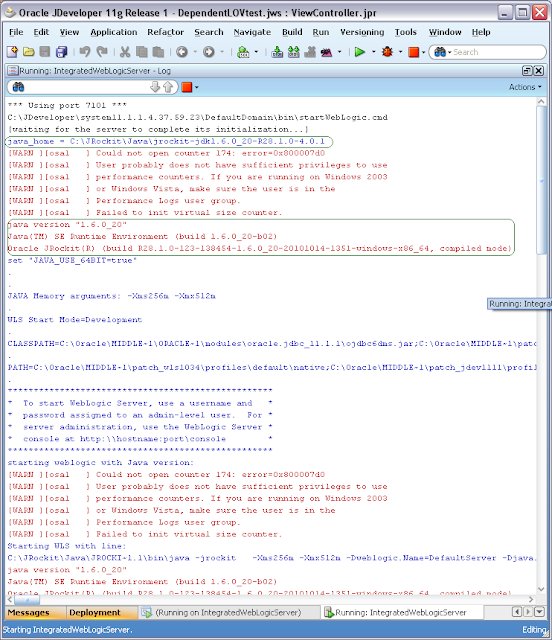
Optionally, print java version to make sure you set it right.
echo java_home = %java_home%
%java_home%\bin\java.exe -version

The result is
Edit setDomainEnv.cmd with:
Right after the initial comments add
set JAVA_VENDOR=Oracle
Replace the line:
set BEA_JAVA_HOME
with
set BEA_JAVA_HOME=C:\JRockit\Java\jrockit-jdk1.6.0_20-R28.1.0-4.0.1
where BEA_JAVA_HOME is where the JRockit is installed.
Optionally, print java version to make sure you set it right.
echo java_home = %java_home%
%java_home%\bin\java.exe -version





 扫一扫
扫一扫


 3331
3331

 被折叠的 条评论
为什么被折叠?
被折叠的 条评论
为什么被折叠?
 到【灌水乐园】发言





