



 本文指导如何利用Jaeger和AspectJ在Springboot项目中定位复杂的API性能问题,包括安装Jaeger、配置Spring与AspectJ、编写Aspect并设置AOP切点,最终通过Opentracing追踪调用链以快速定位瓶颈。
Jaeger, Spring 和 AspectJ 进行性能问题定位
时间有限, 各方面比较粗糙, 多担待,能看懂,能解决问题就行。
问题
性能测试过程中, 一般会发现某些API 性能比较差, 响应时间显著高于其他 其他API, 所以需要确定 这些API 的响应时间高的原因是什么,
一般这样的API 里面有超级复杂的业务逻辑, 嵌套调用其他api, server , 等等, 涉及到的方法调用可能有成百上千。
如何快速定位性能问题根源呢?
如何定位问题
性能问题一般是压测发现的, 首先单独调用一个那个api, 看看响应时间是否正常, 如果单独调用正常, 压测时响应时间高, 一般是server 相关的问题,或者锁相关的问题。
如果单独调用响应时间就很高, 那就需要定位这个api 时间主要花费在哪里, 如何定位呢
- 最直接的方法是, 猜测某些大的方法, 加log 输出所用时间, 然后逐步追踪, 最后确定是哪里的问题。 这需要不断地改代码加log, 重新测试
- 如果方法比较多 而且没有头绪,,或快速准确定位问题, 可以用 Jaeger + AspectJ(+Spring) 来定位问题
用AspectJ 拦截系统涉及到的类、方法, 用AspectJ 表达式定义多个cutpoint , 然后用aspect 拦截, 生成 opentracing 的span, 把这些span 发到jaeger 中, 用jaeger 提高的 UI, 可以快速清晰地定位性能问题根源。
Jaeger 安装
Jaeger 官网 找到 docker-compose , 直接启动
http://localhost:16686 查看jaeger UI
程序连接 jaeger agent udp 端口6831
docker run -d --name jaeger -e COLLECTOR_ZIPKIN_HOST_PORT=:9411 -p 5775:5775/udp -p 6831:6831/udp -p 6832:6832/udp -p 5778:5778 -p 16686:16686 -p 14268:14268 -p 14250:14250 jaegertracing/all-in-one:1.27
D:>docker run -d --name jaeger -e COLLECTOR_ZIPKIN_HOST_PORT=:9411 -p 5775:5775/udp -p 6831:6831/udp -p 6832:6832/udp -p 5778:5778 -p 16686:16686 -p 14268:14268 -p 14250:14250 jaegertracing/all-in-one:1.27
Unable to find image ‘jaegertracing/all-in-one:1.27’ locally
1.27: Pulling from jaegertracing/all-in-one
a0d0a0d46f8b: Pull complete
b45576136ee2: Pull complete
d22e8500bf73: Pull complete
1a972b89c2b0: Pull complete
Digest: sha256:8d0bff43db3ce5c528cb6f957520511d263d7cceee012696e4afdc9087919bb9
Status: Downloaded newer image for jaegertracing/all-in-one:1.27
d0a675654e6efe92cf035b4e210c531ee7e439b978ceda6e427914930b39ac8f
AspectJ +Springboot
需要用到 spring-instrument, spring-aspects, opentracing-spring-jaeger-starter ,
opentracing-spring-jaeger-starter 里有jaeger 自动配置, 会自动配置好全局的tracer, 然后其他代码里直接注入就可以使用了,
spring aop 只能拦截beans, 所以我们需要用aspectj 把 所有代码都能拦截到, 所以需要写个aspectj 的aspect 进行拦截,
里面用Aspectj 定义多个cutpoint, 用spring 的@configurable 功能(因为aspect 不是bean) 把tracer 注入到aspect,
然后在用around 拦截个个方法调用, 在around 中生成每个方法的span, 并于父span 管理,同时可以把方法发生的异常也记录到span log 中,
配置要点:
- spring boot Application 上加上
@EnableLoadTimeWeaving
@EnableSpringConfigured - Jaeger 连接参数
application.properties
spring.application.name=demo-app
opentracing.jaeger.enableB3Propagation=true
#the jaeger agent host
opentracing.jaeger.udpSender.host=localhost
##the jaeger agent port
opentracing.jaeger.udpSender.port=6831
opentracing.jaeger.constSampler.decision=true
- 定义aspect
package com.nick.demo.aspect;

import io.opentracing.Scope;
import io.opentracing.Span;
import io.opentracing.Tracer;
import io.opentracing.tag.Tags;
import org.aspectj.lang.JoinPoint;
import org.aspectj.lang.ProceedingJoinPoint;
import org.aspectj.lang.annotation.Around;
import org.aspectj.lang.annotation.Aspect;
import org.aspectj.lang.annotation.Pointcut;
import org.slf4j.Logger;
import org.slf4j.LoggerFactory;
import org.springframework.beans.factory.annotation.Autowired;
import org.springframework.beans.factory.annotation.Configurable;
import org.springframework.beans.factory.annotation.Value;

import java.util.Arrays;
import java.util.HashMap;
import java.util.Map;

@Aspect
@Configurable
public class MyAspect {
    private static final Logger log= LoggerFactory.getLogger(MyAspect.class);

    @Autowired
    Tracer tracer;
    @Value("${spring.application.name}")
    String appName;

    @Pointcut("within(com.nick.demo.model..*) && execution(public * *(..))")
    public void point1(){

    }
    @Pointcut("within(com.nick.demo.service..*) && execution(public * *(..))")
    public void point2(){

    }
    @Pointcut("execution(public * com.nick.demo.service2.IRoleService+.*(..))")
    public void point3(){

    }
    @Pointcut("execution(public * com.nick.demo.api..*.*(..))")
    public void point4(){

    }
    @Around("point1() || point2() ||point3() ||point4()")
    public Object process(ProceedingJoinPoint point) throws Throwable {
        Span span=null;
        Scope scope=null;

        try{
            if(tracer!=null){
                Object object=point.getTarget();
                JoinPoint.StaticPart staticPart=point.getStaticPart();
                String clazz=null;
                String method=null;
                if(object!=null){
                    clazz=object.getClass().getName();
                    method=point.getSignature().getName();
                }else if(staticPart!=null){
                    clazz=staticPart.getSourceLocation().getFileName();
                    method=staticPart.getSignature().getName();
                }
                //if can not dermine class/method, skip
                if(clazz==null){
                    return point.proceed();
                }

                Span parent=tracer.activeSpan();
                Tracer.SpanBuilder spanBuilder=tracer.buildSpan(clazz+"."+method)
                        .withTag(Tags.COMPONENT.getKey(),appName)
                        .withTag("class",clazz)
                        .withTag("method",method);
                try{
                    spanBuilder.withTag("args", Arrays.toString(point.getArgs()));
                }catch (Throwable t){
                    //log.warn
                    log.warn("",t);

                }
                if(parent!=null){
                    spanBuilder.asChildOf(parent);
                }
                span=spanBuilder.start();
            }
            if(span!=null&&tracer!=null){
                scope=tracer.scopeManager().activate(span);
            }
            return point.proceed();
        }catch (Throwable t){
            if(span!=null){
                Map extInf=new HashMap();
                extInf.put("event",Tags.ERROR.getKey());
                extInf.put("error.exception",t);
                span.log(extInf);
                Tags.ERROR.set(span,true);
            }
            throw  t;
        }finally {
            if(scope!=null){
                scope.close();
            }
            if(span!=null){
                span.finish();
            }
        }
    }
}
- 添加 META-IN/aop.xml,
<aspectj>

    <aspects>
        <!-- declare two existing aspects to the weaver -->
        <aspect name="com.nick.demo.aspect.MyAspect"/>
    </aspects>

    <weaver options="-verbose">
        <!-- Weave types that are within the com.nick.demo.*
             packages.
           NOTE: com.nick.demo.aspect.MyAspect  需要包含在被weave 的包里,
           否则会报 no such method aspectof 异常
              -->
        <include within="com.nick.demo.api.*"/>
        <include within="com.nick.demo.model.*"/>
        <include within="com.nick.demo.service.*"/>
        <include within="com.nick.demo.service2.*"/>
        <include within="com.nick.demo.aspect.*"/>

    </weaver>

</aspectj>
参考下面链接:
https://www.eclipse.org/aspectj/doc/next/devguide/ltw-configuration.html
3. jvm 启动参数指定 ,
<?xml version="1.0" encoding="UTF-8"?>
<project xmlns="http://maven.apache.org/POM/4.0.0" xmlns:xsi="http://www.w3.org/2001/XMLSchema-instance"
	xsi:schemaLocation="http://maven.apache.org/POM/4.0.0 https://maven.apache.org/xsd/maven-4.0.0.xsd">
	<modelVersion>4.0.0</modelVersion>
	<parent>
		<groupId>org.springframework.boot</groupId>
		<artifactId>spring-boot-starter-parent</artifactId>
		<version>2.5.4</version>
		<relativePath/> <!-- lookup parent from repository -->
	</parent>
	<groupId>com.nick</groupId>
	<artifactId>demo</artifactId>
	<version>0.0.1-SNAPSHOT</version>
	<name>demo</name>
	<description>Demo project for Spring Boot</description>
	<properties>
		<java.version>8</java.version>
		<spring-cloud.version>2020.0.3</spring-cloud.version>
	</properties>
	<dependencies>

<!--		<dependency>-->
<!--			<groupId>org.springframework.cloud</groupId>-->
<!--			<artifactId>spring-cloud-starter-function-web</artifactId>-->
<!--			<version>3.1.3</version>-->
<!--		</dependency>-->


		<dependency>
			<groupId>org.springframework.boot</groupId>
			<artifactId>spring-boot-starter-web</artifactId>
		</dependency>
		<dependency>
			<groupId>org.springframework.boot</groupId>
			<artifactId>spring-boot-starter-test</artifactId>
			<scope>test</scope>
		</dependency>


		<dependency>
			<groupId>org.springframework</groupId>
			<artifactId>spring-aspects</artifactId>
		</dependency>
		<dependency>
			<groupId>org.springframework</groupId>
			<artifactId>spring-instrument</artifactId>
		</dependency>
		<dependency>
			<groupId>io.opentracing.contrib</groupId>
			<artifactId>opentracing-spring-jaeger-starter</artifactId>
			<version>3.3.1</version>
		</dependency>
	</dependencies>
	<dependencyManagement>
		<dependencies>
			<dependency>
				<groupId>org.springframework.cloud</groupId>
				<artifactId>spring-cloud-dependencies</artifactId>
				<version>${spring-cloud.version}</version>
				<type>pom</type>
				<scope>import</scope>
			</dependency>
		</dependencies>
	</dependencyManagement>

	<build>
		<plugins>
			<plugin>
				<groupId>org.springframework.boot</groupId>
				<artifactId>spring-boot-maven-plugin</artifactId>
				<version>2.5.4</version>
				<configuration>
					<jvmArguments> -javaagent:${project.build.directory}/lib/aspectjweaver.jar   -javaagent:${project.build.directory}/lib/spring-instrument.jar</jvmArguments>
				</configuration>
			</plugin>
			<plugin>
				<groupId>org.apache.maven.plugins</groupId>
				<artifactId>maven-dependency-plugin</artifactId>
				<version>3.2.0</version>
				<executions>
					<execution>
						<id>copy</id>
						<phase>package</phase>
						<goals>
							<goal>copy</goal>
						</goals>
					</execution>
				</executions>
				<configuration>
					<artifactItems>
						<artifactItem>
							<groupId>org.springframework</groupId>
							<artifactId>spring-instrument</artifactId>
							<version>${spring-framework.version}</version>
							<type>jar</type>
							<overWrite>false</overWrite>
							<outputDirectory>${project.build.directory}/lib</outputDirectory>
							<destFileName>spring-instrument.jar</destFileName>
						</artifactItem>
						<artifactItem>
							<groupId>org.aspectj</groupId>
							<artifactId>aspectjweaver</artifactId>
							<version>${aspectj.version}</version>
							<type>jar</type>
							<overWrite>false</overWrite>
							<outputDirectory>${project.build.directory}/lib</outputDirectory>
							<destFileName>aspectjweaver.jar</destFileName>
						</artifactItem>
					</artifactItems>
					<outputDirectory>${project.build.directory}/wars</outputDirectory>
					<overWriteReleases>false</overWriteReleases>
					<overWriteSnapshots>true</overWriteSnapshots>
				</configuration>
			</plugin>
		</plugins>
	</build>

</project>
运行
mvn spring-boot:run
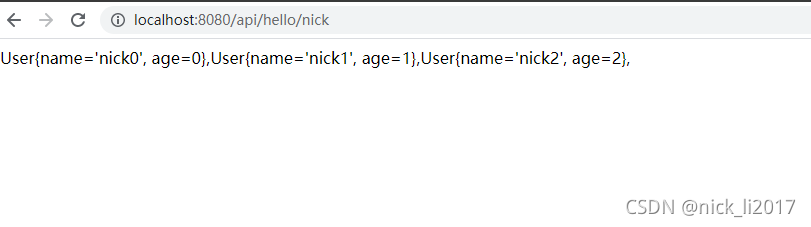
请求api : http://localhost:8080/aip/hello/nick , 多请求几次
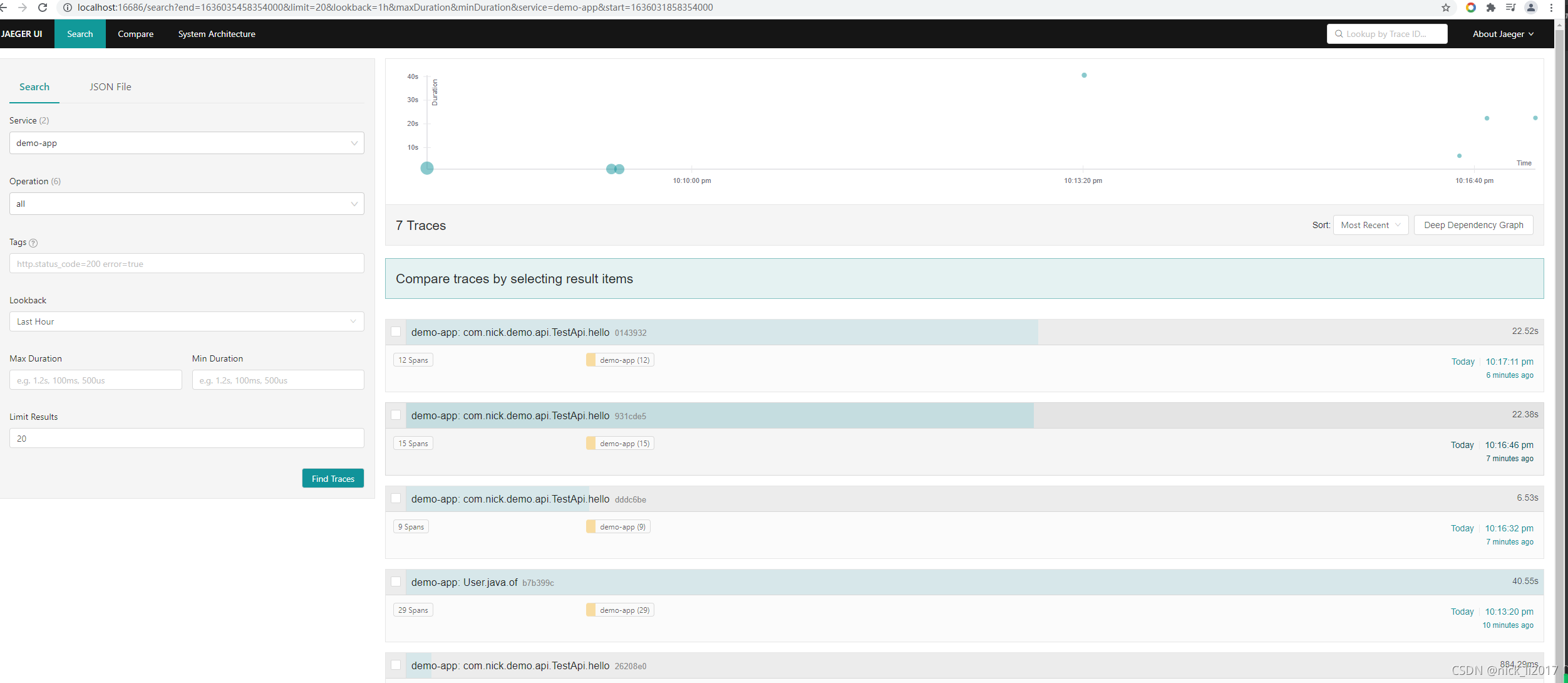
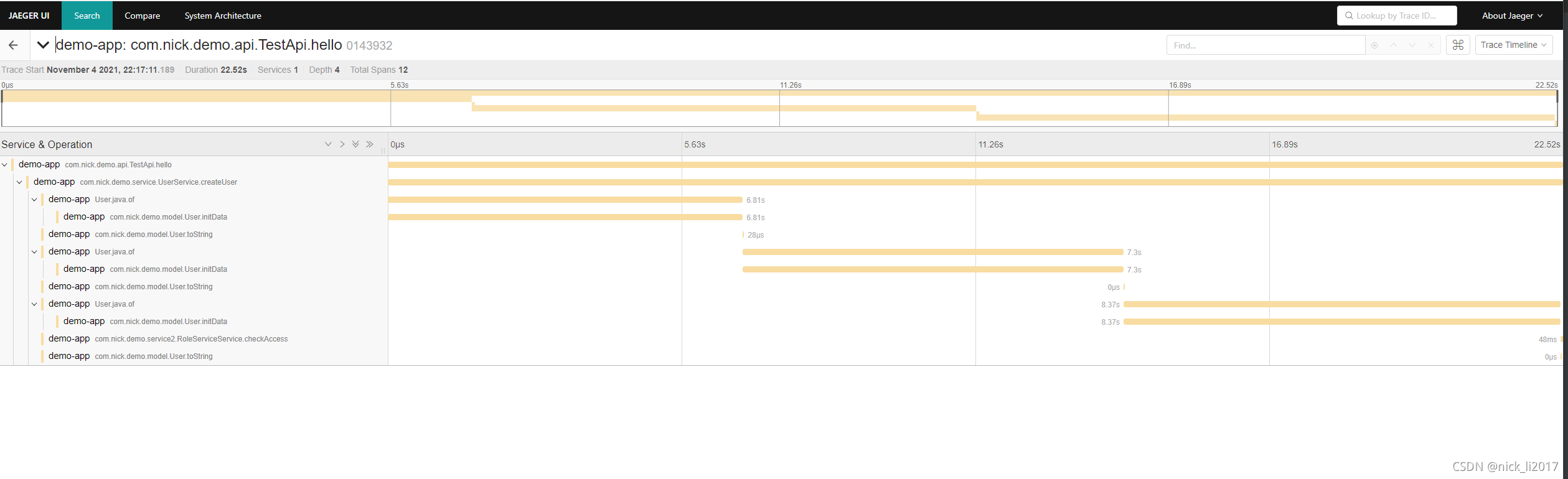
查看 Jaeger UI, 可以看到, api 的调用链, 及各个方法用的时间, 轻松定位 性能问题。
代码链接: https://github.com/springnick/pfmIssue.git





 扫一扫
扫一扫


 2550
2550

 被折叠的 条评论
为什么被折叠?
被折叠的 条评论
为什么被折叠?
 到【灌水乐园】发言





