


 本文介绍了一个使用Win32库函数提取文件图标并将其显示在ListView控件中的示例。通过定义多种视图,如大图标、小图标、列表和平铺等,展示了如何在不同布局下浏览文件。代码示例包括主程序、文件信息列表处理及图标获取方法。
本文转载连接: https://blog.youkuaiyun.com/bruce135lee/article/details/79790104
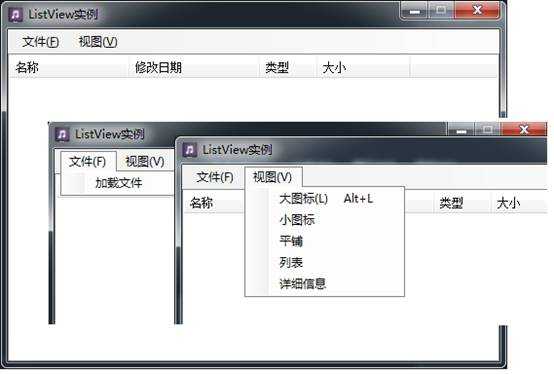
说明:本例将目录中的文件显示在窗体的ListView控件中,并定义了多种视图浏览。通过调用Win32库函数实现图标数据的提取。
主程序:
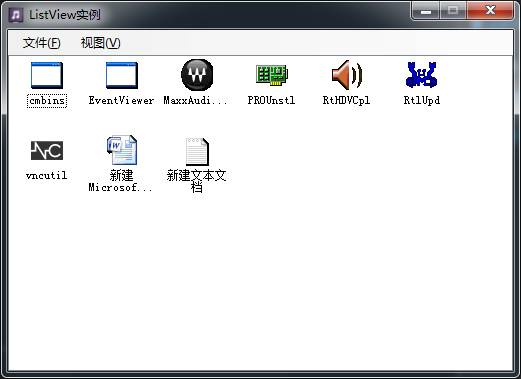
大图标:
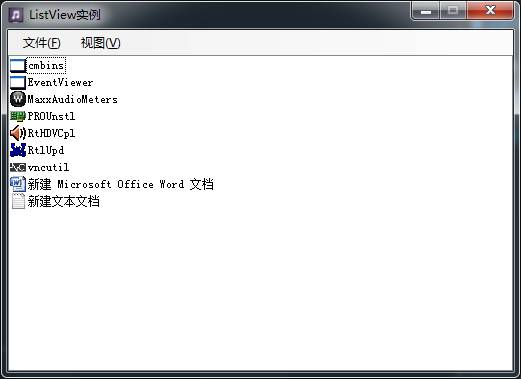
列表:
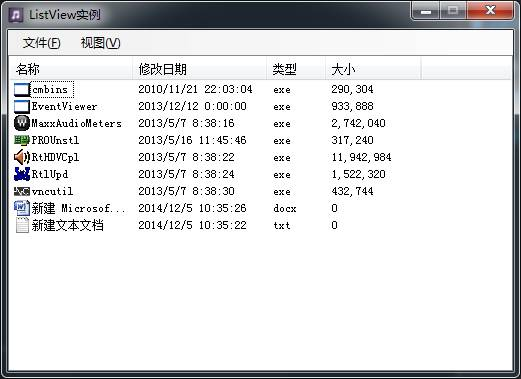
详细信息:
Form1.cs:
-
public partial class Form1 : Form -
{ -
FileInfoList fileList; -
public Form1() -
{ -
InitializeComponent(); -
} -
private void 加载文件ToolStripMenuItem_Click(object sender, EventArgs e) -
{ -
FolderBrowserDialog dlg = new FolderBrowserDialog(); -
if (dlg.ShowDialog() == DialogResult.OK) -
{ -
string[] filespath = Directory.GetFiles(dlg.SelectedPath); -
fileList = new FileInfoList(filespath); -
InitListView(); -
} -
} -
private void InitListView() -
{ -
listView1.Items.Clear(); -
this.listView1.BeginUpdate(); -
foreach (FileInfoWithIcon file in fileList.list) -
{ -
ListViewItem item = new ListViewItem(); -
item.Text = file.fileInfo.Name.Split('.')[0]; -
item.ImageIndex = file.iconIndex; -
item.SubItems.Add(file.fileInfo.LastWriteTime.ToString()); -
item.SubItems.Add(file.fileInfo.Extension.Replace(".","")); -
item.SubItems.Add(string.Format(("{0:N0}"), file.fileInfo.Length)); -
listView1.Items.Add(item); -
} -
listView1.LargeImageList = fileList.imageListLargeIcon; -
listView1.SmallImageList = fileList.imageListSmallIcon; -
listView1.Show(); -
this.listView1.EndUpdate(); -
} -
private void 大图标ToolStripMenuItem_Click(object sender, EventArgs e) -
{ -
listView1.View = View.LargeIcon; -
} -
private void 小图标ToolStripMenuItem_Click(object sender, EventArgs e) -
{ -
listView1.View = View.SmallIcon; -
} -
private void 平铺ToolStripMenuItem_Click(object sender, EventArgs e) -
{ -
listView1.View = View.Tile; -
} -
private void 列表ToolStripMenuItem_Click(object sender, EventArgs e) -
{ -
listView1.View = View.List; -
} -
private void 详细信息ToolStripMenuItem_Click(object sender, EventArgs e) -
{ -
listView1.View = View.Details; -
} -
}
FileInfoList.cs:
说明:主要用于后台数据的存储
-
class FileInfoList -
{ -
public List<FileInfoWithIcon> list; -
public ImageList imageListLargeIcon; -
public ImageList imageListSmallIcon; -
/// <summary> -
/// 根据文件路径获取生成文件信息,并提取文件的图标 -
/// </summary> -
/// <param name="filespath"></param> -
public FileInfoList(string[] filespath) -
{ -
list = new List<FileInfoWithIcon>(); -
imageListLargeIcon = new ImageList(); -
imageListLargeIcon.ImageSize = new Size(32, 32); -
imageListSmallIcon = new ImageList(); -
imageListSmallIcon.ImageSize = new Size(16, 16); -
foreach (string path in filespath) -
{ -
FileInfoWithIcon file = new FileInfoWithIcon(path); -
imageListLargeIcon.Images.Add(file.largeIcon); -
imageListSmallIcon.Images.Add(file.smallIcon); -
file.iconIndex = imageListLargeIcon.Images.Count - 1; -
list.Add(file); -
} -
} -
} -
class FileInfoWithIcon -
{ -
public FileInfo fileInfo; -
public Icon largeIcon; -
public Icon smallIcon; -
public int iconIndex; -
public FileInfoWithIcon(string path) -
{ -
fileInfo = new FileInfo(path); -
largeIcon = GetSystemIcon.GetIconByFileName(path, true); -
if (largeIcon == null) -
largeIcon = GetSystemIcon.GetIconByFileType(Path.GetExtension(path), true); -
smallIcon = GetSystemIcon.GetIconByFileName(path, false); -
if (smallIcon == null) -
smallIcon = GetSystemIcon.GetIconByFileType(Path.GetExtension(path), false); -
} -
}
GetSystemIcon:
说明:定义两种图标获取方式,从文件提取和从文件关联的系统资源中提取。
-
public static class GetSystemIcon -
{ -
/// <summary> -
/// 依据文件名读取图标,若指定文件不存在,则返回空值。 -
/// </summary> -
/// <param name="fileName">文件路径</param> -
/// <param name="isLarge">是否返回大图标</param> -
/// <returns></returns> -
public static Icon GetIconByFileName(string fileName, bool isLarge = true) -
{ -
int[] phiconLarge = new int[1]; -
int[] phiconSmall = new int[1]; -
//文件名 图标索引 -
Win32.ExtractIconEx(fileName, 0, phiconLarge, phiconSmall, 1); -
IntPtr IconHnd = new IntPtr(isLarge ? phiconLarge[0] : phiconSmall[0]); -
if (IconHnd.ToString() == "0") -
return null; -
return Icon.FromHandle(IconHnd); -
} -
/// <summary> -
/// 根据文件扩展名(如:.*),返回与之关联的图标。 -
/// 若不以"."开头则返回文件夹的图标。 -
/// </summary> -
/// <param name="fileType">文件扩展名</param> -
/// <param name="isLarge">是否返回大图标</param> -
/// <returns></returns> -
public static Icon GetIconByFileType(string fileType, bool isLarge) -
{ -
if (fileType == null || fileType.Equals(string.Empty)) return null; -
RegistryKey regVersion = null; -
string regFileType = null; -
string regIconString = null; -
string systemDirectory = Environment.SystemDirectory + "\\"; -
if (fileType[0] == '.') -
{ -
//读系统注册表中文件类型信息 -
regVersion = Registry.ClassesRoot.OpenSubKey(fileType, false); -
if (regVersion != null) -
{ -
regFileType = regVersion.GetValue("") as string; -
regVersion.Close(); -
regVersion = Registry.ClassesRoot.OpenSubKey(regFileType + @"\DefaultIcon", false); -
if (regVersion != null) -
{ -
regIconString = regVersion.GetValue("") as string; -
regVersion.Close(); -
} -
} -
if (regIconString == null) -
{ -
//没有读取到文件类型注册信息,指定为未知文件类型的图标 -
regIconString = systemDirectory + "shell32.dll,0"; -
} -
} -
else -
{ -
//直接指定为文件夹图标 -
regIconString = systemDirectory + "shell32.dll,3"; -
} -
string[] fileIcon = regIconString.Split(new char[] { ',' }); -
if (fileIcon.Length != 2) -
{ -
//系统注册表中注册的标图不能直接提取,则返回可执行文件的通用图标 -
fileIcon = new string[] { systemDirectory + "shell32.dll", "2" }; -
} -
Icon resultIcon = null; -
try -
{ -
//调用API方法读取图标 -
int[] phiconLarge = new int[1]; -
int[] phiconSmall = new int[1]; -
uint count = Win32.ExtractIconEx(fileIcon[0], Int32.Parse(fileIcon[1]), phiconLarge, phiconSmall, 1); -
IntPtr IconHnd = new IntPtr(isLarge ? phiconLarge[0] : phiconSmall[0]); -
resultIcon = Icon.FromHandle(IconHnd); -
} -
catch { } -
return resultIcon; -
} -
} -
/// <summary> -
/// 定义调用的API方法 -
/// </summary> -
class Win32 -
{ -
[DllImport("shell32.dll")] -
public static extern uint ExtractIconEx(string lpszFile, int nIconIndex, int[] phiconLarge, int[] phiconSmall, uint nIcons); -
}





 扫一扫
扫一扫


 584
584

 被折叠的 条评论
为什么被折叠?
被折叠的 条评论
为什么被折叠?
 到【灌水乐园】发言





