



 本文详细介绍了Google身份验证器的服务器端实现过程,包括密钥生成、一次性密码的验证机制以及Java代码实现。通过HMAC算法确保安全,同时提供了测试代码来验证代码的有效性。此外,还展示了在iOS设备上如何使用Google Authenticator应用进行身份验证的步骤。
google身份认证器服务端key的生成和它生成的随机密码的验证:
客户端和服务器事先协商好一个密钥K,用于一次性密码的生成过程,此密钥不被任何第三方所知道。此外,客户端和服务器各有一个计数器C,并且事先将计数值同步。进行验证时,客户端对密钥和计数器的组合(K,C)使用HMAC(Hash-based Message Authentication Code)算法计算一次性密码,公式如下:
上面采用了HMAC-SHA-1,当然也可以使用HMAC-MD5等。HMAC算法得出的值位数比较多,不方便用户输入,因此需要截断(Truncate)成为一组不太长十进制数(例如6位)。计算完成之后客户端计数器C计数值加1。用户将这一组十进制数输入并且提交之后,服务器端同样的计算,并且与用户提交的数值比较,如果相同,则验证通过,服务器端将计数值C增加1。如果不相同,则验证失败。
import java.security.InvalidKeyException;
import java.security.NoSuchAlgorithmException;
import java.security.SecureRandom;
import javax.crypto.Mac;
import javax.crypto.spec.SecretKeySpec;

import org.apache.commons.codec.binary.Base32;
import org.apache.commons.codec.binary.Base64;

/**
 * google身份验证器,java服务端实现
 */
public class GoogleAuthenticator {
    // 生成的key长度( Generate secret key length)
    public static final int SECRET_SIZE = 10;

    public static final String SEED = "g8GjEvTbW5oVSV7avL47357438reyhreyuryetredLDVKs2m0QN7vxRs2im5MDaNCWGmcD2rvcZx";
    // Java实现随机数算法
    public static final String RANDOM_NUMBER_ALGORITHM = "SHA1PRNG";
    // 最多可偏移的时间
    int window_size = 3; // default 3 - max 17

    /**
     * set the windows size. This is an integer value representing the number of
     * 30 second windows we allow The bigger the window, the more tolerant of
     * clock skew we are.
     *
     * @param s window size - must be >=1 and <=17. Other values are ignored
     */
    public void setWindowSize(int s) {
        if (s >= 1 && s <= 17)
            window_size = s;
    }

    /**
     * Generate a random secret key. This must be saved by the server and
     * associated with the users account to verify the code displayed by Google
     * Authenticator. The user must register this secret on their device.
     * 生成一个随机秘钥
     *
     * @return secret key
     */
    public static String generateSecretKey() {
        SecureRandom sr = null;
        try {
            sr = SecureRandom.getInstance(RANDOM_NUMBER_ALGORITHM);
            sr.setSeed(Base64.decodeBase64(SEED));
            byte[] buffer = sr.generateSeed(SECRET_SIZE);
            Base32 codec = new Base32();
            byte[] bEncodedKey = codec.encode(buffer);
            String encodedKey = new String(bEncodedKey);
            return encodedKey;
        } catch (NoSuchAlgorithmException e) {
            // should never occur... configuration error
        }
        return null;
    }

    /**
     * Return a URL that generates and displays a QR barcode. The user scans
     * this bar code with the Google Authenticator application on their
     * smartphone to register the auth code. They can also manually enter the
     * secret if desired
     *
     * @param user   user id (e.g. fflinstone)
     * @param host   host or system that the code is for (e.g. myapp.com)
     * @param secret the secret that was previously generated for this user
     * @return the URL for the QR code to scan
     */
    public static String getQRBarcodeURL(String user, String host, String secret) {
        String format = "http://www.google.com/chart?chs=200x200&chld=M%%7C0&cht=qr&chl=otpauth://totp/%s@%s?secret=%s";
        return String.format(format, user, host, secret);
    }

    /**
     * 生成一个google身份验证器,识别的字符串,只需要把该方法返回值生成二维码扫描就可以了。
     *
     * @param user   账号
     * @param secret 密钥
     * @return
     */
    public static String getQRBarcode(String user, String secret) {
        String format = "otpauth://totp/%s?secret=%s";
        return String.format(format, user, secret);
    }

    /**
     * Check the code entered by the user to see if it is valid 验证code是否合法
     *
     * @param secret   The users secret.
     * @param code     The code displayed on the users device
     * @param timeMsec The time in msec (System.currentTimeMillis() for example)
     * @return
     */
    public boolean check_code(String secret, long code, long timeMsec) {
        Base32 codec = new Base32();
        byte[] decodedKey = codec.decode(secret);
        // convert unix msec time into a 30 second "window"
        // this is per the TOTP spec (see the RFC for details)
        long t = (timeMsec / 1000L) / 30L;
        // Window is used to check codes generated in the near past.
        // You can use this value to tune how far you're willing to go.
        for (int i = -window_size; i <= window_size; ++i) {
            long hash;
            try {
                hash = verify_code(decodedKey, t + i);
                System.out.println(hash);
            } catch (Exception e) {
                // Yes, this is bad form - but
                // the exceptions thrown would be rare and a static
                // configuration problem
                e.printStackTrace();
                throw new RuntimeException(e.getMessage());
                // return false;
            }
            System.out.println(code);
            if (hash == code) {
                return true;
            }
        }
        // The validation code is invalid.
        return false;
    }

    private static int verify_code(byte[] key, long t) throws NoSuchAlgorithmException, InvalidKeyException {
        byte[] data = new byte[8];
        long value = t;
        for (int i = 8; i-- > 0; value >>>= 8) {
            data[i] = (byte) value;
        }
        SecretKeySpec signKey = new SecretKeySpec(key, "HmacSHA1");
        Mac mac = Mac.getInstance("HmacSHA1");
        mac.init(signKey);
        byte[] hash = mac.doFinal(data);
        int offset = hash[20 - 1] & 0xF;
        // We're using a long because Java hasn't got unsigned int.
        long truncatedHash = 0;
        for (int i = 0; i < 4; ++i) {
            truncatedHash <<= 8;
            // We are dealing with signed bytes:
            // we just keep the first byte.
            truncatedHash |= (hash[offset + i] & 0xFF);
        }
        truncatedHash &= 0x7FFFFFFF;
        truncatedHash %= 1000000;
        return (int) truncatedHash;
    }
}
测试代码:
import org.junit.Test;

/**
 * 身份认证测试
 */
public class AuthTest {
    //当测试authTest时候,把genSecretTest生成的secret值赋值给它
    private static String secret = "R2Q3S52RNXBTFTOM";

    //@Test
    public void genSecretTest() {// 生成密钥
        secret = GoogleAuthenticator.generateSecretKey();
        // 把这个qrcode生成二维码,用google身份验证器扫描二维码就能添加成功
        String qrcode = GoogleAuthenticator.getQRBarcode("2816661736@qq.com", secret);
        System.out.println("qrcode:" + qrcode + ",key:" + secret);
    }

    /**
     * 对app的随机生成的code,输入并验证
     */
    @Test
    public void verifyTest() {
        long code = 807337;
        long t = System.currentTimeMillis();
        GoogleAuthenticator ga = new GoogleAuthenticator();
        ga.setWindowSize(5);
        boolean r = ga.check_code(secret, code, t);
        System.out.println("检查code是否正确?" + r);
    }
}
具体使用方式(iOS演示):
第一步:进入iphone的appstore,在搜索框中输入 google身份验证器,如下图:
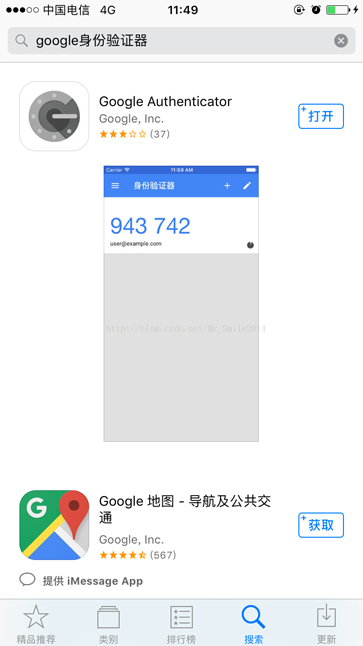
选择上图中的 google authenticator 并安装。
第二步:运行下面链接中下载的demo中的 AuthTest 的 genSecretTest 方法,控制台打印的结果如下图:
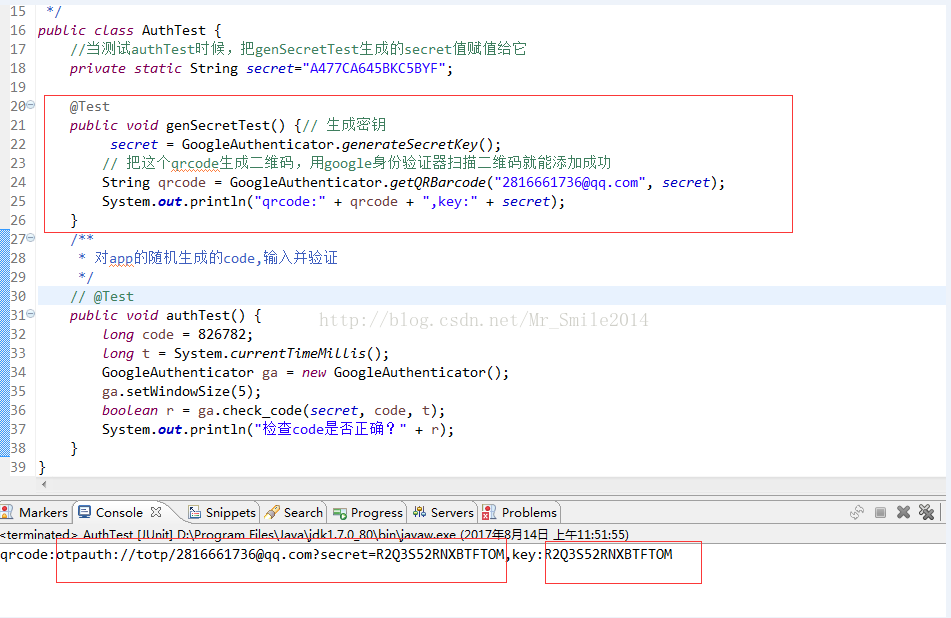
key:为app与服务端约定的秘钥,用于双方的认证。
qrcode:是app扫码能够识别的就是二维码值,把它生成二维码如下图:
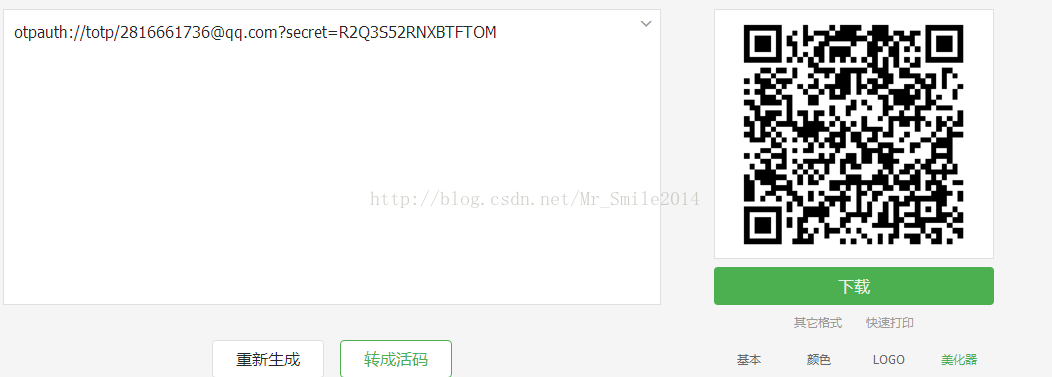
第三步:打开 google authenticator app 软件选择扫描条形码按扭打开相机对二维码扫描加入账号,如下图:
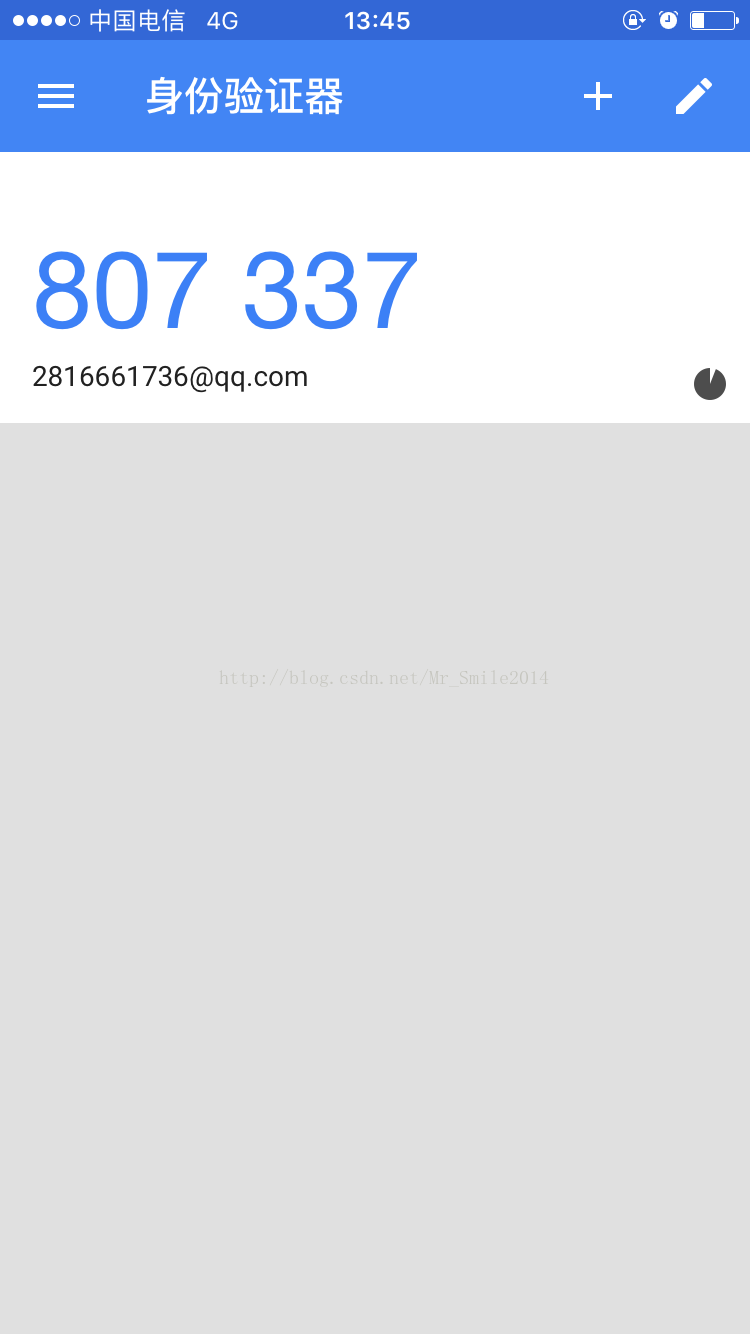
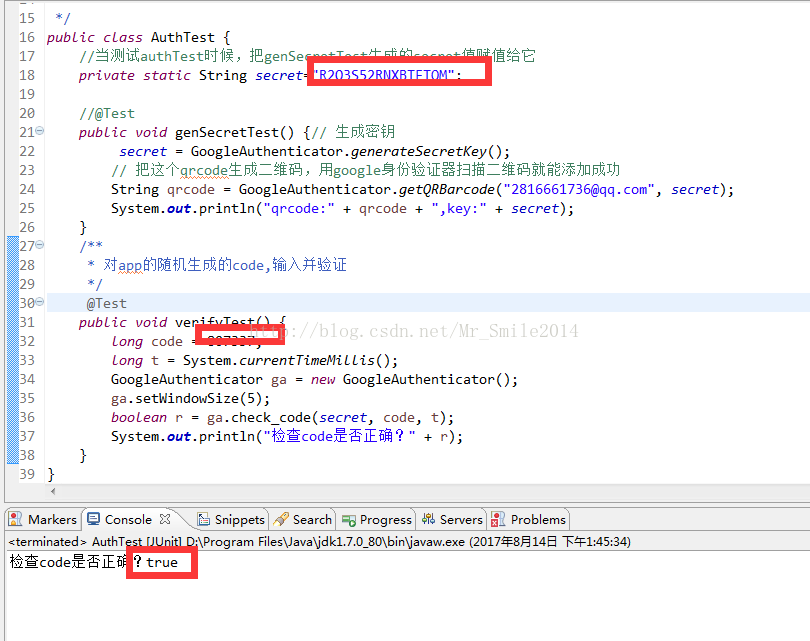
第四步:把 app 中的数字,在 AuthTest 的 verifyTest 进行验证,如下图:






 扫一扫
扫一扫


 2521
2521

 被折叠的 条评论
为什么被折叠?
被折叠的 条评论
为什么被折叠?
 到【灌水乐园】发言





