


 本文介绍了一种在复杂网络环境中使用手动NAT配置的方法。在客户端需要通过特定IP地址访问DMZ区的SFTP服务器时,面对多个Check Point防火墙的情况,手动NAT成为解决路径多变问题的有效手段。文章详细记录了手动NAT配置步骤,包括全局属性设置、规则创建、ARP文件修改及策略推送等。
Checkpoint manual NAT configuration is a quite useful method to remedy the weakness of auto nat . For me, I always mix them according to different scenarios although there are quite discussion which is better in a dispute CPUG post. Use auto nat as possible as I can when starting projects or network, then slowly to roll out manually NAT when complexity components added.
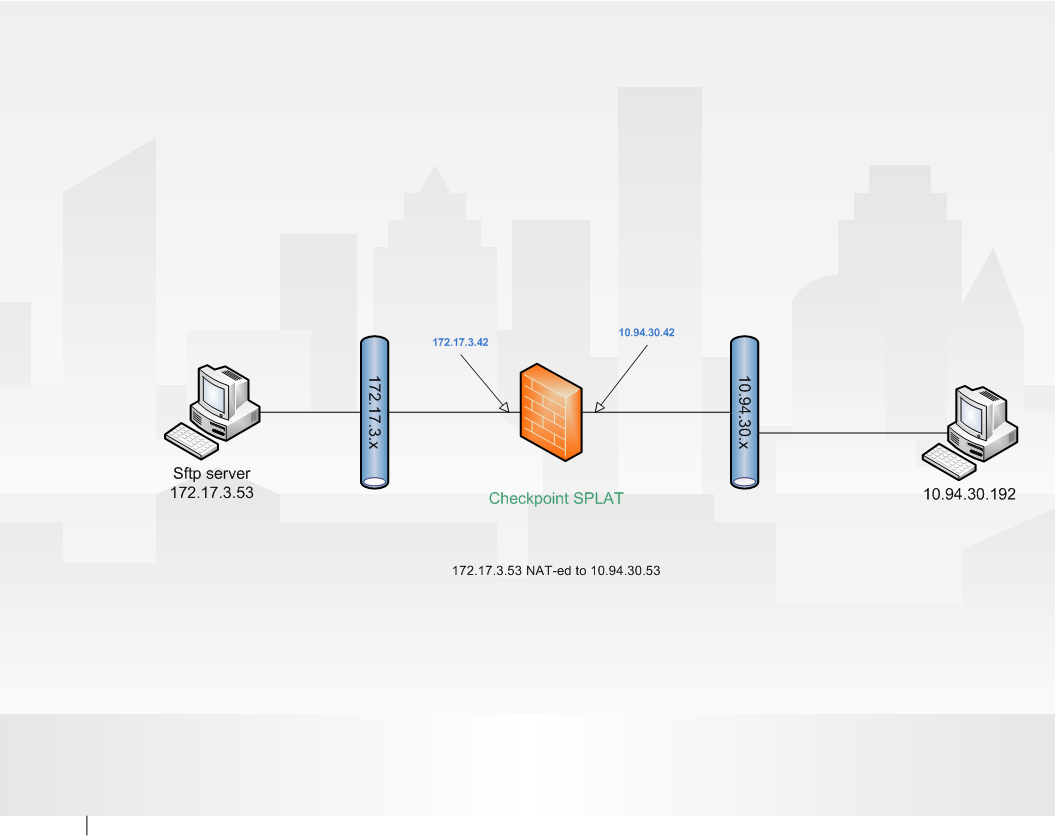
Here is a recent scenario which manual NAT used. Client need to use 10.9.30.53 to access DMZ sftp server 172.17.3.53. Auto NAT should be able to resolve it in 30 seconds configuration. Unfortunately, sftp server 172.17.3.53 is facing multiple checkpoint firewalls and it has to be nat-ed to another segment as well. So manually nat will be the only choice here.
1. Enable Manual NAT from global properties

2. Create Manual NAT rule

3. Add manual proxy arp entry into local.arp file
echo “10.9.30.53 AA:BB:CC:DD:EE” >> $FWDIR/conf/local.arp
note: AA:BB:CC:DD:EE is the mac address of your SPLAT firewall 10.9.30.42 interface. If use clustering implementation, all of cluster members local.arp file need to be modified based on member’s interface mac address.
4. Push policy to enable NAT rule and merge this manual NAT record into arp table.
5. Verify with fw ctl arp command
[CP-FW]# fw ctl arp
(10.9.30.53) at AA:BB:CC:DD:EE





 扫一扫
扫一扫


 6万+
6万+

 被折叠的 条评论
为什么被折叠?
被折叠的 条评论
为什么被折叠?
 到【灌水乐园】发言





