


 该博客介绍了如何在Android中使用ListView来展示水果列表。通过创建FruitAdapter适配器,结合Fruit类和fruit_item.xml布局文件,实现了ListView中每个条目显示水果名称和图片的功能。在MainActivity中初始化水果数据并设置Adapter,最终成功展示了包含多个Fruit实例的列表。
目录
activity_main.xml
<?xml version="1.0" encoding="utf-8"?>
<LinearLayout xmlns:android="http://schemas.android.com/apk/res/android"
    android:layout_width="match_parent"
    android:layout_height="match_parent">

    <ListView
        android:id="@+id/list_view"
        android:layout_width="match_parent"
        android:layout_height="wrap_content"
        />

</LinearLayout>
FruitAdapter
(虽然是通讯录,但是因为书上是拿水果举的例子,所以文件的命名也就照搬了)在包内创建一个Java类并命名为FruitAdapter,输入代码如下:
public class FruitAdapter extends ArrayAdapter<Fruit> {

    private int resouceId;

    public FruitAdapter(Context context, int textViewResourceId, List<Fruit> objects) {
        super(context, textViewResourceId, objects);
        resouceId = textViewResourceId;
    }
    @Override
    public View getView(int position, View convertView, ViewGroup parent) {
        Fruit fruit = getItem(position);

        View view;
        if (convertView == null) {
            view = LayoutInflater.from(getContext()).inflate(resouceId,parent,false);
        } else {
            view = convertView;
        }

        ImageView fruitImage = (ImageView) view.findViewById(R.id.fruit_image);
        TextView fruitName = (TextView) view.findViewById(R.id.fruit_name);
        fruitImage.setImageResource(fruit.getImageId());
        fruitName.setText(fruit.getName());
        return view;

    }

}
Fruit类
在包里创建Java类并命名为Fruit,代码如下:
public class Fruit {
    private String name;
    private int imageId;

    public Fruit(String name, int imageId) {
        this.name = name;
        this.imageId = imageId;
    }

    public String getName() {
        return name;
    }

    public int getImageId() {
        return  imageId;
    }
}
fruit_item.xml
创建layout文件并命名为fruit_item,代码如下:
<?xml version="1.0" encoding="utf-8"?>
<LinearLayout xmlns:android="http://schemas.android.com/apk/res/android"
    android:layout_width="match_parent"
    android:layout_height="wrap_content">

    <ImageView
        android:id="@+id/fruit_image"
        android:layout_width="wrap_content"
        android:layout_height="wrap_content"/>
    <TextView
        android:id="@+id/fruit_name"
        android:layout_width="wrap_content"
        android:layout_height="wrap_content"
        android:layout_gravity="center_vertical"
        android:layout_marginLeft="10dp"/>

</LinearLayout>
Activity
public class MainActivity extends AppCompatActivity {

    private List<Fruit> fruitList = new ArrayList<>();

    @Override
    protected void onCreate(Bundle savedInstanceState) {
        super.onCreate(savedInstanceState);
        setContentView(R.layout.activity_main);

        initFruits();//初始化水果数据
        FruitAdapter adapter = new FruitAdapter(MainActivity.this,
                R.layout.fruit_item,fruitList);
        ListView listView = (ListView) findViewById(R.id.list_view);
        listView.setAdapter(adapter);

    }


//对图片进行加载,图片放在mian/res/drawable里面
    private void initFruits() {
        for(int i=0; i < 3; i++) {
            Fruit apple = new Fruit("周杰伦",R.drawable.image04);
            fruitList.add(apple);
            Fruit banana = new Fruit("哆啦",R.drawable.image02);
            fruitList.add(banana);
            Fruit orange = new Fruit("天皇",R.drawable.image03);
            fruitList.add(orange);
        }
    }
}
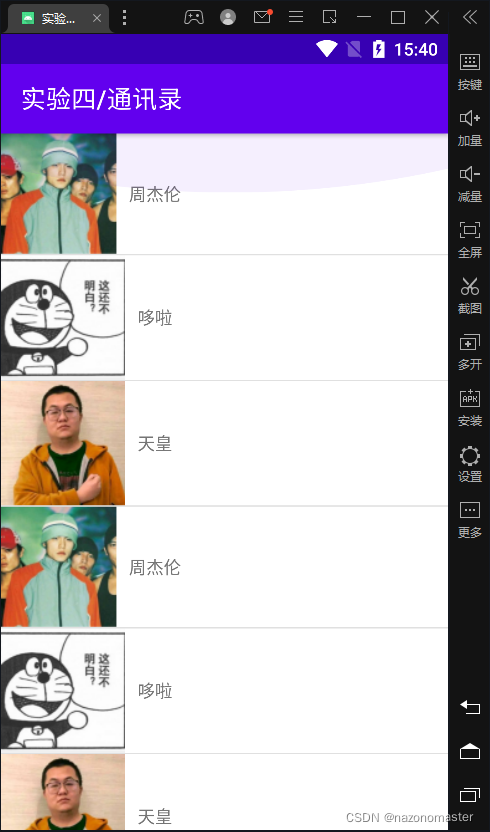
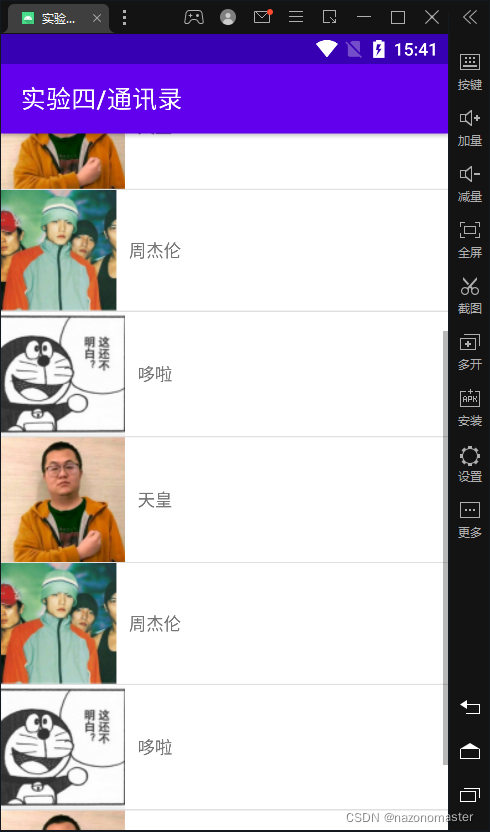
运行截图
项目文件
 https://download.youkuaiyun.com/download/nazonomaster/85219538





 扫一扫
扫一扫


 7552
7552

 被折叠的 条评论
为什么被折叠?
被折叠的 条评论
为什么被折叠?
 到【灌水乐园】发言





