



 本文介绍Python中的数据可视化库matplotlib和seaborn的基本使用方法,包括绘图API、Figure和Subplot的操作、调整间距、颜色、标记和线型的设置,以及如何使用pandas和seaborn进行高效的数据可视化。
第九章 绘图和可视化
信息可视化(也叫绘图)是数据分析中最重要的⼯作之⼀。做一个可交互的数据可视化是我们工作的最终目标。python中有很多静态和动态的数据可视化(matplotlib)。
matplotlib该项⽬是由John Hunter于2002年启动的,其⽬的是为Python构建⼀个MATLAB式的绘图接⼝。matplotlib和IPython社区进⾏合作,简化了从IPython shell(包括现在的Jupyternotebook)进⾏交互式绘图。matplotlib⽀持各种操作系统上许多不同的GUI后端,⽽且还能将图⽚导出为各种常⻅的⽮量(vector)和光栅(raster)图:PDF、SVG、JPG、PNG、BMP、GIF等。
seaborn是使用matplotlib作为底层的可视化工具。
9.1matplotlib API⼊⻔
导入matplotlib操作
import matplotlib.pyplot as plt
书没有详细地讨论matplotlib的各种功能,但⾜以将你引⼊⻔。matplotlib的示例库和⽂档是学习⾼级特性的最好资源。
Figure和Subplot
- matplotlib的图像都位于Figure对象中。你可以⽤plt.figure创建⼀个新的Figure。(默认尺寸大小:<Figure size 720x432 with 0 Axes>)
- 绘制多图(多个figure)
add_subplot()subplots()
import matplotlib.pyplot as plt
import numpy as np
fig = plt.figure()
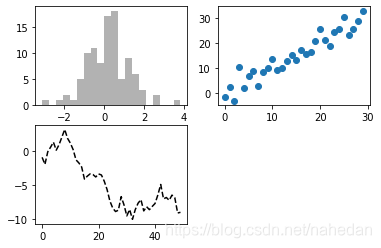
ax1 = fig.add_subplot(2, 2, 1)
ax2 = fig.add_subplot(2, 2, 2)
ax3 = fig.add_subplot(2, 2, 3)
ax3.plot(np.random.randn(50).cumsum(), 'k--')
ax1.hist(np.random.randn(100), bins=20, color='k', alpha=0.3)
ax2.scatter(np.arange(30), np.arange(30) + 3 * np.random.randn(30))
fig, axes = plt.subplots(2, 3)
axes

🕸plt.subplots(),它可以创建⼀个新的Figure,并返回⼀个含有已创建的subplot对象的NumPy数组。这是⾮常实⽤的,因为可以轻松地对axes数组进⾏索引,就好像是⼀个⼆维数组⼀样,例如axes[0,1]。你还可以通过sharex和sharey指定subplot应该具有相同的X轴或Y轴。(这一块可以做出很多非常高级的图,但是我不想学了,你懂了吗?)
🕸下表是pyplot.subplots()的属性参数设置
| 参数 | 说明 |
|---|---|
| nrows | subplots的行数 |
| ncols | subplots的列数 |
| sharex | 所有subplot应该使用相同的x轴(调节xlim将影响所有的subplots) |
| sharey | 所有subplot应该使用相同的y轴(调节ylim将影响所有的subplots) |
| subplot_kw | 创建各subplots的关键字字典 |
| **fig_kw | 创建figure时的其他关键字,如plt.subplots(2,2,figsize=(8,6)) 可做尝试 |
调整subplot周围的间距
- 默认情况下,matplotlib会在subplot外和subplot间留间距。间距跟图像(figure)的⾼度和宽度有关,因此,调整图像⼤⼩(编程还是⼿⼯),间距会调整。利⽤Figure的subplots_adjust⽅法可以修改间距,其是顶级函数(跟第五章中的value_counts()是顶级函数)。
pyplot.subplots_adjust()
fig, axes = plt.subplots(2, 2, sharex=True, sharey=True)
for i in range(2):
    for j in range(2):
        axes[i, j].hist(np.random.randn(500), bins=50, color='k', alpha=0.5)
plt.subplots_adjust(wspace=0, hspace=0)
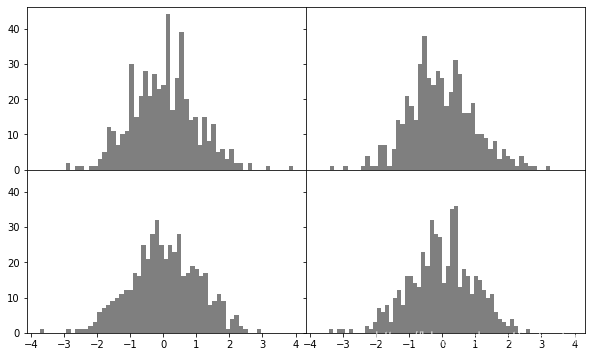
🕸上述图像可以看出各subplot之间没间距,所以需要自己设置刻度位置和刻度标签
颜⾊、标记和线型
- matplotlib的plot函数接受⼀组X和Y坐标,还可以接受⼀个表示颜⾊和线型的字符串缩写。
ax.plot()的属性:color,label,drawstyle,linestyle,marker等
plt.figure()
from numpy.random import randn
data = np.random.randn(30).cumsum()
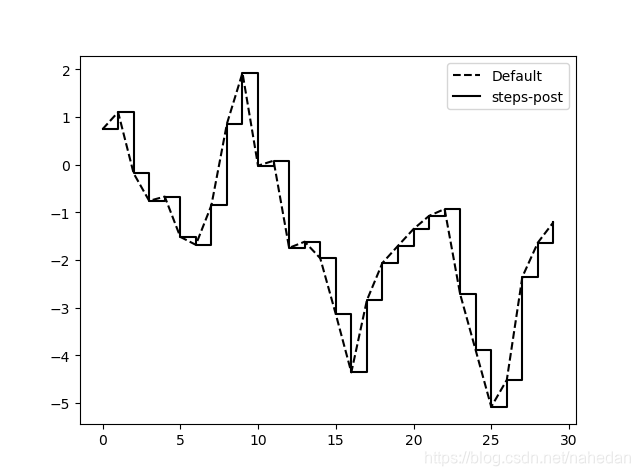
plt.plot(data, 'k--', label='Default')
plt.plot(data, 'k-', drawstyle='steps-post', label='steps-post')
plt.legend(loc='best')
刻度、标签
pyplot接⼝的设计⽬的就是交互式使⽤,含有诸如xlim、xticks和xticklabels之类的⽅法。它们分别控制图表的范围、刻度位置、
刻度标签等。
| 属性 | 说明 |
|---|---|
| xlim | 图表的范围 |
| xticks | 图表的刻度位置 |
| xticklabels | 刻度标签 |
import matplotlib.pyplot as plt
import numpy as  np
fig = plt.figure()
ax = fig.add_subplot(1, 1, 1)
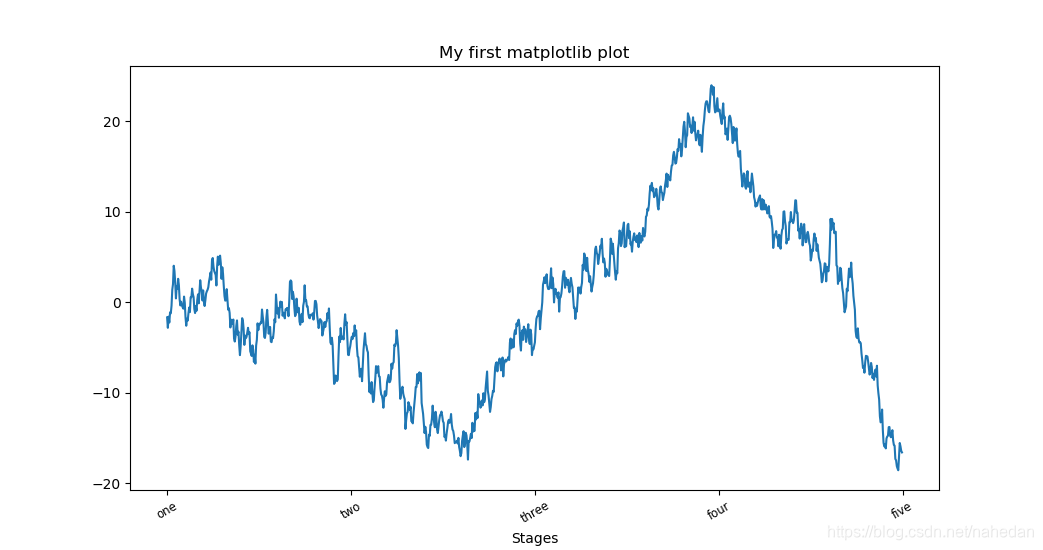
ax.plot(np.random.randn(1000).cumsum())
ticks = ax.set_xticks([0, 250, 500, 750, 1000])
labels = ax.set_xticklabels(['one', 'two', 'three', 'four', 'five'],\
                            rotation=30, fontsize='small')
ax.set_title('My first matplotlib plot')
ax.set_xlabel('Stages')
#————————————————————上面两行可以替代(字符串字典)
#props = { 'title': 'My first matplotlib plot', 'xlabel': 'Stages' }
#ax.set(**props)
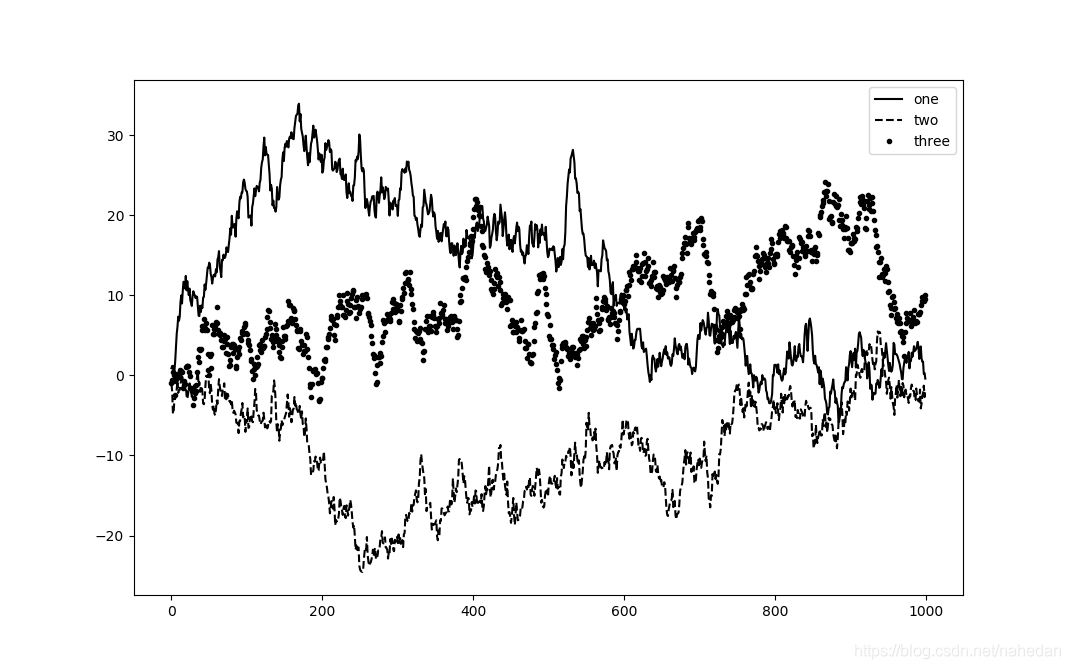
图例
- legend和label是一起使用的,才能出现图例,二者缺一不可。
from numpy.random import randn
import matplotlib.pyplot as plt
fig = plt.figure(); ax = fig.add_subplot(1, 1, 1)
ax.plot(randn(1000).cumsum(), 'k', label='one')
ax.plot(randn(1000).cumsum(), 'k--', label='two')
ax.plot(randn(1000).cumsum(), 'k.', label='three')
ax.legend(loc='best')
注解(Annotation)、subplot上绘图
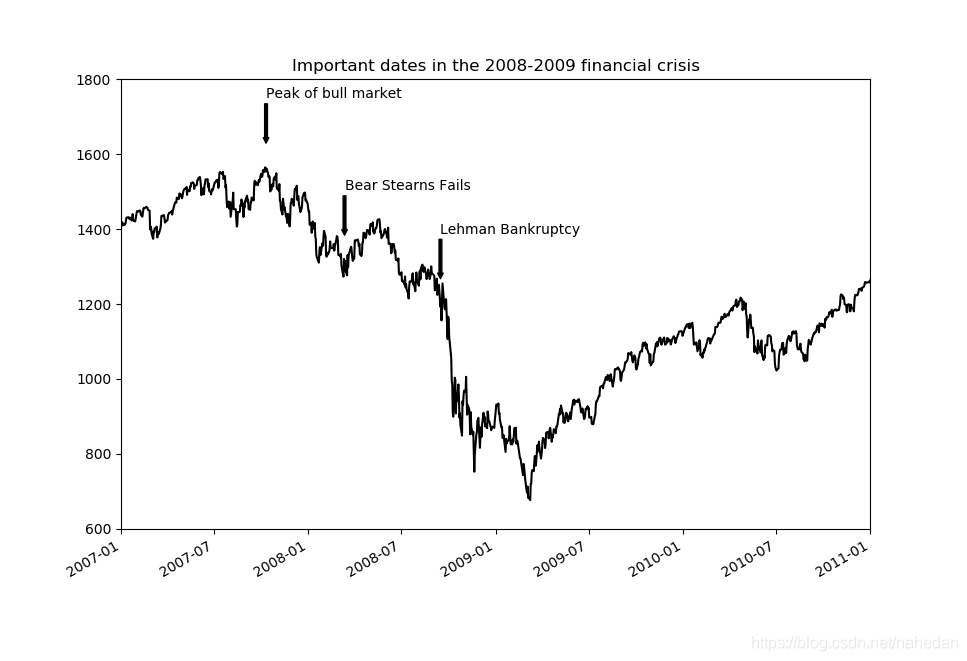
ax.annotate()
🕸直接由Series来做图
from datetime import datetime
import matplotlib.pyplot as plt
import pandas as pd
fig = plt.figure()
ax = fig.add_subplot(1, 1, 1)

data = pd.read_csv('examples/spx.csv', index_col=0, parse_dates=True)
spx = data['SPX']

spx.plot(ax=ax, style='k-')  #这个地方是否存在问题呢?

crisis_data = [
    (datetime(2007, 10, 11), 'Peak of bull market'),
    (datetime(2008, 3, 12), 'Bear Stearns Fails'),
    (datetime(2008, 9, 15), 'Lehman Bankruptcy')
]

for date, label in crisis_data:
    ax.annotate(label, xy=(date, spx.asof(date) + 75),
                xytext=(date, spx.asof(date) + 225),
                arrowprops=dict(facecolor='black', headwidth=4, width=2,
                                headlength=4),
                horizontalalignment='left', verticalalignment='top')

# Zoom in on 2007-2010
ax.set_xlim(['1/1/2007', '1/1/2011'])
ax.set_ylim([600, 1800])

ax.set_title('Important dates in the 2008-2009 financial crisis')
🕸文件地址
🕸这个非常实用。我在处理时间序列会用到annotation🙂😄😃😸
图表文件保存
plt.savefig()
plt.savefig('figpath.svg')

plt.savefig('figpath.png', dpi=400, bbox_inches='tight') #这里

from io import BytesIO
buffer = BytesIO()
plt.savefig(buffer)
plot_data = buffer.getvalue()
🕸保存图⽚时⽤到两个选项是dpi(控制“每英⼨点数”分辨率)和 bbox_inches(可以剪除当前图表周围的空⽩部分)。
matplotlib配置
plt.rc('figure', figsize=(10, 10))

font_options = {'family' : 'monospace', \
					'weight' : 'bold', \
					'size' : 'small'} #这个地方要进一步学习,并设置
plt.rc('font', **font_options)
-
在写论文中配置图样式的可以这样来配置
-
rc(matplotlib resource configurations)的第⼀个参数是希望⾃定义的对象,如‘figure’、‘axes’、‘xtick’、‘ytick’、‘grid’、‘legend’等。
-
请查阅matplotlib的配置⽂件matplotlibrc1(位于matplotlib/mpl-data⽬录中)。😄这个地方学一下,全局设置图形的样式
-
通过rc()函数去配置相关属性
mpl.rc(‘lines’, linewidth=4, color=‘g’)
plt.rc(‘lines’, linewidth=4, color=‘g’)
matplotlib.rc(‘lines’, linewidth=4, color=‘g’)
9.2 使⽤pandas和seaborn绘图
-
seaborn。由MichaelWaskom创建的静态图形库。
-
matplotlib实际上是⼀种⽐较低级的⼯具。要绘制⼀张图表,你组装⼀些基本组件就⾏:数据展示(即图表类型:线型图、柱状图、盒形图、散布图、等值线图等)、图例、标题、刻度标签以及其他注解型信息。
-
在pandas中,我们有多列数据,还有⾏和列标签。pandas⾃身就有内置的⽅法,⽤于简化从DataFrame和Series绘制图形。
Series.plot方法的参数
| 方法 | 说明 |
|---|---|
| label | 图例标签 |
| ax | 要在其上进行绘制的matplotlib subplot对象。如果没有设置,则使用当前matplotlib subplot |
| style | 线条风格字符串(如‘ko–’) |
| alpha | 不透明度(0-1之间) |
| color | 颜色 (我喜欢用cyan) |
| kind | 图类型(‘line’ ‘bar’ ‘barh’ ‘kde‘) 🕸df.plot()等价于df.plot.line() |
| logy | 对数坐标 |
| use_index | 索引作为刻度标签 |
| rot or rotation | 刻度旋转 |
| xticks,yticks | x、y轴刻度的值 |
| xlim,ylim | 界限 |
| grid | 网格 |
DataFrame.plot方法的参数
| 方法 | 说明 |
|---|---|
| subplots | DataFrame列绘制到单独的subplot中 |
| sharex | 共用一个x轴 |
| sharey | 共用一个y轴 |
| figsize | 图像大小(12,8) or (8,8) |
| title | 标题 |
| legend | 添加subplot图例 |
| sort_columns | 以字母表的顺序绘制各列,默认为当前列表 |
🕸有关时间序列的绘图还要见十一章的内容,十一章内容我几乎已看过,后面需要在总结一下!😸
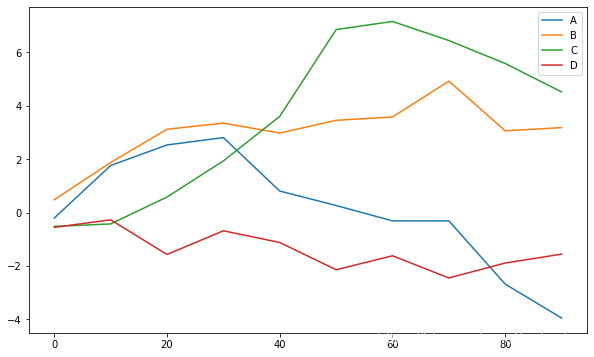
Line Plots
df = pd.DataFrame(np.random.randn(10, 4).cumsum(0),
                  columns=['A', 'B', 'C', 'D'],
                  index=np.arange(0, 100, 10))
df.plot()  #DataFrame  plot,前面的series plot
Bar Plots
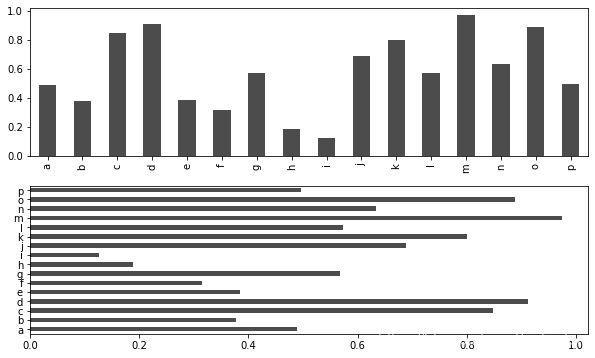
subplot()barh()
fig, axes = plt.subplots(2, 1)
data = pd.Series(np.random.rand(16), index=list('abcdefghijklmnop'))
#要点或者思路可以将频数统计得到series,设置index,随后画图即可
data.plot.bar(ax=axes[0], color='k', alpha=0.7)
data.plot.barh(ax=axes[1], color='k', alpha=0.7)
#___other example
df = pd.DataFrame(np.random.rand(6, 4),
                  index=['one', 'two', 'three', 'four', 'five', 'six'],
                  columns=pd.Index(['A', 'B', 'C', 'D'], name='Genus'))
df
df.plot.bar()
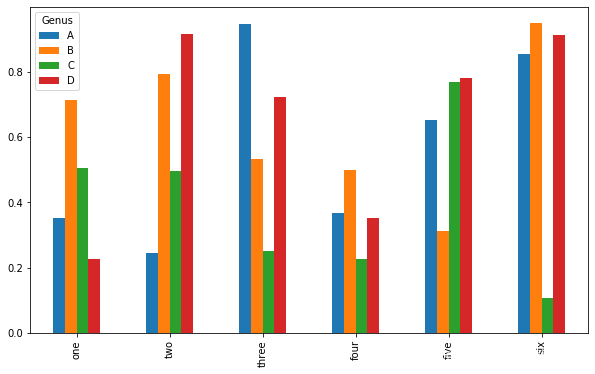
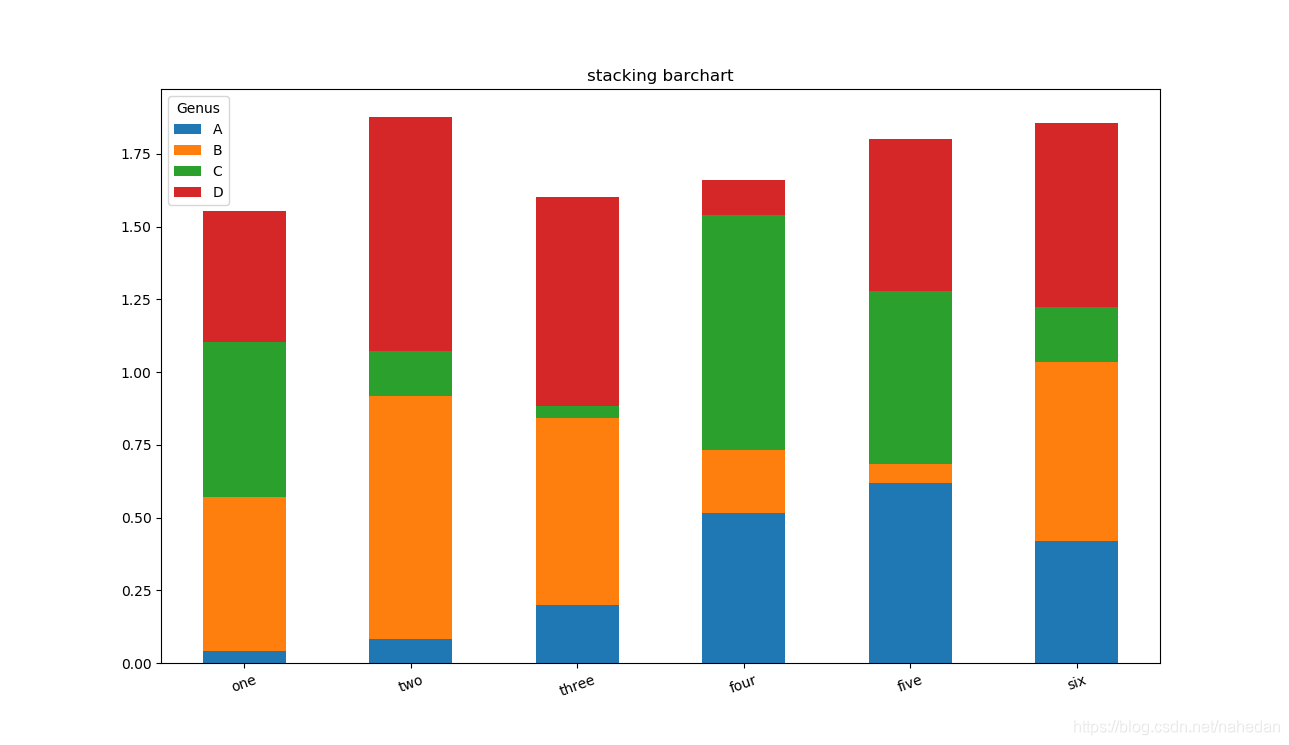
Stacking bar chart
import pandas as pd
import numpy as np

df = pd.DataFrame(np.random.rand(6, 4),
                  index=['one', 'two', 'three', 'four', 'five', 'six'],
                  columns=pd.Index(['A', 'B', 'C', 'D'], name='Genus'))
df
df.plot.bar(figsize=(8,8),title='stacking barchart',sort_columns=True,rot=20,stacked=True)
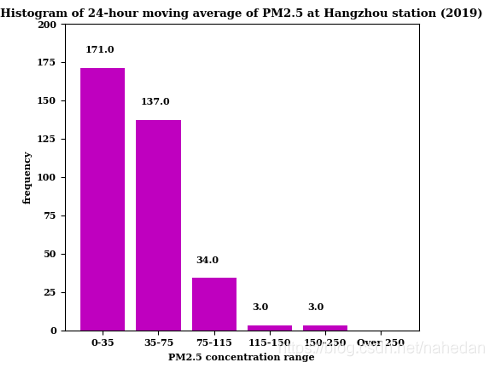
🕸柱状图:利⽤value_counts图形化显示Series中各值的出现频率,⽐如s.value_counts().plot.bar()。(计算企业的类型来做bar)
🕸我今天刚试过好用的,只不过我的比较复杂,😢可能第一次实现,思路不清晰。
🕸交叉表crosstab小案例:这里的内容涉及到第8章的内容,代码如下
tips = pd.read_csv('examples/tips.csv')
party_counts = pd.crosstab(tips['day'], tips['size'])
party_counts
# Not many 1- and 6-person parties
party_counts = party_counts.loc[:, 2:5]
# Normalize to sum to 1
party_pcts = party_counts.div(party_counts.sum(1), axis=0)
party_pcts
plt.figure()
party_pcts.plot.bar()
import seaborn as sns
tips['tip_pct'] = tips['tip'] / (tips['total_bill'] - tips['tip'])
tips.head()
sns.barplot(x='tip_pct', y='day', data=tips, orient='h')#带有误差条(95%的置信区间)的bar
#——————————根据天和时间的bar
sns.barplot(x='tip_pct', y='day', hue='time', data=tips, orient='h')
Histograms and Density Plots
直⽅图(histogram)是⼀种可以对值频率进行离散化显示的柱状图。数据点被拆分到离散的、间隔均匀的⾯元中,绘制的是各⾯元中数据点的数量。
#histograms
plt.figure()
tips['tip_pct'].plot.hist(bins=50)
#______________
#density plots
tips['tip_pct'].plot.density()
Scatter or Point Plots
macro = pd.read_csv('examples/macrodata.csv')
data = macro[['cpi', 'm1', 'tbilrate', 'unemp']]
trans_data = np.log(data).diff().dropna()
trans_data[-5:]
plt.figure()
#regression  (Make a scatter plot and add a linear regression line)
sns.regplot('m1', 'unemp', data=trans_data)
plt.title('Changes in log %s versus log %s' % ('m1', 'unemp'))
#___________________
#In exploratory data analysis, it is meaningful to observe the scatter diagram of a group of variables at the same time, which is also called scatter plot matrix(散布图矩阵)
sns.pairplot(trans_data, diag_kind='kde', plot_kws={'alpha': 0.2})
🕸plot_kws参数,关于更详细的配置参数,可以查阅seaborn.pairplot文档字符串。(现在我还用不到)
Facet Grids and Categorical Data(分面网格(facet grid)和类型数据)
多个分类变量的数据可视化的⼀种⽅法是使用小面网格。seaborn有⼀个有⽤的内置函数factorplot,可以简化制作多种分⾯图(有意思,在数据分析中,可以一试,作为创新点)
#代码续上
sns.factorplot(x='day', y='tip_pct', hue='time', col='smoker',\
               kind='bar', data=tips[tips.tip_pct < 1])
sns.factorplot(x='tip_pct', y='day', kind='box',\
               data=tips[tips.tip_pct < 0.5])
使⽤更通⽤的seaborn.FacetGrid类,你可以创建⾃⼰的分⾯⽹格。请查阅seaborn的⽂档(https://seaborn.pydata.org/)。当然我现在用不到,后面可视化时候需要在关注一下!😙
9.3 其它的Python可视化tool
利⽤tool如Boken(https://bokeh.pydata.org/en/latest/)和Plotly(https://github.com/plotly/plotly.py),现在可以创建动态交互图形,⽤于网页浏览器。
还有百度的echart,我感觉图是真的漂亮!⛄️
9.4科研绘图scienceplot
- ( https://github.com/garrettj403/SciencePlots )clone到本地,直接将*.mplstyle的所有文件放到matplotlibrc(位于matplotlib/mpl-data⽬录中)2。
- 在python中绘图过程上加一行代码即可: with plt.style.context([‘science’,‘no-latex’]):。就可以实现了!是不是很神奇啊!,绘图的其他功能就可以不需要使用了





 扫一扫
扫一扫


 380
380

 被折叠的 条评论
为什么被折叠?
被折叠的 条评论
为什么被折叠?
 到【灌水乐园】发言





