


 本文详细介绍了如何使用Python中的turtle库编写代码来绘制樱花树,包括树干的分支结构和花瓣的随机分布。通过给定的函数和实例代码,读者可以学习到如何控制颜色、形状和随机性以创建逼真的樱花效果。
本篇文章给大家谈谈python画樱花树代码如何读懂,以及如何用python画一朵樱花,希望对各位有所帮助,不要忘了收藏本站喔。
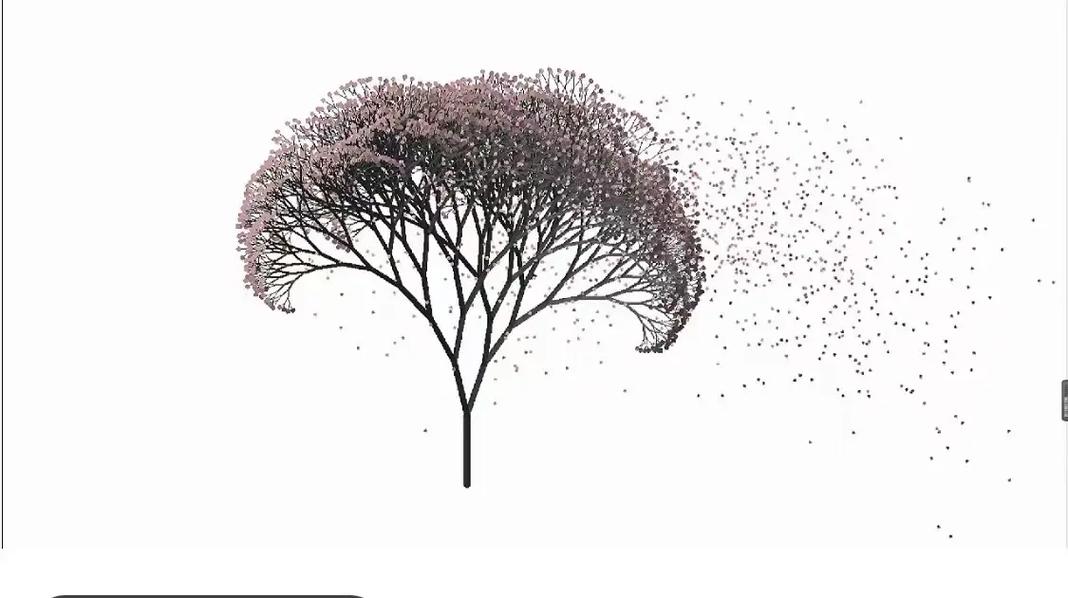
Source code download: 本文相关源码
直接粘效果图 以及代码
import turtle as T
import random
import time

def Tree(branch, tur):
    time.sleep(0.0001)
    if branch > 3:
        if 8 <= branch <= 12:
            rand = random.randint(0, 2)
            if rand == 0:
                tur.color('#fba3c6')
            if rand == 1:
                tur.color('#f94985')
            if rand == 2:
                tur.color('snow')
            tur.pensize(branch / 3)
        elif branch < 8:
            rand = random.randint(0, 1)
            if rand == 0:
                tur.color('#fba3c6')
            if rand == 1:
                tur.color('#f94985')
            tur.pensize(branch / 2)
        else:
            tur.color('#8a7081')  # 赭(zhě)色
            tur.pensize(branch / 10)  # 6
        tur.forward(branch)
        a = 1.6 * random.random()
        tur.right(20 * a)
        b = 1.6 * random.random()
        Tree(branch - 10 * b, tur)
        tur.left(40 * a)
        Tree(branch - 10 * b, tur)
        tur.right(20 * a)
        tur.up()
        tur.backward(branch)
        tur.down()

def Petal(m, tur):
    for i in range(m):
        a = 200 - 400 * random.random()
        b = 10 - 20 * random.random()
        tur.up()
        tur.forward(b)
        tur.left(90)
        tur.forward(a)
        tur.down()
        tur.color('#f94985')
        tur.circle(1)
        tur.up()
        tur.backward(a)
        tur.right(90)
        tur.backward(b)


# 绘图区域
tur = T.Turtle()
# 画布大小
w = T.Screen()
tur.hideturtle()  # 隐藏画笔
tur.getscreen().tracer(5, 0)
w.screensize(bg='#fffbfd')
tur.left(90)
tur.up()
tur.backward(200)
tur.down()
tur.color('#f94985')

# 画樱花的躯干
Tree(60, tur)
# 掉落的花瓣
Petal(100, tur)
w.exitonclick()





 扫一扫
扫一扫


 57万+
57万+

 被折叠的 条评论
为什么被折叠?
被折叠的 条评论
为什么被折叠?
 到【灌水乐园】发言





