





 本文详细介绍了如何在Tomcat8环境下部署Drools 6.4.0Final版本的KIEWorkbench,包括安装基础环境、配置数据源、系统属性设置、JEE安全配置等关键步骤。
最近在研究Drools,虽然最新版本已经到7.35.0 Final了,但收集到的很多资料都是6.4版本的,因此选择使用6.4.0 Final
平时自己使用Win 10,Windows安装过程基本相似,没有太多差别
Drools已经有很长的发展历史了,在开源界,算是很成熟规则引擎了
KIE Workbench部署也不是很复杂,只是有几个需要注意的点,因此记录过程如下:
基础安装环境:JDK 1.8、Tomcat 8、MySQL 5
下载地址:https://download.jboss.org/drools/release/6.4.0.Final/
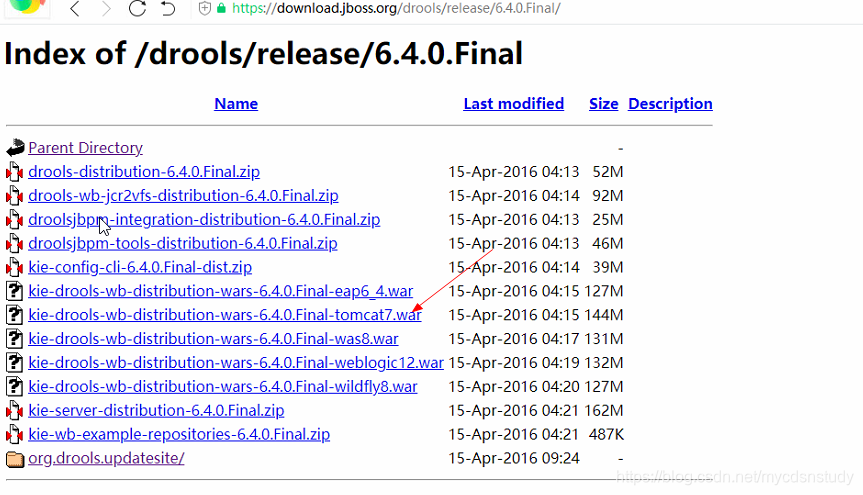
下载 kie-drools-wb-distribution-wars-6.4.0.Final-tomcat7.war之后解压到 Tomcat 的 webapps/kie-drools-wb下面,目录结构如下:
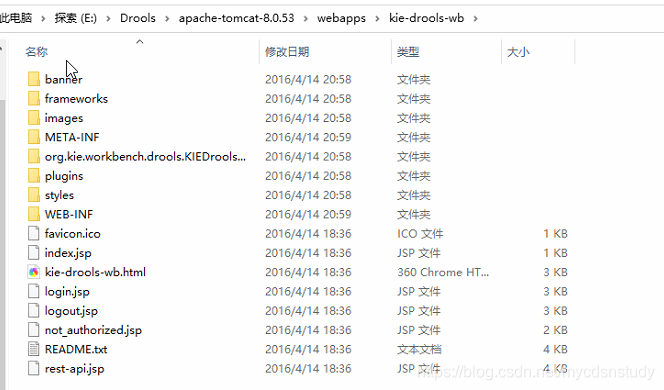
详细的部署说明,其实都在“README.txt”了
Installation notes
==================


1. Install bitronix transaction manager into your tomcat 7
- copy following libs into TOMCAT_HOME/lib
    * btm-2.1.4.jar
    * btm-tomcat55-lifecycle-2.1.4.jar
    * h2-1.3.161.jar
    * jta-1.1.jar
    * slf4j-api-1.7.2.jar
    * slf4j-jdk14-1.7.2.jar

    NOTE: versions of the libraries can be different as these are the actual on the time of writing.

2. Create configuration files inside TOMCAT_HOME/conf
    * btm-config.properties
    ************************ sample btm-config.properties *************************
         bitronix.tm.serverId=tomcat-btm-node0
         bitronix.tm.journal.disk.logPart1Filename=${btm.root}/work/btm1.tlog
         bitronix.tm.journal.disk.logPart2Filename=${btm.root}/work/btm2.tlog
         bitronix.tm.resource.configuration=${btm.root}/conf/resources.properties

    *******************************************************************************


    * resources.properties
    ************************ sample resources.properties **************************
         resource.ds1.className=bitronix.tm.resource.jdbc.lrc.LrcXADataSource
         resource.ds1.uniqueName=jdbc/jbpm
         resource.ds1.minPoolSize=10
         resource.ds1.maxPoolSize=20
         resource.ds1.driverProperties.driverClassName=org.h2.Driver
         resource.ds1.driverProperties.url=jdbc:h2:file:~/jbpm
         resource.ds1.driverProperties.user=sa
         resource.ds1.driverProperties.password=
         resource.ds1.allowLocalTransactions=true
    *******************************************************************************

    NOTE: jdbc/jbpm is the JNDI name used by tomcat distribution of the application

3. Define system properties for btm.root, bitronix config file, JBoss logging provider and others.

    create setenv.sh (or setenv.bat) file inside TOMCAT_HOME/bin and add following:

    CATALINA_OPTS="-Xmx512M -XX:MaxPermSize=512m -Dbtm.root=$CATALINA_HOME \
    -Dbitronix.tm.configuration=$CATALINA_HOME/conf/btm-config.properties \
    -Djbpm.tsr.jndi.lookup=java:comp/env/TransactionSynchronizationRegistry \
    -Djava.security.auth.login.config=$CATALINA_HOME/webapps/kie-drools-wb/WEB-INF/classes/login.config \
    -Dorg.jboss.logging.provider=jdk"

    NOTE: On Debian based systems $CATALINA_HOME needs to be replaced with $CATALINA_BASE. ($CATALINA_HOME defaults to /usr/share/tomcat7 and $CATALINA_BASE defaults to /var/lib/tomcat7/)
    NOTE: this is an example for unix like systems for Windows $CATALINA_HOME needs to be replaced with windows env variable or absolute path
    NOTE: java.security.auth.login.config value includes name of the folder in which application is deployed by default it assumes kie-drools-wb so ensure that matches real installation.
    login.config file can be externalized as well meaning be placed outside of war file.


   *******************************************************************************

4. Configure JEE security for kie-wb on tomcat (with default realm backed by tomcat-users.xml)

   2a. Copy "kie-tomcat-integration" JAR into TOMCAT_HOME/lib (org.kie:kie-tomcat-integration)
   2b. Copy "JACC" JAR into TOMCAT_HOME/lib (javax.security.jacc:artifactId=javax.security.jacc-api in JBoss Maven Repository)
   2c. Copy "slf4j-api" JAR into TOMCAT_HOME/lib (org.slf4j:artifactId=slf4j-api in JBoss Maven Repository)
   2d. Add valve configuration into TOMCAT_HOME/conf/server.xml inside Host element as last valve definition:

      <Valve className="org.kie.integration.tomcat.JACCValve" />

   2e. Edit TOMCAT_HOME/conf/tomcat-users.xml to include roles and users, make sure there will be 'analyst' or 'admin' roles defined as it's required to be authorized to use kie-wb
网上有很多参考的配置说明,可以参考 https://my.oschina.net/duanjunwei/blog/679184
注意事项如下:
1、虽然推荐使用Tomcat7,但已经是16年的推荐配置了,实际使用Tomcat8也都是兼容的
2、需要在tomcat/conf/context.xml里配置数据源jdbc/jbpm
3、setevn.bat里配置内容,Windows参考如下(和Linux有区别):
set CATALINA_OPTS=-Xmx512M -XX:MaxPermSize=512m -Dbtm.root=E:/Drools/apache-tomcat-8.0.53 -Dbitronix.tm.configuration=E:/Drools/apache-tomcat-8.0.53/conf/btm-config.properties -Djbpm.tsr.jndi.lookup=java:comp/env/TransactionSynchronizationRegistry -Djava.security.auth.login.config=E:/Drools/apache-tomcat-8.0.53/webapps/kie-drools-wb/WEB-INF/classes/login.config -Dorg.jboss.logging.provider=jdk4、persistence.xml文件相对路径:WEB-INF\classes\META-INF
5、如果在第一次启动之后,发现后来又找不到一些表,可以在persistence.xml文件修改为如下设置:
<property name="hibernate.hbm2ddl.auto" value="none"/>





 扫一扫
扫一扫


 2305
2305

 被折叠的 条评论
为什么被折叠?
被折叠的 条评论
为什么被折叠?
 到【灌水乐园】发言





