 图像平移操作





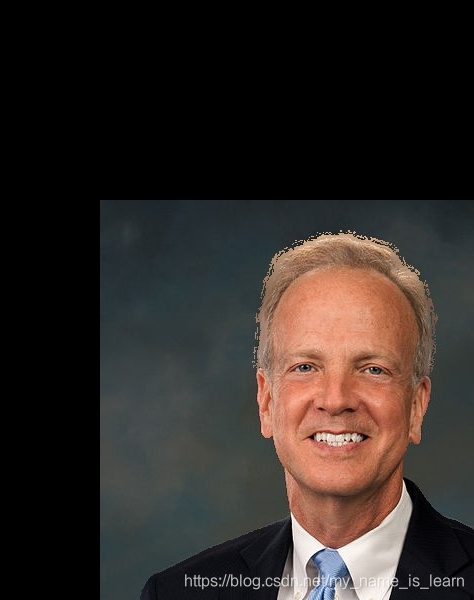
 本文介绍了一种使用OpenCV库在Python中实现图像平移的方法。通过调整矩阵参数,可以将图像向任意方向移动指定的像素数量,展示了图像处理的基本操作。
import cv2
import numpy as np

img = cv2.imread('../data/1.jpg')
h, w = img.shape[:2]
x = 100  # 向右移动100像素,负数则反
y = 200  # 向下移动200像素,负数则反
M = np.float32([[1, 0, x], [0, 1, y]])
move = cv2.warpAffine(img, M, (w, h))  # (w,h)表示输出的尺寸大小,dsize的高宽位置需要反过来
cv2.imshow('move', move)
cv2.waitKey()
cv2.destroyAllWindows()
cv2.imwrite('../data/pingyi.jpg', move)
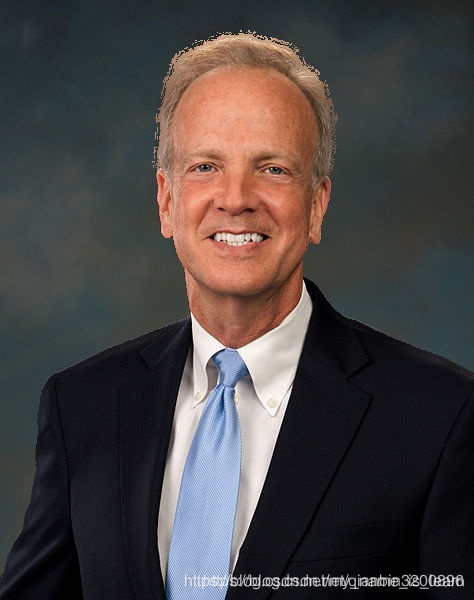
原图
结果





 扫一扫
扫一扫


 2329
2329

 被折叠的 条评论
为什么被折叠?
被折叠的 条评论
为什么被折叠?
 到【灌水乐园】发言





