



 本文介绍了SpringBoot实战后台管理的架构模式,包括单体架构和前后端分离模式,并详细阐述了菜单导航的渲染、登录拦截、分页查询以及数据删除的实现。使用的技术栈包括SpringBoot、MybatisPlus、Mysql、Jquery、Layui等。
SpringBoot实战开发后台管理-架构说明和开发
1、架构模式
-
单体架构
-
技术结构
-
springboot + mybatisplus + mysql
-
前端技术:jquery / layui
-
字体图标库:iconfont
2、后台开发的架构模式有哪些?
- 纯企业开发(全部由公司自己内部去设计后台的页面和功能控制,动画,js、css的编写)
- 使用开源一些开发模式 (layui、bootstrap、jui、extjs)等等。这些有什么好处呢?快速和方便,里面提供大量的组件和模块。比如:日期组件、表格、form、按钮,弹窗等等 95%。
- 新型的后台开发模式:vue-admin-element、elementui、antd等都一些基于vue-cli架构提提完成的一种前后端分离的架构模式。(95%)
3、后台开发的菜单导航的渲染的问题
有三种比较程序的模式:
1、基于iframe(比较传统 异步 + 动态页面渲染)
2、纯异步(全部用js来动态拼接和渲染)(比较传统 异步 + 动态页面渲染)
3、基于路由跳转(vue脚手架)-vue-router
4、菜单导航的渲染问题
先要把导航栏进行管理控制
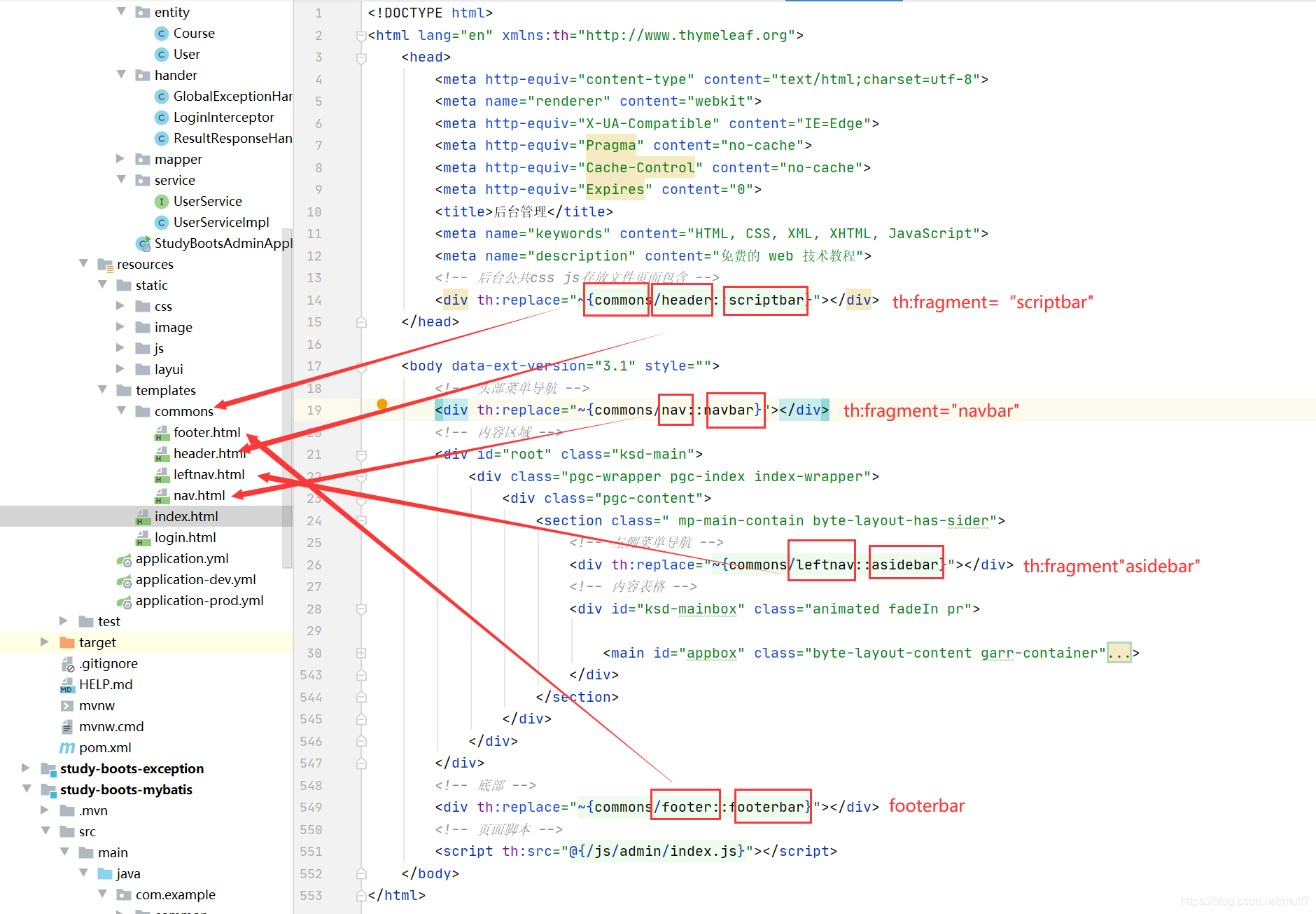
思考问题:导航是在每个页面中,都需要存在,那么我们可以公共的部分用页面包含的技术进行剥离,然后用定义的语法,在每个页面中进行导入。即可
好处就是:方便我们统一维护和后续的升级和控制。
在freemarker或者jsp或者thymeleaf都有这样的页面包含的技术。以thymeleaf为例:
新建一个common在里面新建leftnav.html如下
<!DOCTYPE html>
<html lang="en" xmlns:th="http://www.thymeleaf.org">
    <body>
        <aside id="asideapp" th:fragment="asidebar"
               class="byte-layout-sider byte-layout-sider-light mp-main-sider animated fadeInLeft"
               style="width: 246px;">
            <div class="byte-layout-sider-children">
                <div class="mp-menu-wrapper f-min-scroll f-hover-scroll mp-menu-wrapper-can-scroll">
                    <div class="byte-menu garr-menu">
                        <div class="byte-menu-inline  base_creation_tab">
                            <div class="byte-menu-inline-header">
                                <a href="/admin/index" class="">
                                    <span style="padding-left: 0px; display: block;">
                                        <span title="控制台" class="ksd-icon-sp iconfont fz20 mr-2 iconhome"></span>
                                        <span>控制台</span>
                                    </span>
                                </a>
                            </div>
                            <div class="byte-menu-inline-content animated fadeIn"
                                 style="height: auto; display: none;"></div>
                        </div>
                        <div class="byte-menu-inline  base_creation_tab">
                            <div class="byte-menu-inline-header">
                                <a href="javascript:void(0);" class="">
                                    <span style="padding-left: 0px;">
                                        <span title="用户管理" class="ksd-icon-sp iconfont fz20 mr-2 iconiconzh1"></span>
                                        <span>用户管理</span>
                                    </span>
                                    <span class="byte-menu-icon-suffix">
                                        <svg viewBox="0 0 1024 1024" width="1em" height="1em" fill="currentColor" class="byte-icon byte-icon-down">
                                        </svg>
                                    </span>
                                </a>
                            </div>
                            <div class="byte-menu-inline-content animated fadeIn" style="display: block;">
                                <div title="用户管理" data-href="/admin/user/list" class="byte-menu-item">
                                    <span style="padding-left: 24px; display: block;">
                                        <span class="ksd-icon-sp selected-border-right iconfont fz20 mr-2 iconiconzh1"></span>
                                        <a href="javascript:void(0);">用户管理</a>
                                    </span>
                                </div>
                                <div title="统计模块" data-href="/admin/state/list" class="byte-menu-item">
                                    <span style="padding-left: 24px; display: block;">
                                        <span class="ksd-icon-sp selected-border-right iconfont fz20 mr-2 iconiconzh1"></span>
                                        <a href="javascript:void(0);">统计模块</a>
                                    </span>
                                </div>
                            </div>
                        </div>

                        <div class="byte-menu-inline  base_creation_tab">
                            <div class="byte-menu-inline-header">
                                <a href="javascript:void(0);" class="">
                                    <span style="padding-left: 0px; display: block;">
                                        <span title="角色管理" class="ksd-icon-sp iconfont fz20 mr-2 iconorder1"></span>
                                        <span>通知管理</span>
                                    </span>
                                    <span class="byte-menu-icon-suffix is-open">
                                        <svg viewBox="0 0 1024 1024" width="1em" height="1em" fill="currentColor" class="byte-icon byte-icon-down">
                                        </svg>
                                    </span>
                                </a>
                            </div>
                            <div class="byte-menu-inline-content animated fadeIn"
                                 style="height: auto; display: none;">
                                <div title="角色列表" data-href="/admin/permission/list" class="byte-menu-item">
                                    <span style="padding-left: 24px; display: block;">
                                        <span class="ksd-icon-sp selected-border-right iconfont fz20 mr-2 iconorder1"></span>
                                        <a href="javascript:void(0);">角色列表</a>
                                    </span>
                                </div>
                                <div title="权限列表" data-href="/admin/role/list" class="byte-menu-item">
                                    <span style="padding-left: 24px; display: block;">
                                        <span class="ksd-icon-sp selected-border-right iconfont fz20 mr-2 iconorder1"></span>
                                        <a href="javascript:void(0);">权限列表</a>
                                    </span>
                                </div>
                            </div>
                        </div>
                    </div>
                </div>
            </div>
        </aside>
    </body>
</html>
核心代码
<!DOCTYPE html>
<html lang="en" xmlns:th="http://www.thymeleaf.org">
<body>
<aside th:fragment="asidebar"></aside>
th:fragment="asidebar"给页面模板的具体位置取一个名字:asidebar。这个名字在需要包含的页面中引入:如下
<!DOCTYPE html>
<html lang="en" xmlns:th="http://www.thymeleaf.org">
	<head>
		<meta http-equiv="content-type" content="text/html;charset=utf-8">
		<meta name="renderer" content="webkit">
		<meta http-equiv="X-UA-Compatible" content="IE=Edge">
		<meta http-equiv="Pragma" content="no-cache">
		<meta http-equiv="Cache-Control" content="no-cache">
		<meta http-equiv="Expires" content="0">
		<title>后台管理</title>
		<meta name="keywords" content="HTML, CSS, XML, XHTML, JavaScript">
		<meta name="description" content="免费的 web 技术教程">
		<!-- 后台公共css js存放文件页面包含 -->
		<div th:replace="~{commons/header::scriptbar}"></div>
	</head>

	<body data-ext-version="3.1" style="">
		<!-- 头部菜单导航 -->
		<div th:replace="~{commons/nav::navbar}"></div>
		<!-- 内容区域 -->
		<div id="root" class="ksd-main">
			<div class="pgc-wrapper pgc-index index-wrapper">
				<div class="pgc-content">
					<section class=" mp-main-contain byte-layout-has-sider">
						<!-- 左侧菜单导航 -->
						<div th:replace="~{commons/leftnav::asidebar}"></div>
						<!-- 内容表格 -->
						<div id="ksd-mainbox" class="animated fadeIn pr"></div>
					</section>
				</div>
			</div>
		</div>
		<!-- 底部 -->
		<div th:replace="~{commons/footer::footerbar}"></div>
		<!-- 页面脚本 -->
		<script th:src="@{/js/admin/index.js}"></script>
	</body>
</html>
核心代码:
<div th:replace="~{commons/leftnav::asidebar}"></div>
th:replace 代表的:就把commons/leftnav.html中的具体代码块名字是:th:fragment=“asidebar” 取出来,替换这个div。
$(function () {
    // 初始化菜单导航
    adminAside.init();
    // 页面加载提示
    adminLoading.init();
})

// 控制左侧菜单导航
var adminAside = {
    init:function () {
        this.animate();
        this.menuEvent();
    },

    // 控制左侧菜单导航的折叠和展开
    animate:function () {
        //点击菜单绑定点击事件,然后控制自己下方的菜单进行展开和收起
        $("#asideapp").find(".byte-menu-inline-header").on("click", function () {
            // 控制排它
            $(this).parents(".byte-menu-inline").siblings().find(".byte-menu-inline-content").hide();
            $(this).parents(".byte-menu-inline").siblings().find(".byte-menu-icon-suffix").removeClass("is-open");
            $(this).next().toggle();
            $(this).find(".byte-menu-icon-suffix").toggleClass("is-open");
        })
    },

    // 控制菜单点击渲染右侧模板
    menuEvent:function () {
        $("#asideapp").find(".byte-menu-item").on("click", function () {
            var href = $(this).data("href");
            // $.get(href, function (res) {
            //     $("#ksd-mainbox").html(res);
            // })

            $("#ksd-mainbox").load(href);
        })
        // 触发第一个元素,作为默认的激活项目
        $("#asideapp").find(".byte-menu-item").eq(0).trigger("click");
    }

}

// 页面加载提示
var adminLoading = {
    init:function () {
        this.animate();
    },
    animate:function () {

    }
}
5、登录
注意:后台的开发中处理登录和退出,是不需要进行登录。其他的后台访问页面都需要进行登录拦截才能进行进入。所以我们在做后台的时候首先考虑的问题之一:登录拦截
5.1 定义并注册登录拦截器
package com.example.config;

import com.example.hander.LoginInterceptor;
import org.springframework.context.annotation.Bean;
import org.springframework.context.annotation.Configuration;
import org.springframework.web.servlet.config.annotation.InterceptorRegistry;
import org.springframework.web.servlet.config.annotation.WebMvcConfigurer;

/**
 * @Auther: 长颈鹿
 * @Date: 2021/07/26/16:43
 * @Description:
 */
@Configuration
public class WebMvcConfiguration implements WebMvcConfigurer {

    @Bean
    public LoginInterceptor getLoginInterceptor() {
        return new LoginInterceptor();
    }

    @Override
    public void addInterceptors(InterceptorRegistry registry) {
        // 拦截器注册
        registry.addInterceptor(getLoginInterceptor())
                // 排除登录,退出
                .excludePathPatterns("/admin/login",
                        "/admin/logout",
                        "/admin/toLogin")
                // 拦截后台所有请求
                .addPathPatterns("/admin/**");
    }
}
5.2 在拦截器中排除登录和退出的路由
@Override
    public void addInterceptors(InterceptorRegistry registry) {
        // 拦截器注册
        registry.addInterceptor(getLoginInterceptor())
                // 排除登录,退出
                .excludePathPatterns("/admin/login",
                        "/admin/logout",
                        "/admin/toLogin")
                // 拦截后台所有请求
                .addPathPatterns("/admin/**");
    }
5.3 已登录,跳转到首页
package com.example.controller;

import com.example.common.constant.RConstants;
import com.example.common.exception.ResultCodeEnum;
import com.example.common.exception.ValidationException;
import com.example.entity.User;
import com.example.service.UserService;
import lombok.extern.slf4j.Slf4j;
import org.springframework.beans.factory.annotation.Autowired;
import org.springframework.stereotype.Controller;
import org.springframework.web.bind.annotation.GetMapping;
import org.springframework.web.bind.annotation.PostMapping;
import org.springframework.web.bind.annotation.ResponseBody;

import javax.servlet.http.HttpSession;

/**
 * @Auther: 长颈鹿
 * @Date: 2021/07/25/11:07
 * @Description:
 */
@Controller
@Slf4j
public class LoginController extends BaseController {

    @Autowired
    private UserService userService;

    @GetMapping("/login")
    public String login(HttpSession session){
        // 首先判断一下,用户是否已经登录
        User sessionUser = (User) session.getAttribute(RConstants.SESSION_USER);
        // 如果已经登录就直接进入到首页
        if (sessionUser != null) {
            return "redirect:/admin/index";
        }
        // 如果没有登录,直接去登录页面
        return "login";
    }

    @PostMapping("/toLogin")
    @ResponseBody
    public String toLogin(HttpSession session, String nickname, String password){
        log.info("当前用户:{},密码:{}", nickname, password);
        // 根据用户输入的nickname,查询用户是否存在
        User user = userService.getByUserName(nickname);
        // 如果不存在就返回fail,代表用户找不到
        if(user == null){
            throw new ValidationException(ResultCodeEnum.NICKNAME_NO_EXISTENCE);
        }
        // 判断当前用户输入的密码和数据库密码是否一致。 如果一致 登录成功
        if (user != null && !user.getPassword().equalsIgnoreCase(password)) {
            throw new ValidationException(ResultCodeEnum.PASSWORD_ERROR);
        }
        // 把登录成功用户信息写入session会话中
        session.setAttribute(RConstants.SESSION_USER, user);
        // 登录成功返回success
        return "success";
    }

}
5.4、退出登录
@GetMapping("/logout")
public String logout(HttpSession session){
    // 退出登录
    session.invalidate();
    // 退出成功已经,重定向到登录页面
    return "redirect:/admin/login";
}
<a th:href="@{/admin/logout}" style="width: 86px;"><i class="iconfont iconai-out"></i>退出登录</a>
5.5、登录页面背景设置
.bgpic{
  	background:url("xxxx.jpg");
    position:fixed;
    top:0;
    left:0;
    bottom:0;
    right:0;
    filter:blur(1px);
    background-size:cover;
}
6、完成列表查询,搜索,分页
6.1 分页拦截器的配置
package com.example.config;

import com.baomidou.mybatisplus.extension.plugins.PaginationInterceptor;
import org.mybatis.spring.annotation.MapperScan;
import org.springframework.context.annotation.Bean;
import org.springframework.context.annotation.Configuration;
import org.springframework.transaction.annotation.EnableTransactionManagement;

/**
 * @Auther: 长颈鹿
 * @Date: 2021/07/30/14:53
 * @Description:
 */
@Configuration
@EnableTransactionManagement
public class MyBatisPlusConfig {

    // 分页插件
    @Bean
    public PaginationInterceptor paginationInterceptor() {
        return new PaginationInterceptor();
    }
}
6.2 定义分页逻辑
package com.example.controller.state;

import com.baomidou.mybatisplus.core.conditions.query.QueryWrapper;
import com.baomidou.mybatisplus.extension.plugins.pagination.Page;
import com.example.controller.common.BaseController;
import com.example.entity.State;
import com.example.service.state.StateService;
import org.springframework.beans.factory.annotation.Autowired;
import org.springframework.stereotype.Controller;
import org.springframework.ui.ModelMap;
import org.springframework.web.bind.annotation.GetMapping;
import org.springframework.web.bind.annotation.RequestParam;

import java.util.List;

/**
 * @Auther: 长颈鹿
 * @Date: 2021/07/28/15:27
 * @Description:
 */
@Controller
public class StateController extends BaseController {

    @Autowired
    private StateService stateService;

    @GetMapping("state/list")
    public String list(ModelMap modelMap){
        Page<State> pageState = stateService.pageList(0, 10);
        // 2: 把数据放入到作用域
        // 每页显示的具体数据
        modelMap.put("stateList", pageState.getRecords());
        // 总记录数
        modelMap.put("total", pageState.getTotal());
        //pageSize是每页显示多少条
        modelMap.put("pageSize", pageState.getSize());
        // pageNo 当前页
        modelMap.put("pageNo", pageState.getCurrent());
        //  pages分了多少页
        modelMap.put("pages", pageState.getPages());
        // 3: 渲染的视图模板
        return "state/template";
    }

    @GetMapping("state/listTemplate")
    public String listTemplate(ModelMap modelMap, @RequestParam(name = "pageNo", defaultValue = "1")Integer pageNo,
                               @RequestParam(name = "pageSize", defaultValue = "10")Integer pageSize){
        Page<State> pageState = stateService.pageList(pageNo,pageSize);
        // 2: 把数据放入到作用域
        // 每页显示的具体数据
        modelMap.put("stateList", pageState.getRecords());
        // 总记录数
        modelMap.put("total", pageState.getTotal());
        //pageSize是每页显示多少条
        modelMap.put("pageSize", pageState.getSize());
        // pageNo 当前页
        modelMap.put("pageNo", pageState.getCurrent());
        //  pages分了多少页
        modelMap.put("pages", pageState.getPages());
        // 3: 渲染的视图模板
        return "state/listTemplate";
    }
}
package com.example.service.state;

import com.baomidou.mybatisplus.core.conditions.query.QueryWrapper;
import com.baomidou.mybatisplus.extension.plugins.pagination.Page;
import com.baomidou.mybatisplus.extension.service.impl.ServiceImpl;
import com.example.entity.State;
import com.example.mapper.StateMapper;
import org.springframework.stereotype.Service;

/**
 * @Auther: 长颈鹿
 * @Date: 2021/07/30/13:33
 * @Description:
 */
@Service
public class StateServiceImpl extends ServiceImpl<StateMapper, State> implements StateService {

    @Override
    public Page<State> pageList(int pageNo, int pageSize) {
        Page<State> page = new Page<>(pageNo, pageSize);
        // 查询分页
        QueryWrapper<State> queryWrapper = new QueryWrapper<>();
        Page<State> pageState = this.page(page, queryWrapper);
        return pageState;
    }
}
package com.example.service.state;

import com.baomidou.mybatisplus.extension.plugins.pagination.Page;
import com.baomidou.mybatisplus.extension.service.IService;
import com.example.entity.State;

/**
 * @Auther: 长颈鹿
 * @Date: 2021/07/30/13:32
 * @Description:
 */
public interface StateService extends IService<State> {

    Page<State> pageList(int pageNo, int pageSize);
}
6.3 页面初始化分页
<!DOCTYPE html>
<html lang="en" xmlns:th="http://www.thymeleaf.org">
<body>
<main id="appbox" class="byte-layout-content garr-container" style="background: rgb(255, 255, 255);">
    <div class="layui-tab-item layui-show">
        <div id="LAY_preview">
            <div class="layui-border-box">
                <div class="layui-table-tool">
                    <span class="mr-4 fl">共 11 条</span>
                    <div class="layui-table-tool-selfc ml-2 fr">
                        <a href="https://www.kuangstudy.com/bbs" target="_blank" class="layui-btn layui-btn-sm">
                            <span class="iconfont iconhome mr-2 fz12"></span>
                            访问首页
                        </a>
                    </div>
                    <div class="layui-table-tool-selfc ml-2 fr">
                        <button class="layui-btn layui-btn-sm">
                            <i class="iconfont iconadd mr-2"></i>
                            添加一级分类
                        </button>
                    </div>
                    <div class="layui-table-tool-selfc fr">
                        <div class="layui-inline">
                            <input title="敲enter键盘也可以搜索!" maxlength="100" autocomplete="off"
                                   placeholder="请输入分类标题..." class="layui-input" style="width: 320px; height: 32px; line-height: 32px;">
                        </div>
                        <button class="layui-btn layui-btn-sm">搜索</button>
                    </div>
                </div>
            </div>
            <div class="layui-table-box">
                <div class="layui-table-body layui-table-main">
                    <table cellspacing="0" cellpadding="0" border="0" class="layui-table">
                        <thead>
                        <tr>
                            <th class="layui-table-col-special">
                                <div class="layui-table-cell  laytable-cell-numbers">
                                    <span>ID</span>
                                </div>
                            </th>
                            <th>
                                <div class="layui-table-cell"><span>标题</span></div>
                            </th>
                            <th>
                                <div class="layui-table-cell"><span>参与人数</span></div>
                            </th>
                            <th>
                                <div class="layui-table-cell"><span>创建时间</span></div>
                            </th>
                            <th>
                                <div class="layui-table-cell"><span>创建用户</span></div>
                            </th>
                            <th>
                                <div class="layui-table-cell"><span>状态</span></div>
                            </th>
                            <th>
                                <div class="layui-table-cell"><span>操作</span></div>
                            </th>
                        </tr>
                        </thead>
                        <tbody id="state-tbody" th:data-total="${total}" th:data-pages="${pages}"
                               th:data-pageSize="${pageSize}">
                            <div th:replace="~{state/listTemplate::stateList}"></div>
                        </tbody>
                    </table>
                </div>
                <!-- 翻页 -->
                <div class="layui-table-page" id="state-page" style="height: 60px; text-align: center; margin-top: 50px;"></div>
            </div>
        </div>
    </div>

    <script>

        // 1:如何初始化,然后并且获取每次点击的页码
        // 2:如何根据分页查询对应的数据,把对应的数据查询出来返回的指定的位置

        var state = {
            page:function (total) {
                var that = this;
                layui.use(['laypage', 'layer'], function() {
                    var layPage = layui.laypage
                        , layer = layui.layer;

                    //总页数大于页码总数
                    layPage.render({
                        elem: 'state-page'
                        , count: total //数据总数
                        , jump: function (obj) {
                            // 获取当前用户点击当前页
                            var currentPageNo = obj.curr;
                            // if(currentPageNo > 1){
                                // 点击每页渲染的数据
                                that.loadData(currentPageNo);
                            // }
                        }
                    });
                });
            },
            // 加载后台数据
            // loadData:function (pageNo) {
            //     $.get("/admin/state/listTemplate", {pageNo:pageNo}, function (res) {
            //         // 找到第二页渲染完毕的tbody的内容
            //         var tbodyHtml = $(res).find("#state-tbody").html();
            //         // 把找到的内容放入当前的tbody中
            //         $("#state-tbody").html(tbodyHtml);
            //     })
            // }
            loadData:function(pageNo){
                $.get("/admin/state/listTemplate",{pageNo:pageNo},function(res){
                    $("#state-tbody").html(res);
                })
            }
        };

        $(function () {
            // 获取总记录数
            var total = $("#state-tbody").data("total");
            // 根据total初始化分页
            state.page(total);
        })
    </script>

</main>
</body>
</html>
核心代码
<tbody id="ksd-tbody" th:data-total="${total}" th:data-pages="${pages}">
1、上面的代码是通过thymeleaf的模板渲染技术,把后台作用域中的数据取出来。
// 每页显示的具体数据
modelMap.put("stateList", pageState.getRecords());
// 总记录数
modelMap.put("total", pageState.getTotal());
//pageSize是每页显示多少条
modelMap.put("pageSize", pageState.getSize());
// pageNo 当前页
modelMap.put("pageNo", pageState.getCurrent());
//  pages分了多少页
modelMap.put("pages", pageState.getPages());
2、然后通过ajax渲染到左侧位置,然后在加载JS,通过jQuery的data语法去重总记录数,然后初始化分页即可。
// 当前所有的节点,不包括image和iframe加载完毕,立即触发的入口函数
$(function(){
     // 1、把总记录数从ksd-tbody属性上取出来
     var total = $("#ksd-tbody").data("total");
     // 2、根据total初始化分页即可
     ksdState.page(total);
 })
核心代码
<tbody id="ksd-tbody" th:data-total="${total}" th:data-pages="${pages}">
1、上面的代码是通过thymeleaf的模板渲染技术,把后台作用域中的数据取出来。
// 每页显示的具体数据
modelMap.put("stateList", pageState.getRecords());
// 总记录数
modelMap.put("total", pageState.getTotal());
//pageSize是每页显示多少条
modelMap.put("pageSize", pageState.getSize());
// pageNo 当前页
modelMap.put("pageNo", pageState.getCurrent());
//  pages分了多少页
modelMap.put("pages", pageState.getPages());
2、然后通过ajax渲染到左侧位置,然后在加载JS,通过jQuery的data语法去重总记录数,然后初始化分页即可。
// 当前所有的节点,不包括image和iframe加载完毕,立即触发的入口函数
$(function(){
     // 1、把总记录数从ksd-tbody属性上取出来
     var total = $("#ksd-tbody").data("total");
     // 2、根据total初始化分页即可
     ksdState.page(total);
 })
7、删除
7.1 实现数据的删除
删除逻辑一般都是根据主键id进行处理和删除,删除分为逻辑删除和物理删除。
- 一般开发中一般都是逻辑删除,执行的是 :update修改表的状态,定义字段is_delete 0代表未删除 1 删除
- 物理删除,直接把表的数据直接删掉,执行:delete from table where id = xxx
7.2 layui组件的引入
-
下载layui组件:https://www.layui.com/
-
把下载的layui组件解压到项目的static目录
-
在header.html页面引入layui.js
-
<script th:fragment="scriptbar" src="../js/jquery-3.5.1.min.js"></script> <script th:fragment="scriptbar" src="../layui/layui.js"></script> -
使用layui即可
https://www.layui.com/demo/
7.3 后台逻辑方法(物理删除)
@ResponseBody
@PostMapping("state/delete/{id}")
public int deleteState(@PathVariable("id")Integer id){
    boolean flag = stateService.removeById(id);
    return flag ? 1 : 0;
}
	delete:function () {
        var mainThat = this;
        $("#state-tbody").on("click", ".state-delete-btn", function () {
            var that = this; // that代表当前你点击的每一个删除按钮
            // 拿到缓存的数据id
            var opId = $(this).data("opid");
            // 发送异步请求
            $.post("/admin/state/delete/"+opId, function (res) {
            	if(res.code == 200){
                	// 删除成功进行异步删除 $(that).parents("tr") 获取当前删除按钮的所在的tr行
                    $(that).parents("tr").fadeOut("slow", function () {
                    	//  $(this) 这个代表的当前行tr,删除当前行
                    	$(this).remove();
                        // 删除一行,总数就减去1次
                        var total = $("#state-tbody").data("total");
                        var newTotal = total-1;
                        $("#state-tbody").data("total",newTotal);
                        $(".state-total-num").text(newTotal);
                         // 如果当前页面的数据已经全部删除完毕
                        var length = $("#state-tbody").children().length;
                        if(length == 0){
                            // 重新加载数据
                            mainThat.page(newTotal);
                      	}
                	})
            	}
        	})
    	})
	}
7.4 layui组件的引入和删除逻辑的融合
@ResponseBody
@PostMapping("state/update/{id}")
public int updateState(@PathVariable("id")Integer id){
    State state = stateService.getById(id);
    if(state != null && state.getIsDelete().equals(0)){
        state.setIsDelete(1);
    }else if(state != null && state.getIsDelete().equals(1)){
        state.setIsDelete(0);
    }
    System.out.println(state.getIsDelete());
    boolean flag = stateService.updateById(state);
    System.out.println(state.getIsDelete());
    return flag ? state.getIsDelete() : 0;
}
delete:function () {
    var mainThat = this;
    $("#state-tbody").on("click", ".state-delete-btn", function () {
        var that = this; // that代表当前你点击的每一个删除按钮
        // 拿到缓存的数据id
        var opId = $(this).data("opid");
        // 发送异步请求
        layui.use('layer', function(){
            var layer = layui.layer;
            layer.confirm('确定删除?', {
                btn: ['确定','取消'] //按钮
            }, function(){
                // 发送删除异步请求
                $.post("/admin/state/update/" + opId,function(res){
                    if(res.code == 200){
                        layer.msg('删除成功');
                        if(res.data == 1) {
                            $(that).parents("tr").find(".state-isDelete").removeClass("green").addClass("red").text("已删除");
                        }else{
                            $(that).parents("tr").find(".state-isDelete").removeClass("red").addClass("green").text("未删除");
                        }
                    }
                });
            }, function(){
                layer.msg('这个是取消按钮事件');
            });
        });
    })
}





 扫一扫
扫一扫


 497
497


 到【灌水乐园】发言



