



 本文档介绍了如何在SpringBoot项目中集成Swagger,用于创建和展示在线API文档。通过在pom.xml添加依赖,配置Swagger类,并使用注解进行接口和实体定义,可以方便地进行接口测试和文档查看。在完成设置后,可以通过特定URL访问Swagger UI来体验和测试API。
SpringBoot和在线文档Swagger的整合
1、分析
在开发中,现在主流开发方式都前后端分离的开放方式,
面临问题:如何校验接口的有效性
采用工具:比如:postman、swagger 和 小幺鸡 等。
2、swagger使用
swagger:依赖内嵌在项目中的一款在线文档测试工具
2.1 在项目的pom.xml导入swagger的依赖
<!-- Swagger -->
<dependency>
    <groupId>io.springfox</groupId>
    <artifactId>springfox-swagger-ui</artifactId>
    <version>2.9.2</version>
</dependency>

<!-- 文档 -->
<dependency>
    <groupId>io.springfox</groupId>
    <artifactId>springfox-swagger2</artifactId>
    <version>2.9.2</version>
    <exclusions>
        <exclusion>
            <groupId>io.swagger</groupId>
            <artifactId>swagger-models</artifactId>
        </exclusion>
        <exclusion>
            <groupId>com.google.guava</groupId>
            <artifactId>guava</artifactId>
        </exclusion>
    </exclusions>
</dependency>

<dependency>
    <groupId>io.swagger</groupId>
    <artifactId>swagger-models</artifactId>
    <version>1.5.21</version>
</dependency>

<dependency>
    <groupId>io.springfox</groupId>
    <artifactId>springfox-swagger-ui</artifactId>
    <version>2.9.2</version>
</dependency>

<dependency>
    <groupId>com.github.xiaoymin</groupId>
    <artifactId>swagger-bootstrap-ui</artifactId>
    <version>1.8.5</version>
</dependency>
2.2 定义和开启swagger的配置类
package com.example.config;

import org.springframework.context.annotation.Bean;
import org.springframework.context.annotation.Configuration;
import springfox.documentation.builders.ApiInfoBuilder;
import springfox.documentation.builders.PathSelectors;
import springfox.documentation.builders.RequestHandlerSelectors;
import springfox.documentation.service.ApiInfo;
import springfox.documentation.spi.DocumentationType;
import springfox.documentation.spring.web.plugins.Docket;
import springfox.documentation.swagger2.annotations.EnableSwagger2;

@Configuration
@EnableSwagger2
public class SwaggerConfiguration {
    @Bean
    public Docket createRestApi() {
        return new Docket(DocumentationType.SWAGGER_2)
                .apiInfo(getApiInfo())
                .select()
                // 核心:读取把那个包下面的方法作为接口,只能是:controller
                .apis(RequestHandlerSelectors.basePackage("com.example.controller"))
                .paths(PathSelectors.any())
                .build();
    }


    private ApiInfo getApiInfo() {
        return new ApiInfoBuilder()
                .title("测试项目数据接口")
                .description("测试项目数据接口,在线体验文档")
                .termsOfServiceUrl("https://api.taoyuan.com/api")
                .contact("刘备,关羽,张飞")
                .version("1.0")
                .build();
    }
}
2.3 开始体验swagger
运行项目
旧版
http://localhost:服务器端口/swagger-ui.html
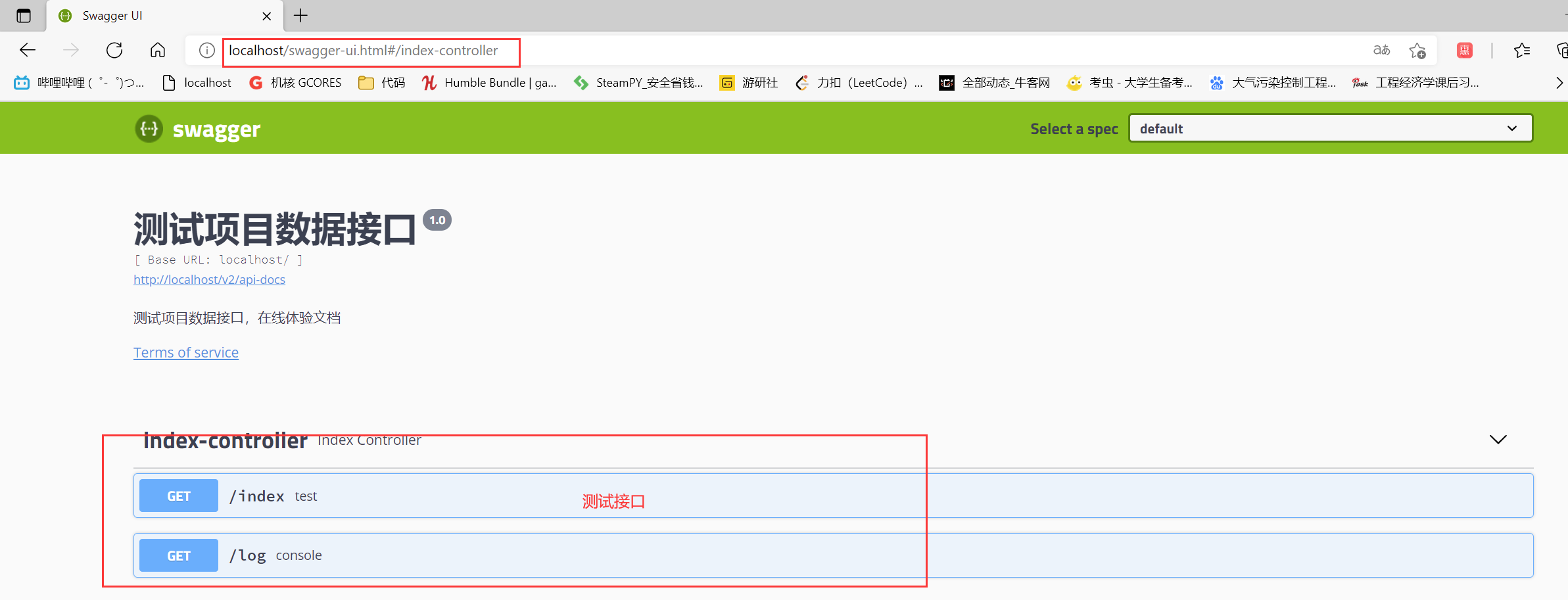
新版
http://localhost:服务器端口/doc.html
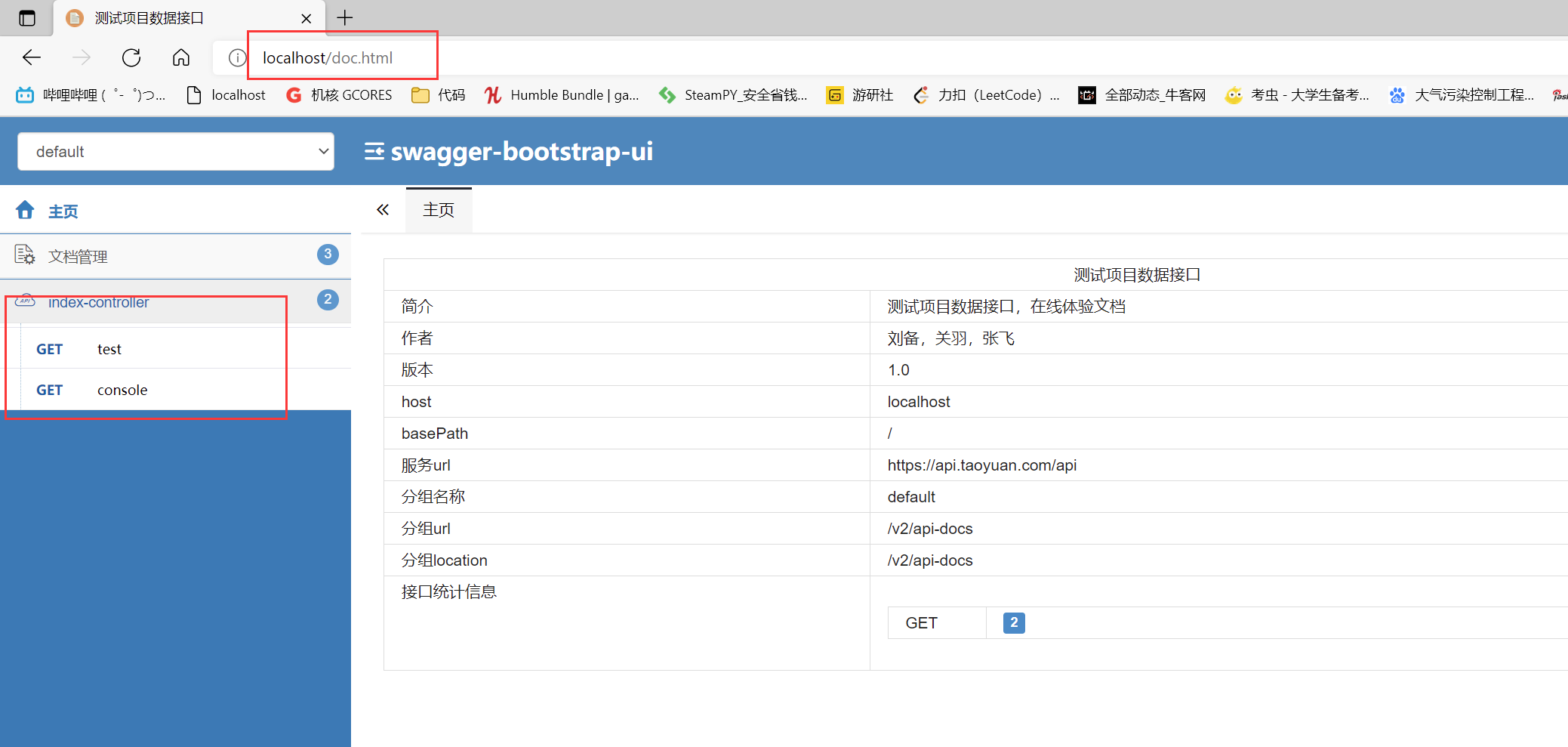
3、注解的使用和认识
 /**
 * 在完成上述配置之后,其实就已经可以产生帮助文档了,但是这样的文档主要针对请求本身,而描述主要来源于函数等命名产生。
 * 对用户体验不好,我们通常需要自己增加一些说明来丰富文档内容。如果:
 * 加入
 *
 * @ApiIgnore 忽略暴露的 api
 * @ApiOperation(value = "查找", notes = "根据用户 ID 查找用户")
 * 添加说明
 * <p>
 * <p>
 * 其他注解:
 * @Api :用在类上,说明该类的作用
 * @ApiImplicitParams :用在方法上包含一组参数说明
 * @ApiResponses :用于表示一组响应
 * 完成上述之后,启动springboot程序,
 * 旧访问:http://localhost:8080/swagger-ui.html
 * 新访问:http://localhost:8080/doc.html
 * @ApiOperation() 用于方法;表示一个http请求的操作
 * value用于方法描述
 * notes用于提示内容
 * tags可以重新分组(视情况而用)
 * @ApiParam() 用于方法,参数,字段说明;表示对参数的添加元数据(说明或是否必填等)
 * name–参数名
 * value–参数说明
 * required–是否必填
 * @ApiModel()用于类 ;表示对类进行说明,用于参数用实体类接收
 * value–表示对象名
 * description–描述
 * 都可省略
 * @ApiModelProperty()用于方法,字段; 表示对model属性的说明或者数据操作更改
 * value–字段说明
 * name–重写属性名字
 * dataType–重写属性类型
 * required–是否必填
 * example–举例说明
 * hidden–隐藏
 * @ApiIgnore()用于类或者方法上,可以不被swagger显示在页面上 比较简单, 这里不做举例
 * @ApiImplicitParam() 用于方法
 * 表示单独的请求参数
 * @ApiImplicitParams() 用于方法,包含多个 @ApiImplicitParam
 * name–参数ming
 * value–参数说明
 * dataType–数据类型
 * paramType–参数类型
 * example–举例说明
 */
4、案例分析
4.1 实体注解定义
package com.example.entity;

import io.swagger.annotations.ApiModel;
import io.swagger.annotations.ApiModelProperty;
import lombok.AllArgsConstructor;
import lombok.Data;
import lombok.NoArgsConstructor;
import lombok.ToString;
import lombok.experimental.Accessors;

@Data // getter/setter
@ToString // toString
@AllArgsConstructor // 有参构造函数
@NoArgsConstructor // 无参构造函数
@Accessors(chain = true)
@ApiModel(description = "用户实体")
public class User {

    // 用户编号
    @ApiModelProperty(value = "用户编号",required=true)
    private Integer id;
    // 用户昵称
    @ApiModelProperty(value = "用户昵称",required=true)
    private String nickname;
    // 用户密码
    @ApiModelProperty(value = "用户密码",required=true)
    private String password;
    // 用户头像
    @ApiModelProperty(value = "用户头像",required=true)
    private String avatar;
    // 用户地址
    @ApiModelProperty(value = "用户地址",required=true)
    private String adddress;

}
4.2 controller定义
package com.example.controller;

import com.example.entity.Course;
import com.example.entity.User;
import com.example.service.WeiXinPayService;
import io.swagger.annotations.Api;
import io.swagger.annotations.ApiImplicitParam;
import io.swagger.annotations.ApiOperation;
import lombok.extern.slf4j.Slf4j;
import org.slf4j.Logger;
import org.slf4j.LoggerFactory;
import org.springframework.beans.factory.annotation.Autowired;
import org.springframework.web.bind.annotation.GetMapping;
import org.springframework.web.bind.annotation.RestController;

@RestController
@Slf4j
@Api(description = "用户管理")
public class UserController {

    // 初始化一个日志对象
//    private static final Logger log = LoggerFactory.getLogger(UserController.class);

    @Autowired
    private WeiXinPayService weixinPayService;

    @GetMapping("/user/list")
    @ApiOperation(value = "用户列表查询并分页")
    public String user(){
        userSave(new User());
        return "success";
    }

    @GetMapping("/course/save")
    @ApiOperation(value = "用户保存")
    @ApiImplicitParam(name = "user", value = "用户对象")
    public String userSave(User user){
        return "success";
    }
}
4.3 最终效果
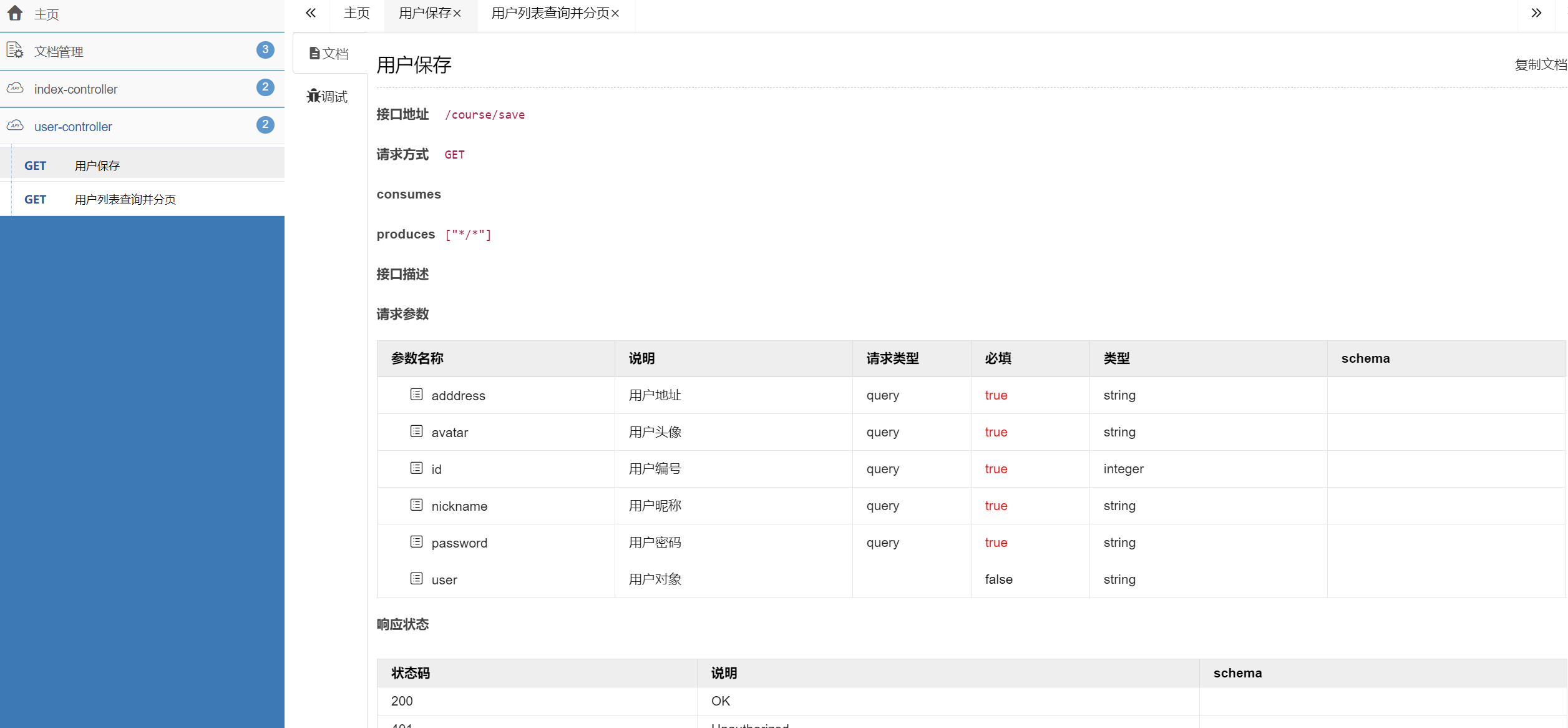





 扫一扫
扫一扫


 3324
3324

 被折叠的 条评论
为什么被折叠?
被折叠的 条评论
为什么被折叠?
 到【灌水乐园】发言





