



 本文深入探讨了如何利用.NET框架3.0的新特性高效地读取和解析Excel 2007/2010的XLSX文件格式,包括理解XLSX文件结构、使用System.IO.Packaging简化操作等技巧。
Over the past week I have been learning about the complexity of working with Excel 2007 native file format - XLSX or as it is known correctly, SpreadsheetXL. There is three ways to work with it, firstly build your own parser - just too much work for me or second use OpenXML SDK format which Microsoft provides. The current version, at time of writing that was version 1, of the SDK is not great: there is very little (if any) benefit of using it over the third method. There is a V2 SDK currently in beta which looks brilliant and frankly when released would be the recommend route.
The third way, which is the way I chose is the uses new features introduced in the .NET Framework 3.0.
What is a XLSX file? A XLSX file is actually just a ZIP file which contains a number of XML files in it.

This means all you need to do is open the XLSX file as a ZIP file, get the right XML files (or parts as they are referred to) out of it and parse those.
If you are thinking this is a .NET only solutionthe chart below is from Doug Mahugh which shows a number of ways across a number of technologies/OS’s to do the same thing. This series will focus on the .NET way.
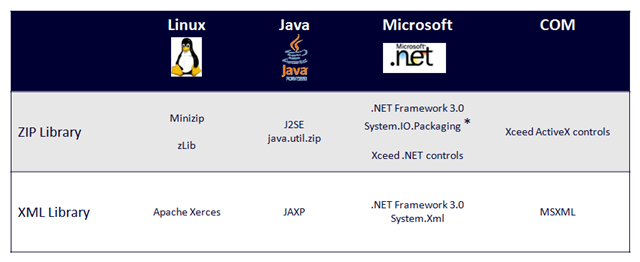
What is nice about using System.IO.Packaging to read the file over the direct ZIP options, is that there are some helper methods to make it easier when working with any of the new formats (docx, xlsx etc...)





 扫一扫
扫一扫


 1768
1768

 被折叠的 条评论
为什么被折叠?
被折叠的 条评论
为什么被折叠?
 到【灌水乐园】发言





