java自习室 day 2

本文深入探讨了Java内存管理机制,包括JVM管理的内存分类如MethodArea、RuntimeConstantPool、Heapspace等,以及内存分配的方式和并发问题。同时,详细解析了HashMap的工作原理,包括其基于数组的底层实现、碰撞处理策略以及对象创建和初始化过程。

java基础知识

HashMap

HashMap是如何工作的
作者:阿进的写字台
HashMap底层是基于数组,数组中存储Node节点,发生碰撞时,采用拉链法,节点数小于8时形成链表,大于8时用红黑树。

Java 内存管理

内存管理
作者:CHEN川
JVM管理的内存分为两类,所有线程共享的数据区与线程隔离的数据区
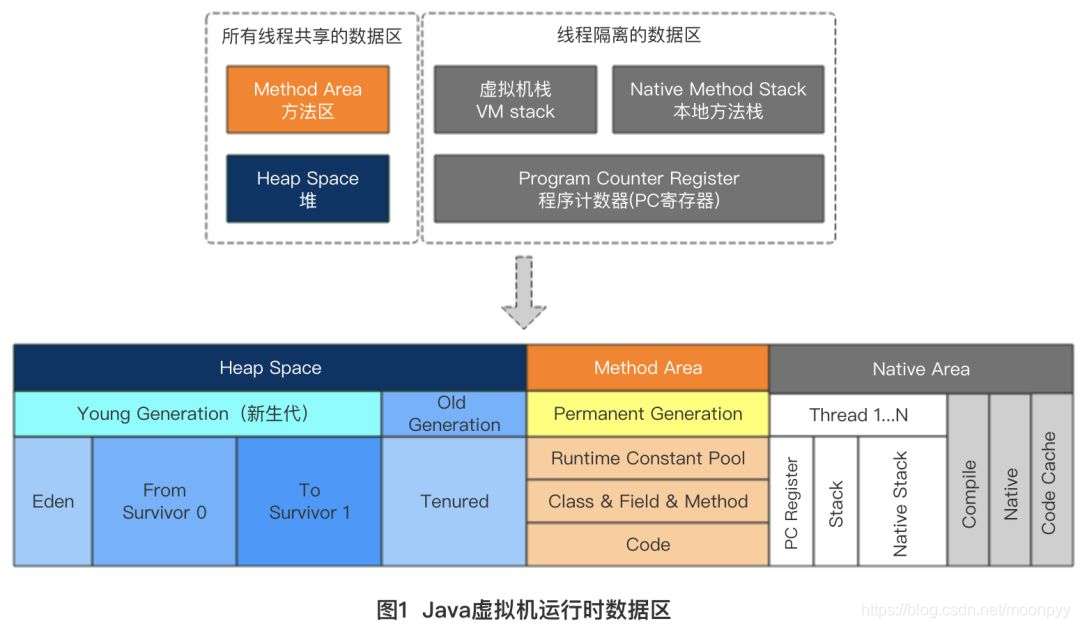
JVM内存模型

内存分类

Method Area

存储已被虚拟机加载的类信息、常量、静态变量、JIT编译后的代码等数据。

Runtime Constant Pool

常量池被加载到内存之后的版本,运行期间产生的新的常量也可以放入运行时常量池。
常量池主要用于存放字面量和符号引用量。

Heap space

java堆可以分为新生代和老年代,新生代包括Eden、From Survivor,To Survivor。
Eden与Survivor的比值一般为8:1,新生对象在新生代Eden区中分配,当Eden区没有足够的空间进行分配时,则触发一次Minor GC,将对象Copy到Survivor区,如果Survivor区没有足够的空间来容纳,则会通过分配担保机制提前转移到老年代去。
Survivor区的对象经过若干次GC后仍然存活会置入老年代。

VMStack & Native Method Stack

虚拟机栈用于描述方法执行:每个方法执行的同时会创建一个栈帧用于存储局部变量表、操作数栈、动态连接、方法出口等信息。

public void sayHello(String name) {
    System.out.println("hello " + name);
    greet(name);
    bye();
}
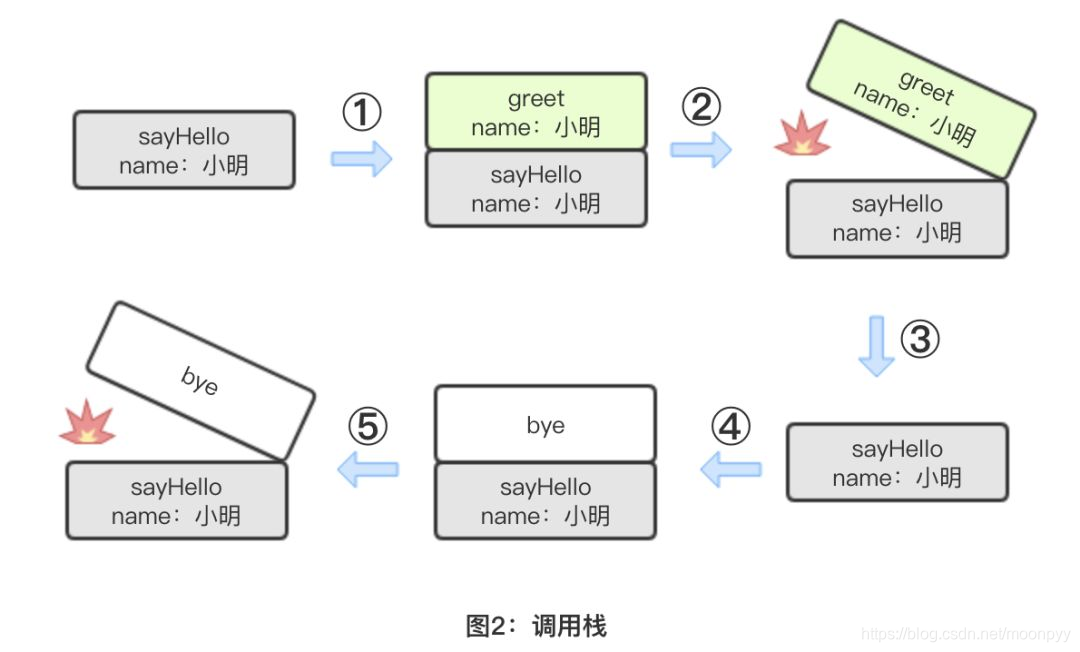
在这里插入图片描述

Program Counter Register

多线程中为了保证每个线程在切换后能恢复切换之前的程序执行位置,每个线程都必须有自己的程序计数器,互不干扰。

内存分配

内存分配的两种方式
  1. 指针碰撞
    堆内存规整无碎片时使用
    将用过的内存整合到一边,没用过的整合到一边,中间有一个分界指针,只需要向未分配的内存方向移动边界指针到对象内存需要的大小即可。
  2. 空闲碰撞
    适用于堆内存不规整的情况。
    虚拟机维护一个列表,列表记录的是可用的内存,分配的时候,找一块足够大的内存块划分给对象实例,然后更新列表。
内存分配并发问题

采用两种方式来保证线程安全:

  1. (CAS)乐观锁+失败重试
  2. TLAB:为每个线程在Eden区分配一块内存,给对象分配内存时,首先在TLAB分配,再采用CAS分配。

对象创建

内存与对象创建
作者:SnailClimb在csdn
对象创建的过程:
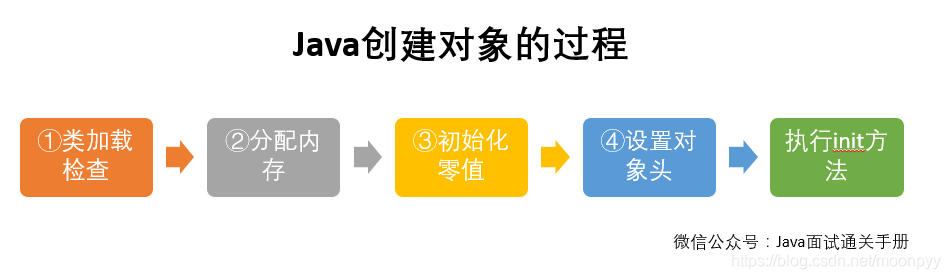
在这里插入图片描述

对象头

对象头中存放类的元数据信息,对象的哈希码,对象的GC分代年龄等信息

初始化

上面步骤执行完后,对象才会按照程序员的意愿进行初始化。

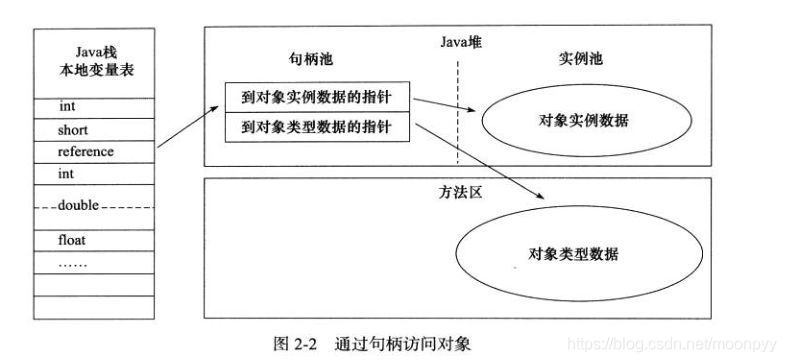
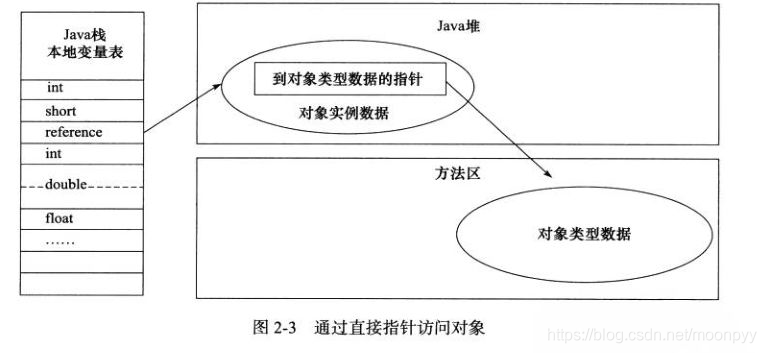
对象的访问定位
  1. 使用句柄
    在这里插入图片描述

  2. 直接指针
    在这里插入图片描述

帮我优化一下 在线选座代码的座位 改为接口模拟 到时候我写出接口 给我提供结构 包括座位的价格也是后台接口来的 包括时间段也是后台来的 <template> <view class="container"> <!-- 场馆信息 --> <view class="venue-info"> <text class="venue-name">{{ venueInfo.name }}</text> <text class="venue-address">{{ venueInfo.address }}</text> </view> <!-- 日期选择 --> <view class="date-section"> <view class="section-title">选择日期</view> <scroll-view scroll-x class="date-scroll"> <view class="date-list"> <view class="date-item" v-for="(date, index) in dateList" :key="index" :class="{ active: selectedDate === date.value }" @click="selectDate(date.value)" > <text class="date-week">{{ date.week }}</text> <text class="date-day">{{ date.day }}</text> <text class="date-label">{{ date.label }}</text> </view> </view> </scroll-view> </view> <!-- 多选模式切换 --> <view class="mode-toggle"> <text>跨场地多选:</text> <switch :checked="allowMultiSelect" @change="toggleMultiSelect" /> </view> <!-- 图例说明 --> <view class="reserve_legend"> <view class="dp"> <view class="reserve_legend_view"> <view class="reserve_legend_view_i bg_one"></view> <text>可预订</text> </view> <view class="reserve_legend_view"> <view class="reserve_legend_view_i bg_two"></view> <text>已被订</text> </view> <view class="reserve_legend_view"> <view class="reserve_legend_view_i bg_three"></view> <text>已选中</text> </view> </view> </view> <!-- 核心表格区域 --> <view class="reserve_middle"> <scroll-view class="middle_scroll_container" scroll-x scroll-y :scroll-top="scrollTop" :style="{ height: scrollContainerHeight + 'rpx' }" > <view class="table_content" :style="{ width: contentWidth + 'rpx', height: contentHeight + 'rpx' }"> <view class="header-sticky-row"> <view class="corner-cell"> <text>时间</text> </view> <view class="mid_site_text" v-for="(court, index) in courtList" :key="'header-' + index" > {{ court.name }} </view> </view> <view class="time-sticky-col"> <view class="mid_time_cell" v-for="(timeSlot, idx) in timeSlots" :key="'time-' + idx" > {{ timeSlot.label }} </view> </view> <view class="data-scroll-area"> <view v-for="(timeSlot, timeIdx) in timeSlots" :key="'row-' + timeIdx" class="mid_row dp" > <view class="mid_col" v-for="(court, colIdx) in courtList" :key="'cell-' + timeIdx + '-' + colIdx" @click="handleChoose(timeIdx, colIdx)" > <view class="mid_col_v" :class="[ bookedData[timeIdx][colIdx] ? 'bought-grid' : '', isSelected(timeIdx, colIdx) ? 'selected-grid' : '', !bookedData[timeIdx][colIdx] && !isSelected(timeIdx, colIdx) ? 'unselected-grid' : '' ]" > <text class="price-text">¥{{ getPrice(timeSlot, court) }}</text> </view> </view> </view> </view> </view> </scroll-view> </view> <view class="" style="height: 100px;"> </view> <!-- 底部操作栏 --> <view class="reserve_bottom"> <view class="btm_txt" @click="showSelectionDetails"> <text class="btm_price">当前选择:</text> <text class="btm_nums">{{ selectionSummary }}</text> </view> <view class="btm_order" :class="hasSelection ? 'btm_blue' : 'btm_gray'" @click="openPage"> <text>提交订单</text> </view> </view> <!-- 多选详情弹窗 --> <uni-popup ref="popup" type="bottom"> <view class="popup-content"> <view class="popup-header"> <text class="popup-title">已选场地详情</text> <uni-icons type="closeempty" size="24" color="#999" @click="closePopup"></uni-icons> </view> <scroll-view scroll-y class="selection-list"> <view v-for="(item, index) in selectedSeats" :key="index" class="selection-item"> <text class="item-time">{{ timeSlots[item.row].label }}</text> <text class="item-court">{{ courtList[item.col].name }}</text> <text class="item-price">¥{{ getPrice(timeSlots[item.row], courtList[item.col]) }}</text> </view> </scroll-view> </view> </uni-popup> </view> </template> <script> export default { data() { return { allowMultiSelect: false, // 控制是否允许跨场地多选 selectedSeats: [], // 存储所有选中的座位 [{row, col}] weekArray: [], weekIndex: 0, courtList: [], timeSlots: [], priceMatrix: {}, bookedData: [], selectedSeat: null, selectedTimeSlot: null, selectedCourt: null, chooseInfo: '', scrollLeft: 0, scrollTop: 0, cellWidth: 140, rowHeight: 88, colCount: 8,//几点开始 rowCount: 16, // 8点到24点共16个时间段 scrollContainerHeight: 0, // 新增:滚动容器高度 contentWidth: 0, contentHeight: 0, selectedDate: '', dateList: [], venueInfo: { name: '飞扬羽毛球馆', address: '朝阳区建国路88号' }, } }, mounted() { this.calculateContainerHeight(); // 监听窗口大小变化 uni.onWindowResize(this.calculateContainerHeight); }, beforeDestroy() { // 移除监听 uni.offWindowResize(this.calculateContainerHeight); }, onLoad() { this.generateDateList() if (this.dateList.length > 0) { this.selectedDate = this.dateList[0].value } this.generateCourtList() this.generateTimeSlots() this.initPriceMatrix() this.initBookedData() this.contentWidth = 95 + this.colCount * this.cellWidth this.contentHeight = 40 + this.rowCount * this.rowHeight }, computed: { // 当前是否有选中的座位 hasSelection() { return this.selectedSeats.length > 0; }, // 底部显示的摘要信息 selectionSummary() { if (this.selectedSeats.length === 0) return '未选择'; if (!this.allowMultiSelect) { const seat = this.selectedSeats[0]; return `${this.courtList[seat.col].name} ${this.timeSlots[seat.row].label}`; } return ` ${this.selectedSeats.length} 个场地 (点击查看)`; } }, methods: { calculateContainerHeight() { // 获取系统信息 uni.getSystemInfo({ success: (res) => { // 计算可用高度(屏幕高度 - 顶部导航栏高度 - 底部操作栏高度 - 其他元素高度) const windowHeight = res.windowHeight * res.pixelRatio; const topHeight = 200; // 顶部区域大约高度(rpx) const bottomHeight = 120; // 底部按钮高度(rpx) const otherElementsHeight = 300; // 其他元素高度(rpx) // 计算滚动区域可用高度 const availableHeight = windowHeight - topHeight - bottomHeight - otherElementsHeight; // 设置滚动容器高度(确保不小于最小高度) this.scrollContainerHeight = Math.max(availableHeight, 600); } }); }, // 切换多选模式 toggleMultiSelect(e) { this.allowMultiSelect = e.detail.value; // 切换模式时清空选择 this.selectedSeats = []; }, // 检查指定位置是否被选中 isSelected(timeIdx, colIdx) { return this.selectedSeats.some(seat => seat.row === timeIdx && seat.col === colIdx ); }, // 处理用户选择 handleChoose(timeIdx, colIdx) { if (this.bookedData[timeIdx][colIdx]) return; const seatIndex = this.selectedSeats.findIndex(seat => seat.row === timeIdx && seat.col === colIdx ); if (seatIndex !== -1) { // 已选中则取消 this.selectedSeats.splice(seatIndex, 1); } else { // 多选模式直接添加 if (this.allowMultiSelect) { this.selectedSeats.push({ row: timeIdx, col: colIdx }); } else { // 单选模式替换当前选择 this.selectedSeats = [{ row: timeIdx, col: colIdx }]; } } }, // 显示多选详情弹窗 showSelectionDetails() { if (this.allowMultiSelect && this.selectedSeats.length > 0) { this.$refs.popup.open(); } }, // 关闭弹窗 closePopup() { this.$refs.popup.close(); }, // 生成日期列表 generateDateList() { const dates = [] const today = new Date() for (let i = 0; i < 7; i++) { const date = new Date(today) date.setDate(today.getDate() + i) const weekDays = ['周日', '周一', '周二', '周三', '周四', '周五', '周六'] const week = weekDays[date.getDay()] const day = date.getDate() const month = date.getMonth() + 1 let label = '' if (i === 0) { label = '今天' } else if (i === 1) { label = '明天' } else { label = `${month}月${day}日` } dates.push({ value: date.toISOString().split('T')[0], week, day, label }) } this.dateList = dates }, // 选择日期 selectDate(date) { this.selectedDate = date // 重新获取时间段和场地数据 console.log('重新获取时间段和场地数据'); }, generateCourtList() { this.courtList = Array.from({ length: this.colCount }, (_, i) => ({ id: i + 1, name: `${i + 1}号场` })) }, // generateTimeSlots() { // const slots = [] // for (let h = 8; h < 8 + this.rowCount; h++) { // slots.push({ // value: `${h}:00`, // label: `${h}:00` // }) // } // this.timeSlots = slots // }, generateTimeSlots() { const slots = []; // 生成8:00-24:00的时间段 for (let h = 8; h < 24; h++) { const nextHour = h + 1; const startTime = `${String(h).padStart(2, '0')}:00`; const endTime = nextHour === 24 ? '24:00' : `${String(nextHour).padStart(2, '0')}:00`; slots.push({ value: startTime, label: `${startTime}-${endTime}` // 显示为"8:00-9:00"格式 }); } this.timeSlots = slots; }, initPriceMatrix() { this.priceMatrix = {} this.timeSlots.forEach(ts => { this.priceMatrix[ts.value] = {} this.courtList.forEach(court => { this.priceMatrix[ts.value][court.id] = ts.value >= '18:00' ? 120 + (court.id - 1) * 10 : 80 + (court.id - 1) * 5 }) }) }, getPrice(timeSlot, court) { return this.priceMatrix[timeSlot.value]?.[court.id] || 80 }, initBookedData() { this.bookedData = this.timeSlots.map(() => Array(this.colCount).fill(false)) const booked = ['0-0', '0-1', '1-2', '2-3', '5-4'] booked.forEach(str => { const [col, row] = str.split('-').map(Number) if (row < this.bookedData.length && col < this.colCount) { this.$set(this.bookedData[row], col, true) } }) }, onScroll(e) { this.scrollLeft = e.detail.scrollLeft this.scrollTop = e.detail.scrollTop }, openPage() { if(!global.token){ this.$message.info('请先登录') setTimeout(function(){ uni.switchTab({ url:'/pages/profile/profile' }) },800) return false } if (!this.hasSelection) return if (this.allowMultiSelect) { const details = this.selectedSeats.map(seat => ({ time: this.timeSlots[seat.row].label, court: this.courtList[seat.col].name, price: this.getPrice(this.timeSlots[seat.row], this.courtList[seat.col]) })); uni.showToast({ title: `提交${details.length}个场地`, icon: 'success' }); console.log('预定详情:', details); } else { const seat = this.selectedSeats[0]; uni.showToast({ title: '提交成功', icon: 'success' }); console.log('预定:', { time: this.timeSlots[seat.row].label, court: this.courtList[seat.col].name, price: this.getPrice(this.timeSlots[seat.row], this.courtList[seat.col]) }) } } } } </script> <style> page { width: 100%; height: 100%; } /* 新增样式:确保时间单元格内容可换行 */ .mid_time_cell { white-space: normal !important; line-height: 1.4 !important; padding: 10rpx 5rpx !important; font-size: 24rpx !important; /* 适当减小字体大小 */ } /* 调整时间列宽度 */ .time-sticky-col { width: 120rpx !important; /* 增加宽度以容纳更长的文本 */ } /* 调整数据区域位置 */ .data-scroll-area { left: 120rpx !important; /* 与时间列宽度一致 */ } /* 调整单元格高度 */ .mid_time_cell, .mid_col { height: 80rpx !important; /* 略微减小单元格高度 */ } /* 确保表格内容区域高度自适应 */ .table_content { min-height: 100% !important; } /* 添加响应式字体大小 */ @media (max-width: 600px) { .mid_time_cell { font-size: 22rpx !important; } } .venue-info { background-color: #ffffff; padding: 30rpx; margin-bottom: 20rpx; } .venue-name { font-size: 36rpx; font-weight: bold; color: #000000; display: block; margin-bottom: 10rpx; } .venue-address { font-size: 28rpx; color: #666666; } /* 添加多选切换样式 */ .mode-toggle { display: flex; align-items: center; padding: 20rpx 30rpx; background-color: #fff; margin-bottom: 20rpx; font-size: 28rpx; } /* 弹窗样式 */ .popup-content { background-color: #fff; border-radius: 20rpx 20rpx 0 0; padding: 30rpx; } .popup-header { display: flex; justify-content: space-between; align-items: center; margin-bottom: 20rpx; } .popup-title { font-size: 32rpx; font-weight: bold; } .selection-list { max-height: 60vh; } .selection-item { display: flex; justify-content: space-between; padding: 20rpx 0; border-bottom: 1rpx solid #eee; } .item-time, .item-court { font-size: 28rpx; } .item-price { color: #f96010; font-weight: bold; } .section-title { font-size: 32rpx; font-weight: bold; color: #000000; margin-bottom: 20rpx; padding: 0 30rpx; } .date-section { background-color: #ffffff; padding: 30rpx 0; margin-bottom: 20rpx; } .date-scroll { white-space: nowrap; } .date-list { display: flex; padding: 0 30rpx; gap: 20rpx; } .date-item { display: flex; flex-direction: column; align-items: center; padding: 20rpx 30rpx; background-color: #f5f5f5; border-radius: 16rpx; min-width: 120rpx; } .active { background-color: #f96010; color: #ffffff; } .date-week { font-size: 24rpx; margin-bottom: 8rpx; } .date-day { font-size: 36rpx; font-weight: bold; margin-bottom: 8rpx; } .date-label { font-size: 24rpx; } .venue_reserve { display: flex; flex-direction: column; width: 100%; height: 100%; background-color: #f5f5f5; } /* ========== 顶部日期 ========== */ .reserve_top {} .top_view { display: flex; justify-content: space-around; padding: 20rpx 0; background: white; border-bottom: 1rpx solid #eee; } .top_date { width: 13%; height: 70rpx; color: #666; background-color: #F5F5F8; border: 1rpx solid #ccc; text-align: center; font-size: 24rpx; padding-top: 10rpx; line-height: 1.4; } .top_date_active { background-color: #FFFFFF; border: 1rpx solid #f96010; color: #f96010; } /* ========== 图例 ========== */ .reserve_legend { display: flex; justify-content: center; margin: 20rpx 0; font-size: 24rpx; } .dp { display: flex; } .reserve_legend_view { display: flex; align-items: center; margin: 0 30rpx; } .reserve_legend_view_i { width: 30rpx; height: 30rpx; margin-right: 10rpx; } .bg_one { background-color: #6acb6c; } .bg_two { background-color: #CCCCCC; } .bg_three { background-color: #f96010; } /* ========== 表格区域 ========== */ .reserve_middle { flex: 1; margin: 0 30rpx; border-radius: 16rpx; overflow: hidden; box-shadow: 0 4rpx 10rpx rgba(0,0,0,0.05); position: relative; } .middle_scroll_container { width: 100%; height: 100%; white-space: nowrap; } .table_content { position: relative; background: white; } /* 左上角小方块 */ .corner-cell { position: sticky; left: 0; top: 0; width: 122rpx; height: 40rpx; background: #eaeaea; z-index: 10; display: flex; justify-content: center; align-items: center; font-size: 24rpx; font-weight: bold; border-right: 1rpx solid #ddd; border-bottom: 1rpx solid #eee; } /* 顶部:场地标题行(横向滚动时固定在上方) */ .header-sticky-row { position: sticky; top: 0; z-index: 9; display: flex; height: 40rpx; background: #f8f8f8; border-bottom: 1rpx solid #eee; } .mid_site_text { width: 140rpx; text-align: center; font-size: 24rpx; color: #666; display: flex; justify-content: center; align-items: center; } /* 左侧:时间列(纵向滚动时固定在左边) */ .time-sticky-col { position: sticky; left: 0; z-index: 8; width: 95rpx; background: #f8f8f8; border-right: 1rpx solid #ddd; } .mid_time_cell { height: 88rpx; line-height: 88rpx; text-align: center; font-size: 26rpx; color: #333; border-bottom: 1rpx solid #eee; font-weight: bold; } /* 数据区域:真正滚动的内容 */ .data-scroll-area { position: absolute; left: 95rpx; top: 40rpx; min-width: max-content; } .mid_row { display: flex; border-bottom: 1rpx solid #eee; } .mid_col { width: 140rpx; height: 88rpx; display: flex; justify-content: center; align-items: center; padding: 10rpx; box-sizing: border-box; } .mid_col_v { width: 100%; height: 100%; background-size: 100% 100%; background-repeat: no-repeat; background-position: center; display: flex; flex-direction: column; justify-content: center; align-items: center; color: white; font-size: 24rpx; font-weight: bold; text-shadow: 1rpx 1rpx 2rpx rgba(0,0,0,0.5); } .unselected-grid { background: #6acb6c; } .bought-grid { background: #CCCCCC; } .selected-grid { background-color: #f96010; } .price-text { color: white; font-size: 22rpx; font-weight: normal; text-shadow: 1rpx 1rpx 2rpx rgba(0,0,0,0.8); } /* ========== 底部按钮 ========== */ .reserve_bottom { position: fixed; bottom: 0; left: 0; z-index: 999; display: flex; height: 100rpx; width: 100%; line-height: 100rpx; background: white; box-shadow: 0 -2rpx 10rpx rgba(0,0,0,0.05); /* 增加安全区域处理 */ padding-bottom: constant(safe-area-inset-bottom); /* 兼容 iOS < 11.2 */ padding-bottom: env(safe-area-inset-bottom); /* 兼容 iOS >= 11.2 */ box-sizing: content-box; /* 确保padding不包含在高度内 */ } .btm_txt { width: 70%; padding-left: 30rpx; color: #A5A5A5; font-size: 28rpx; white-space: nowrap; overflow: hidden; text-overflow: ellipsis; } .btm_nums { color: #FF0000; font-size: 32rpx; font-weight: bold; } .btm_order { width: 30%; display: flex; justify-content: center; align-items: center; color: white; font-size: 30rpx; } .btm_gray { background-color: #CCCCCC; } .btm_blue { background-color: #f96010; } </style>
12-31
评论
添加红包

请填写红包祝福语或标题

红包个数最小为10个

红包金额最低5元

当前余额3.43前往充值 >
需支付:10.00
成就一亿技术人!
领取后你会自动成为博主和红包主的粉丝 规则
hope_wisdom
发出的红包
实付
使用余额支付
点击重新获取
扫码支付
钱包余额 0

抵扣说明:

1.余额是钱包充值的虚拟货币,按照1:1的比例进行支付金额的抵扣。
2.余额无法直接购买下载,可以购买VIP、付费专栏及课程。

余额充值