



 SecureCRT允许用户针对每个会话单独设置日志,配置包括每次断开重连时生成新的日志文件,文件命名包含时间信息如%Y%M%D_%h_%m_%s.log。日志内容每一行都带有时间记录,如%Y%M%D_%h:%m:%s。用户可以利用%H,%S,%Y等变量自定义文件名和内容格式。
SecureCRT日志设置时针对每个会话单独设置的
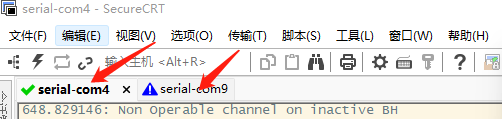
下图两个串口打印的地方,每个是一个会话。
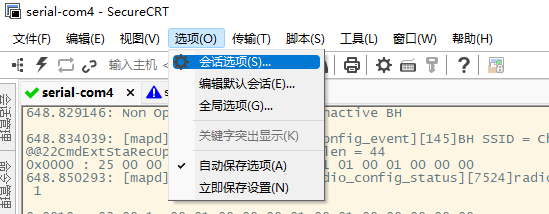
打开【选项】
按照如下选项进行配置:
每次断开重新链接都会重新存一个日志文件,文件生成时间以秒为最小单位。
并且每行都有时间记录。
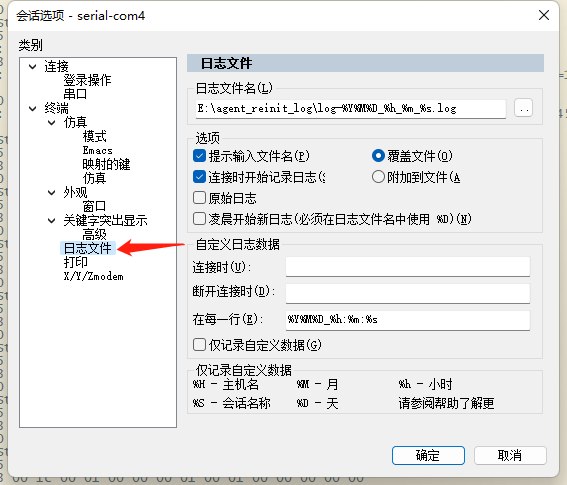
一般使用”年月日时分秒毫秒“就够。
如果【文件名】设置如下:%S-%Y%M%D_%h_%m_%s.log
文件结果会存成这个样子:

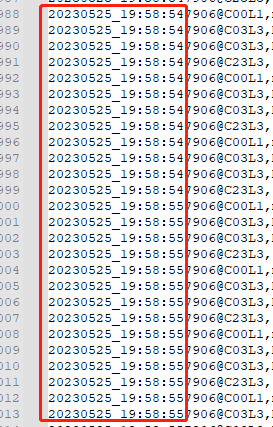
如果【在每一行(E)】设置如下:%Y%M%D_%h:%m:%s
文件内容会存成这个样子:
至于那些%对应的内容,SecurCRT有详细的帮助文档,请参考下面原文:
In the dialog, this section lists some of the variables that SecureCRT can expand when writing to the log file. A complete list is shown below.

%H - hostname (not valid with protocols that do not specify a host, such as Serial)

%S - session name                   //session 名称

%Y - four-digit year                //4位的年

%y - two-digit year

%M - two-digit month                 //2位的月

%D - two-digit day of the month      //2位的日

%P - port (not valid with protocols that do not specify a port, such as RLogin)

%h - two-digit hour                  //2位的时

%m - two-digit minute                //2位的分

%s - two-digit seconds               //2位的秒

%t - three-digit milliseconds        //3位毫秒

%F - directory path starting below the "Sessions" folder

%% - percent (%)

%envvar% - environment variable

Note: The environment variable substitution occurs first.





 扫一扫
扫一扫


 4846
4846

 被折叠的 条评论
为什么被折叠?
被折叠的 条评论
为什么被折叠?
 到【灌水乐园】发言





