



 本文介绍了一个使用Delphi编写的表单应用,展示了如何通过ADO.NET连接数据库、读写文件并实现数据的加载、更新和保存。重点在于FormMain类中ckbxConnectionInd和按钮事件的处理,适合数据库操作初学者学习。
1. Form设计
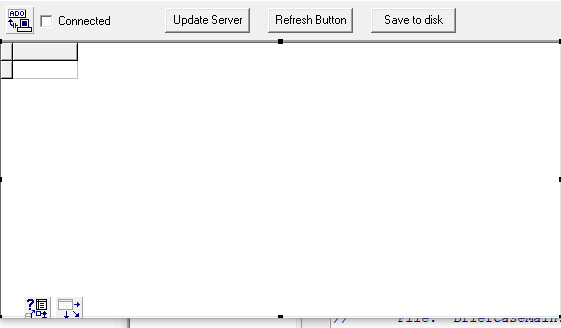
2. 源码
#include <vcl.h>
#pragma hdrstop
#include "BriefCaseMain.h"
//---------------------------------------------------------------------------
#pragma package(smart_init)
#pragma resource "*.dfm"
TfrmMain *frmMain;
//---------------------------------------------------------------------------
__fastcall TfrmMain::TfrmMain(TComponent* Owner)
: TForm(Owner)
{
BaseFileName = "EMPLOYEE.ADTG";
}
//---------------------------------------------------------------------------
void __fastcall TfrmMain::LoadData()
{
DataFileName = ExtractFilePath(ParamStr(0))+ BaseFileName;
// If a persisted datafile exists, assume we exited in a disconnected
// (offline) state and load the data from the file.
if (FileExists(DataFileName))
{
adodsEmployees->LoadFromFile(DataFileName);
}
else
{
// Otherwise establish the connection and get data from the database
ckbxConnectionInd->Checked = true;
adodsEmployees->Open();
}
}
//---------------------------------------------------------------------------
void __fastcall TfrmMain::UpdateData()
{
// Connect to the database and send the pending updates }
ckbxConnectionInd->Checked = true;
adodsEmployees->UpdateBatch(arAll);
DeleteFile(DataFileName);
}
//---------------------------------------------------------------------------
void __fastcall TfrmMain::SaveData()
{
adodsEmployees->SaveToFile(DataFileName, pfADTG);
}
//---------------------------------------------------------------------------
void __fastcall TfrmMain::ckbxConnectionIndClick(TObject *Sender)
{
if(ckbxConnectionInd->Checked)
{
// Toggle the connections state
adocnctnConnection->Open("", "");
adodsEmployees->Connection = adocnctnConnection;
adodsEmployees->Open();
}
else
{
// Note here you must clear the connection property of the
// dataset before closing the connection. Otherwise the dataset
// will close with the connection.
adodsEmployees->Connection = NULL;
adocnctnConnection->Close();
}
}
//---------------------------------------------------------------------------
void __fastcall TfrmMain::btnUpdateButtonClick(TObject *Sender)
{
UpdateData();
}
//---------------------------------------------------------------------------
void __fastcall TfrmMain::btnRefreshButtonClick(TObject *Sender)
{
// Close and reopen the dataset to refresh the data. Note that in this demo
// there is no checking for pending updates so they are lost if you click
// the refresh data button before clicking the Update database button.
ckbxConnectionInd->Checked = true;
adodsEmployees->Close();
adodsEmployees->CommandType = cmdTable;
adodsEmployees->CommandText = "Employee";
adodsEmployees->Open();
}
//---------------------------------------------------------------------------
void __fastcall TfrmMain::btnSaveButtonClick(TObject *Sender)
{
SaveData();
}
//---------------------------------------------------------------------------
void __fastcall TfrmMain::FormCloseQuery(TObject *Sender, bool &CanClose)
{
if(adodsEmployees->Active)
{
try
{
// When closing, update the database if connected or save it to disk if not
if (adocnctnConnection->Connected)
UpdateData();
else
SaveData();
}
catch(Exception &E)
{
Application->HandleException(Sender);
CanClose = MessageDlg("Data not saved/updated, exit anyway?", mtConfirmation,
TMsgDlgButtons() <<mbYes <<mbNo <<mbCancel, 0)== mbYes;
}
}
}
//---------------------------------------------------------------------------
void __fastcall TfrmMain::FormCreate(TObject *Sender)
{
adocnctnConnection->ConnectionString = "FILE NAME=" + DataLinkDir() + "\\BCDEMOS.UDL";
LoadData();
}
//---------------------------------------------------------------------------





 扫一扫
扫一扫


 被折叠的 条评论
为什么被折叠?
被折叠的 条评论
为什么被折叠?
 到【灌水乐园】发言





