#include <windows.h>
#include <stdio.h>
#include <comutil.h>
#include <FsrmQuota.h>  // Quota objects
#include <FsrmTlb.h>    // Contains CLSIDs.

#pragma comment(lib, "comsupp.lib")
void wmain(void)
{
	HRESULT hr = S_OK;
	IFsrmQuotaManager* pFsrmQuotaManager = NULL;
	IFsrmQuota* pQuota = NULL;
	VARIANT var;
	DATE date;
	SYSTEMTIME st;

	hr = CoInitializeEx(NULL, COINIT_APARTMENTTHREADED);
	if (FAILED(hr))
	{
		wprintf(L"CoInitializeEx() failed, 0x%x.\n", hr);
		return;
	}

	hr = CoCreateInstance(CLSID_FsrmQuotaManager,
		NULL,
		CLSCTX_LOCAL_SERVER,
		__uuidof(IFsrmQuotaManager),
		reinterpret_cast<void**> (&pFsrmQuotaManager));

	if (FAILED(hr))
	{
		wprintf(L"CoCreateInstance(FsrmQuotaManager) failed, 0x%x.\n", hr);
		if (E_ACCESSDENIED == hr)
			wprintf(L"Access denied. You must run the client with an elevated token.\n");

		goto cleanup;
	}

	// Get the quota that applies to the specified directory.
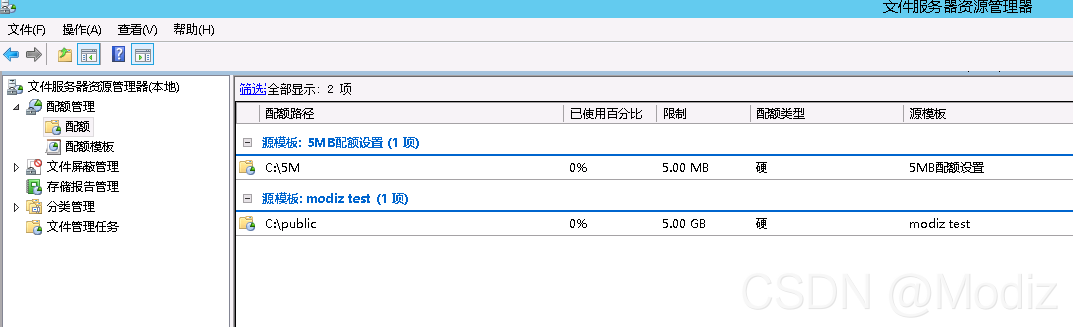
	hr = pFsrmQuotaManager->GetQuota(_bstr_t(L"c:\\5m"), &pQuota);
	if (FAILED(hr))
	{
		wprintf(L"pFsrmQuotaManager->GetQuota failed, 0x%x.\n", hr);
		goto cleanup;
	}

	VariantInit(&var);

	// Get the quota limit.
	hr = pQuota->get_QuotaLimit(&var);
	if (FAILED(hr))
	{
		wprintf(L"pQuota->get_QuotaLimit failed, 0x%x.\n", hr);
		goto cleanup;
	}

	wprintf(L"Limit: %I64u\n", var.ullVal);
	VariantClear(&var);

	// Get the amount of disk space usage charged to this quota.
	hr = pQuota->get_QuotaUsed(&var);
	if (FAILED(hr))
	{
		wprintf(L"pQuota->get_QuotaUsed failed, 0x%x.\n", hr);
		goto cleanup;
	}

	wprintf(L"Used: %I64u\n", var.ullVal);
	VariantClear(&var);

	// Get the highest amount of disk space usage charged to this quota.
	hr = pQuota->get_QuotaPeakUsage(&var);
	if (FAILED(hr))
	{
		wprintf(L"pQuota->get_QuotaPeakUsage failed, 0x%x.\n", hr);
		goto cleanup;
	}

	wprintf(L"PeakUsage: %I64u\n", var.ullVal);

	// Get the date and time when the peak usage occurred.
	hr = pQuota->get_QuotaPeakUsageTime(&date);
	if (FAILED(hr))
	{
		wprintf(L"pQuota->get_QuotaPeakUsageTime failed, 0x%x.\n", hr);
		goto cleanup;
	}

	if (VariantTimeToSystemTime(date, &st))
		wprintf(L"Peak usage occurred on %d\\%d\\%d at %d:%d", st.wMonth, st.wDay, st.wYear, st.wHour, st.wMinute);

cleanup:

	if (pFsrmQuotaManager)
		pFsrmQuotaManager->Release();

	if (pQuota)
		pQuota->Release();

	VariantClear(&var);

	CoUninitialize();
}








 扫一扫
扫一扫


 3329
3329

 被折叠的 条评论
为什么被折叠?
被折叠的 条评论
为什么被折叠?
 到【灌水乐园】发言





