



Default Route

本文详细解析了默认路由在企业网络中的角色与配置方法,通过实例展示了如何利用默认路由实现数据包的有效转发,特别是去往Internet的数据。文章还探讨了最长前缀匹配原则在路由选择中的作用。

背景需求

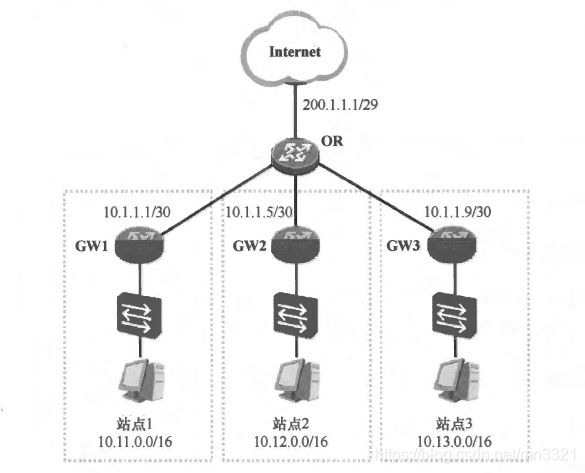
如下图所示的网络拓扑中,展示了一个企业的网络:

  • GW1、GW2及GW3是该企业各个站点的网关路由器,这些路由器各下联一台以太网交换机,同时上联出口路由器OR。
  • 以太网交换机连接着终端用户,出口路由器则连接着Internet。
  • 在该场景中,以OR为例,由于其连接着Internet,是整个网络的出口,因此需要它将负责把内网到达Internet的数据包转发出去,但是网络管理员不太可能在OR上配置到达Internet的明细路由,毕竟整个Internet包含的网段实在太多了,要想让OR获知到达整个Internet的路由显然不现实。
    在这里插入图片描述

默认路由

  • 在上述场景中,使用默认路由(Default Route )是一个非常不错的解决办法。
  • 默认路由也被称为缺省路由,是目的网络地址及网络掩码均为0的路由,即0.0.0.0/0或者0.0.0.0 0.0.0.0。这是一条非常特殊的路由,所有的目的IP地址都能被这条路由匹配。

示例

若在OR上部署静态路由,那么它可以采用如下配置:

[OR]ip route-static 0.0.0.0 0.0.0.0 200.1.1.1
[OR]ip route-static 10.11.0.0 16 10.1.1.1
[OR]ip route-static 10.12.0.0 16 10.1.1.5
[OR]ip route-static 10.13.0.01610.1.1.9
  • OR创建了4条静态路由,其中ip route-static 0.0.0.0 0.0.0.0 200.1.1.1命令(HW)为OR创建了一条静态的默认路由,该路由的下一跳为200.1.1.1 (OR到达Internet的下一跳IP地址)。
  • 基于这条路由,路由器能够将访问Internet的数据转发出去。
  • 当去往三个站点内网的数据包到达OR时,报文会优先匹配10.11.0.0/16、10.12.0.0/16及10.13.0.0/16这三条静态路由,并被送达相应站点的网关路由器,而目的地址为其他网段的报文(包括访问Internet的报文)则被默认路由匹配,被送往200.1.1.1。

引入问题

所有的目的IP地址都能够被默认路由匹配,那么在OR完成上述4条静态路由的配置后,当其收到去往某个站点的数据包时,为什么OR不会将该数据包转发到200.1.1.1,而是将其转发到相应站点的网关路由器呢?

问题分析

以发往站点1的10.11.1.1这个IP地址的报文为例,当OR收到该报文时,它会在路由表中查询该报文的目的IP地址:

  • 结果发现静态路由10.11.0.0/16及0.0.0.0/0都匹配该地址,
  • 最终OR会选择10.11.0.0/16路由来指导报文转发,这其实是“最长前缀匹配原则”作用的结果,因为10.11.0.0/16路由与目的1P地址10.11.1.1的匹配程度更高。
  • 实际上默认路由的匹配优先级实际上是最低的,如果路由表中存在默认路由,则只有当路由器没有发现匹配报文目的IP地址的任何具体路由之后,才会使用这条默认路由来转发数据,因此默认路由的下一跳又被视为“最后的求助对象”。
  • 对于GW1, GW2及GW3这三台网关路由器来说,也可以分别配置静态默认路由,它们只需将默认路由的下一跳配置为OR即可实现数据的全网互通。
  • 当它们转发到达其他站点的报文时,报文的目的地址能够被默认路由匹配,因此被送往OR,并由OR进一步转发到目的站点,而当它们转发到达Internet的报文时,报文的目的地址也匹配默认路由,并被送往OR,再由OR转发到Internet。

默认路由的下发方式

在现网中,默认路由在实际项目有着广泛的应用,默认路由不仅可以通过静态的方式实现,动态路由协议同样支持默认路由的动态下发,

#!/bin/sh # Set the name of the primary network interface primary_interface="eth0" # Set the name of the secondary network interface secondary_interface="wlan0" # Set the IP address range of the local network local_network="192.168.1.0/24" primary_interface_table="eth0_table" # Keep running the script indefinitely while true; do # Check if the primary interface is up and connected to the local network if ip addr show $primary_interface up | grep -q $local_network; then # Add a new routing table for the primary interface echo "200 $primary_interface_table" >> /etc/iproute2/rt_tables # Add default route for primary interface to the new routing table primary_gateway=$(ip route show | grep "default" | grep "$primary_interface" | awk '{print $3}') ip route add default via $primary_gateway dev $primary_interface table $primary_interface_table # Add a rule to route all traffic from primary interface through the new routing table primary_ip=$(ip addr show $primary_interface | grep "inet\b" | awk '{print $2}' | cut -d/ -f1) ip rule add from $primary_ip table $primary_interface_table # Remove any existing default route for the secondary interface ip route del default dev $secondary_interface else # Remove any existing routing table for the primary interface existing_table=$(grep -n " $primary_interface_table" /etc/iproute2/rt_tables | cut -f1 -d:) if [ ! -z "$existing_table" ]; then sed -i "${existing_table}d" /etc/iproute2/rt_tables ip route flush table $primary_interface_table ip rule del table $primary_interface_table fi # Add default route for the secondary interface secondary_gateway=$(ip route show | grep "default" | grep "$secondary_interface" | awk '{print $3}') ip route add default via $secondary_gateway dev $secondary_interface fi # Wait for 1 second before checking the network interfaces again sleep 1 done 运行上述脚本,提示ip: RTNETLINK answers: File exists
05-31
评论
成就一亿技术人!
拼手气红包6.0元
还能输入1000个字符
 
红包 添加红包
表情包 插入表情
 条评论被折叠 查看
添加红包

请填写红包祝福语或标题

红包个数最小为10个

红包金额最低5元

当前余额3.43前往充值 >
需支付:10.00
成就一亿技术人!
领取后你会自动成为博主和红包主的粉丝 规则
hope_wisdom
发出的红包
实付
使用余额支付
点击重新获取
扫码支付
钱包余额 0

抵扣说明:

1.余额是钱包充值的虚拟货币,按照1:1的比例进行支付金额的抵扣。
2.余额无法直接购买下载,可以购买VIP、付费专栏及课程。

余额充值


