


大纲
1.NodeSelectorSlot构建资源调用树
2.LogSlot和StatisticSlot采集资源的数据
3.Sentinel监听器模式的规则对象与规则管理
4.AuthoritySlot控制黑白名单权限
5.SystemSlot根据系统保护规则进行流控
3.Sentinel监听器模式的规则对象与规则管理
(1)Sentinel的规则对象
(2)Sentinel的规则管理
(1)Sentinel的规则对象
一.Sentinel中的规则其实就是配置
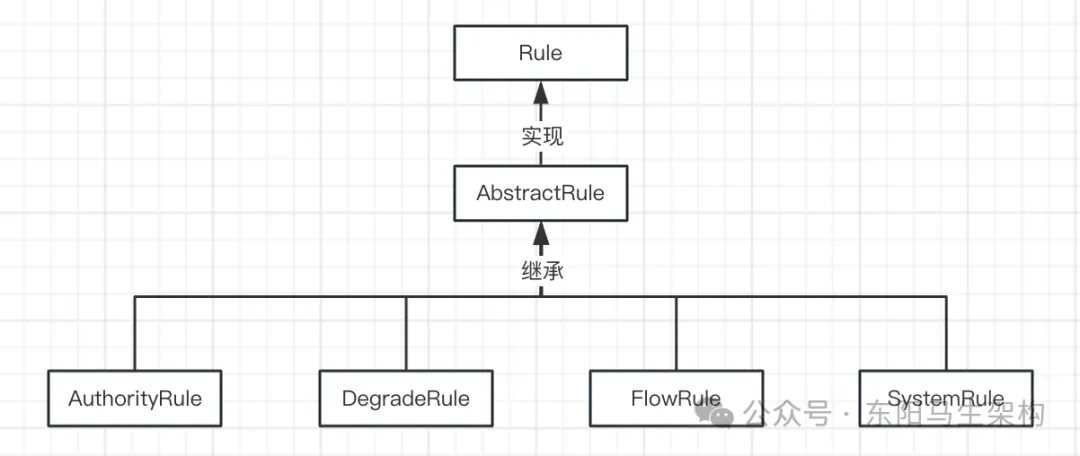
二.规则接口Rule和抽象父类AbstractRule及其具体实现类
一.Sentinel中的规则其实就是配置
黑白名单控制规则:例如需要设置一份配置,确定哪些请求属于黑名单、哪些请求属于白名单,那么这份配置就是黑白名单控制规则。
系统负载自适应规则:例如需要设置当CPU使用率达到90%时,系统就不再接受新请求以防止系统崩溃,那么这个90%的CPU使用率阈值就是系统负载自适应规则。
流量控制规则:例如需要设置单机QPS最高为100,那么这个单机限流100QPS便是流量控制规则。
熔断降级规则:例如需要设置当错误比例在1秒内超过10次时,系统自动触发熔断降级,那么这个1秒内超过10次的错误比例就是熔断降级规则。
二.规则接口Rule和抽象父类AbstractRule及其具体实现类
首先规则与资源是紧密关联的,规则会对资源起作用,因此规则接口Rule需要一个获取资源的方法getResource()。
然后每一条具体的规则都应继承抽象父类AbstractRule并具备三个字段:规则id、资源name以及针对来源limitApp。其中针对来源指的是诸如黑名单值、白名单值等,默认是default。
//Base interface of all rules.
public interface Rule {
    //Get target resource of this rule.
    //获取当前规则起作用的目标资源
    String getResource();
}

//Abstract rule entity. AbstractRule是实现了规则接口Rule的抽象规则类
public abstract class AbstractRule implements Rule {
    //rule id. 规则id
    private Long id;
    //Resource name. 资源名称
    private String resource;
    //针对来源,默认是default
    //多个来源使用逗号隔开,比如黑名单规则,限制userId是1和3的访问,那么就设置limitApp为"1,3"
    //Application name that will be limited by origin.
    //The default limitApp is default, which means allowing all origin apps.
    //For authority rules, multiple origin name can be separated with comma (',').
    private String limitApp;

    public Long getId() {
        return id;
    }

    public AbstractRule setId(Long id) {
        this.id = id;
        return this;
    }

    @Override
    public String getResource() {
        return resource;
    }

    public AbstractRule setResource(String resource) {
        this.resource = resource;
        return this;
    }

    public String getLimitApp() {
        return limitApp;
    }

    public AbstractRule setLimitApp(String limitApp) {
        this.limitApp = limitApp;
        return this;
    }
    ...
}

//Authority rule is designed for limiting by request origins.
public class AuthorityRule extends AbstractRule {
    ...
}

public class SystemRule extends AbstractRule {
    ...
}

public class FlowRule extends AbstractRule {
    ...
}

public class DegradeRule extends AbstractRule {
    ...
}
(2)Sentinel的规则管理
一.PropertyListener<T>监听器接口及其实现类
二.SentinelProperty监听器接口管理所有PropertyListener<T>子类
三.DynamicSentinelProperty会触发监听器PropertyListener<T>的回调
一.PropertyListener<T>监听器接口及其实现类
为了感知规则Rule的变化,需要一个负责监听规则变化的类,也就是需要一个监听器来监听规则Rule的变化,这个监听器就是PropertyListener<T>。
PropertyListener<T>是一个接口,它定义了两个方法:方法一是首次加载规则时触发的回调方法configLoad(),方法二是规则变更时触发的回调方法configUpdate()。
PropertyListener<T>接口使用了泛型T而不是规则接口Rule来定义,是因为除了规则的变化需要监听器监听外,还有其他场景也需要监听。
PropertyListener<T>接口的具体实现类有:
AuthorityRuleManager.RulePropertyListener
FlowRuleManager.FlowPropertyListener
DegradeRuleManager.RulePropertyListener
SystemRuleManager.SystemPropertyListener
//This class holds callback method when SentinelProperty.updateValue(Object) need inform the listener.
public interface PropertyListener<T> {
    //Callback method when {@link SentinelProperty#updateValue(Object)} need inform the listener.
    //规则变更时触发的回调方法
    void configUpdate(T value);

    //The first time of the {@code value}'s load.
    //首次加载规则时触发的回调方法
    void configLoad(T value);
}

//Manager for authority rules.
public final class AuthorityRuleManager {
    //key是资源名称,value是资源对应的规则
    private static volatile Map<String, Set<AuthorityRule>> authorityRules = new ConcurrentHashMap<>();
    //饿汉式单例模式实例化黑白名单权限控制规则的监听器对象
    private static final RulePropertyListener LISTENER = new RulePropertyListener();
    //监听器对象的管理器
    private static SentinelProperty<List<AuthorityRule>> currentProperty = new DynamicSentinelProperty<>();

    static {
        //将黑白名单权限控制规则的监听器对象添加到DynamicSentinelProperty中
        currentProperty.addListener(LISTENER);
    }
    ...

    private static class RulePropertyListener implements PropertyListener<List<AuthorityRule>> {
        @Override
        public synchronized void configLoad(List<AuthorityRule> value) {
            authorityRules = loadAuthorityConf(value);
            RecordLog.info("[AuthorityRuleManager] Authority rules loaded: {}", authorityRules);
        }

        @Override
        public synchronized void configUpdate(List<AuthorityRule> conf) {
            authorityRules = loadAuthorityConf(conf);
            RecordLog.info("[AuthorityRuleManager] Authority rules received: {}", authorityRules);
        }

        private Map<String, Set<AuthorityRule>> loadAuthorityConf(List<AuthorityRule> list) {
            Map<String, Set<AuthorityRule>> newRuleMap = new ConcurrentHashMap<>();
            if (list == null || list.isEmpty()) {
                return newRuleMap;
            }
            for (AuthorityRule rule : list) {
                if (!isValidRule(rule)) {
                    RecordLog.warn("[AuthorityRuleManager] Ignoring invalid authority rule when loading new rules: {}", rule);
                    continue;
                }
                if (StringUtil.isBlank(rule.getLimitApp())) {
                    rule.setLimitApp(RuleConstant.LIMIT_APP_DEFAULT);
                }
                String identity = rule.getResource();
                Set<AuthorityRule> ruleSet = newRuleMap.get(identity);
                //putIfAbsent
                if (ruleSet == null) {
                    ruleSet = new HashSet<>();
                    ruleSet.add(rule);
                    newRuleMap.put(identity, ruleSet);
                } else {
                    //One resource should only have at most one authority rule, so just ignore redundant rules.
                    RecordLog.warn("[AuthorityRuleManager] Ignoring redundant rule: {}", rule.toString());
                }
            }
            return newRuleMap;
        }
    }
    ...
}

public class FlowRuleManager {
    private static volatile Map<String, List<FlowRule>> flowRules = new HashMap<>();
    private static final FlowPropertyListener LISTENER = new FlowPropertyListener();
    private static SentinelProperty<List<FlowRule>> currentProperty = new DynamicSentinelProperty<List<FlowRule>>();

    static {
        currentProperty.addListener(LISTENER);
        startMetricTimerListener();
    }
    ...

    private static final class FlowPropertyListener implements PropertyListener<List<FlowRule>> {
        @Override
        public synchronized void configUpdate(List<FlowRule> value) {
            Map<String, List<FlowRule>> rules = FlowRuleUtil.buildFlowRuleMap(value);
            if (rules != null) {
                flowRules = rules;
            }
            RecordLog.info("[FlowRuleManager] Flow rules received: {}", rules);
        }

        @Override
        public synchronized void configLoad(List<FlowRule> conf) {
            Map<String, List<FlowRule>> rules = FlowRuleUtil.buildFlowRuleMap(conf);
            if (rules != null) {
                flowRules = rules;
            }
            RecordLog.info("[FlowRuleManager] Flow rules loaded: {}", rules);
        }
    }
    ...
}

public final class DegradeRuleManager {
    private static final RulePropertyListener LISTENER = new RulePropertyListener();
    private static SentinelProperty<List<DegradeRule>> currentProperty = new DynamicSentinelProperty<>();

    static {
        currentProperty.addListener(LISTENER);
    }
    ...

    private static class RulePropertyListener implements PropertyListener<List<DegradeRule>> {
        ...
        @Override
        public void configUpdate(List<DegradeRule> conf) {
            reloadFrom(conf);
            RecordLog.info("[DegradeRuleManager] Degrade rules has been updated to: {}", ruleMap);
        }

        @Override
        public void configLoad(List<DegradeRule> conf) {
            reloadFrom(conf);
            RecordLog.info("[DegradeRuleManager] Degrade rules loaded: {}", ruleMap);
        }
        ...
    }
    ...
}
二.SentinelProperty监听器接口管理所有PropertyListener<T>子类
为了在创建规则时回调configLoad()方法初始化规则配置,以及在规则变更时回调configUpdate()方法通知到所有监听者,需要一个类来管理所有监听器,比如将所有监听器添加到集合中。当配置发生变化时,就可以遍历监听器集合然后调用回调方法进行处理。
其实就是使用监听器模式或观察者模式,创建一个实现了SentinelProperty接口的类,专门负责管理所有实现了PropertyListener<T>接口的监听器。
其中SentinelProperty接口如下所示:
//This class holds current value of the config,
//and is responsible for informing all PropertyListeners added on this when the config is updated.
//Note that not every updateValue(Object newValue) invocation should inform the listeners,
//only when newValue is not Equals to the old value, informing is needed.
public interface SentinelProperty<T> {
    //添加监听者
    //Add a PropertyListener to this SentinelProperty.
    //After the listener is added, updateValue(Object) will inform the listener if needed.
    //This method can invoke multi times to add more than one listeners.
    void addListener(PropertyListener<T> listener);

    //移除监听者
    //Remove the PropertyListener on this.
    //After removing, updateValue(Object) will not inform the listener.
    void removeListener(PropertyListener<T> listener);

    //当监听值有变化时,调用此方法进行通知
    //Update the newValue as the current value of this property and inform all
    //PropertyListeners added on this only when new value is not Equals to the old value.
    boolean updateValue(T newValue);
}
三.DynamicSentinelProperty会触发监听器PropertyListener<T>的回调
DynamicSentinelProperty会使用写时复制集合CopyOnWriteArraySet来存储监听器,当DynamicSentinelProperty添加监听器或者更新新值时,便会触发执行PropertyListener<T>接口的两个回调方法。
具体就是:当执行DynamicSentinelProperty的addListener()方法添加监听器时,会将监听器保存到DynamicSentinelProperty的写时复制集合CopyOnWriteArraySet中,并且回调监听器的configLoad()方法来初始化规则配置。由于监听器监听的是规则,而规则又是和资源绑定的,所以初始化就是将资源和规则绑定到一个Map中:即形如Map<String resourcename, Set<Rule>>这样的Map。
当执行DynamicSentinelProperty的updateValue()方法更新规则配置时,则会遍历所有监听器并调用每个监听器的configUpdate()方法进行更新,也就是更新Map<String resourcename, Set<Rule>>这种Map里的value。
public class DynamicSentinelProperty<T> implements SentinelProperty<T> {
    protected Set<PropertyListener<T>> listeners = new CopyOnWriteArraySet<>();
    private T value = null;

    public DynamicSentinelProperty() {

    }

    public DynamicSentinelProperty(T value) {
        super();
        this.value = value;
    }

    //添加监听器到集合
    @Override
    public void addListener(PropertyListener<T> listener) {
        listeners.add(listener);
        //回调监听器的configLoad()方法初始化规则配置
        listener.configLoad(value);
    }

    //移除监听器
    @Override
    public void removeListener(PropertyListener<T> listener) {
        listeners.remove(listener);
    }

    //更新值
    @Override
    public boolean updateValue(T newValue) {
        //如果值没变化,直接返回
        if (isEqual(value, newValue)) {
            return false;
        }
        RecordLog.info("[DynamicSentinelProperty] Config will be updated to: {}", newValue);
        value = newValue;
        //如果值发生了变化,则遍历监听器,回调监听器的configUpdate()方法更新对应的值
        for (PropertyListener<T> listener : listeners) {
            listener.configUpdate(newValue);
        }
        return true;
    }
    ...
}
(3)总结
一.PropertyListener<T>
PropertyListener<T>是一个泛型接口,用于监听配置变更。它包含两个方法:configUpdate()方法和configLoad()方法。
PropertyListener的configUpdate()方法在配置发生变化时触发,PropertyListener的configLoad()方法在首次加载配置时触发。通过实现PropertyListener<T>接口,可以实现不同类型的监听器,例如FlowPropertyListener等。
二.SentinelProperty
SentinelProperty是一个用于管理PropertyListener监听器的接口,它提供了添加、移除和更新监听器的方法。
添加监听器可调用SentinelProperty实现类的addListener()方法实现添加,配置变更可调用SentinelProperty实现类的updateValue()方法通知监听器。Sentinel提供了默认的SentinelProperty实现:DynamicSentinelProperty。
4.AuthoritySlot控制黑白名单权限
(1)黑白名单权限控制规则的配置Demo
(2)AuthoritySlot验证黑白名单权限控制规则
(1)黑白名单权限控制规则的配置Demo
一.配置黑白名单权限控制规则的过程
二.AuthorityRuleManager初始化和加载黑白名单权限控制规则详情
一.配置黑白名单权限控制规则的过程
首先创建一个AuthorityRule规则对象,然后设置三个关键要素:通过setStrategy()方法设置规则是黑名单还是白名单、通过setResource()方法设置规则绑定到哪个资源、通过setLimitApp()方法设置限制哪些来源,最后调用AuthorityRuleManager的loadRules()方法加载此规则。所以黑白名单权限规则是通过AuthorityRuleManager类来进行管理的。
//Authority rule is designed for limiting by request origins.
//In blacklist mode, requests will be blocked when blacklist contains current origin, otherwise will pass.
//In whitelist mode, only requests from whitelist origin can pass.
public class AuthorityDemo {
    private static final String RESOURCE_NAME = "testABC";

    public static void main(String[] args) {
        System.out.println("========Testing for black list========");
        initBlackRules();
        testFor(RESOURCE_NAME, "appA");
        testFor(RESOURCE_NAME, "appB");
        testFor(RESOURCE_NAME, "appC");
        testFor(RESOURCE_NAME, "appE");

        System.out.println("========Testing for white list========");
        initWhiteRules();
        testFor(RESOURCE_NAME, "appA");
        testFor(RESOURCE_NAME, "appB");
        testFor(RESOURCE_NAME, "appC");
        testFor(RESOURCE_NAME, "appE");
    }

    private static void testFor(String resource, String origin) {
        ContextUtil.enter(resource, origin);
        Entry entry = null;
        try {
            entry = SphU.entry(resource);
            System.out.println(String.format("Passed for resource %s, origin is %s", resource, origin));
        } catch (BlockException ex) {
            System.err.println(String.format("Blocked for resource %s, origin is %s", resource, origin));
        } finally {
            if (entry != null) {
                entry.exit();
            }
            ContextUtil.exit();
        }
    }

    private static void initWhiteRules() {
        AuthorityRule rule = new AuthorityRule();
        rule.setResource(RESOURCE_NAME);
        rule.setStrategy(RuleConstant.AUTHORITY_WHITE);
        rule.setLimitApp("appA,appE");
        AuthorityRuleManager.loadRules(Collections.singletonList(rule));
    }

    private static void initBlackRules() {
        AuthorityRule rule = new AuthorityRule();
        rule.setResource(RESOURCE_NAME);
        rule.setStrategy(RuleConstant.AUTHORITY_BLACK);
        rule.setLimitApp("appA,appB");
        AuthorityRuleManager.loadRules(Collections.singletonList(rule));
    }
}
二.AuthorityRuleManager初始化和加载黑白名单权限控制规则详情
AuthorityRuleManager类中有一个静态变量LISTENER,该变量指向由饿汉式单例模式实例化的黑白名单权限控制规则监听器对象。
AuthorityRuleManager类有一个静态代码块,在该代码块中,会调用DynamicSentinelProperty的addListener(LISTENER)方法,将黑白名单权限控制规则的监听器对象添加到DynamicSentinelProperty。
在DynamicSentinelProperty的addListener()方法中,又会回调LISTENER的configLoad()方法初始化黑白名单权限规则。
当AuthorityDemo调用AuthorityRuleManager的loadRules()方法加载规则时,便会执行DynamicSentinelProperty的updateValue()方法,也就是会触发执行LISTENER的configUpdate()方法加载权限规则到一个map中,即执行RulePropertyListener的loadAuthorityConf()方法加载规则,从而完成黑白名单权限控制规则的加载和初始化。其中map是AuthorityRuleManager的Map<String, Set<AuthorityRule>>。
//Manager for authority rules.
public final class AuthorityRuleManager {
    //key是资源名称,value是资源对应的规则
    private static volatile Map<String, Set<AuthorityRule>> authorityRules = new ConcurrentHashMap<>();
    //饿汉式单例模式实例化黑白名单权限控制规则的监听器对象
    private static final RulePropertyListener LISTENER = new RulePropertyListener();
    //监听器对象的管理器
    private static SentinelProperty<List<AuthorityRule>> currentProperty = new DynamicSentinelProperty<>();

    static {
        //将黑白名单权限控制规则的监听器对象添加到DynamicSentinelProperty中
        currentProperty.addListener(LISTENER);
    }

    //Load the authority rules to memory.
    public static void loadRules(List<AuthorityRule> rules) {
        currentProperty.updateValue(rules);
    }
    ...

    //静态内部类的方式实现黑白名单权限控制规则监听器
    private static class RulePropertyListener implements PropertyListener<List<AuthorityRule>> {
        //黑名单权限控制规则初始化
        @Override
        public synchronized void configLoad(List<AuthorityRule> value) {
            authorityRules = loadAuthorityConf(value);
            RecordLog.info("[AuthorityRuleManager] Authority rules loaded: {}", authorityRules);
        }

        //黑名单权限控制规则变更
        @Override
        public synchronized void configUpdate(List<AuthorityRule> conf) {
            authorityRules = loadAuthorityConf(conf);
            RecordLog.info("[AuthorityRuleManager] Authority rules received: {}", authorityRules);
        }

        //加载黑白名单权限控制规则
        private Map<String, Set<AuthorityRule>> loadAuthorityConf(List<AuthorityRule> list) {
            Map<String, Set<AuthorityRule>> newRuleMap = new ConcurrentHashMap<>();
            if (list == null || list.isEmpty()) {
                return newRuleMap;
            }
            //遍历每个黑白名单权限控制规则
            for (AuthorityRule rule : list) {
                if (!isValidRule(rule)) {
                    RecordLog.warn("[AuthorityRuleManager] Ignoring invalid authority rule when loading new rules: {}", rule);
                    continue;
                }
                if (StringUtil.isBlank(rule.getLimitApp())) {
                    rule.setLimitApp(RuleConstant.LIMIT_APP_DEFAULT);
                }
                //获取黑白名单权限控制规则对应的资源名称
                String identity = rule.getResource();
                Set<AuthorityRule> ruleSet = newRuleMap.get(identity);
                //putIfAbsent
                //将黑白名单权限控制规则放到newRuleMap中
                if (ruleSet == null) {
                    ruleSet = new HashSet<>();
                    ruleSet.add(rule);
                    newRuleMap.put(identity, ruleSet);
                } else {
                    //One resource should only have at most one authority rule, so just ignore redundant rules.
                    RecordLog.warn("[AuthorityRuleManager] Ignoring redundant rule: {}", rule.toString());
                }
            }
            return newRuleMap;
        }
    }
    ...
}

public class DynamicSentinelProperty<T> implements SentinelProperty<T> {
    protected Set<PropertyListener<T>> listeners = new CopyOnWriteArraySet<>();
    private T value = null;

    public DynamicSentinelProperty() {

    }

    public DynamicSentinelProperty(T value) {
        super();
        this.value = value;
    }

    //添加监听器到集合
    @Override
    public void addListener(PropertyListener<T> listener) {
        listeners.add(listener);
        //回调监听器的configLoad()方法初始化规则配置
        listener.configLoad(value);
    }

    //移除监听器
    @Override
    public void removeListener(PropertyListener<T> listener) {
        listeners.remove(listener);
    }

    //更新值
    @Override
    public boolean updateValue(T newValue) {
        //如果值没变化,直接返回
        if (isEqual(value, newValue)) {
            return false;
        }
        RecordLog.info("[DynamicSentinelProperty] Config will be updated to: {}", newValue);

        //如果值发生了变化,则遍历监听器,回调监听器的configUpdate()方法更新对应的值
        value = newValue;
        for (PropertyListener<T> listener : listeners) {
            listener.configUpdate(newValue);
        }
        return true;
    }

    private boolean isEqual(T oldValue, T newValue) {
        if (oldValue == null && newValue == null) {
            return true;
        }
        if (oldValue == null) {
            return false;
        }
        return oldValue.equals(newValue);
    }

    public void close() {
        listeners.clear();
    }
}
(2)AuthoritySlot验证黑白名单权限控制规则
在AuthoritySlot的checkBlackWhiteAuthority()方法中,首先会调用AuthorityRuleManager的getAuthorityRules()方法,从AuthorityRuleManager中获取全部黑白名单权限控制规则,然后再调用AuthorityRuleChecker的passCheck()方法根据规则验证权限。
在AuthorityRuleChecker的passCheck()方法中,首先会从当前上下文Context中获取调用源的名称,然后判断调用源不空且配置了黑白名单规则,才执行黑白名单验证逻辑。接着先通过indexOf()方法进行一次黑白名单的简单匹配,再通过split()方法分割黑白名单数组以实现精确匹配。如果调用源在名单中,再根据黑白名单策略来决定是否拒绝请求。
注意,实现黑白名单权限控制的前提条件是:每个客户端在发起请求时已将自己服务的唯一标志放到Context的origin属性里。
@Spi(order = Constants.ORDER_AUTHORITY_SLOT)
public class AuthoritySlot extends AbstractLinkedProcessorSlot<DefaultNode> {
    @Override
    public void entry(Context context, ResourceWrapper resourceWrapper, DefaultNode node, int count, boolean prioritized, Object... args) throws Throwable {
        //验证黑白名单权限控制规则
        checkBlackWhiteAuthority(resourceWrapper, context);
        fireEntry(context, resourceWrapper, node, count, prioritized, args);
    }

    @Override
    public void exit(Context context, ResourceWrapper resourceWrapper, int count, Object... args) {
        fireExit(context, resourceWrapper, count, args);
    }

    void checkBlackWhiteAuthority(ResourceWrapper resource, Context context) throws AuthorityException {
        //先从AuthorityRuleManager中获取存放全部的黑白名单权限控制规则的Map
        Map<String, Set<AuthorityRule>> authorityRules = AuthorityRuleManager.getAuthorityRules();
        if (authorityRules == null) {
            return;
        }
        //获取当前资源对应的黑白名单权限控制规则集合
        Set<AuthorityRule> rules = authorityRules.get(resource.getName());
        if (rules == null) {
            return;
        }
        for (AuthorityRule rule : rules) {
            //验证规则
            if (!AuthorityRuleChecker.passCheck(rule, context)) {
                throw new AuthorityException(context.getOrigin(), rule);
            }
        }
    }
}

//Rule checker for white/black list authority.
final class AuthorityRuleChecker {
    static boolean passCheck(AuthorityRule rule, Context context) {
        String requester = context.getOrigin();
        //Empty origin or empty limitApp will pass.
        //如果没设置来源,或者没限制app,那么就直接放行,不进行规则限制
        if (StringUtil.isEmpty(requester) || StringUtil.isEmpty(rule.getLimitApp())) {
            return true;
        }

        //Do exact match with origin name.
        //判断此次请求的来源是不是在limitApp里,注意这里用的是近似精确匹配,但不是绝对精确
        //比如limitApp写的是a,b,而资源名称是",b",那么就匹配不到,因为limitApp是按逗号隔开的,但资源却包含了逗号
        int pos = rule.getLimitApp().indexOf(requester);
        boolean contain = pos > -1;

        //如果近似精确匹配成功,则再进行精确匹配
        if (contain) {
            boolean exactlyMatch = false;
            String[] appArray = rule.getLimitApp().split(",");
            for (String app : appArray) {
                if (requester.equals(app)) {
                    exactlyMatch = true;
                    break;
                }
            }
            contain = exactlyMatch;
        }
        //获取策略
        int strategy = rule.getStrategy();
        //如果是黑名单,并且此次请求的来源在limitApp里,则需返回false,禁止请求
        if (strategy == RuleConstant.AUTHORITY_BLACK && contain) {
            return false;
        }
        //如果是白名单,并且此次请求的来源不在limitApp里,则也需返回false,禁止请求
        if (strategy == RuleConstant.AUTHORITY_WHITE && !contain) {
            return false;
        }
        return true;
    }

    private AuthorityRuleChecker() {

    }
}
(3)总结
一.黑白名单权限验证规则涉及的核心类
二.黑白名单权限验证的处理逻辑
三.Sentinel监听器模式的处理逻辑
一.黑白名单权限验证规则涉及的核心类
首先是黑白名单管理器AuthorityRuleManager,调用方直接调用该类的loadRules()方法来通知监听器规则的变更。
然后是黑白名单监听器RulePropertyListener,它实现了PropertyListener接口,负责监听和管理黑白名单的规则变化。
二.黑白名单权限验证的处理逻辑
首先通过AuthorityRuleManager获取全部黑白名单权限控制规则,然后循环遍历这些权限控制规则逐一验证是否匹配。
这里需要注意:来源是从Context里获取的,也就是Context的getOrigin()方法。因此在进行黑白名单权限规则控制时,需要先定义好一个origin。这个origin可以是userId,也可以是IP地址,还可以是项目名称等。
此外,规则里的limitApp字段是字符串,多个时需要使用逗号隔开,然后在验证环节先通过indexOf()方法近似匹配,匹配上之后再通过split()方法转成数组进行精确匹配。
三.Sentinel监听器模式的处理逻辑
Sentinel监听器模式会包含三大角色:
角色一:监听器PropertyListener<T>
角色二:监听器管理器SentinelProperty<T>
角色三:规则管理器RuleManager
首先,规则管理器RuleManager在初始化时:会调用监听器管理器SentinelProperty<T>的addListener()方法将监听器PropertyListener<T>注册到监听器管理器SentinelProperty<T>中。
然后,使用方使用具体的规则时:可以通过调用规则管理器RuleManager的loadRules()方法加载规则。加载规则时会调用监听器管理器SentinelProperty<T>的的updateValue()方法通知每一个监听器,即通过监听器PropertyListener<T>的configUpdate()方法把规则加载到规则管理器RuleManager的本地中。
5.SystemSlot根据系统保护规则进行流控
(1)系统保护规则SystemRule的配置Demo
(2)SystemRuleManager加载规则和获取系统信息
(3)SystemSlot根据系统保护规则进行流控
(1)系统保护规则SystemRule的配置Demo
系统规则类SystemRule包含了以下几个指标:highestSystemLoad、highestCpuUsage、QPS、avgRt、maxThread。
当需要限制系统的这些指标时,可以创建一个SystemRule对象并设置对应的阈值,然后通过调用SystemRuleManager的loadRules()方法,加载系统保护规则设置的阈值到SystemRuleManager。
//Sentinel System Rule makes the inbound traffic and capacity meet.
//It takes average RT, QPS and thread count of requests into account.
//And it also provides a measurement of system's load, but only available on Linux.
//We recommend to coordinate highestSystemLoad, qps, avgRt and maxThread to make sure your system run in safety level.
//To set the threshold appropriately, performance test may be needed.
public class SystemRule extends AbstractRule {
    //对应Dashboard上阈值类型为LOAD的值,代表系统最高负载值,默认为-1,只有大于等于0才生效
    private double highestSystemLoad = -1;
    //对应Dashboard上阈值类型为CPU使用率的值,代表系统最高CPU使用率,取值是[0,1]之间,默认为-1,只有大于等于0才生效
    private double highestCpuUsage = -1;
    //对应Dashboard上阈值类型为为入口QPS的值,代表限流的阈值,默认为-1,只有大于0才生效
    private double qps = -1;
    //对应Dashboard上阈值类型为为RT的值,代表系统的平均响应时间,默认为-1,只有大于0才生效
    private long avgRt = -1;
    //对应Dashboard上阈值类型为线程数的值,代表系统允许的最大线程数,默认为-1,只有大于0才生效
    private long maxThread = -1;
    ...
}

public class SystemGuardDemo {
    private static AtomicInteger pass = new AtomicInteger();
    private static AtomicInteger block = new AtomicInteger();
    private static AtomicInteger total = new AtomicInteger();
    private static volatile boolean stop = false;
    private static final int threadCount = 100;
    private static int seconds = 60 + 40;

    public static void main(String[] args) throws Exception {
        //启动线程定时输出信息
        tick();
        //初始化系统保护规则
        initSystemRule();
        //模拟有100个线程在访问系统
        for (int i = 0; i < threadCount; i++) {
            Thread entryThread = new Thread(new Runnable() {
                @Override
                public void run() {
                    while (true) {
                        Entry entry = null;
                        try {
                            entry = SphU.entry("methodA", EntryType.IN);
                            pass.incrementAndGet();
                            try {
                                TimeUnit.MILLISECONDS.sleep(20);
                            } catch (InterruptedException e) {
                                // ignore
                            }
                        } catch (BlockException e1) {
                            block.incrementAndGet();
                            try {
                                TimeUnit.MILLISECONDS.sleep(20);
                            } catch (InterruptedException e) {
                                // ignore
                            }
                        } catch (Exception e2) {
                            // biz exception
                        } finally {
                            total.incrementAndGet();
                            if (entry != null) {
                                entry.exit();
                            }
                        }
                    }
                }
            });
            entryThread.setName("working-thread");
            entryThread.start();
        }
    }

    private static void initSystemRule() {
        List<SystemRule> rules = new ArrayList<SystemRule>();
        SystemRule rule = new SystemRule();
        //最大负载是3
        rule.setHighestSystemLoad(3.0);
        //最大CPU使用率是60%
        rule.setHighestCpuUsage(0.6);
        //请求的平均响应时间最大是10ms
        rule.setAvgRt(10);
        //最大的QPS是20
        rule.setQps(20);
        //最大的工作线程数是10
        rule.setMaxThread(10);
        rules.add(rule);
        //加载系统保护规则设置的阈值到SystemRuleManager中
        SystemRuleManager.loadRules(Collections.singletonList(rule));
    }

    private static void tick() {
        Thread timer = new Thread(new TimerTask());
        timer.setName("sentinel-timer-task");
        timer.start();
    }

    static class TimerTask implements Runnable {
        @Override
        public void run() {
            System.out.println("begin to statistic!!!");
            long oldTotal = 0;
            long oldPass = 0;
            long oldBlock = 0;

            while (!stop) {
                try {
                    TimeUnit.SECONDS.sleep(1);
                } catch (InterruptedException e) {

                }
                long globalTotal = total.get();
                long oneSecondTotal = globalTotal - oldTotal;
                oldTotal = globalTotal;


                long globalPass = pass.get();
                long oneSecondPass = globalPass - oldPass;
                oldPass = globalPass;

                long globalBlock = block.get();
                long oneSecondBlock = globalBlock - oldBlock;
                oldBlock = globalBlock;

                System.out.println(seconds + ", " + TimeUtil.currentTimeMillis() + ", total:"
                    + oneSecondTotal + ", pass:"
                    + oneSecondPass + ", block:" + oneSecondBlock);
                if (seconds-- <= 0) {
                    stop = true;
                }
            }
            System.exit(0);
        }
    }
}
(2)SystemRuleManager加载规则和获取系统信息
一.在加载系统保护规则设置的阈值到本地方面
SystemRuleManager会通过loadRules()方法加载系统保护规则的阈值,即调用DynamicSentinelProperty的updateValue()方法通知监听器更新规则。此时会触发执行监听器SystemPropertyListener的configUpdate()方法,从而执行SystemRuleManager的loadSystemConf()方法更新本地规则阈值。
二.在获取系统信息方面
SystemRuleManager初始化时会启动一个线程SystemPropertyListener,每隔1秒定时获取系统的Load、CPU使用率等信息,这样后续便可以通过SystemPropertyListener获取系统负载等信息。
public final class SystemRuleManager {
    //系统保护规则中的5个阈值:Load、CPU使用率、QPS、最大RT、最大线程数
    private static volatile double highestSystemLoad = Double.MAX_VALUE;
    private static volatile double highestCpuUsage = Double.MAX_VALUE;
    private static volatile double qps = Double.MAX_VALUE;
    private static volatile long maxRt = Long.MAX_VALUE;
    private static volatile long maxThread = Long.MAX_VALUE;
    ...
    //标记系统流控功能是否开启
    private static AtomicBoolean checkSystemStatus = new AtomicBoolean(false);
    //定时获取系统状态信息(负载和CPU使用率)的线程
    private static SystemStatusListener statusListener = null;
    //饿汉式单例模式实例化系统保护规则的监听器对象
    private final static SystemPropertyListener listener = new SystemPropertyListener();
    //监听器对象的管理器
    private static SentinelProperty<List<SystemRule>> currentProperty = new DynamicSentinelProperty<List<SystemRule>>();
    private final static ScheduledExecutorService scheduler = Executors.newScheduledThreadPool(1, new NamedThreadFactory("sentinel-system-status-record-task", true));

    static {
        checkSystemStatus.set(false);
        //启动定时任务获取系统的Load、CPU负载等信息
        statusListener = new SystemStatusListener();
        scheduler.scheduleAtFixedRate(statusListener, 0, 1, TimeUnit.SECONDS);
        //添加监听器
        currentProperty.addListener(listener);
    }

    //Load SystemRules, former rules will be replaced.
    public static void loadRules(List<SystemRule> rules) {
        currentProperty.updateValue(rules);
    }

    static class SystemPropertyListener extends SimplePropertyListener<List<SystemRule>> {
        @Override
        public synchronized void configUpdate(List<SystemRule> rules) {
            restoreSetting();
            if (rules != null && rules.size() >= 1) {
                for (SystemRule rule : rules) {
                    //加载系统保护规则的阈值到本地
                    loadSystemConf(rule);
                }
            } else {
                checkSystemStatus.set(false);
            }
            ...
        }
    }

    //加载系统保护规则的阈值到本地
    public static void loadSystemConf(SystemRule rule) {
        boolean checkStatus = false;
        if (rule.getHighestSystemLoad() >= 0) {
            highestSystemLoad = Math.min(highestSystemLoad, rule.getHighestSystemLoad());
            highestSystemLoadIsSet = true;
            checkStatus = true;
        }
        if (rule.getHighestCpuUsage() >= 0) {
            if (rule.getHighestCpuUsage() > 1) {
                RecordLog.warn(String.format("[SystemRuleManager] Ignoring invalid SystemRule: " + "highestCpuUsage %.3f > 1", rule.getHighestCpuUsage()));
            } else {
                highestCpuUsage = Math.min(highestCpuUsage, rule.getHighestCpuUsage());
                highestCpuUsageIsSet = true;
                checkStatus = true;
            }
        }
        if (rule.getAvgRt() >= 0) {
            maxRt = Math.min(maxRt, rule.getAvgRt());
            maxRtIsSet = true;
            checkStatus = true;
        }
        if (rule.getMaxThread() >= 0) {
            maxThread = Math.min(maxThread, rule.getMaxThread());
            maxThreadIsSet = true;
            checkStatus = true;
        }
        if (rule.getQps() >= 0) {
            qps = Math.min(qps, rule.getQps());
            qpsIsSet = true;
            checkStatus = true;
        }
        checkSystemStatus.set(checkStatus);
    }
    ...
}

public class DynamicSentinelProperty<T> implements SentinelProperty<T> {
    protected Set<PropertyListener<T>> listeners = new CopyOnWriteArraySet<>();
    private T value = null;
    ...
    //添加监听器到集合
    @Override
    public void addListener(PropertyListener<T> listener) {
        listeners.add(listener);
        //回调监听器的configLoad()方法初始化规则配置
        listener.configLoad(value);
    }

    //更新值
    @Override
    public boolean updateValue(T newValue) {
        //如果值没变化,直接返回
        if (isEqual(value, newValue)) {
            return false;
        }
        RecordLog.info("[DynamicSentinelProperty] Config will be updated to: {}", newValue);
        //如果值发生了变化,则遍历监听器,回调监听器的configUpdate()方法更新对应的值
        value = newValue;
        for (PropertyListener<T> listener : listeners) {
            listener.configUpdate(newValue);
        }
        return true;
    }
    ...
}

public class SystemStatusListener implements Runnable {
    volatile double currentLoad = -1;
    volatile double currentCpuUsage = -1;
    volatile long processCpuTime = 0;
    volatile long processUpTime = 0;
    ...
    @Override
    public void run() {
        try {
            OperatingSystemMXBean osBean = ManagementFactory.getPlatformMXBean(OperatingSystemMXBean.class);
            currentLoad = osBean.getSystemLoadAverage();
            double systemCpuUsage = osBean.getSystemCpuLoad();

            //calculate process cpu usage to support application running in container environment
            RuntimeMXBean runtimeBean = ManagementFactory.getPlatformMXBean(RuntimeMXBean.class);
            long newProcessCpuTime = osBean.getProcessCpuTime();
            long newProcessUpTime = runtimeBean.getUptime();
            int cpuCores = osBean.getAvailableProcessors();
            long processCpuTimeDiffInMs = TimeUnit.NANOSECONDS.toMillis(newProcessCpuTime - processCpuTime);
            long processUpTimeDiffInMs = newProcessUpTime - processUpTime;
            double processCpuUsage = (double) processCpuTimeDiffInMs / processUpTimeDiffInMs / cpuCores;
            processCpuTime = newProcessCpuTime;
            processUpTime = newProcessUpTime;
            currentCpuUsage = Math.max(processCpuUsage, systemCpuUsage);
            if (currentLoad > SystemRuleManager.getSystemLoadThreshold()) {
                writeSystemStatusLog();
            }
        } catch (Throwable e) {
            RecordLog.warn("[SystemStatusListener] Failed to get system metrics from JMX", e);
        }
    }

    public double getSystemAverageLoad() {
        return currentLoad;
    }

    public double getCpuUsage() {
        return currentCpuUsage;
    }
    ...
}
(3)SystemSlot根据系统保护规则进行流控
SystemSlot会根据当前系统的实际情况,判断是否需要对请求进行限流,也就是通过调用SystemRuleManager的checkSystem()方法来进行检查。
在SystemRuleManager的checkSystem()方法中:
一.首先通过checkSystemStatus.get()判断系统保护功能是否开启
开启的入口就是:
->SystemRuleManager.loadRules()方法
->DynamicSentinelProperty.updateValue()方法
->SystemPropertyListener.configUpdate()方法
->SystemRuleManager.loadSystemConf()方法
二.接着通过Constants.ENTRY_NODE获取如QPS、threadNum等数据
Constants.ENTRY_NODE其实就是ClusterNode。在StatisticSlot的entry()方法中,会对Constants.ENTRY_NODE进行统计,所以可以通过Constants.ENTRY_NODE获取QPS、threadNum等数据。
三.然后采取BBR算法来检查系统负载是否超过系统保护规则的阈值
BBR是Google开发的一种拥塞控制算法,主要用来解决网络拥塞问题。SystemRuleManager的checkBbr()方法的目的是在系统负载较高的情况下,通过限制并行线程数来防止系统过载。
简单来说就是:检查当前线程数是否大于(每秒最大成功请求数 * 最小响应时间 / 1000)。如果大于这个值,说明系统可能出现拥塞,要返回false,否则返回true。
四.最后判断CPU使用率是否超系统保护规则的阈值
系统负载和CPU使用率是通过SystemStatusListener获取的。
@Spi(order = Constants.ORDER_SYSTEM_SLOT)
public class SystemSlot extends AbstractLinkedProcessorSlot<DefaultNode> {
    @Override
    public void entry(Context context, ResourceWrapper resourceWrapper, DefaultNode node, int count, boolean prioritized, Object... args) throws Throwable {
        //检查系统保护规则
        SystemRuleManager.checkSystem(resourceWrapper, count);
        //执行下一个ProcessorSlot
        fireEntry(context, resourceWrapper, node, count, prioritized, args);
    }

    @Override
    public void exit(Context context, ResourceWrapper resourceWrapper, int count, Object... args) {
        fireExit(context, resourceWrapper, count, args);
    }
}

public final class SystemRuleManager {
    //系统保护规则中的5个阈值:Load、CPU使用率、QPS、最大RT、最大线程数
    private static volatile double highestSystemLoad = Double.MAX_VALUE;
    private static volatile double highestCpuUsage = Double.MAX_VALUE;
    private static volatile double qps = Double.MAX_VALUE;
    private static volatile long maxRt = Long.MAX_VALUE;
    private static volatile long maxThread = Long.MAX_VALUE;
    ...
    //标记系统流控功能是否开启
    private static AtomicBoolean checkSystemStatus = new AtomicBoolean(false);
    //定时获取系统状态信息(负载和CPU使用率)的线程
    private static SystemStatusListener statusListener = null;
    //监听器对象的管理器
    private static SentinelProperty<List<SystemRule>> currentProperty = new DynamicSentinelProperty<List<SystemRule>>();
    ...
    //Apply SystemRule to the resource. Only inbound traffic will be checked.
    public static void checkSystem(ResourceWrapper resourceWrapper, int count) throws BlockException {
        //资源为空则直接返回
        if (resourceWrapper == null) {
            return;
        }
        //Ensure the checking switch is on.
        //判断系统流控功能是否开启,如果没开启则直接返回
        if (!checkSystemStatus.get()) {
            return;
        }
        //for inbound traffic only
        //判断资源的流量是否为入口流量,如果不是IN,则直接返回
        //也就是说Sentinel系统保护规则限流只对入口流量生效,如果类型为OUT则直接返回
        if (resourceWrapper.getEntryType() != EntryType.IN) {
            return;
        }
        //total qps
        //获取当前qps,如果当前qps大于系统保护规则SystemRule配置的阈值,则抛出SystemBlockException异常
        double currentQps = Constants.ENTRY_NODE.passQps();
        if (currentQps + count > qps) {
            throw new SystemBlockException(resourceWrapper.getName(), "qps");
        }
        //total thread
        //获取当前线程数,如果当前线程数大于系统保护规则SystemRule配置的阈值,则抛出SystemBlockException异常
        int currentThread = Constants.ENTRY_NODE.curThreadNum();
        if (currentThread > maxThread) {
            throw new SystemBlockException(resourceWrapper.getName(), "thread");
        }
        //如果当前请求的平均响应时间大于系统保护规则SystemRule配置的阈值,则抛出SystemBlockException异常
        double rt = Constants.ENTRY_NODE.avgRt();
        if (rt > maxRt) {
            throw new SystemBlockException(resourceWrapper.getName(), "rt");
        }
        //load. BBR algorithm.
        //如果当前系统负载大于系统保护规则SystemRule配置的负载,则采取BBR算法验证,验证不通过则抛出SystemBlockException异常
        if (highestSystemLoadIsSet && getCurrentSystemAvgLoad() > highestSystemLoad) {
            if (!checkBbr(currentThread)) {
                throw new SystemBlockException(resourceWrapper.getName(), "load");
            }
        }
        //cpu usage
        //判断当前CPU使用率是否大于系统保护规则SystemRule配置的阈值,如果大于则抛出SystemBlockException异常
        if (highestCpuUsageIsSet && getCurrentCpuUsage() > highestCpuUsage) {
            throw new SystemBlockException(resourceWrapper.getName(), "cpu");
        }
    }

    //BBR(Bottleneck Bandwidth and Round-trip propagation time)是Google开发的一种拥塞控制算法;
    //BBR主要用来解决网络拥塞问题;

    //checkBbr()方法的目的是在系统负载较高的情况下,通过限制并行线程数来防止系统过载;
    //简单来说就是:
    //检查当前线程数是否大于(每秒最大成功请求数 * 最小响应时间 / 1000);
    //如果大于这个值,说明系统可能出现拥塞,需要返回false,否则返回true;

    //具体来说就是:
    //首先检查当前线程数是否大于1,如果不是,则直接返回true,表示通过BBR检查;
    //如果当前线程数大于1,那么检查当前线程数是否大于:
    //(Constants.ENTRY_NODE.maxSuccessQps() * Constants.ENTRY_NODE.minRt() / 1000);
    //这里的maxSuccessQps()是每秒最大成功请求数,minRt()是最小响应时间;
    //如果当前线程数大于这个计算值,那么返回false,表示未通过BBR检查;否则,返回true;

    //举个例子:
    //假设currentThread为 5,maxSuccessQps()为 10,minRt()为200;
    //那么计算值为(10 * 200) / 1000 = 2;
    //因为currentThread大于计算值,所以返回false,表示未通过BBR检查;
    private static boolean checkBbr(int currentThread) {
        //检查当前线程数是否大于(每秒最大成功请求数 * 最小响应时间 / 1000)
        //如果大于这个值,说明系统可能出现拥塞,需要返回false,否则返回true
        if (currentThread > 1 && currentThread > Constants.ENTRY_NODE.maxSuccessQps() * Constants.ENTRY_NODE.minRt() / 1000) {
            return false;
        }
        return true;
    }

    public static double getCurrentSystemAvgLoad() {
        return statusListener.getSystemAverageLoad();
    }

    public static double getCurrentCpuUsage() {
        return statusListener.getCpuUsage();
    }
    ...
}

@Spi(order = Constants.ORDER_STATISTIC_SLOT)
public class StatisticSlot extends AbstractLinkedProcessorSlot<DefaultNode> {
    @Override
    public void entry(Context context, ResourceWrapper resourceWrapper, DefaultNode node, int count, boolean prioritized, Object... args) throws Throwable {
        ...
        if (resourceWrapper.getEntryType() == EntryType.IN) {
            //Add count for global inbound entry node for global statistics.
            Constants.ENTRY_NODE.increaseThreadNum();
            Constants.ENTRY_NODE.addPassRequest(count);
        }
        ...
    }
    ...
}

public final class Constants {
    ...
    //Global statistic node for inbound traffic. Usually used for {@code SystemRule} checking.
    public final static ClusterNode ENTRY_NODE = new ClusterNode(TOTAL_IN_RESOURCE_NAME, ResourceTypeConstants.COMMON);
    ...
}
(4)总结
一.SystemSlot的使用和处理流程
二.Sentinel监听器模式的处理逻辑
一.SystemSlot的使用和处理流程
在使用SystemSlot前,需要先定义系统保护规则,设置相应的阈值,然后通过SystemRuleManager加载系统保护规则SystemRule。当请求进入SystemSlot时,会检查系统性能数据是否满足规则中的阈值。如果满足,则请求可以继续执行。如果不满足,则请求将被限流,也就是抛出SystemBlockException异常。
二.Sentinel监听器模式的处理逻辑
Sentinel监听器模式会包含三大角色:
角色一:监听器PropertyListener<T>
角色二:监听器管理器SentinelProperty<T>
角色三:规则管理器RuleManager
首先,规则管理器RuleManager在初始化时:会调用监听器管理器SentinelProperty<T>的addListener()方法将监听器PropertyListener<T>注册到监听器管理器SentinelProperty<T>中。
然后,使用方使用具体的规则时:可以通过调用规则管理器RuleManager的loadRules()方法加载规则。加载规则时会调用监听器管理器SentinelProperty<T>的的updateValue()方法通知每一个监听器,即通过监听器PropertyListener<T>的configUpdate()方法把规则加载到规则管理器RuleManager的本地中。

 1854


 扫一扫


 被折叠的 条评论
为什么被折叠?
 到【灌水乐园】发言


