



 本文介绍Hystrix断路器在Ribbon和Feign项目中的应用,通过实例展示了如何配置断路器来实现故障隔离和优雅降级,同时介绍了Hystrix仪表盘的使用。
Hystrix
Hystrix翻译成中文是“豪猪”,豪猪周身长满了刺,能保护自己不受天敌的伤害,代表了一种防御机制,这与Hystrix本身的功能不谋而合,因此Netflix团队将该框架命名为Hystrix。所以,Hystrix的功能便是自我保护机制,我们将其称之为断路器。
在一个分布式系统里,许多依赖不可避免的会调用失败,比如超时、异常等,如何能够保证在一个依赖出问题的情况下,不会导致整体服务失败,这个就是Hystrix需要做的事情。Hystrix提供了熔断、隔离、Fallback、cache、监控等功能,能够在一个、或多个依赖同时出现问题时保证系统依然可用。
在Ribbon项目中开启Hystrix
在Ribbon项目中,我们需要在pom.xml文件中导入spring-cloud-starter-netflix-hystrix依赖。
<dependency>
    <groupId>org.springframework.cloud</groupId>
    <artifactId>spring-cloud-starter-netflix-hystrix</artifactId>
</dependency>
再在Ribbon项目的启动类中,增加@EnableHystrix注解开启Hystrix。
@SpringBootApplication
@EnableDiscoveryClient
@EnableHystrix
public class RibbonApplication {

    public static void main(String[] args) {
        SpringApplication.run(RibbonApplication.class, args);
    }

    @Bean
    @LoadBalanced
    RestTemplate restTemplate() {
        return new RestTemplate();
    }
}
再修改Service中的welcomeService方法,增加@HystrixCommand(fallbackMethod = “error”)注解,指定好断路时调用的方法。并新增error方法。
@HystrixCommand(fallbackMethod = "error")
    public String welcomeService(String name) {
        return restTemplate.getForObject("http://client/welcome?name="+name,String.class);
    }

    public String error(String name) {
        return "哎呀呀,"+name+",出错了呀!";
}最后,我们依次启动Service,Client,Ribbon项目,访问http://localhost:9003/welcome?name=Cheng,出现:
Cheng 欢迎您,这里有一些话想对你说: Hey! This is Spring Cloud
再关闭Client项目,刷新页面,出现:
哎呀呀,Cheng,出错了呀!
由此我们可以知道,当访问Client(程序调用API接口)出错时,将会快速执行失败,返回出错时,希望用户看到的内容。而不是要用户等待到访问超时,这很好的控制了容器的线程阻塞。
在Feign项目中开启Hystrix
在Feign中,已经集成了Hystrix断路器,在Spring Cloud Dalston及以上的版本中,默认是不启动的,我们需要在properties中,打开它。
Dalston及以上的版本中,打开断路器
feign.hystrix.enabled=true
而后,我们在WelcomeInterface中,新增fallback,并指定其出错时,调用的方法。
@FeignClient(value = "client",fallback = WelcomeError.class)
public interface WelcomeInterface {
    @RequestMapping(value = "/welcome",method = RequestMethod.GET)
    String welcomeClientOne(@RequestParam(value = "name") String name);
}
新增WelcomeError类,指定出错时调用的内容:
@Component
public class WelcomeError implements WelcomeInterface {
    @Override
    public String welcomeClientOne(String name) {
        return "哎呀呀,不好意思"+name+",出错了呀!";
    }
}启动Server、Client、Feign项目,访问http://localhost:9004/welcome?name=Cheng,出现:
Cheng 欢迎您,这里有一些话想对你说: Hey! This is Spring Cloud
关闭Client项目,刷新页面(有时候可能因为缓存问题,没有出现,清除缓存就好了),出现:
哎呀呀,不好意思Cheng,出错了呀!
同样证明了,我们的断路器启用了。
Hystrix Dashboard——Hystrix仪表盘
Spring Cloud的断路器,还有个仪表盘功能,可以直观的看到程序当前的状态。
Ribbon和Feign项目都一样,所以我就在Feign项目中,进行演示了。
在pom.xml文件中。引入spring-cloud-starter-netflix-hystrix-dashboard依赖。
<dependency>
    <groupId>org.springframework.cloud</groupId>
    <artifactId>spring-cloud-starter-netflix-hystrix-dashboard</artifactId>
</dependency>
而后,在项目的启动类中,加入@EnableHystrixDashboard注解,打开断路器仪表盘功能。并添加ServletRegistrationBean,因为在SpringBoot 2.0及以上的版本中, Springboot的默认路径不是 “/hystrix.stream”,所以我们手动加上即可。
@SpringBootApplication
@EnableDiscoveryClient
@EnableFeignClients
@EnableHystrixDashboard
public class FeignApplication {

    public static void main(String[] args) {
        SpringApplication.run(FeignApplication.class, args);
    }

    @Bean
    public ServletRegistrationBean getServlet(){
        HystrixMetricsStreamServlet streamServlet = new HystrixMetricsStreamServlet();
        ServletRegistrationBean registrationBean = new ServletRegistrationBean(streamServlet);
        registrationBean.setLoadOnStartup(1);
        registrationBean.addUrlMappings("/hystrix.stream");
        registrationBean.setName("HystrixMetricsStreamServlet");
        registrationBean.setName("HystrixMetricsStreamServlet");
        return registrationBean;

    }
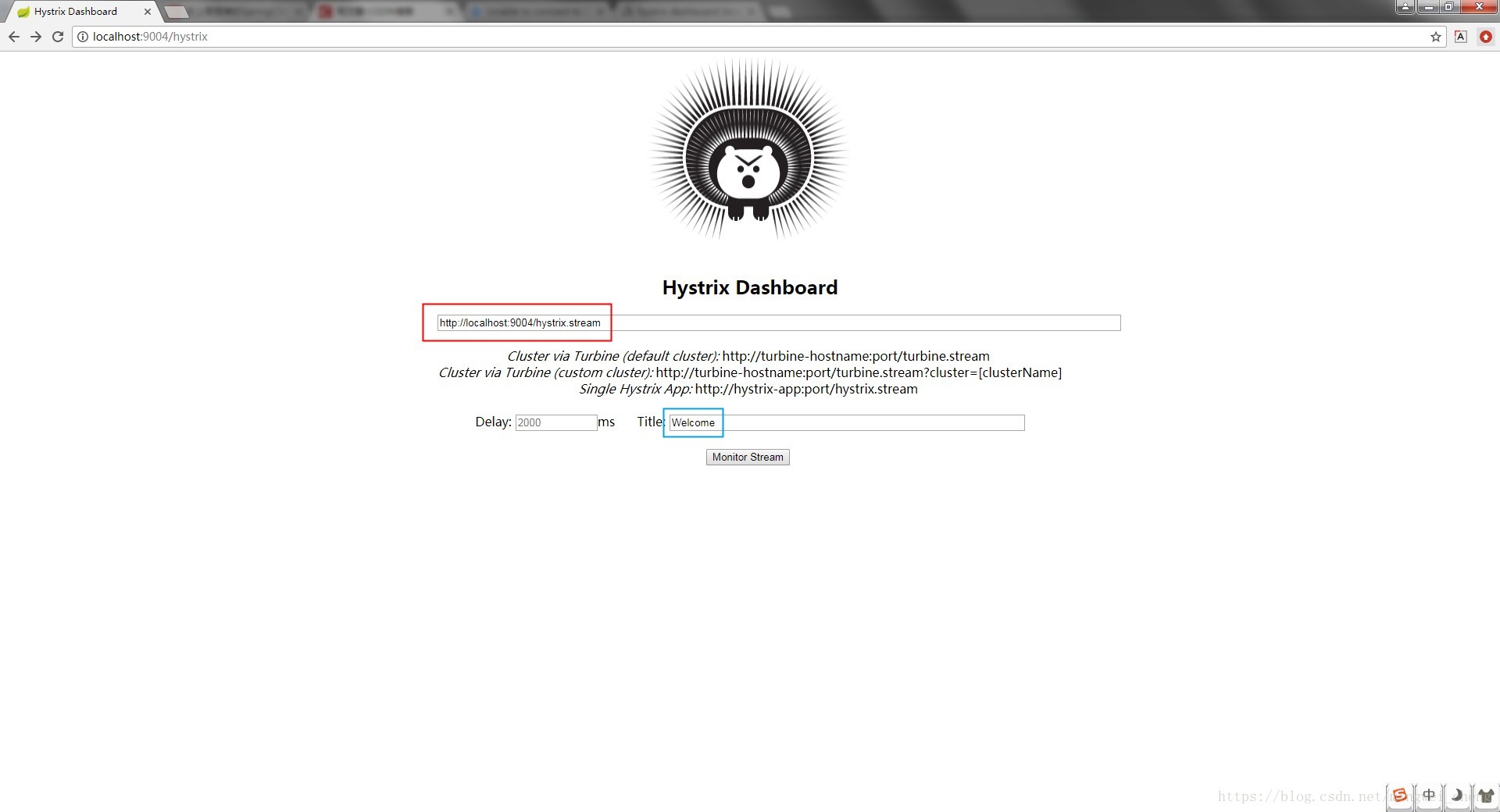
}再启动项目,访问http://localhost:9004/hystrix,出现下图界面,红色圈的地方为位置路径,需指定,蓝色圈的地方为名称,可以随意填写。
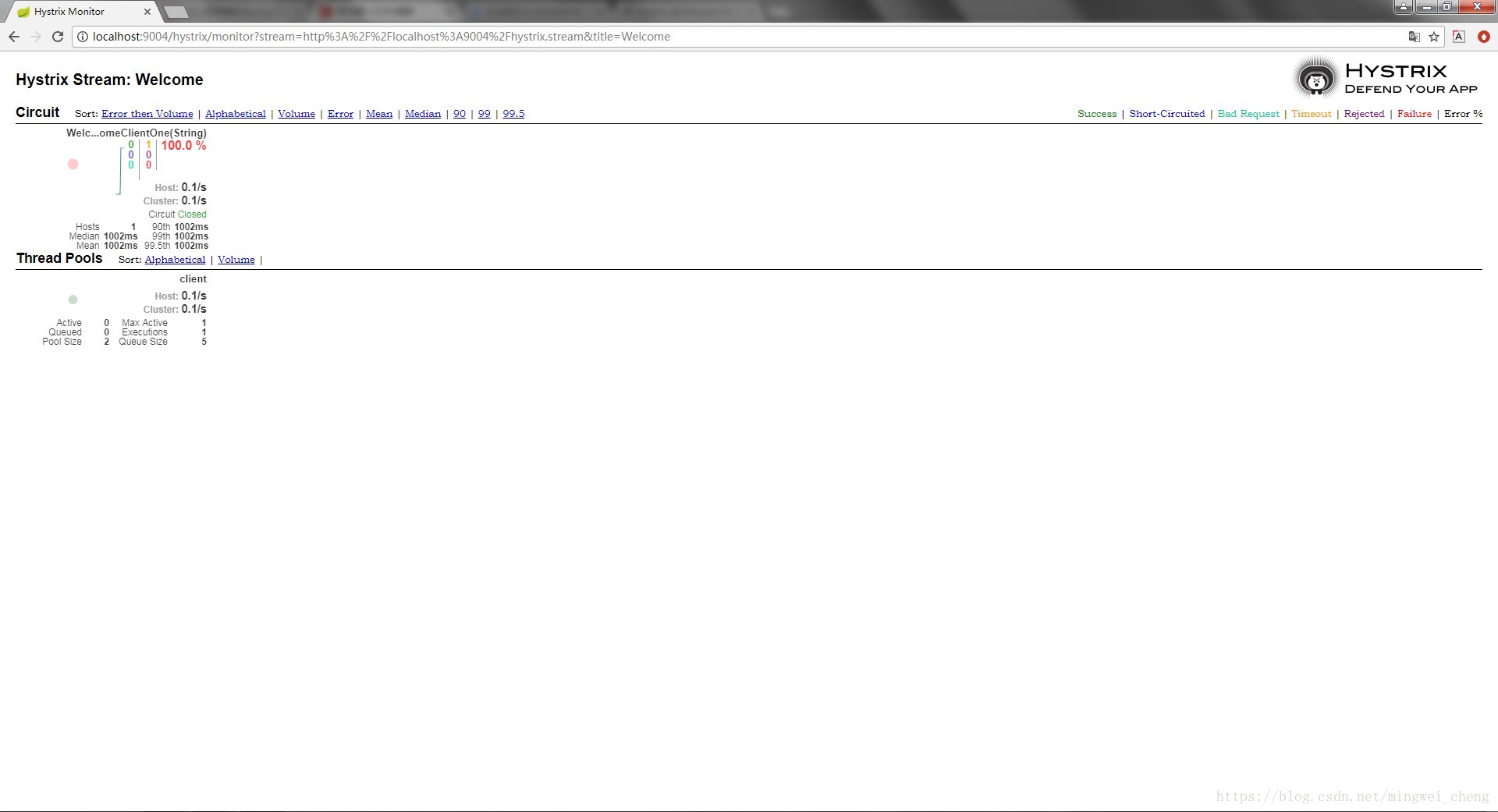
我们再访问http://localhost:9004/welcome?name=Cheng,此时监控界面会出现





 扫一扫
扫一扫


 146
146


 到【灌水乐园】发言



