




 本文围绕ViewGroup事件分发原理展开,通过自定义ViewGroup子类并打印执行顺序,总结出事件分发流程为dispatchTouchEvent->onInterceptTouchEvent->onTouchListener->onTouchEvent。还对父布局事件拦截进行猜想并分析源码,最后给出流程图,指出view的onTouch返回false时的事件处理流程。
ViewGroup事件分发原理
首先我们先自定义一个ViewGroup的子类。
public class MyRelativeLayout extends RelativeLayout {

    public MyRelativeLayout(Context context, AttributeSet attrs) {
        super(context, attrs);
        // TODO Auto-generated constructor stub
    }

    @Override
    public boolean dispatchTouchEvent(MotionEvent ev) {
        Log.i("ricky", "dispatchTouchEvent:action--"+ev.getAction()+"---view:MyRelativeLayout");
        return super.dispatchTouchEvent(ev);
    }

    @Override
    public boolean onInterceptTouchEvent(MotionEvent ev) {
        Log.i("ricky", "onInterceptTouchEvent:action--"+ev.getAction()+"---view:MyRelativeLayout");
        return super.onInterceptTouchEvent(ev);
    }

    @Override
    public boolean onTouchEvent(MotionEvent event) {
        Log.i("ricky", "onTouchEvent:action--"+event.getAction()+"---view:MyRelativeLayout");
        return true;
    }


}
我们打印下执行顺序:
06-19 14:51:18.962 8602-8602/com.example.shijiantest I/ricky: dispatchTouchEvent:action--0---view:MyRelativeLayout
06-19 14:51:18.962 8602-8602/com.example.shijiantest I/ricky: onInterceptTouchEvent:action--0---view:MyRelativeLayout
06-19 14:51:18.962 8602-8602/com.example.shijiantest I/ricky: dispatchTouchEvent:action--0---view:MyButton
06-19 14:51:18.962 8602-8602/com.example.shijiantest I/ricky: OnTouchListener:acton--0----view:com.example.shijiantest.MyButton{52ca23d VFED..C.. ........ 0,0-264,144 #7f070022 app:id/button}
06-19 14:51:18.962 8602-8602/com.example.shijiantest I/ricky: onTouchEvent:action--0---view:MyButton
06-19 14:51:19.042 8602-8602/com.example.shijiantest I/ricky: dispatchTouchEvent:action--1---view:MyRelativeLayout
06-19 14:51:19.042 8602-8602/com.example.shijiantest I/ricky: onInterceptTouchEvent:action--1---view:MyRelativeLayout
06-19 14:51:19.042 8602-8602/com.example.shijiantest I/ricky: dispatchTouchEvent:action--1---view:MyButton
06-19 14:51:19.042 8602-8602/com.example.shijiantest I/ricky: OnTouchListener:acton--1----view:com.example.shijiantest.MyButton{52ca23d VFED..C.. ...P.... 0,0-264,144 #7f070022 app:id/button}
06-19 14:51:19.042 8602-8602/com.example.shijiantest I/ricky: onTouchEvent:action--1---view:MyButton
06-19 14:51:19.044 8602-8602/com.example.shijiantest I/ricky: OnClickListener----view:com.example.shijiantest.MyButton{52ca23d VFED..C.. ...P.... 0,0-264,144 #7f070022 app:id/button}
总结:dispatchTouchEvent-->onInterceptTouchEvent----->onTouchListener---return false-->onTouchEvent
我们发现跟View的基本差不多。下面我们就猜想一下,父布局是怎么对事件进行拦截的呢?我们带着猜想去看下源码:
首先我们分析下onInterceptTouchEvent:action返回true,也就是我们理解的拦截是的源码是怎样的,以及为什么返回true会执行拦截操作。我们先看下intercepted的返回情况与什么因素有关。
final boolean intercepted;
if (actionMasked == MotionEvent.ACTION_DOWN
    || mFirstTouchTarget != null) {
        final boolean disallowIntercept = (mGroupFlags & FLAG_DISALLOW_INTERCEPT) != 0;
        if (!disallowIntercept) {
            intercepted = onInterceptTouchEvent(ev);//调用拦截方法判断
            ev.setAction(action); // restore action in case it was changed
        } else {
            intercepted = false;
               }
} else {
    // There are no touch targets and this action is not an initial down
    // so this view group continues to intercept touches.
    intercepted = true;
}

 public boolean onInterceptTouchEvent(MotionEvent ev) {
        if (ev.isFromSource(InputDevice.SOURCE_MOUSE)
                && ev.getAction() == MotionEvent.ACTION_DOWN
                && ev.isButtonPressed(MotionEvent.BUTTON_PRIMARY)
                && isOnScrollbarThumb(ev.getX(), ev.getY())) {
            return true;
        }
        return false;
  }
我们可以发现这个返回值默认返回的是个false,也就是不进行拦截操作。我们反着进行推理,看看默认情况下我怎么执行我们顺着源码往下看。
if (!canceled && !intercepted) {
    ...

   if (dispatchTransformedTouchEvent(ev, false, child, idBitsToAssign)) {
       // Child wants to receive touch within its bounds.
       mLastTouchDownTime = ev.getDownTime();
       if (preorderedList != null) {
           // childIndex points into presorted list, find original index
           for (int j = 0; j < childrenCount; j++) {
               if (children[childIndex] == mChildren[j]) {
                     mLastTouchDownIndex = j;
                     break;
               }
           }
       } else {
           mLastTouchDownIndex = childIndex;
       }
       mLastTouchDownX = ev.getX();
       mLastTouchDownY = ev.getY();
       newTouchTarget = addTouchTarget(child, idBitsToAssign);
       alreadyDispatchedToNewTouchTarget = true;
       break;
   }
    ...
}

 private TouchTarget addTouchTarget(@NonNull View child, int pointerIdBits) {
        final TouchTarget target = TouchTarget.obtain(child, pointerIdBits);
        target.next = mFirstTouchTarget;
        mFirstTouchTarget = target;
        return target;
    }
我们在其中mFirstTouchTarget被赋值啦,这个使我们寻找的关键。现在我们头看一下,如果intercepted返回true,那么就不会走上面的方法,也就是mFirstTouchTarget会返回一个false。
那么我们看下下面源码:
// Dispatch to touch targets.
            if (mFirstTouchTarget == null) {
                // No touch targets so treat this as an ordinary view.
                handled = dispatchTransformedTouchEvent(ev, canceled, null,
                        TouchTarget.ALL_POINTER_IDS);
            }

private boolean dispatchTransformedTouchEvent(MotionEvent event, boolean cancel,
            View child, int desiredPointerIdBits) {
        final boolean handled;

        // Canceling motions is a special case.  We don't need to perform any                 transformations
        // or filtering.  The important part is the action, not the contents.
        final int oldAction = event.getAction();
        if (cancel || oldAction == MotionEvent.ACTION_CANCEL) {
            event.setAction(MotionEvent.ACTION_CANCEL);
            if (child == null) {
                handled = super.dispatchTouchEvent(event);
            } else {
                handled = child.dispatchTouchEvent(event);
            }
            event.setAction(oldAction);
            return handled;
        }
    ...
}
我们可以发现会执行super.dispatchTouchEvent(event),也就是执行了View的dispatchTouchEvent事件啦。不会在进行向下传递执行了。
我总结了一幅流程图
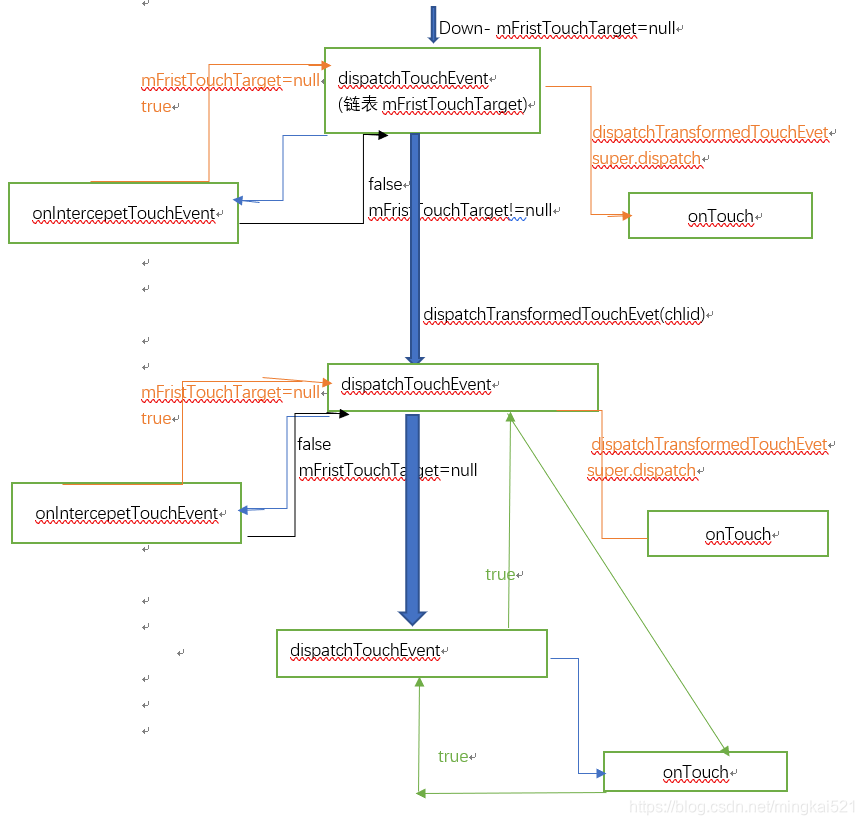
当view的onTouch返回false是其实差不多的流程:
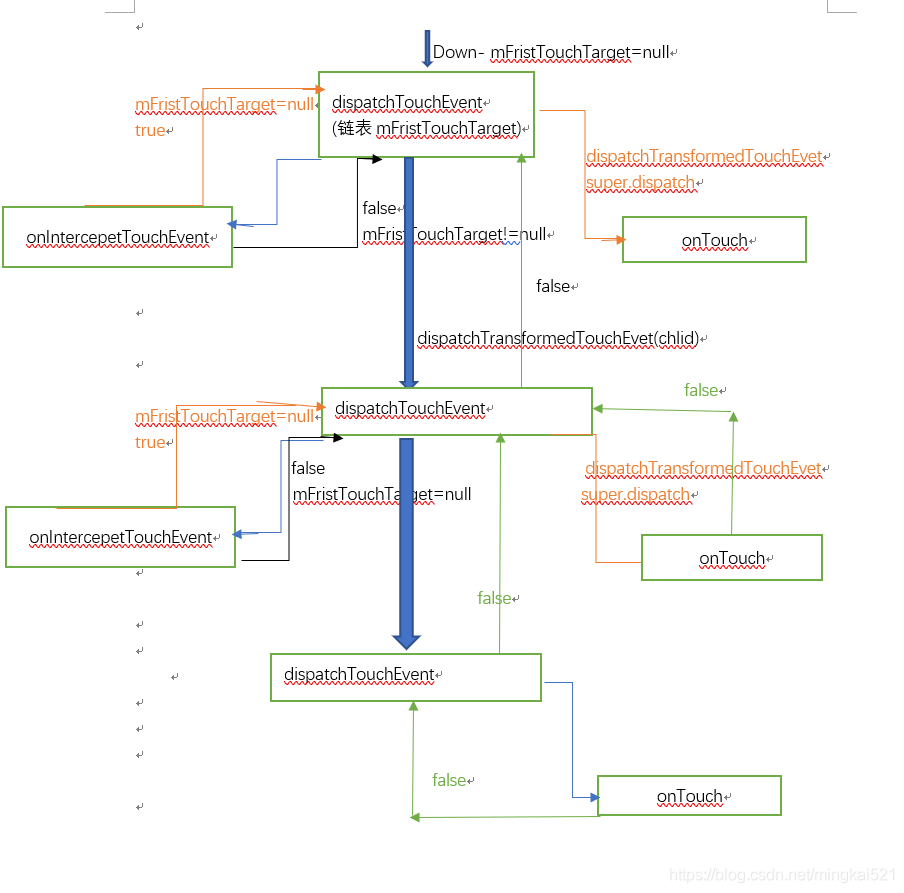
会依次向上返回直到上层ViewGroup的onTouch去消耗这个事件。
感觉这块的源码很难分析吧,自己总结的也不是那么好,以后继续补充。





 扫一扫
扫一扫


 821
821

 被折叠的 条评论
为什么被折叠?
被折叠的 条评论
为什么被折叠?
 到【灌水乐园】发言





