


 本文介绍如何在SpringBoot项目中集成Elasticsearch,通过示例代码展示添加索引数据及查询操作,分享项目搭建步骤及遇到的问题。
Demo实现的功能
springBoot集成elasticsearch(下面简称es)有2种实现方案, 一种是基于Jest, 另一种是基于springDataElasticsearch, 我们此次整合采用后者实现.
简单实现对es搜索引擎, 添加索引数据, 查询数据等操作.
github源码地址
https://github.com/mikewuhao/springBoot-es-demo
搭建详细步骤
1. 准备工作
1.1 提前把es环境搭建和启动好, 注意好es版本匹配(本人用的是6.4.3版本)
(本人开始打算用windows环境部署es, 发现从官网下载好慢, 改从虚拟机上使用docker部署es, 参考本人博客: https://blog.youkuaiyun.com/mikewuhao/article/details/106690887)
1.2 提前把es的head可视化插件配置好(Kibana插件也可以)
参考本人的博客:https://blog.youkuaiyun.com/mikewuhao/article/details/106682282
2. 项目结构
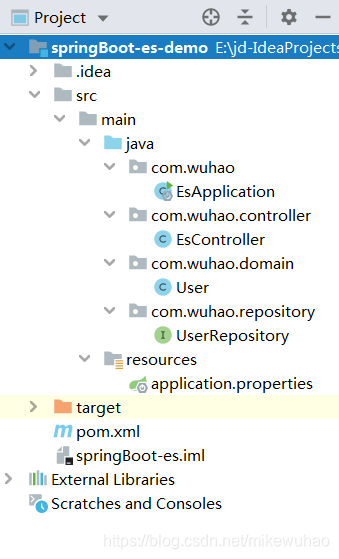
在idea开发工具里面新建maven类型的project, 命名为springBoot-es-demo
按上图目录结构建包
2.1 pom文件
<?xml version="1.0" encoding="UTF-8"?>
<project xmlns="http://maven.apache.org/POM/4.0.0"
xmlns:xsi="http://www.w3.org/2001/XMLSchema-instance"
xsi:schemaLocation="http://maven.apache.org/POM/4.0.0 http://maven.apache.org/xsd/maven-4.0.0.xsd">
<modelVersion>4.0.0</modelVersion>
<groupId>com.wuhao.demo</groupId>
<artifactId>springBootEs</artifactId>
<version>1.0-SNAPSHOT</version>
<parent>
<groupId>org.springframework.boot</groupId>
<artifactId>spring-boot-starter-parent</artifactId>
<version>2.1.7.RELEASE</version>
<relativePath/> <!-- lookup parent from repository -->
</parent>
<dependencies>
<!--elasticsearch-->
<dependency>
<groupId>org.springframework.boot</groupId>
<artifactId>spring-boot-starter-data-elasticsearch</artifactId>
</dependency>
<dependency>
<groupId>org.springframework.boot</groupId>
<artifactId>spring-boot-starter-web</artifactId>
</dependency>
< 最低0.47元/天 解锁文章






 扫一扫
扫一扫


 983
983

 被折叠的 条评论
为什么被折叠?
被折叠的 条评论
为什么被折叠?
 到【灌水乐园】发言





