


【yum】CentOS7.x 安装php-mysql提示需要:libmysqlclient.so.18()(64bit)的解决办法

在安装httpd、php、php-mysql和mod_ssl过程中遇到缺少libmysqlclient.so.18()(64bit)的问题。解决方法是下载并安装mysql57-community-release-el7-11.noarch.rpm,然后安装mysql-community-libs-compat包,该包包含MySQL 5.6.45客户端应用所需的共享兼容库。

# yum -y install httpd php php-mysql mod_ssl


提示缺少 libmysqlclient.so.18()(64bit)

查询libmysqlclient.so,唯独缺少libmysqlclient.so.18
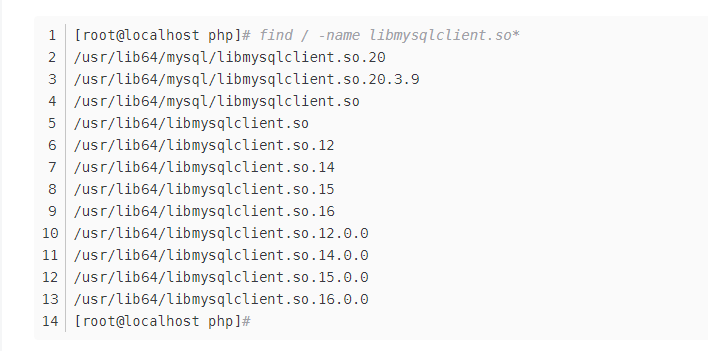
查询得知是需要安装 mysql-community-libs-compat 这个包


# wget https://repo.mysql.com//mysql57-community-release-el7-11.noarch.rpm


# yum -y localinstall mysql57-community-release-el7-11.noarch.rpm


# yum -y install mysql-community-libs-compat


# yum info mysql-community-libs-compat
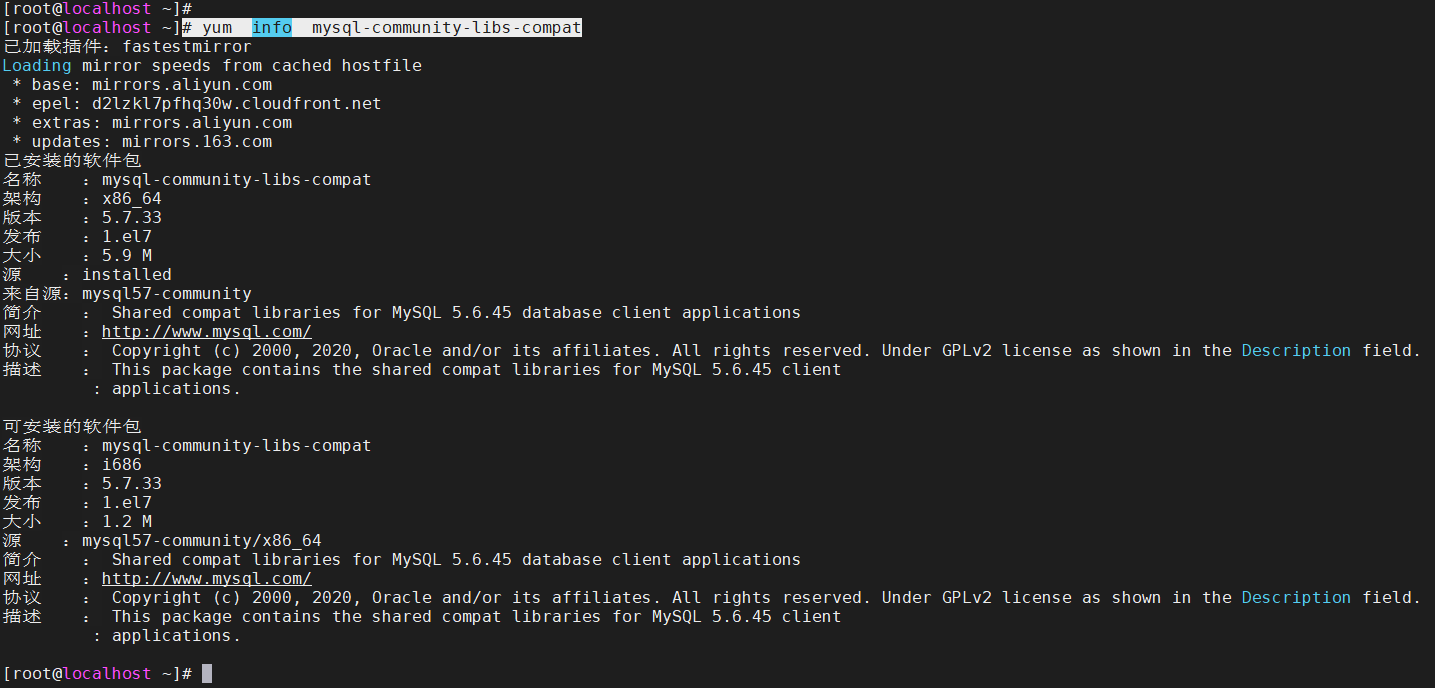
描述 : This package contains the shared compat libraries for MySQL 5.6.45 client applications.

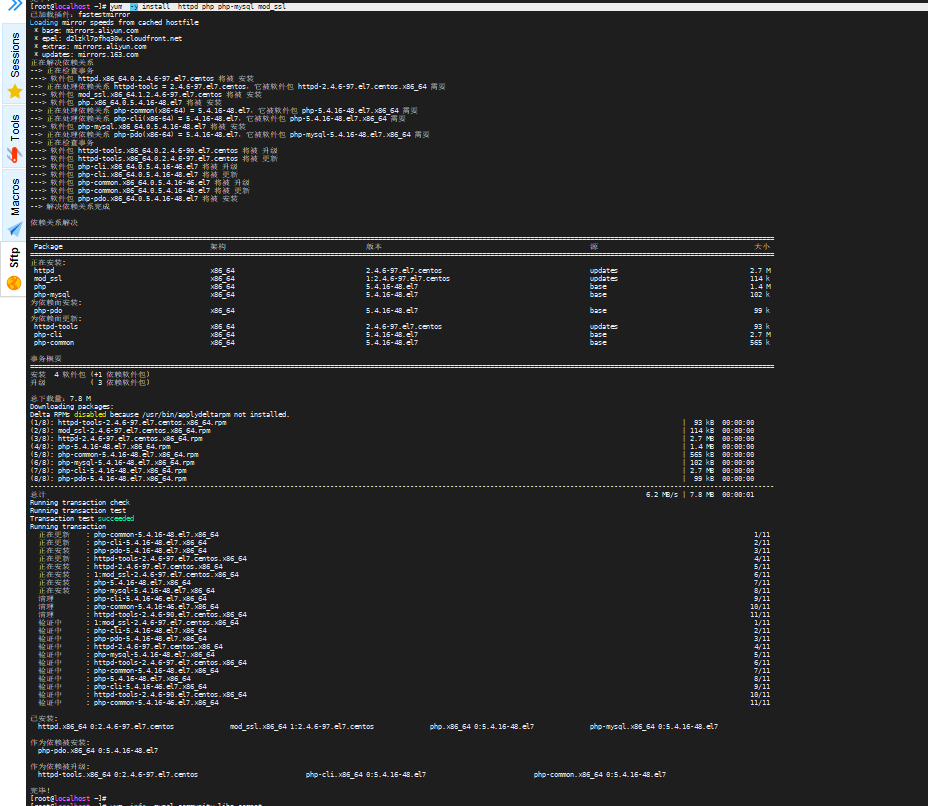
# yum -y install httpd php php-mysql mod_ssl


yum install -y net-snmp net-snmp-utils Loaded plugins: fastestmirror, langpacks Loading mirror speeds from cached hostfile * base: mirrors.aliyun.com * extras: mirrors.aliyun.com * updates: mirrors.aliyun.com Resolving Dependencies --> Running transaction check ---> Package net-snmp.x86_64 1:5.7.2-49.el7_9.4 will be installed --> Processing Dependency: net-snmp-agent-libs = 1:5.7.2-49.el7_9.4 for package: 1:net-snmp-5.7.2-49.el7_9.4.x86_64 --> Processing Dependency: perl(Data::Dumper) for package: 1:net-snmp-5.7.2-49.el7_9.4.x86_64 --> Processing Dependency: libnetsnmptrapd.so.31()(64bit) for package: 1:net-snmp-5.7.2-49.el7_9.4.x86_64 --> Processing Dependency: libnetsnmpmibs.so.31()(64bit) for package: 1:net-snmp-5.7.2-49.el7_9.4.x86_64 --> Processing Dependency: libnetsnmpagent.so.31()(64bit) for package: 1:net-snmp-5.7.2-49.el7_9.4.x86_64 --> Processing Dependency: libmysqlclient.so.18()(64bit) for package: 1:net-snmp-5.7.2-49.el7_9.4.x86_64 ---> Package net-snmp-utils.x86_64 1:5.7.2-49.el7_9.4 will be installed --> Running transaction check ---> Package mariadb-libs.x86_64 1:5.5.68-1.el7 will be installed ---> Package net-snmp-agent-libs.x86_64 1:5.7.2-49.el7_9.4 will be installed ---> Package perl-Data-Dumper.x86_64 0:2.145-3.el7 will be installed Removing mariadb-libs.x86_64 1:5.5.68-1.el7 - u due to obsoletes from installed mysql-community-libs-5.7.37-1.el7.x86_64 --> Restarting Dependency Resolution with new changes. --> Running transaction check ---> Package mariadb-libs.x86_64 1:5.5.68-1.el7 will be installed --> Processing Dependency: libmysqlclient.so.18(libmysqlclient_18)(64bit) for package: 1:net-snmp-agent-libs-5.7.2-49.el7_9.4.x86_64 --> Processing Dependency: libmysqlclient.so.18(libmysqlclient_18)(64bit) for package: 2:postfix-2.10.1-9.el7.x86_64 --> Processing Dependency: libmysqlclient.so.18()(64bit) for package: 1:net-snmp-agent-libs-5.7.2-49.el7_9.4.x86_64 --> Processing Dependency: libmysqlclient.so.18()(64bit) for package: 2:postfix-2.10.1-9.el7.x86_64 --> Processing Dependency: libmysqlclient.so.18()(64bit) for package: 1:net-snmp-5.7.2-49.el7_9.4.x86_64 --> Finished Dependency Resolution Error: Package: 1:net-snmp-agent-libs-5.7.2-49.el7_9.4.x86_64 (updates) Requires: libmysqlclient.so.18(libmysqlclient_18)(64bit) Error: Package: 2:postfix-2.10.1-9.el7.x86_64 (@base) Requires: libmysqlclient.so.18(libmysqlclient_18)(64bit) Error: Package: 1:net-snmp-5.7.2-49.el7_9.4.x86_64 (updates) Requires: libmysqlclient.so.18()(64bit) Error: Package: 1:net-snmp-agent-libs-5.7.2-49.el7_9.4.x86_64 (updates) Requires: libmysqlclient.so.18()(64bit) Error: Package: 2:postfix-2.10.1-9.el7.x86_64 (@base) Requires: libmysqlclient.so.18()(64bit) You could try using --skip-broken to work around the problem ** Found 2 pre-existing rpmdb problem(s), 'yum check' output follows: 2:postfix-2.10.1-9.el7.x86_64 has missing requires of libmysqlclient.so.18()(64bit) 2:postfix-2.10.1-9.el7.x86_64 has missing requires of libmysqlclient.so.18(libmysqlclient_18)(64bit) [root@localhost w123]# net-snmp-create-v3-user -ro -A yu202211 -a SHA temp_user bash: net-snmp-create-v3-user: command not found... [root@localhost w123]#
最新发布
09-23
评论
添加红包

请填写红包祝福语或标题

红包个数最小为10个

红包金额最低5元

当前余额3.43前往充值 >
需支付:10.00
成就一亿技术人!
领取后你会自动成为博主和红包主的粉丝 规则
hope_wisdom
发出的红包
实付
使用余额支付
点击重新获取
扫码支付
钱包余额 0

抵扣说明:

1.余额是钱包充值的虚拟货币,按照1:1的比例进行支付金额的抵扣。
2.余额无法直接购买下载,可以购买VIP、付费专栏及课程。

余额充值


