【MySQL&SSL】How To Configure SSL/TLS for MySQL on CentOS7.x?

一、实验背景

MySQL默认的数据通道是不加密的,在一些安全性要求特别高的场景下,我们需要配置MySQL端口为SSL,使得数据通道加密处理,避免敏感信息泄漏和被篡改。

当然,启用MySQL SSL之后,由于每个数据包都需要加密和解密,这个对MySQL的性能是有不小影响的,们在使用的时候,要根据实际情况斟酌。

MySQL客户端登录服务器时候的密码不是明文传输,有加密策略处理。


MySQL 连接方式
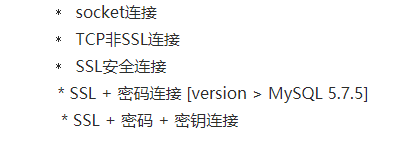
下面我们测试 MySQL SSL+密码+密钥的连接方式。


二、实验环境

MySQL版本: 5.7.27

IP:192.168.1.105


# systemctl status mysqld

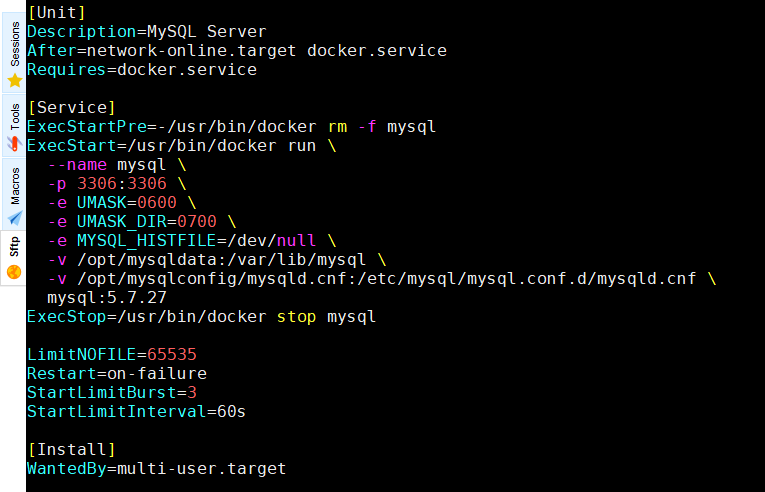
# cat /etc/systemd/system/mysqld.service
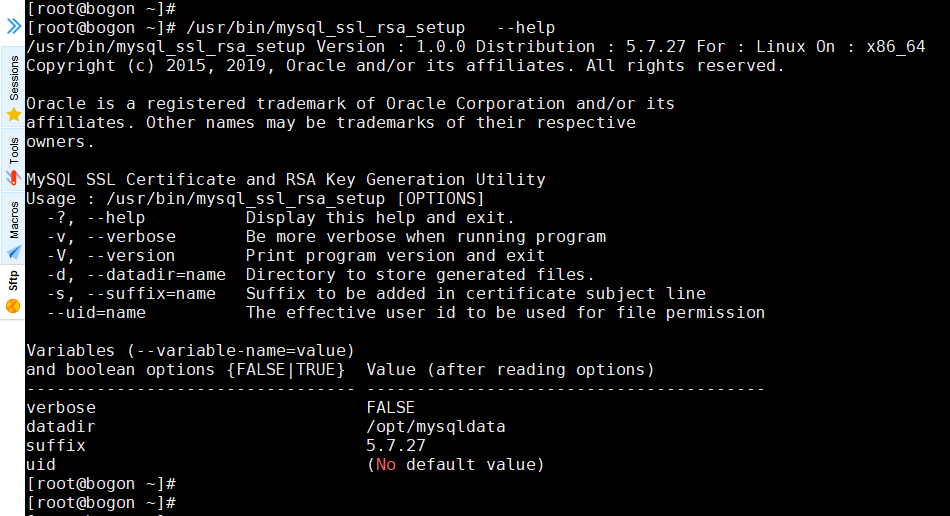
# /usr/bin/mysql_ssl_rsa_setup  --help

# /usr/bin/mysql_ssl_rsa_setup   --daradir=/opt/mysqldata  --uid-mysql
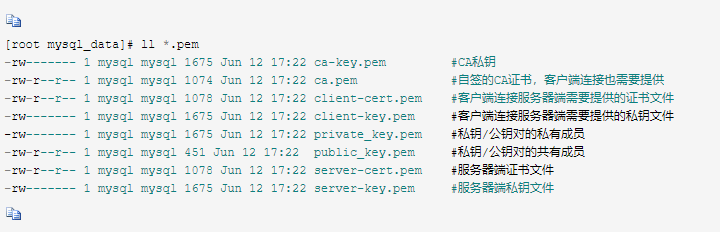
# ll  /opt/mysqldata/*.pem
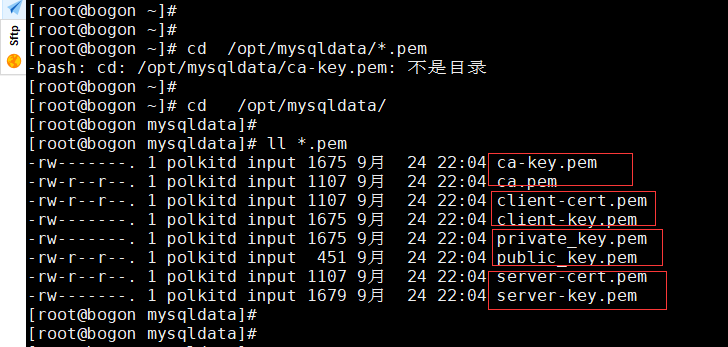
 

MySQL5.7.x data(数据)目录下生成的这些pem文件是用于启用SSL功能的。

这些文件是证书颁发机构(以“ca”开头),MySQL服务器进程(以“服务器”开头)和MySQL客户端(以“客户端”开头)的密钥和证书对。 此外,当不使用SSL时,MySQL使用private_key.pem和public_key.pem文件来安全地传输密码。


三、开启服务端SSL


添加SSL相关配置

# vim   /opt/mysqlconfig/mysqld.cnf

#########################################

[mysqld]

require_secure_transport = ON

ssl-ca                  = /var/lib/mysql/ca.pem

ssl-cert                = /var/lib/mysql/server-cert.pem

ssl-key                  = /var/lib/mysql/server-key.pem

##########################################


# docker exec -it mysql   mysql -u root -p"MySQL@123"
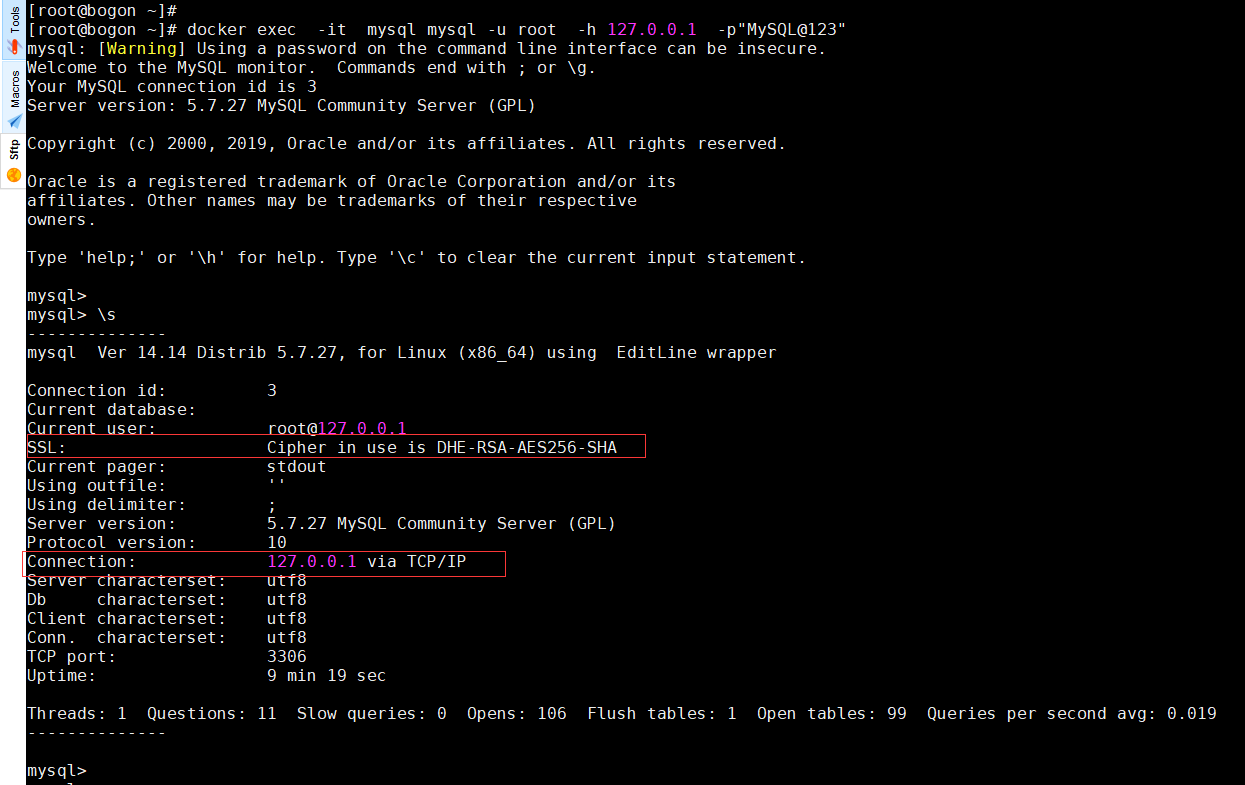
mysql>  ALTER USER 'root'@'%' REQUIRE X509;

mysql> FLUSH PRIVILEGES;

mysql> exit

# systemctl restart mysqld 


四、连接测试


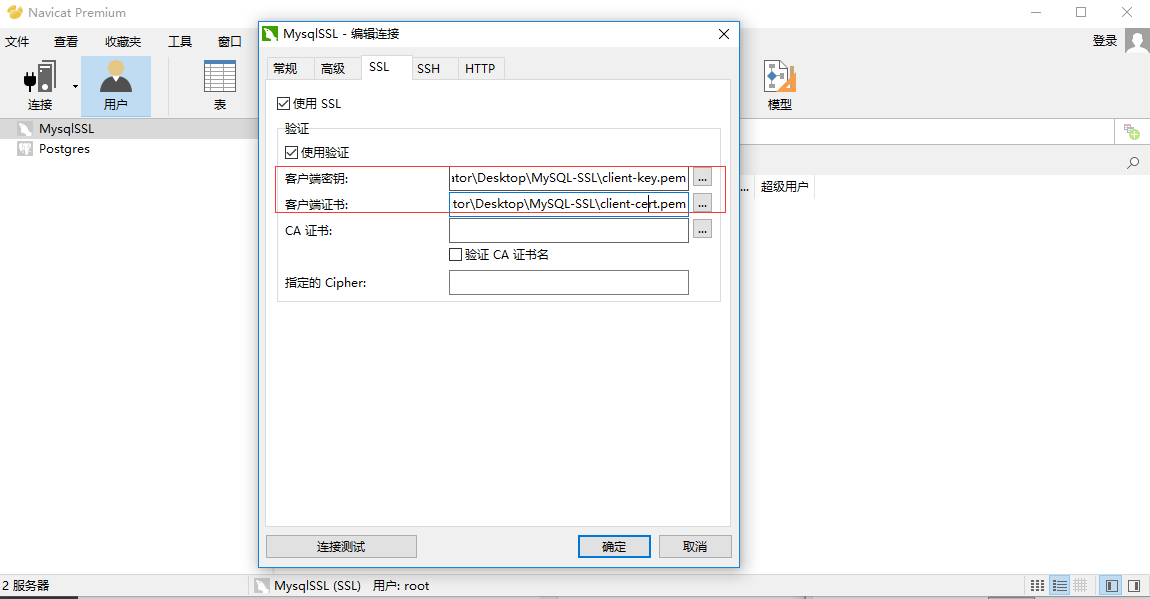
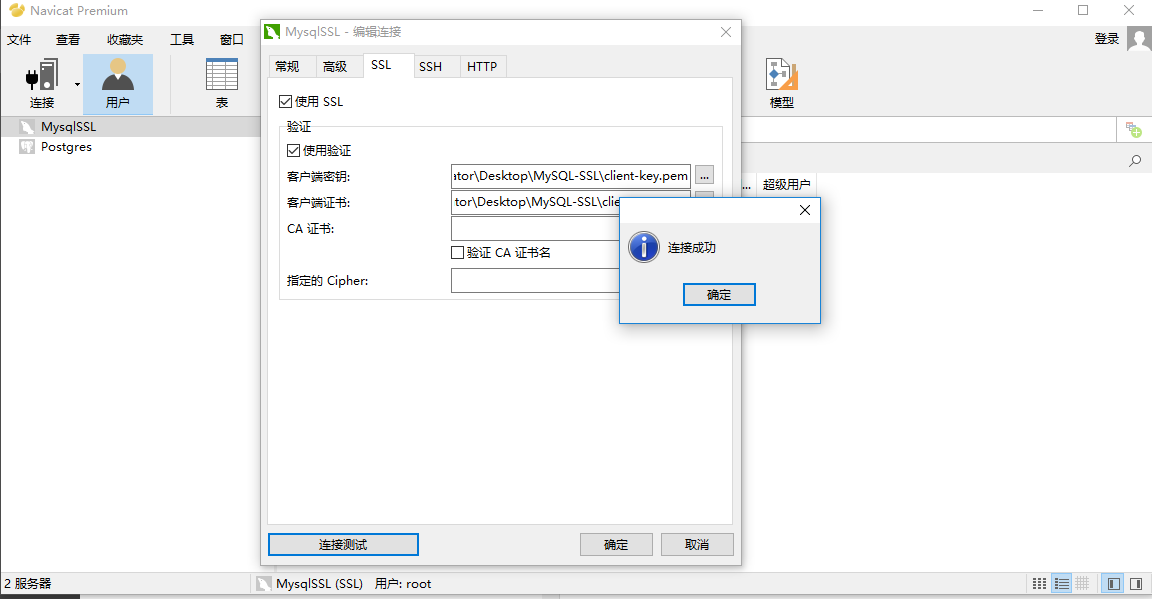
在Windows上用Navicat for MySQL客户端

将 ca.pem  client-cert.pem  client-key.pem拷贝到windows文件夹
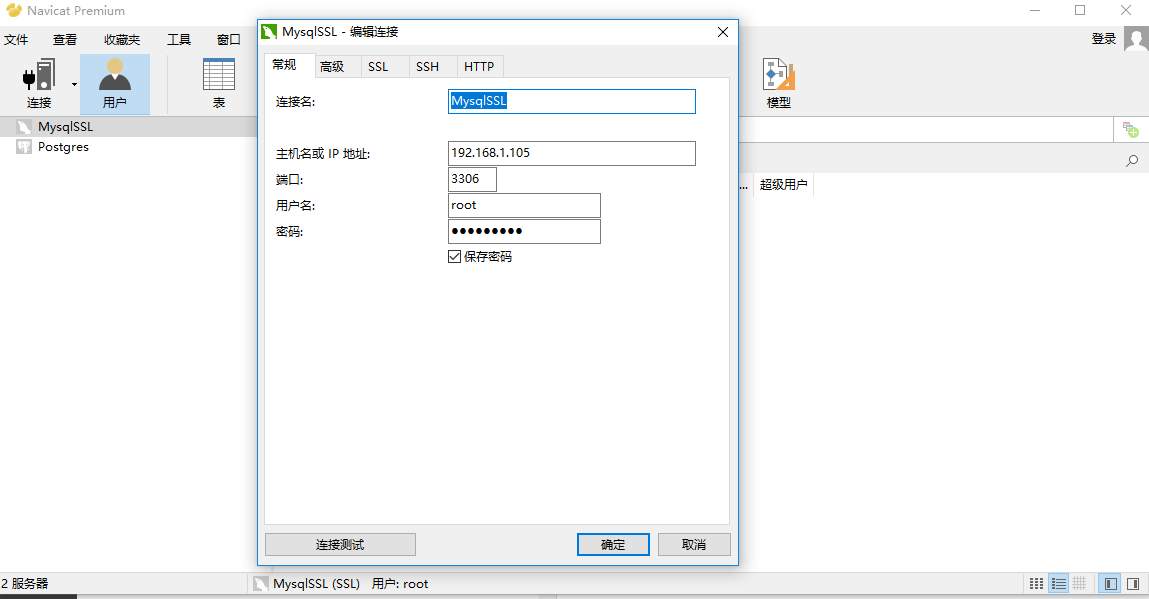


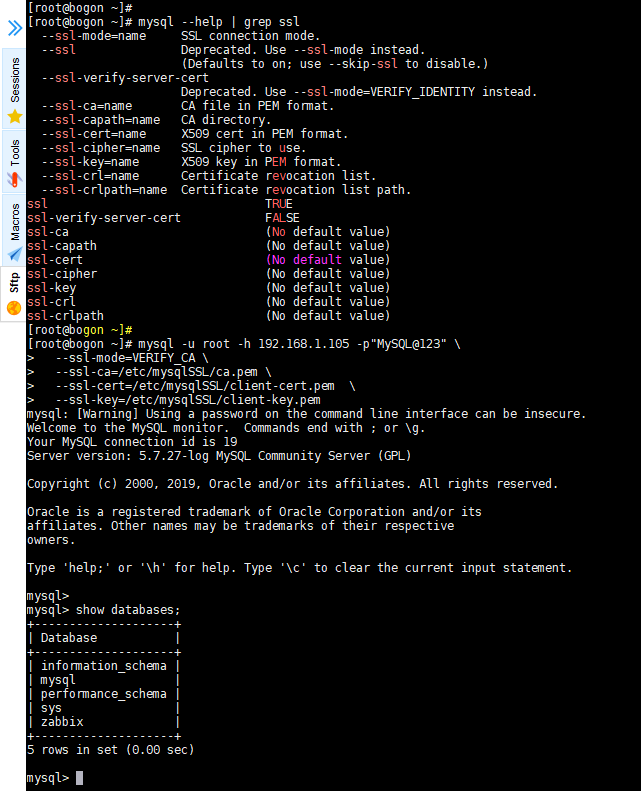
在其他服务器用MySQL命令行工具

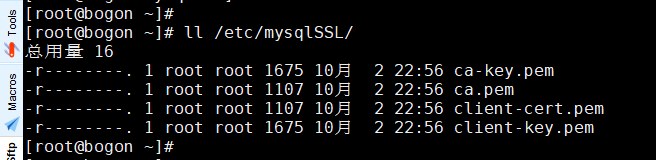
将 ca.pem client-cert.pem  client-key.pem拷贝到其他服务的  /etc/mysqlSSL 目录

# chmd 700  /etc/mysqlSSL

# chmod  400 /etc/mysqlSSL/*
 

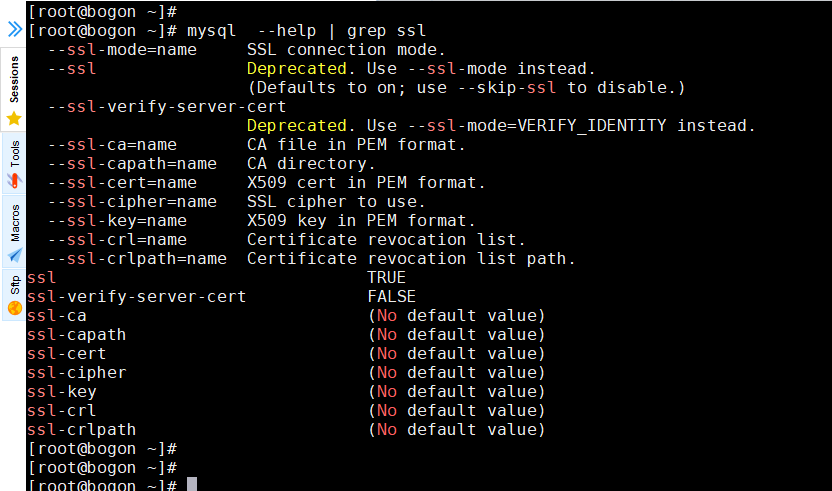
# mysql --help | grep ssl
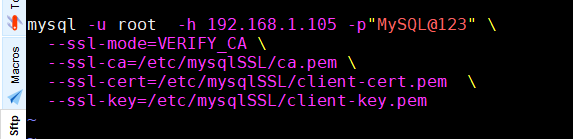
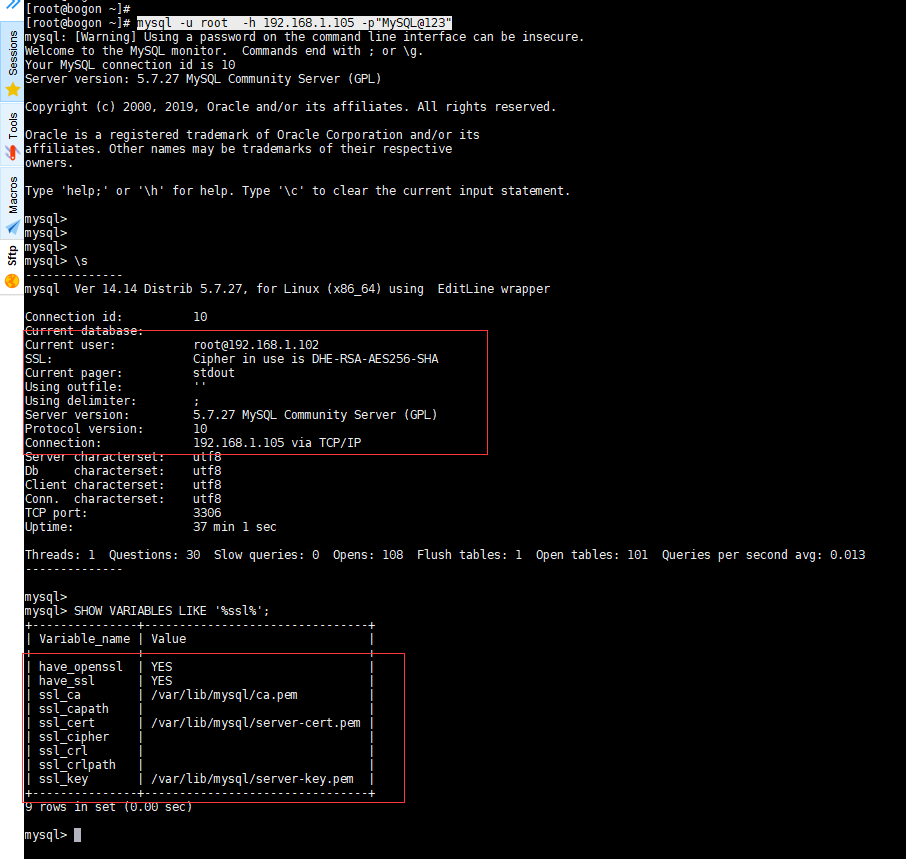
# mysql -u root -h 192.168.1.105 -p"MySQL@123" 

 

# mysql -u root -h 192.168.1.105 -p"MySQL@123" \

  --ssl-mode=VERIFY_CA \

  --ssl-ca=/etc/mysqlSSL/ca.pem \

  --ssl-cert=/etc/mysqlSSL/client-cert.pem  \

  --ssl-key=/etc/mysqlSSL/client-key.pem
 

关于 ssl_mode

Alternatives are: 'DISABLED','PREFERRED','REQUIRED','VERIFY_CA','VERIFY_IDENTITY'

SSL connection error: CA certificate is required if ssl-mode is VERIFY_CA or VERIFY_IDENTITY


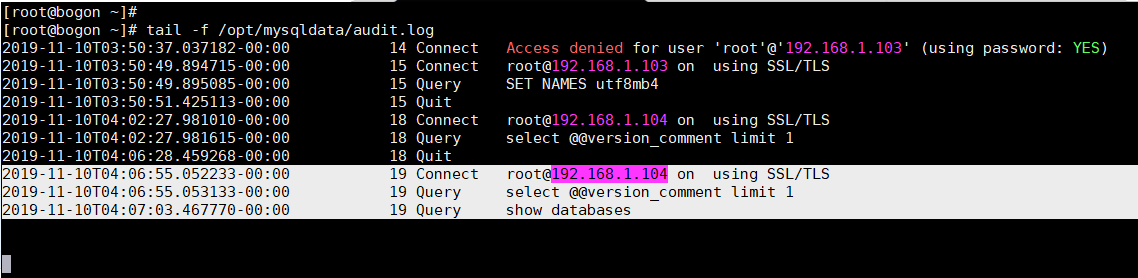
看服务端审计日志
 

如果不想在客户端用MySQL命令行工具指定证书参数,可以将其写在文件配置文件中

在客户端服务器

# vim /etc/my.cnf

###############################

[mysql]

ssl-ca=/etc/mysqlSSL/ca.pem

ssl-cert=/etc/mysqlSSL/client-cert.pem

ssl-key=/etc/mysqlSSL/client-key.pem

################################
 

五、关于MySQL JDBC


如何解决MySQL在高版本需要指明是否进行SSL连接问题

https://zhidao.baidu.com/question/2056521203295428667.html

https://blog.youkuaiyun.com/weixin_43201310/article/details/83146610


Warning about SSL connection when connecting to MySQL database

https://stackoverflow.com/questions/34189756/warning-about-ssl-connection-when-connecting-to-mysql-database


六、参考

MySQL开启ssl连接

https://blog.youkuaiyun.com/weixin_39845407/article/details/81708230


MySQL 5.7.x开启SSL连接

https://blog.youkuaiyun.com/weixin_34200628/article/details/89904819


mysql_ssl_rsa_setup - 创建SSL / RSA文件

https://www.docs4dev.com/docs/zh/mysql/5.7/reference/mysql-ssl-rsa-setup.html#mysql-ssl-rsa-setup---%E5%88%9B%E5%BB%BAssl--rsa%E6%96%87%E4%BB%B6


MySQL Connection over SSL

https://www.heidisql.com/forum.php?t=19494


Debugging MySQL SSL problems

https://www.percona.com/blog/2012/11/08/debugging-mysql-ssl-problems


MySQL数据库连接useSSL=false

https://blog.youkuaiyun.com/UIYOOOO/article/details/80301411


Navicat for MySQL设置SSL属性的步骤

https://jingyan.baidu.com/article/ca41422f36b35b1eae99edc3.html


MySQL SSL: bad other signature confirmation

https://serverfault.com/questions/622317/mysql-ssl-bad-other-signature-confirmation


MySQL 5.7 SSL连接最佳实战

https://blog.youkuaiyun.com/qq_37322178/article/details/79177052


How To Configure SSL/TLS for MySQL on Ubuntu 16.04

https://www.digitalocean.com/community/tutorials/how-to-configure-ssl-tls-for-mysql-on-ubuntu-16-04

debian12安装root@debian:/usr/src/asterisk-13.38.3# ./configure --with-crypto --with-ssl --with-srtp --with-pjproject-bundled checking build system type... x86_64-pc-linux-gnu checking host system type... x86_64-pc-linux-gnu checking for gcc... gcc checking whether the C compiler works... yes checking for C compiler default output file name... a.out checking for suffix of executables... checking whether we are cross compiling... no checking for suffix of object files... o checking whether we are using the GNU C compiler... yes checking whether gcc accepts -g... yes checking for gcc option to accept ISO C89... none needed checking how to run the C preprocessor... gcc -E checking for grep that handles long lines and -e... /usr/bin/grep checking for egrep... /usr/bin/grep -E checking for ANSI C header files... yes checking for sys/types.h... yes checking for sys/stat.h... yes checking for stdlib.h... yes checking for string.h... yes checking for memory.h... yes checking for strings.h... yes checking for inttypes.h... yes checking for stdint.h... yes checking for unistd.h... yes checking minix/config.h usability... no checking minix/config.h presence... no checking for minix/config.h... no checking whether it is safe to define __EXTENSIONS__... yes checking whether char is unsigned... no checking for uname... /usr/bin/uname checking for g++... g++ checking whether we are using the GNU C++ compiler... yes checking whether g++ accepts -g... yes checking how to run the C preprocessor... gcc -E checking how to run the C++ preprocessor... g++ -E checking for a sed that does not truncate output... /usr/bin/sed checking for egrep... grep -E checking for ld used by gcc... /usr/bin/ld checking if the linker (/usr/bin/ld) is GNU ld... yes checking for gawk... no checking for mawk... mawk checking for a BSD-compatible install... /usr/bin/install -c checking whether ln -s works... yes checking for ranlib... ranlib checking for GNU make... make checking for egrep... (cached) /usr/bin/grep -E checking for strip... strip checking for ar... ar checking for bison... : checking for cmp... /usr/bin/cmp checking for cat... /usr/bin/cat checking for cut... /usr/bin/cut checking for flex... : checking for grep... (cached) /usr/bin/grep checking for python2.7... no checking for python2... no checking for python... no checking for python3... /usr/bin/python3 checking for find... /usr/bin/find checking for basename... /usr/bin/basename checking for dirname... /usr/bin/dirname checking for sh... /bin/bash checking for ln... /usr/bin/ln checking for doxygen... : checking for dot... : checking for wget... /usr/bin/wget checking for curl... /usr/bin/curl checking for xmllint... : checking for xmlstarlet... no checking for xml... no checking for bash... /bin/bash checking for git... /usr/bin/git checking for alembic... : checking for bzip2... /usr/bin/bzip2 checking for tar... /usr/bin/tar checking for patch... /usr/bin/patch checking for sed... (cached) /usr/bin/sed checking for nm... /usr/bin/nm checking for ldconfig... /sbin/ldconfig checking for sha1sum... /usr/bin/sha1sum checking for openssl... /usr/bin/openssl checking for bison that supports parse-param... checking for soxmix... no checking for md5... no checking for md5sum... md5sum checking for a sed that does not truncate output... (cached) /usr/bin/sed checking whether gcc is Clang... no checking whether pthreads work with -pthread... yes checking for joinable pthread attribute... PTHREAD_CREATE_JOINABLE checking whether more special flags are required for pthreads... no checking for PTHREAD_PRIO_INHERIT... yes checking for RAII support... checking for gcc -fnested-functions... no checking for clang strsep/strcmp optimization... no checking for embedded pjproject (may have to download)... configuring [pjproject] Verifying /tmp/pjproject-2.10.tar.bz2 [pjproject] Verify successful [pjproject] Unpacking /tmp/pjproject-2.10.tar.bz2 [pjproject] Applying patches /usr/src/asterisk-13.38.3/third-party/pjproject/patches /usr/src/asterisk-13.38.3/third-party/pjproject/source The text leading up to this was: -------------------------- |From e8000cc80e5f8ba02cc52852edc02cdb0e949525 Mon Sep 17 00:00:00 2001 |From: Richard Mudgett <rmudgett@digium.com> |Date: Mon, 6 Aug 2018 11:24:25 -0500 |Subject: [PATCH 1/5] 0000-configure-ssl-library-path.patch | |--- | aconfigure | 6 +++++- | aconfigure.ac | 6 +++++- | 2 files changed, 10 insertions(+), 2 deletions(-) | |diff --git a/aconfigure b/aconfigure |index 1c449b8..c4c6060 100755 |--- a/aconfigure |+++ b/aconfigure -------------------------- File to patch:
最新发布
07-30
评论
成就一亿技术人!
拼手气红包6.0元
还能输入1000个字符
 
红包 添加红包
表情包 插入表情
 条评论被折叠 查看
添加红包

请填写红包祝福语或标题

红包个数最小为10个

红包金额最低5元

当前余额3.43前往充值 >
需支付:10.00
成就一亿技术人!
领取后你会自动成为博主和红包主的粉丝 规则
hope_wisdom
发出的红包
实付
使用余额支付
点击重新获取
扫码支付
钱包余额 0

抵扣说明:

1.余额是钱包充值的虚拟货币,按照1:1的比例进行支付金额的抵扣。
2.余额无法直接购买下载,可以购买VIP、付费专栏及课程。

余额充值