



 VRP是华为的网络操作系统,支持多种协议和数据通信功能。硬件包括CPU、RAM、ROM、NVRAM和FLASHROM等。设备管理包括本地登录(console口和MiniUSB)和远程登录(VTY,如Telnet和SSH)。VRP还涉及AAA认证和权限配置,以及WEB网管方式。
一、VRP系统介绍
华为自主研发的网络操作系统,可以运行在多种硬件平台上。VRP平台以 TCP/IP协议为核心,实现数据链路层、网络层、应用层的多种协议,操作系统中集成了路由交换协议、QOS技术、安全技术和IP语音技术等数据通信功能,并以IP转发引擎技术作为基础,为网络设备提供了出色的数据转发能力。
1、设备的硬件组成
CPU:中央处理器,执行指令跟计算
RAM:动态内存,承载配置文件:current-configuration,重启配置丢失
ROM:只读存储器【BootStarp/VRP Version】
NVRAM:非易失性的存储器,32-128K,承载启动文件镜像;
FLASHROM:相当于硬盘,4M-256M,承载重要的系统文件:Unix、saved-configuration
外部文件服务器:TFTPServer、TFTPd32等【TFTP-UDp69、TFP-TCP21】
二、VRP的发展
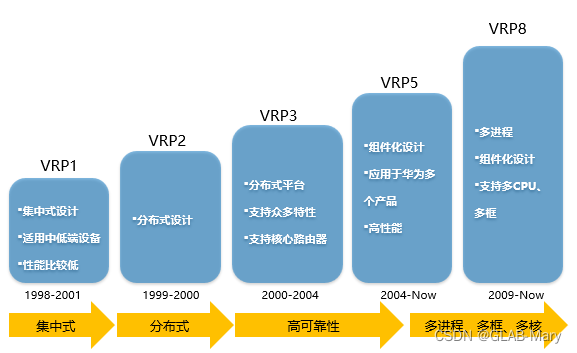
VRP的版本:VRP1、VRP2、VRP3、VRP5、VRP8
三、设备管理接口【VRP用户界面】
作用:连接设备 VRP操作系统
1、本地登录
1.1、console 口
是一种通信串行端口,由设备的主控板提供。
现在分为2种本地登录方式:console线、无线蓝牙
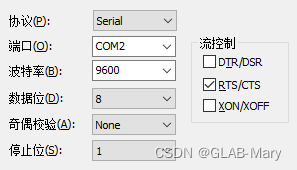
参数配置:
接入协议:【串口 | Serial】、选择相应的 COM口、速率选择 9600
命令:【本地账号】
a、配置console本地登录密码【passwd】
[RA2] user-interface console 0
[RA2-ui-console0] authentication-mode password
Please configure the login password (maximum length 16):123456
[RA2-ui-console0]
b、配置console本地设备作为AAA服务器【aaa】;
[RA2] user-interface console 0 进入 console 口
[RA2-ui-console0] authentication-mode aaa 安全密码模式:aaa
[RA2-ui-console0] aaa 进入 aaa模式配置本地账号和密码
[RA2-aaa] local-user test2 password cipher 123456 设置本地账号 test 密码 123456
Info: Add a new user.
[RA2-aaa] local-user test2 service-type terminal 【service-type】:设定 test2账号的使用环境,【terminal】只适用于本地登录;
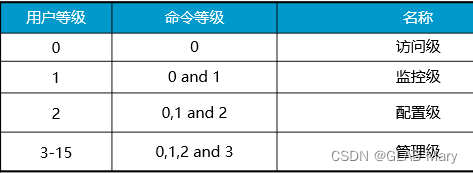
[RA2-aaa] local-user test2 privilege level 3 设置本地账号的等级权限,默认为 0
1.2、Mini USB
电脑需要安装相应的 Mini USB驱动程序,才能正常使用,不常用,可以查官网
http://www.support.huawei.com/enterprise/
2、远程登陆【VTY | 虚拟终端登录】
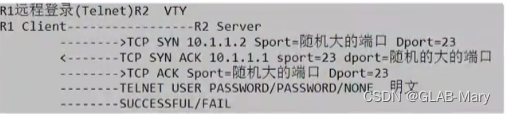
是一种虚拟线路端口,建立了一条 VTY通道,即用户可以通过VTY通道使用不同的协议,如:Telnet、SSH等来登录设备。
2.1、接入协议:【Telnet,STelnet【SSH】等】
2.2、远程登录需要有 IP接入设备。
2.3、VTY 用户登录的最大数量为15,模拟器为 5个【0 4】
命令:【远程登录账号】
a、远程登录【password】模式
[RA2] user-interface vty 0 4 设置以 telnet协议登录模式
[RA2-ui-vty0-4] authentication-mode password 设置密码模式
Please configure the login password (maximum length 16):111111 设置密码
[RA2-ui-vty0-4] user privilege level 3 对 【vty】通道设置权限【全局】,下面会有对账号【单独】设置权限;
telnet 10.1.1.2 远程 telnet登录 RA2
b、远程登录【aaa】模式
b.1、使本地账号可用于远程 telnet登录,命令:
[RA2-aaa] local-user test2 service-type terminal telnet 通过【service-type】添加 telnet选项,【可跟多个选项】使账户 test2 本地与远程都可以使用此账号登录;
[RA2-aaa] display this
[V200R003C00]
#
aaa
authentication-scheme default
authorization-scheme default
accounting-scheme default
domain default
domain default_admin
local-user admin password cipher %%K8m.Nt84DZ}e#<0`8bmE3Uw}%%
local-user admin service-type http
local-user test2 password cipher %%B>;!j>;!j%.G>;!jblB<>W’tAQq3Pr%%
local-user test2 privilege level 3
local-user test2 service-type telnet terminal
b.2、配置 VTY 远程登录账号;
[RA2] user-interface vty 0 4 进入 vty 接口
[RA2-ui-vty0-4] authentication-mode aaa 将 vty 设定为 需要用 账号密码登录的模式
[RA2-ui-vty0-4 ]aaa
[RA2-aaa] local-user test3 password cipher 111111
[RA2-aaa] local-user test3 privilege level 3
[RA2-aaa] display this 查看3A下创建的账号的不同登录方式及权限
[V200R003C00]
#
aaa
local-user test2 password cipher %%B>;!j>;!j%.G>;!jblB<>W’tAQq3Pr%% test2 账号用于 telnet登录,权限为3
local-user test2 privilege level 3
local-user test2 service-type telnet
local-user test3 password cipher %%(RJ6-NISmTbqB@QEV5T:qu"t%% test3 账号没有特指登录方式【默认用于所有登录方式】,权限为3
local-user test3 privilege level 3
b.3、配置 ssh协议登录
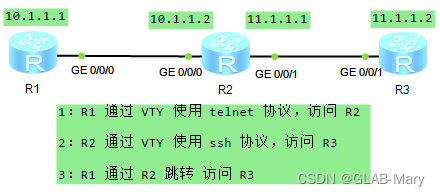
配置 SSH 服务端
SSH 用户使用 password 方式验证,需要在 SSH 服务端生成本地 RSA 密钥
[RA3] rsa local-key-pair create
[RA3] display rsa local-key-pair
配置 VTY 用户,AAA授权方式,设置 SSH协议后,设备自动禁止 telnet 协议
[RA3] user-interface vty 0 4
[RA3-ui-vty0-4] authentication-mode aaa
[Huawei-ui-vty0-4] protocol inbound ssh
[RA3] aaa
[RA3-aaa] local-user test3 password cipher 111111
[RA3-aaa] local-user test3 privilege level 3
新建 SSH用户,指定认证方式 password
[RA3] ssh user a4 authentication-type password
[RA3] stelnet server enable
[RA3] display ssh user-information
[RA3] display ssh server status
[RA3] display ssh server session
R2客户端 SSH 配置
[RA3] ssh client first-time enable
[RA3] stelnet 11.1.1.2
注:本地账户权限优于通道全局权限、远程登录账号权限、【aaa】下面创建的账号,通过service-type,赋予账号的不同登录方式,如:telnet、terminal、http、ssh等
本地账户权限:local-user 账户 privilege level ?
通道全局权限:console 0 | vty 0 4 —> user privilege level ?
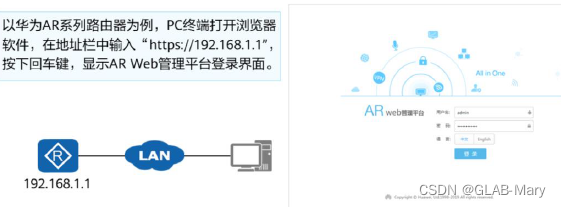
3、WEB网管方式
四、VRP命令行基础
1、VRP的命令运行模式:
特权模式:< 设备名 >
系统模式:[ 设备名 ]
2、关闭log日志通知信息
undo terminal monitor
[RA1] undo info-center enable
3、配置系统时钟

4、登录用户永不超时登出
[RA1] user-interface console 0
[RA1-ui-console0] idle-timeout 0 0
5、历史命令记录显示条数
[RA1]user-interface console 0
[RA1-ui-console0]display history-command
[RA1-ui-console0]history-command max-size 20





 扫一扫
扫一扫


 3483
3483

 被折叠的 条评论
为什么被折叠?
被折叠的 条评论
为什么被折叠?
 到【灌水乐园】发言





