



 本文详细介绍Android应用从安装到更新的全过程,包括解决安装失败问题、适配高版本Android系统的方法,以及如何使用不同方式在线更新应用。涵盖权限设置、Shell命令使用、更新策略配置等关键步骤。
安装失败,gradle.properties文件下添加 即可
android.injected.testOnly = false
shell命令安装
/**
 * 安装apk
 *
 * @param path apk文件路径
 */
public void installAPK(String path) {
    Log.i(TAG, "installAPK:" + path);
    com.dlc.xiaohaitun.utils.ShellUtils utils = new com.dlc.xiaohaitun.utils. ShellUtils();
    if (utils.isRoot()) {
        LogPlus.e("###已經root, 開始 pm install ");
        utils.run("pm install -r " + path, 600 * 1000);
    } else {
        spm("没有root");
    }
}
1、Android 8.0已上版本需要添加必要权限
依赖
implementation 'com.github.lovetuzitong:MultiImageSelector:1.2'<uses-permission android:name="android.permission.REQUEST_INSTALL_PACKAGES" />2、适配Android 10.0所需xml文件——file_paths
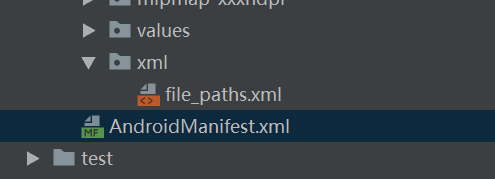
<?xml version="1.0" encoding="utf-8"?>
<resources xmlns:android="http://schemas.android.com/apk/res/android">
    <paths>
        <!--external-path用来指定Uri共享的
            name属性的值可以随便填
            path属性的值表示共享的具体路径,这里设置为空代表将整个SD卡进行共享,当然你也可以共享存放的图片地址-->
        <external-path name="my_images" path=""/>
    </paths>

</resources>
3、适配Android 10.0所需provider
<!--authorities是自定义的,调用是复制即可-->
<provider
    android:name="androidx.core.content.FileProvider"
    android:authorities="a.b.c.fileprovider"
    android:grantUriPermissions="true"
    android:exported="false">
    <meta-data
        android:name="android.support.FILE_PROVIDER_PATHS"
        android:resource="@xml/file_paths" />
</provider>
4、根据Android版本,不同安装配置
int version = android.os.Build.VERSION.SDK_INT;
if (version > 24) {//android 7.0-10.0及以上版本
    installIntent.setFlags(Intent.FLAG_ACTIVITY_NEW_TASK);
    installIntent.addFlags(Intent.FLAG_GRANT_READ_URI_PERMISSION);
    installIntent.setDataAndType(apkUri, "application/vnd.android.package-archive");
} else {//android 5.0-7.0
    installIntent.addFlags(Intent.FLAG_ACTIVITY_NEW_TASK);
    installIntent.setDataAndType(Uri.fromFile(updateFile), "application/vnd.android.package-archive");

}
startActivity(installIntent);5、完整demo,实现下载与安装:android应用下载安装apk升级版本实现demo适配Android10_android升级apk,androidapk版本升级-Android文档类资源-优快云下载
6、在线交流解决下载安装bug:QQ1085220040
方法二
//在线更新
implementation ('com.teprinciple:updateapputilsx:2.3.0'){
    exclude group: 'org.jetbrains:annotations:13.0'
}
    public void postApp(AppDownloadBean bean) {

//        if (!UserHelper.get().getSettingBean().isWifiUpdate()) {

            UpdateConfig updateConfig = new UpdateConfig();
            updateConfig.setNeedCheckMd5(false);
            updateConfig.setNotifyImgRes(R.mipmap.ic_launcher);
            updateConfig.setForce(bean.getEnforce() == 1);
//            updateConfig.setForce(true);
            updateConfig.setDebug(false);
            updateConfig.setAlwaysShowDownLoadDialog(true);


            UiConfig uiConfig = new UiConfig();
            uiConfig.setUiType(UiType.PLENTIFUL);
            uiConfig.setCustomLayoutId(R.layout.view_update_dialog_plentiful);


            UpdateAppUtils
                    .getInstance()
                    .apkUrl(bean.getDownloadurl())
                    .updateTitle(bean.getTitle())
                    .updateContent(bean.getContent())
                    .uiConfig(uiConfig)
                    .updateConfig(updateConfig)
                    .setOnInitUiListener(new OnInitUiListener() {
                        @Override
                        public void onInitUpdateUi(@Nullable View view, UpdateConfig updateConfig,  UiConfig uiConfig) {
                            TextView mTitle = view.findViewById(R.id.tv_update_title);
                            TextView mContent = view.findViewById(R.id.tv_update_content);
                            mTitle.setText(bean.getTitle());
                            mContent.setText(Html.fromHtml(bean.getContent()));
                        }
                    })
                    .setUpdateDownloadListener(new UpdateDownloadListener() {
                        @Override
                        public void onStart() {

                        }

                        @Override
                        public void onDownload(int progress) {

                        }

                        @Override
                        public void onFinish() {

                        }

                        @Override
                        public void onError(Throwable e) {

                        }
                    })
                    .update();

//        }


    }

    /**
     * 获取版本号
     *
     * @return 当前应用的版本号
     */
    public int getVersion(Activity activity) {
        try {
            PackageManager manager = activity.getPackageManager();
            PackageInfo info = manager.getPackageInfo(activity.getPackageName(), 0);
            return info.versionCode;
        } catch (Exception e) {
            e.printStackTrace();
            return 0;
        }
    }
<?xml version="1.0" encoding="utf-8"?>
<androidx.constraintlayout.widget.ConstraintLayout
    xmlns:android="http://schemas.android.com/apk/res/android"
    xmlns:app="http://schemas.android.com/apk/res-auto"
    xmlns:tools="http://schemas.android.com/tools"
    android:layout_width="280dp"
    android:layout_height="wrap_content"
    android:background="@drawable/bg_update_dialog"
    android:paddingBottom="10dp">

    <ImageView
        android:id="@+id/iv_update_logo"
        android:layout_width="80dp"
        android:layout_height="80dp"
        android:layout_marginTop="15dp"
        app:layout_constraintEnd_toEndOf="parent"
        app:layout_constraintStart_toStartOf="parent"
        app:layout_constraintTop_toTopOf="parent"
        app:srcCompat="@drawable/ic_kzf"/>

    <TextView
        android:id="@+id/tv_update_title"
        android:layout_width="wrap_content"
        android:layout_height="wrap_content"
        android:layout_marginTop="10dp"
        android:textColor="@color/text_title"
        android:textSize="16sp"
        app:layout_constraintEnd_toEndOf="parent"
        app:layout_constraintStart_toStartOf="parent"
        app:layout_constraintTop_toBottomOf="@+id/iv_update_logo"
        tools:text="版本更新啦!"/>

    <ScrollView
        android:id="@+id/scrollView2"
        android:layout_width="match_parent"
        android:layout_height="90dp"
        android:layout_marginTop="10dp"
        android:overScrollMode="never"
        app:layout_constraintEnd_toEndOf="parent"
        app:layout_constraintStart_toStartOf="parent"
        app:layout_constraintTop_toBottomOf="@+id/tv_update_title">

        <TextView
            android:id="@+id/tv_update_content"
            android:layout_width="match_parent"
            android:layout_height="wrap_content"
            android:layout_gravity="top"
            android:gravity="start"
            android:lineSpacingExtra="5dp"
            android:paddingLeft="20dp"
            android:paddingRight="20dp"
            android:textColor="@color/text_content"
            android:textSize="14sp"
            tools:text="1、快来升级最新版本\n2、这次更漂亮了\n3、快点来吧"/>
    </ScrollView>

    <TextView
        android:id="@+id/btn_update_sure"
        android:layout_width="0dp"
        android:layout_height="35dp"
        android:layout_marginStart="20dp"
        android:layout_marginTop="10dp"
        android:layout_marginEnd="20dp"
        android:background="@drawable/bg_btn_lv_selector"
        android:gravity="center"
        android:text="@string/update_now"
        android:textColor="@color/white"
        android:textSize="14sp"
        app:layout_constraintBottom_toTopOf="@+id/btn_update_cancel"
        app:layout_constraintEnd_toEndOf="parent"
        app:layout_constraintStart_toStartOf="parent"
        app:layout_constraintTop_toBottomOf="@+id/scrollView2"
        app:layout_goneMarginBottom="10dp"/>

    <TextView
        android:id="@+id/btn_update_cancel"
        android:layout_width="0dp"
        android:layout_height="35dp"
        android:layout_marginStart="20dp"
        android:layout_marginTop="5dp"
        android:layout_marginEnd="20dp"
        android:gravity="center"
        android:text="@string/update_cancel"
        android:textColor="@color/text_content"
        android:textSize="14sp"
        app:layout_constraintBottom_toBottomOf="parent"
        app:layout_constraintEnd_toEndOf="parent"
        app:layout_constraintStart_toStartOf="parent"
        app:layout_constraintTop_toBottomOf="@+id/btn_update_sure"
        app:layout_goneMarginTop="10dp"/>

</androidx.constraintlayout.widget.ConstraintLayout>
{
"code":1,
"msg":"app下载",
"time":"1615343899",
"data":{
"id":9,
"title":"Android回收员端",
"downloadurl":"http://szhdljhsxshg.app.xiaozhuschool.com/uploads/20200831/b995d216dc9297ca9350ac48ee7193a0.apk",
"newversion":"139",
"packagesize":"1",
"content":"<p>版本2升级测试</p>",
"enforce":0,
"brief":"版本更新啦!"
}
}
"code":1,
"msg":"app下载",
"time":"1615343899",
"data":{
"id":9,
"title":"Android回收员端",
"downloadurl":"http://szhdljhsxshg.app.xiaozhuschool.com/uploads/20200831/b995d216dc9297ca9350ac48ee7193a0.apk",
"newversion":"139",
"packagesize":"1",
"content":"<p>版本2升级测试</p>",
"enforce":0,
"brief":"版本更新啦!"
}
}





 扫一扫
扫一扫


 4023
4023

 被折叠的 条评论
为什么被折叠?
被折叠的 条评论
为什么被折叠?
 到【灌水乐园】发言





