


 本文介绍JMeter中如何设置全局变量及Cookie,并详细剖析JMeter生成的.jmx文档结构,帮助读者理解测试计划的配置细节。
话说
各位读者盆友,早上好,这里接着总结下Jmeter的使用 。
目录
1.如何添加全局变量?
2.Jmeter生成的文档结构剖析
3.总结
开发工具:Jmeter
难度系数:★★☆☆☆
建议用时:1H
1.如何添加全局变量?
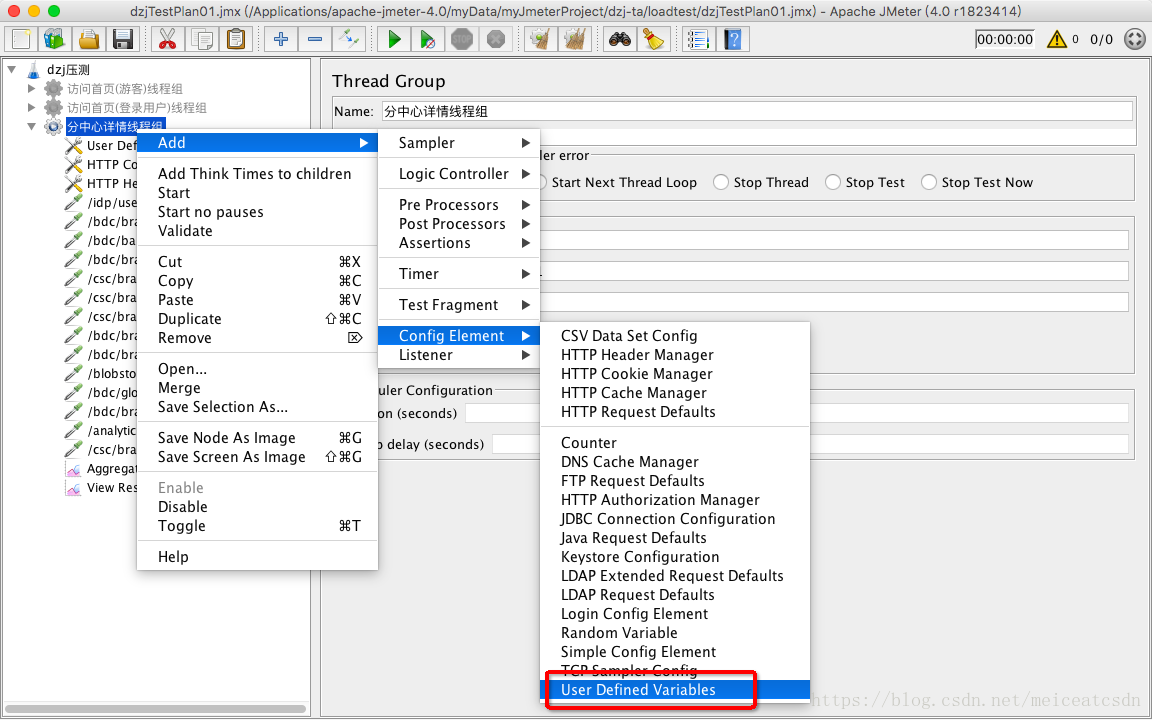
当建立一个ThreadsGroup之后,就会新建多个Samples,这多个Samples组成一个场景,比如:首页、视频列表等等,每个Samples一般都是HTTP请求,每个请求都需要去访问主机Ip,按照笔者博客Jmeter-1的做法,都要手动写,这个能否类似Java变量一样剥离出来,然后全局引用?
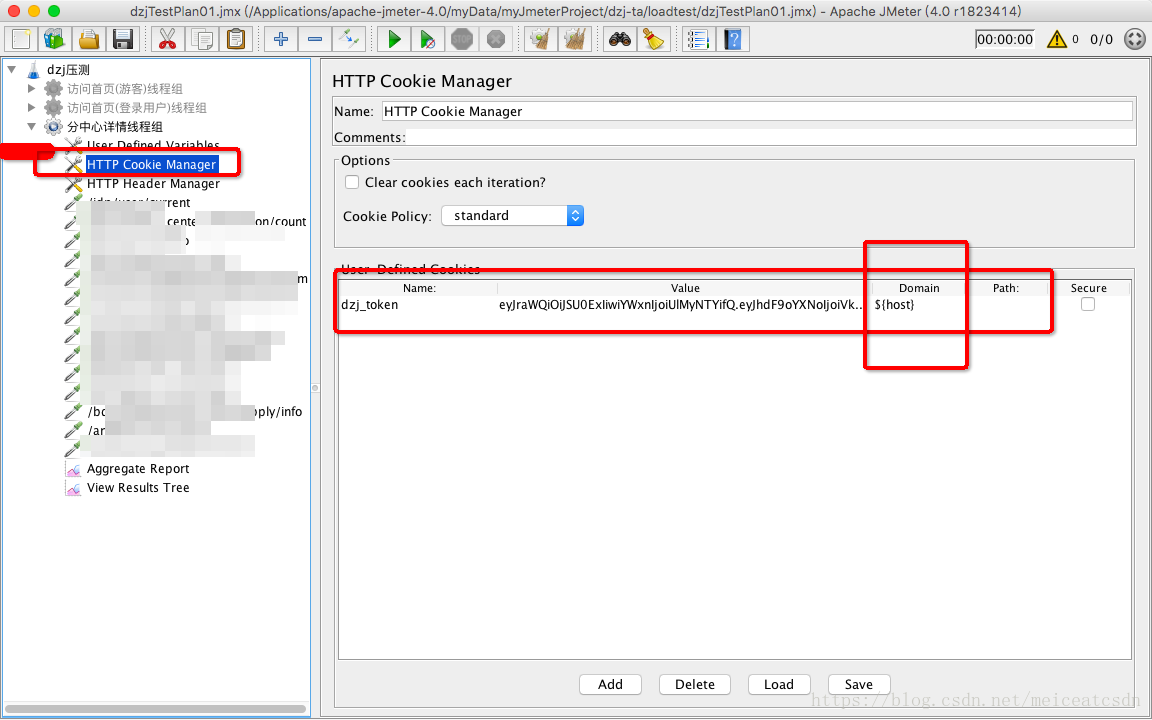
还有每次HTTP请求,都涉及权限问题,这个Token能够全局共享?而不用每个都携带?
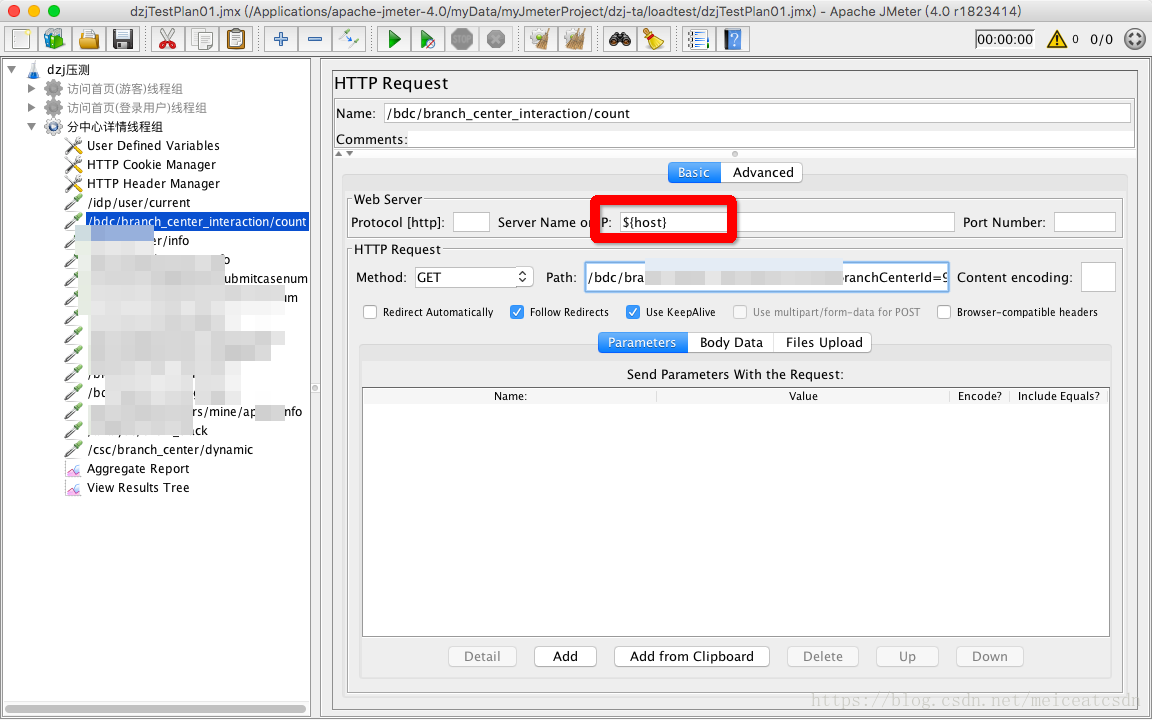
都是可以的。主机Ip,我们通过Defined Variables实现;Token 我们通过Cookie实现。一图胜千言。
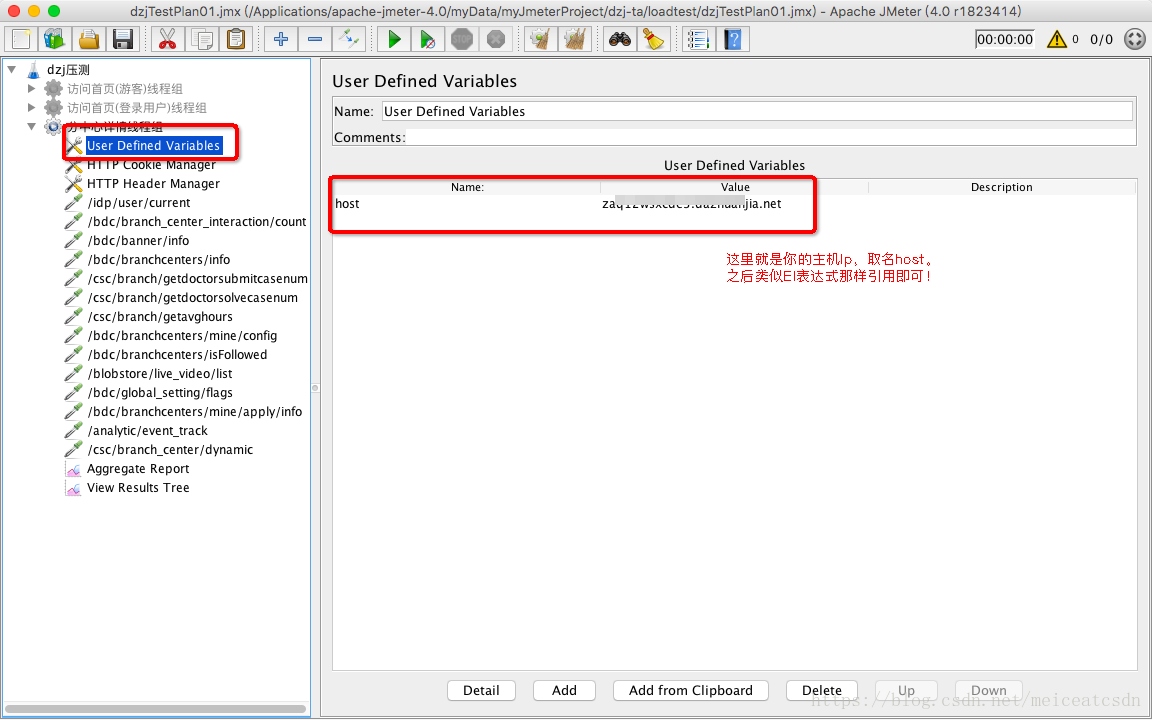
其他地方这么引用即可:
同理,Cookie主要是去携带Token,这个全局设置后,就不用管了,因为cookie就是全局的。
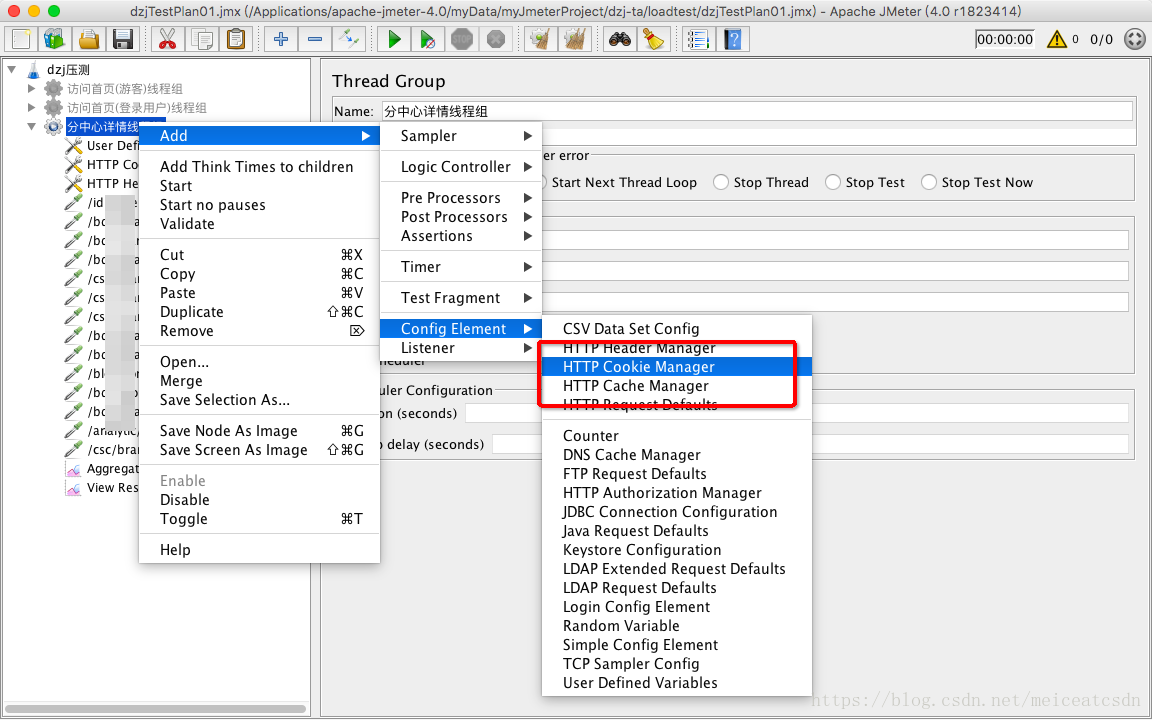
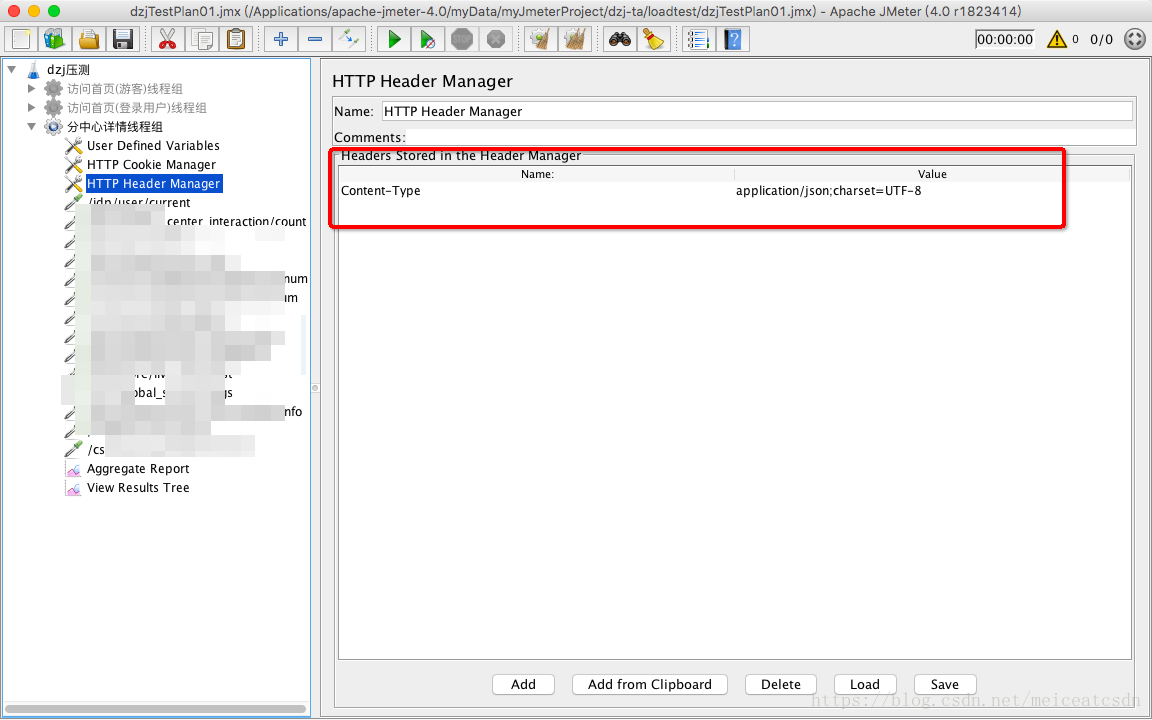
因为Token返回的格式,需要定义Content-Type,所以这里要定义 一下HTTP Header
寻找方法类似,这里直接看结果:
2.Jmeter生成的文档结构剖析
当你在Jmeter之中设置一个TestPlan之后,你的每个操作,背后都是用.jmx文档在记录?神马是.jmx格式?就是表示是Jmeter生成的文档,类似xml格式。
我们来看一个比较全面的.jmx文档,包含:全局variables 、Cookie、各种线程。
<?xml version="1.0" encoding="UTF-8"?>
<jmeterTestPlan version="1.2" properties="4.0" jmeter="4.0 r1823414">
  <hashTree>
    <TestPlan guiclass="TestPlanGui" testclass="TestPlan" testname="dzj压测" enabled="true">
      <stringProp name="TestPlan.comments"></stringProp>
      <boolProp name="TestPlan.functional_mode">false</boolProp>
      <boolProp name="TestPlan.serialize_threadgroups">false</boolProp>
      <elementProp name="TestPlan.user_defined_variables" elementType="Arguments" guiclass="ArgumentsPanel" testclass="Arguments" testname="用户定义的变量" enabled="true">
        <collectionProp name="Arguments.arguments"/>
      </elementProp>
      <stringProp name="TestPlan.user_define_classpath"></stringProp>
    </TestPlan>

      <ThreadGroup guiclass="ThreadGroupGui" testclass="ThreadGroup" testname="分中心详情线程组" enabled="true">
        <stringProp name="ThreadGroup.on_sample_error">continue</stringProp>
        <elementProp name="ThreadGroup.main_controller" elementType="LoopController" guiclass="LoopControlPanel" testclass="LoopController" testname="Loop Controller" enabled="true">
          <boolProp name="LoopController.continue_forever">false</boolProp>
          <stringProp name="LoopController.loops">5</stringProp>
        </elementProp>
        <stringProp name="ThreadGroup.num_threads">1</stringProp>
        <stringProp name="ThreadGroup.ramp_time">1</stringProp>
        <boolProp name="ThreadGroup.scheduler">false</boolProp>
        <stringProp name="ThreadGroup.duration"></stringProp>
        <stringProp name="ThreadGroup.delay"></stringProp>
      </ThreadGroup>
      <hashTree>
        <Arguments guiclass="ArgumentsPanel" testclass="Arguments" testname="User Defined Variables" enabled="true">
          <collectionProp name="Arguments.arguments">
            <elementProp name="host" elementType="Argument">
              <stringProp name="Argument.name">host</stringProp>
              <stringProp name="Argument.value">za1sde3.duanjia.net</stringProp>
              <stringProp name="Argument.metadata">=</stringProp>
            </elementProp>
          </collectionProp>
        </Arguments>
        <hashTree/>
        <CookieManager guiclass="CookiePanel" testclass="CookieManager" testname="HTTP Cookie Manager" enabled="true">
          <collectionProp name="CookieManager.cookies">
            <elementProp name="dzj_token" elementType="Cookie" testname="dzj_token">
              <stringProp name="Cookie.value">eyJraWQiOiJSU0ExIiwiYWxnIjoiUlMyNTYifQ.eyJhdF9oYXNoIjoiVkZBSWE3OEVCZUZLUWJ4eGM3b2tIQSIsInN1YiI6IjAwYTY0NzJkLWFkMjYtNDEzYy1iY2I4LWI4MTQyZThmMGM3YiIsImF1ZCI6IlZ0ZVVWUGRvUDFQTUFGM3EiLCJjb2RlIjoiamlhd2VpIiwicHJvdmluY2VfaWQiOjExMDAwMCwicm9sZXMiOlsiT1BFUkFUT1IiLCJTVVBFUl9PUEVSQVRPUiIsIk1TTCIsIkVOVEVSUFJJU0w</stringProp>
              <stringProp name="Cookie.domain">${host}</stringProp>
              <stringProp name="Cookie.path"></stringProp>
              <boolProp name="Cookie.secure">false</boolProp>
              <longProp name="Cookie.expires">0</longProp>
              <boolProp name="Cookie.path_specified">true</boolProp>
              <boolProp name="Cookie.domain_specified">true</boolProp>
            </elementProp>
          </collectionProp>
          <boolProp name="CookieManager.clearEachIteration">false</boolProp>
        </CookieManager>
        <hashTree/>
        <HeaderManager guiclass="HeaderPanel" testclass="HeaderManager" testname="HTTP Header Manager" enabled="true">
          <collectionProp name="HeaderManager.headers">
            <elementProp name="" elementType="Header">
              <stringProp name="Header.name">Content-Type</stringProp>
              <stringProp name="Header.value">application/json;charset=UTF-8</stringProp>
            </elementProp>
          </collectionProp>
        </HeaderManager>
        <hashTree/>
        <HTTPSamplerProxy guiclass="HttpTestSampleGui" testclass="HTTPSamplerProxy" testname="/idp/user/current" enabled="true">
          <elementProp name="HTTPsampler.Arguments" elementType="Arguments" guiclass="HTTPArgumentsPanel" testclass="Arguments" testname="用户定义的变量" enabled="true">
            <collectionProp name="Arguments.arguments">
              <elementProp name="" elementType="HTTPArgument">
                <boolProp name="HTTPArgument.always_encode">false</boolProp>
                <stringProp name="Argument.value"></stringProp>
                <stringProp name="Argument.metadata">=</stringProp>
                <boolProp name="HTTPArgument.use_equals">true</boolProp>
              </elementProp>
            </collectionProp>
          </elementProp>
          <stringProp name="HTTPSampler.domain">${host}</stringProp>
          <stringProp name="HTTPSampler.port"></stringProp>
          <stringProp name="HTTPSampler.protocol"></stringProp>
          <stringProp name="HTTPSampler.contentEncoding"></stringProp>
          <stringProp name="HTTPSampler.path">/idp/user/current</stringProp>
          <stringProp name="HTTPSampler.method">GET</stringProp>
          <boolProp name="HTTPSampler.follow_redirects">true</boolProp>
          <boolProp name="HTTPSampler.auto_redirects">false</boolProp>
          <boolProp name="HTTPSampler.use_keepalive">true</boolProp>
          <boolProp name="HTTPSampler.DO_MULTIPART_POST">false</boolProp>
          <stringProp name="HTTPSampler.embedded_url_re"></stringProp>
          <stringProp name="HTTPSampler.connect_timeout"></stringProp>
          <stringProp name="HTTPSampler.response_timeout"></stringProp>
        </HTTPSamplerProxy>
        <hashTree/>
        <HTTPSamplerProxy guiclass="HttpTestSampleGui" testclass="HTTPSamplerProxy" testname="/bdc/branch_center_interaction/count" enabled="true">
          <elementProp name="HTTPsampler.Arguments" elementType="Arguments" guiclass="HTTPArgumentsPanel" testclass="Arguments" testname="用户定义的变量" enabled="true">
            <collectionProp name="Arguments.arguments"/>
          </elementProp>
          <stringProp name="HTTPSampler.domain">${host}</stringProp>
          <stringProp name="HTTPSampler.port"></stringProp>
          <stringProp name="HTTPSampler.protocol"></stringProp>
          <stringProp name="HTTPSampler.contentEncoding"></stringProp>
          <stringProp name="HTTPSampler.path">/bdc/branch_center_interaction/count?branchCenterId=99390121d77945e797a659c41f1f3295</stringProp>
          <stringProp name="HTTPSampler.method">GET</stringProp>
          <boolProp name="HTTPSampler.follow_redirects">true</boolProp>
          <boolProp name="HTTPSampler.auto_redirects">false</boolProp>
          <boolProp name="HTTPSampler.use_keepalive">true</boolProp>
          <boolProp name="HTTPSampler.DO_MULTIPART_POST">false</boolProp>
          <stringProp name="HTTPSampler.embedded_url_re"></stringProp>
          <stringProp name="HTTPSampler.connect_timeout"></stringProp>
          <stringProp name="HTTPSampler.response_timeout"></stringProp>
        </HTTPSamplerProxy>
        <hashTree/>


        <ResultCollector guiclass="StatVisualizer" testclass="ResultCollector" testname="Aggregate Report" enabled="true">
          <boolProp name="ResultCollector.error_logging">false</boolProp>
          <objProp>
            <name>saveConfig</name>
            <value class="SampleSaveConfiguration">
              <time>true</time>
              <latency>true</latency>
              <timestamp>true</timestamp>
              <success>true</success>
              <label>true</label>
              <code>true</code>
              <message>true</message>
              <threadName>true</threadName>
              <dataType>true</dataType>
              <encoding>false</encoding>
              <assertions>true</assertions>
              <subresults>true</subresults>
              <responseData>false</responseData>
              <samplerData>false</samplerData>
              <xml>false</xml>
              <fieldNames>true</fieldNames>
              <responseHeaders>false</responseHeaders>
              <requestHeaders>false</requestHeaders>
              <responseDataOnError>false</responseDataOnError>
              <saveAssertionResultsFailureMessage>true</saveAssertionResultsFailureMessage>
              <assertionsResultsToSave>0</assertionsResultsToSave>
              <bytes>true</bytes>
              <sentBytes>true</sentBytes>
              <threadCounts>true</threadCounts>
              <idleTime>true</idleTime>
              <connectTime>true</connectTime>
            </value>
          </objProp>
          <stringProp name="filename"></stringProp>
        </ResultCollector>
        <hashTree/>
        <ResultCollector guiclass="ViewResultsFullVisualizer" testclass="ResultCollector" testname="View Results Tree" enabled="true">
          <boolProp name="ResultCollector.error_logging">false</boolProp>
          <objProp>
            <name>saveConfig</name>
            <value class="SampleSaveConfiguration">
              <time>true</time>
              <latency>true</latency>
              <timestamp>true</timestamp>
              <success>true</success>
              <label>true</label>
              <code>true</code>
              <message>true</message>
              <threadName>true</threadName>
              <dataType>true</dataType>
              <encoding>false</encoding>
              <assertions>true</assertions>
              <subresults>true</subresults>
              <responseData>false</responseData>
              <samplerData>false</samplerData>
              <xml>false</xml>
              <fieldNames>true</fieldNames>
              <responseHeaders>false</responseHeaders>
              <requestHeaders>false</requestHeaders>
              <responseDataOnError>false</responseDataOnError>
              <saveAssertionResultsFailureMessage>true</saveAssertionResultsFailureMessage>
              <assertionsResultsToSave>0</assertionsResultsToSave>
              <bytes>true</bytes>
              <sentBytes>true</sentBytes>
              <threadCounts>true</threadCounts>
              <idleTime>true</idleTime>
              <connectTime>true</connectTime>
            </value>
          </objProp>
          <stringProp name="filename"></stringProp>
        </ResultCollector>
        <hashTree/>
      </hashTree>
    </hashTree>
  </hashTree>
</jmeterTestPlan>
反正你就明白,这里面记录了所有你在Jmeter界面所进行的所有操作,关键元素总结如下:
TestPlan ——测试计划
ThreadsGroup——测试组
Arguments ——全局变量
CookieManager——Cookie值
HeaderManager ——Http头部信息携带
HTTPSamplerProxy ——HTTP请求
ResultCollector ——结果集
知道这些有卵用?NO!知道这些,你才会知道到时候在哪里可以修改参数,在哪里要把参数设置为property
3.总结
Jmeter-1和Jmeter-2都是最基础的应用,这周我们要搭建Jenkins+Jmeter+Ant组合的框架,实现各种参数可注入、场景可分离等重要功能,后续博客陆续跟上,让我们拭目以待吧。
下期再会!





 扫一扫
扫一扫


 2171
2171

 被折叠的 条评论
为什么被折叠?
被折叠的 条评论
为什么被折叠?
 到【灌水乐园】发言





